
Overview
What is a Service Location?
A service location is a physical address where healthcare services are provided. Service locations are used on claims to indicate where the patient was seen.Why is Adding or Editing a Service Location important?
Accurate service location information is required for proper claim submission. Claims must include the correct Place of Service (POS) code and address to avoid denials.Workflow Instructions
Elation All-in-One Integration
If you are an Elation AiO (All-in-One) customer, updating your Service Locations in Elation Billing will also update your locations in the EHR.
Adding a Service Location
-
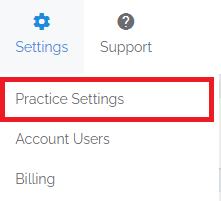
Navigate - Select the Practice Settings option from the Settings drop-down menu, then select the Locations tab.

-
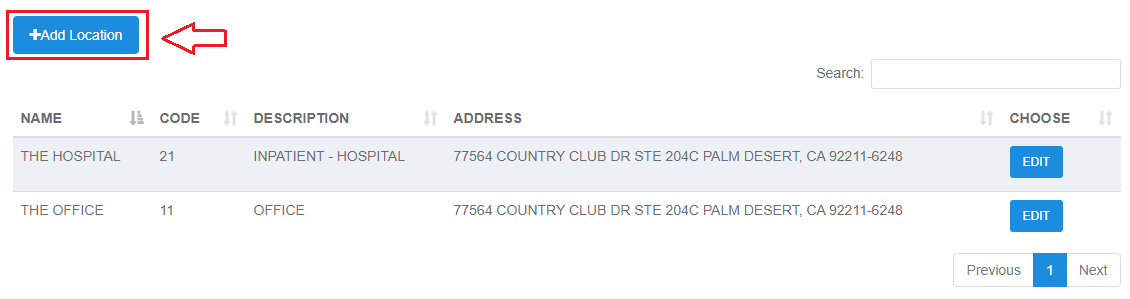
Add Location - Click the Add Location button.
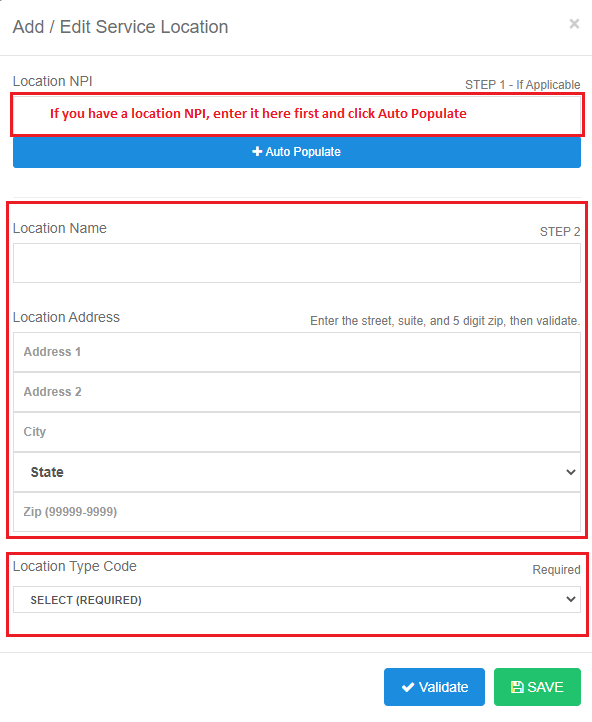
If you have the NPI, enter it first to auto-populate the location details.
- Verify Completion - Verify that you can see your location on the list as well as in the drop-down options when creating or editing claims on a superbill.