
ERA and auto-posting basics
What is an ERA?
An Electronic Remittance Advice (ERA) is an electronic version of an Explanation of Benefits (EOB) sent by insurance payers. It contains detailed payment information including allowed amounts, adjustments, and patient responsibility.Why is viewing ERAs important?
ERAs enable efficient payment posting by providing structured payment data that can be auto-posted to claims. This reduces manual data entry, speeds up payment processing, and minimizes errors.How ERAs are matched to a practice
When an ERA arrives from the clearinghouse, Elation determines which practice it belongs to by evaluating the following conditions in order:- Practice-level NPI and TIN settings — the ERA is matched to the practice whose NPI and TIN correspond to the payment.
- Claim details on the ERA — if practice-level settings do not match, Elation checks the patient control numbers (PCNs) and provider details on the claims listed in the ERA.
- Practice entity NPI and TIN — if none of the previous conditions apply, Elation matches the ERA against the NPI and TIN configured on each practice entity.
Prerequisites
Before you can view and auto-post ERAs, confirm the following:- User role: You need one of the following roles to view and auto-post ERAs:
- Admin
- Manager
- Biller
- BillCo Admins
- BillCo Staff
- Data Entry
- ERA enrollment: The payer must be enrolled for ERAs through ClaimMD. See Enrolling for Claims Submission, ERA, and Real-Time Eligibility (EDI).
- Timing: After enrollment is approved, ERAs typically begin arriving within 1–2 payer payment cycles, often 2–4 weeks. In the meantime you should still be receiving remittances in the mail or you can view your remittances via an external payer portal.
- If no ERAs appear after this window, see Troubleshooting.
Workflow Instructions
Viewing the ERA list
1
Go to Payments → ERAs.
2
The ERA list defaults to all ERAs that have not been reviewed. Use the filters and search box to narrow results. Available filters include:
- Reviewed Status - All, Reviewed, Not Reviewed
- Posted Status - All, Posted, Needs Review, Not Yet Posted
ERA list columns
The ERA list displays the following columns:Reviewed (status) labels
- Mark Reviewed - Click to manually mark the ERA as reviewed.
- Reviewed - Someone in the practice has reviewed the ERA, confirmed the posting and marked the ERA as reviewed.
- Unreviewed - New ERA, not yet posted or reviewed
Posted (status) labels
- Auto Post Now - Click to auto-post payments in the ERA to claims.
- Auto Posted - All the payments in the ERA were successfully auto-posted to claims.
- Needs Review - Certain payments in the ERA could not be posted when auto-post was triggered. Someone needs to review the unposted payments.
Viewing a specific ERA
To view a specific ERA1
Click on the Payer Name.
2
A new tab will open in your browser displaying the PDF version of the ERA. You can also choose to download the ERA for your records.
Auto-Posting ERAs
To auto-post an ERA:1
Click on the Auto Post Now button
2
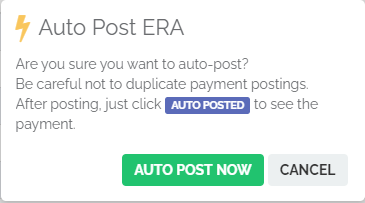
A confirmation box will appear. Click Auto Post Now to confirm.
3
The system first scans the ERA for issues that would cause a system error. If errors are found, the ERA will be labeled Needs Review and must be manually posted. Otherwise, the ERA will auto-post.
What the auto-post scan checks
The scan verifies that each claim on the ERA can be matched and posted without ambiguity. Common blocking issues include:- Missing or mismatched Superbill ID
- Claim not found in Elation Billing (e.g., claim was deleted or sent from a different system)
- Duplicate claim matches
- Missing metadata such as service line detail, CPT codes, or adjustment codes
How auto-post handles payment details
When auto-posting succeeds, the system applies the following automatically:- Allowed amounts are recorded per service line
- Contractual adjustments (CARC codes like CO-45) are written off to the appropriate adjustment category
- Patient responsibility (copay, coinsurance, deductible — PR codes) is transferred to patient balance
- Secondary/tertiary balances are queued for crossover or secondary submission if a secondary payer is on file
- Denials (CO, OA, PI codes without payment) are flagged but not automatically worked — you must review these manually
We do not advise auto-posting ERAs with Denials, to avoid the creation of clerical errors. Review denied claims individually and work them through the claims workflow.
Partial auto-posting
Elation auto-posts the entire ERA as a single action — partial posting of individual claims from one ERA is not supported. If any claim fails, the full ERA is marked Needs Review.
Reviewing auto-posted ERAs
An ERA that was successfully auto-posted, will say Auto Posted in the Posted column. Click the Auto Posted button to go straight to the payment details.- Review the payment(s) for accuracy. Look for things like negative balances or zero payments.
Marking ERAs as reviewed
After you’ve reviewed auto-posted or manually posted ERAs and are satisfied with the results, click Mark Reviewed in the Reviewed column. Marking an ERA as reviewed:- Removes it from the default (unreviewed) ERA queue.
- Records a timestamp and the reviewing user for audit purposes.
- Does not change the posted payment — only the reviewed status.

Troubleshooting
ERA Needs Review
Occasionally, an ERA will need review before it can be posted. This is most often due to:- Missing/Mismatched Claim Info - If the ERA is missing claim info (e.g., Superbill ID), the ERA will need review.
- Missing Metadata - Occasionally the payer will fail to include pertinent metadata attached to the claim data (e.g. service line breakdowns or adjustment reason codes).
- Reversals, takebacks, or recoupments - ERAs that reverse prior payments require manual review and cannot auto-post.
Missing ERAs
If you were receiving ERAs for a payer and they have stopped arriving, or you expected ERAs after enrollment and none appear:1
Confirm enrollment is still active in Practice Settings → Insurance.
2
Verify the payer issued payment — log into the payer portal or call the payer to confirm a check or EFT was sent.
3
Check with the payer that ERAs are still routed to ClaimMD (Elation’s Clearinghouse).
4
Confirm the NPI and TIN configured on each of your practice entities are accurate and complete. Elation uses entity-level NPI and TIN as a fallback when matching an ERA to a practice, so incorrect or missing values can delay ERAs from appearing.
5
If the ERA is still missing, contact Elation Support.
There isn’t a self-service option to upload an 835/ERA file from your computer directly into Elation. If you have an ERA that didn’t arrive through the clearinghouse (for example, one a payer sent you directly), post the payment manually instead. See Posting a Payment in Elation Billing.
Duplicate ERAs
If the same ERA appears twice, do not auto-post both. Review the check/EFT numbers and- if they match, post one and mark the duplicate as reviewed without posting.
- if the amounts differ, the payer may have issued a corrected ERA. Post the corrected ERA and mark the duplicate ERA as reviewed without posting.
Reversals, takebacks, and recoupments
Payers sometimes reverse a prior payment or recoup funds on a subsequent ERA. These cannot be auto-posted and must be manually posted against the original claim.ERA vs EOB mismatches
If the ERA total does not match the paper EOB or bank deposit:1
Open the ERA PDF and compare line-by-line with the paper EOB.
2
Check for missing service lines or adjustment codes.
3
If the ERA is incorrect, ask the payer to send a corrected ERA.
CARC and RARC codes
ERAs use standardized codes to explain adjustments:- Claim Adjustment Reason Codes (CARC)- Explain why an adjustment was made (e.g.,
CO-45= charge exceeds fee schedule) - Remittance Advice Remark Codes (RARC) - Provide additional context for adjustments
Reporting
ERA data will appear in the following reports:- Lightning Insights
- Lightning Reports
- Charges and Financial Transactions Report
- Deposit Report
- Denials Report
- Provider Payment Report