
Overview
What is Adding a New Patient?
Adding a new patient is the process of creating a patient record in Elation Billing with demographic and insurance information. This enables you to create claims and manage billing for the patient.Why is Adding a New Patient important?
Accurate patient records are essential for proper claim filing, insurance verification, and maintaining billing records. Patient demographic information is required to submit claims to insurance payers.Workflow Instructions
Integrated/AiO Patient Creation
Generally speaking, AiO Patients will be created in the EHR, which will then create a linked Patient file within the billing software. All changes to Patient Demographics will be made in the EHR, which will then update the demographics within the billing software.Adding a New Patient Manually
You can also add a new patient directly from the superbill screen when creating a new claim. The process is almost identical and you never have to leave the claim screen.
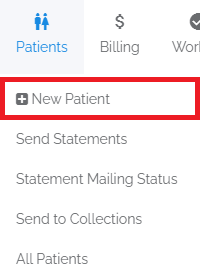
- Navigate - Click on the New Patient option under the Patients drop-down menu.
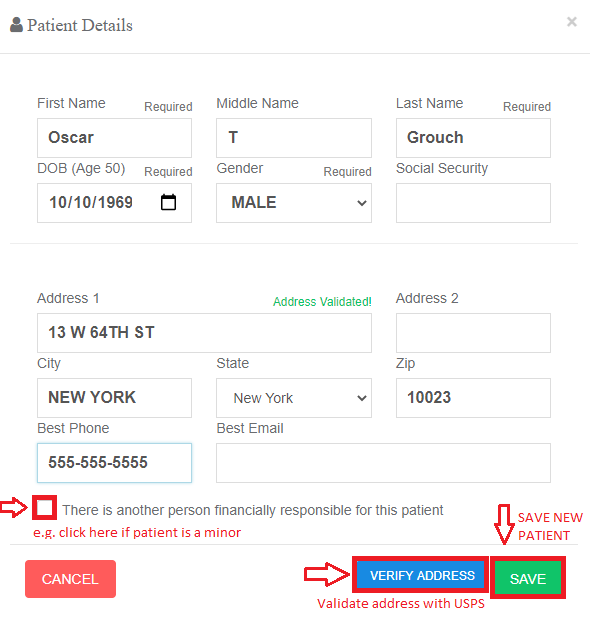
- Enter the Patient Demographics - Fill in the demographic fields and click SAVE. You will need to have some kind of address in the system to file a claim.
-
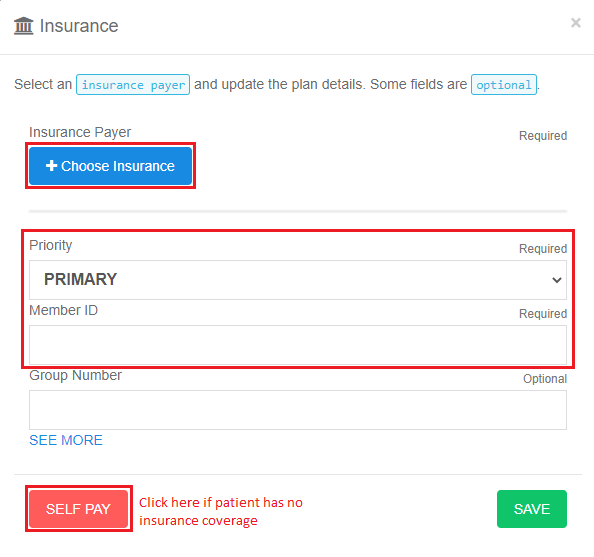
Enter Insurance Info - If there is no insurance, just click SELF PAY. Otherwise, you must choose insurance, Primary or Secondary, enter the member id, and then click SAVE.
- Add Additional Insurance Policies - If the patient has additional insurance policies, you can add them after saving the initial patient record.