
REST API 2.0 FHIR API WEBHOOKS HOSTED DATABASE SANDBOX ELATION ANALYST
Core Developer is for practices that want to build on Elation, not just work inside it. You get read and write API access to your practice data, a SQL copy of that data for reporting, and a free sandbox to build in first.
Getting answers out of your data does not require SQL. The Hosted Database ships with Elation Analyst, which takes a question in plain language and returns a report — so a practice manager, biller, or clinician can work with the same data an analyst would. SQL is there for questions that go past Analyst’s topics, or when you want exact control.
Building an integration requires someone comfortable writing code against an API. That can be your own engineers, a consulting partner, or an AI coding assistant. Elation provides full documentation and a dedicated MCP server so whoever builds it has what they need.
01 — WHAT IT IS
What’s included
Core Developer is a paid add-on to a Standard or Premium Elation EHR subscription.02 — WHAT YOU CAN BUILD
Integrations and automation
Questions you can answer with the Hosted Database
Use Elation Analyst to ask questions in plain language and get a report back, or write SQL directly for deeper analysis like ERA adjustments, denials, and cross-domain joins.Query your data with SQL
Every table below is in the Hosted Database schema.Chronic disease prevalence
Size and segment your chronic care population. Join
patient and patient_problem_code.Preventive care gaps
Find who is overdue for a screening or vaccine. Combine
health_maintenance, patient_immunization, and patient_problem_code, and report quality measures using the measure_code column on health_maintenance.Referral leakage
Find where patients go and where the loop never closes. Analyze
referral_order.Schedule utilization
Quantify no-shows, gaps, and provider utilization from
appointment.Denials and revenue cycle
Track denial reasons, rework, and days in A/R using
claim, claim_queue, and era_matched_adjustment.Patient balances and statements
See who owes what, and who has never been sent a statement, using
patient_statement_tracking, payment, and financial_transaction.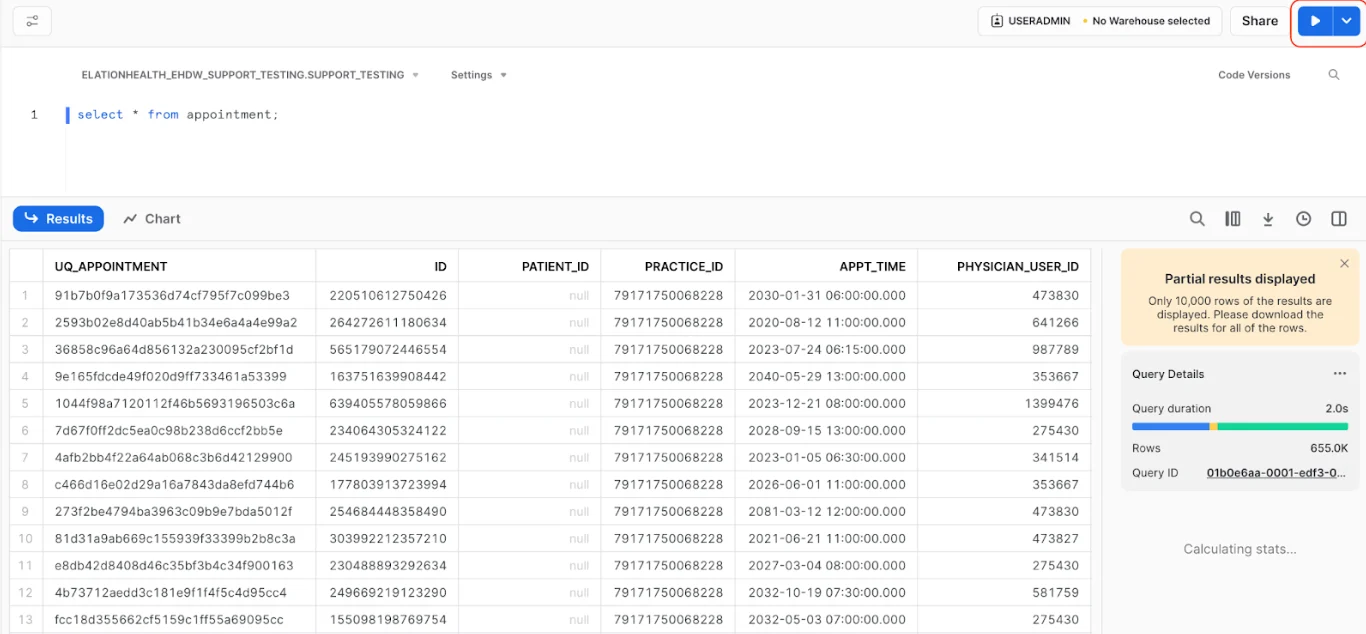
Open a SQL Worksheet in Snowflake, select your database and schema, and run a query against any table. Autocomplete surfaces table and column names as you type.
Ask Elation Analyst in plain language
Elation Analyst (Beta) is an AI assistant built into your Hosted Database. Ask a concrete question — “Who has missed their appointments this year?” or “Show me patients with an A1c above 9” — and get back SQL and a results table you can download as CSV.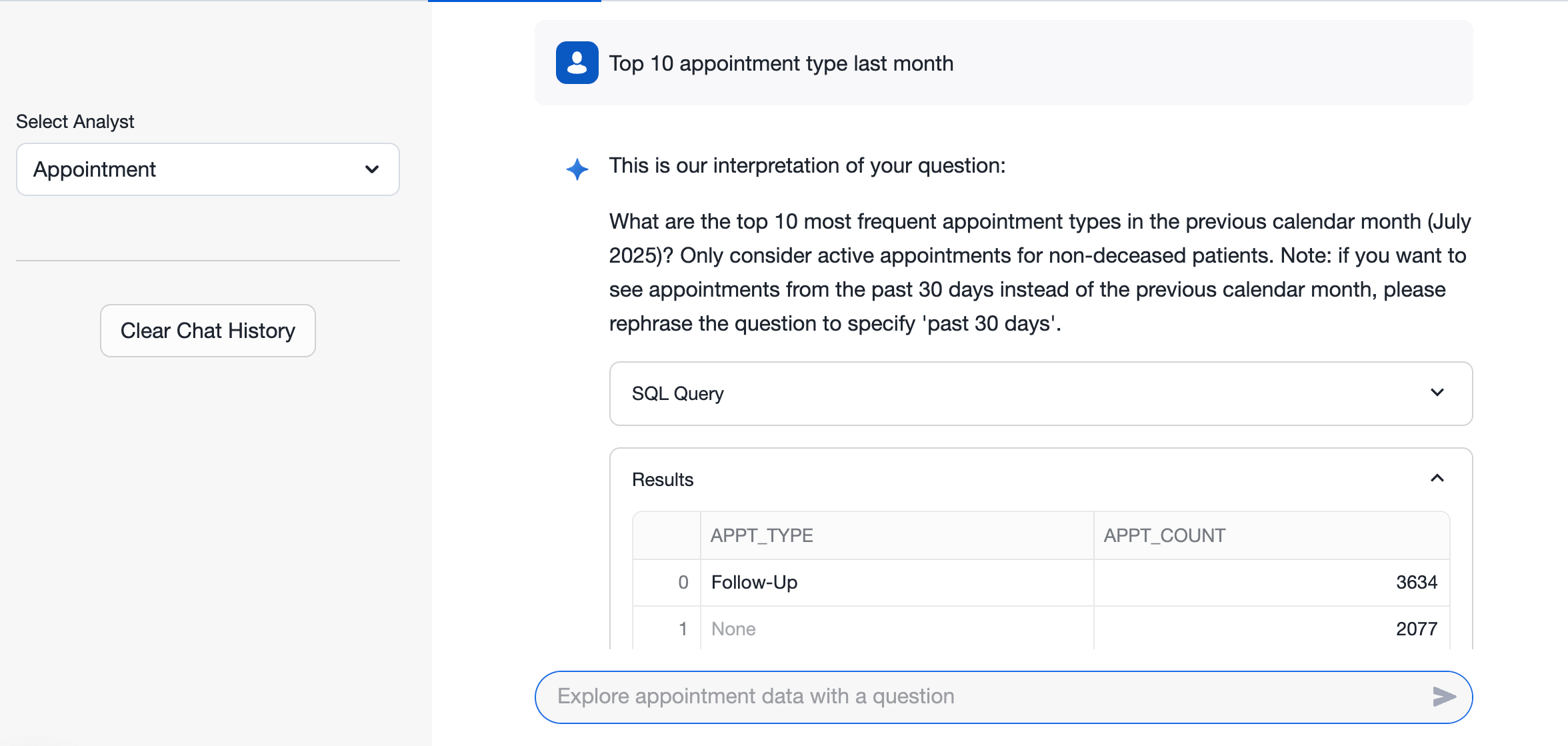
Elation Analyst turns a plain-language question into SQL you can inspect, and returns the results alongside it.
03 — WHAT IT COSTS
Priced per provider
Added to your existing Elation subscription.
One-time implementation fee
Covers initial setup, configuration, and technical onboarding.
04 — NEXT STEPS
Get a free sandbox
No subscription required. Start building before you buy.
Pricing and add-ons
Seat rules, contract terms, and what else you can add.
Go to production
What has to be true before production credentials are issued.
Related articles
- REST API documentation — endpoints, auth, pagination, errors
- API overview — every API 2.0 category and the resources it covers
- FHIR API documentation — standards-based interoperability
- Webhooks — event models, signature verification, retries
- What is the Hosted Database — access, schema, and querying
- Hosted Database schema — every table and column
- Elation Analyst — AI-assisted reporting in your Hosted Database
- Elation MCP Server — connect Elation docs to your AI coding assistant