
What is the CAIR Immunization Registry Interface?
The CAIR Immunization Registry Interface allows connected practices to send vaccination information from their Elation EHR directly to CAIR- the California Immunization Registry. Practices can also query CAIR for vaccination history or forecast.Why is the CAIR Immunization Registry Interface valuable?
With the CAIR Immunization Registry Interface, practices no longer need to separately log in to CAIR to enter vaccination records for their patients. Once the vaccination is recorded in Elation during the patient encounter, the information can be sent immediately from the patient’s chart in Elation to CAIR. You can also pull vaccination history for specific patients from CAIR to allow you to populate your patient’s clinical profile and make informed decisions for administering vaccines. This interface saves you time and allows you to streamline your vaccination workflows.How to establish interface between Elation & CAIR
The Elation Team will assist you with initiating an interface with CAIR. First you must notify CAIR of your intent to connect electronically via Elation EHR via one of the steps below. After you have notified CAIR, please click here to fill out our contact form, select Immunization Registry as the Request Type, and send the following information to Elation:- Your CAIR Site ID for each office location
(New to CAIR) Register to submit immunizations electronically via Elation
- Navigate directly to the CAIR registration page.
- Under Site intends to section, choose the second option, that your Site intends to Submit immunization data through a Sending Facility. (A “Sending Facility” is a vendor like Elation that submits records on your behalf.)
- You will then be prompted to enter the Sending Facility ID of your Data Submitter. Elation’s Sending Facility ID is SF-001728.
- Complete the required fields about your practice and your practice’s contact information (fields in red text are required for registration).
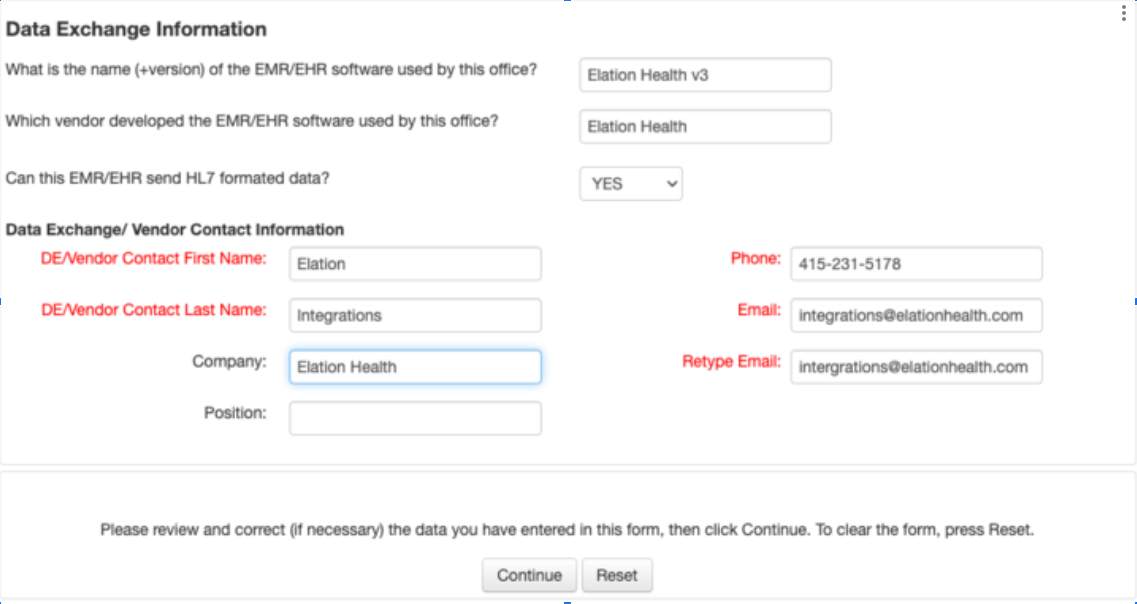
- Under Data Exchange Information, enter the following information:
- What is the name (+version) of the EMR/EHR software used by this office? ElationEMR v3
- Which vendor developed the EMR/EHR software used by this office? Elation Health
- Is this EHR/EHR Certified? YES
- Can this EMR/EHR send HL7 formatted data? YES
- DE/Vendor Contact First Name: Elation
- DE/Vendor Contact Last Name: Support
- Company: Elation Health
- Position: (Leave blank)
- Phone: 415-231-5178
- Email: integrations@elationhealth.com
- Retype Email: integrations@elationhealth.com
- Click Continue and review the CAIR Organization Access & Confidentiality Agreement. If you have reviewed the information and wish to continue,
- Check the box to agree that your Organization will abide CAIR rules.
- Enter the name of your Organization Representative
- Enter the title of your Organization Representative
- Click Complete Site Registration
(Existing CAIR User) Register to submit immunizations electronically via Elation
If you are already registered with CAIR and have your CAIR ID, you can log into the CAIR IZ Portal using your CAIR ID and zip code.- What is the name (+version) of the EMR/EHR software used by this office? ElationEMR v3
- Which vendor developed the EMR/EHR software used by this office? Elation Health
- Is this EHR/EHR Certified? YES
- Can this EMR/EHR send HL7 formatted data? YES
- DE/Vendor Contact First Name: Elation
- DE/Vendor Contact Last Name: Support
- Company: Elation Health
- Position: (Leave blank)
- Phone: 415-231-5178
- Email: integrations@elationhealth.com
- Retype Email: integrations@elationhealth.com