To support the importance of promoting and prioritizing interoperability and exchange of patient immunization data across various healthcare platforms, Elation has established an electronic interface with the Connecticut State Immunization Registry known as CT WiZ.
What is the IRIS Immunization Registry Interface?
The CT WiZ Immunization Registry Interface allows connected practices to send vaccination information from their Elation EHR directly to CT WiZ, the Connecticut State Immunization Registry. Practices can also query CT WiZ for vaccination history or forecast.
Why is the CT WiZ Immunization Registry Interface valuable?
With the CT WiZ Immunization Registry Interface, practices no longer need to separately log in to CT WiZ to enter vaccination records for their patients. Once the vaccination is recorded in Elation during the patient encounter, the information can be sent immediately from the patient’s chart in Elation to CT WiZ. You can also pull vaccination history for specific patients from CT WiZ to allow you to populate your patient’s clinical profile and make informed decisions for administering vaccines. This interface saves you time and allows you to streamline your vaccination workflows.
How to establish interface between Elation & CT WiZ
The Elation Team will assist you with initiating interface with CT WiZ. To notify us of your interest, click here to fill out our contact form, select “Immunization Registry” as the Request Typeand notify us who in your practice will be administering and ordering vaccinations.
How to submit vaccination data to CT WiZ using Elation
You will use the Vaccine Form in the patient’s chart to document the vaccination data and submit it the data to CT WiZ. Learn more about how to use the Vaccine Form using the
Vaccination Documentation Guide
.
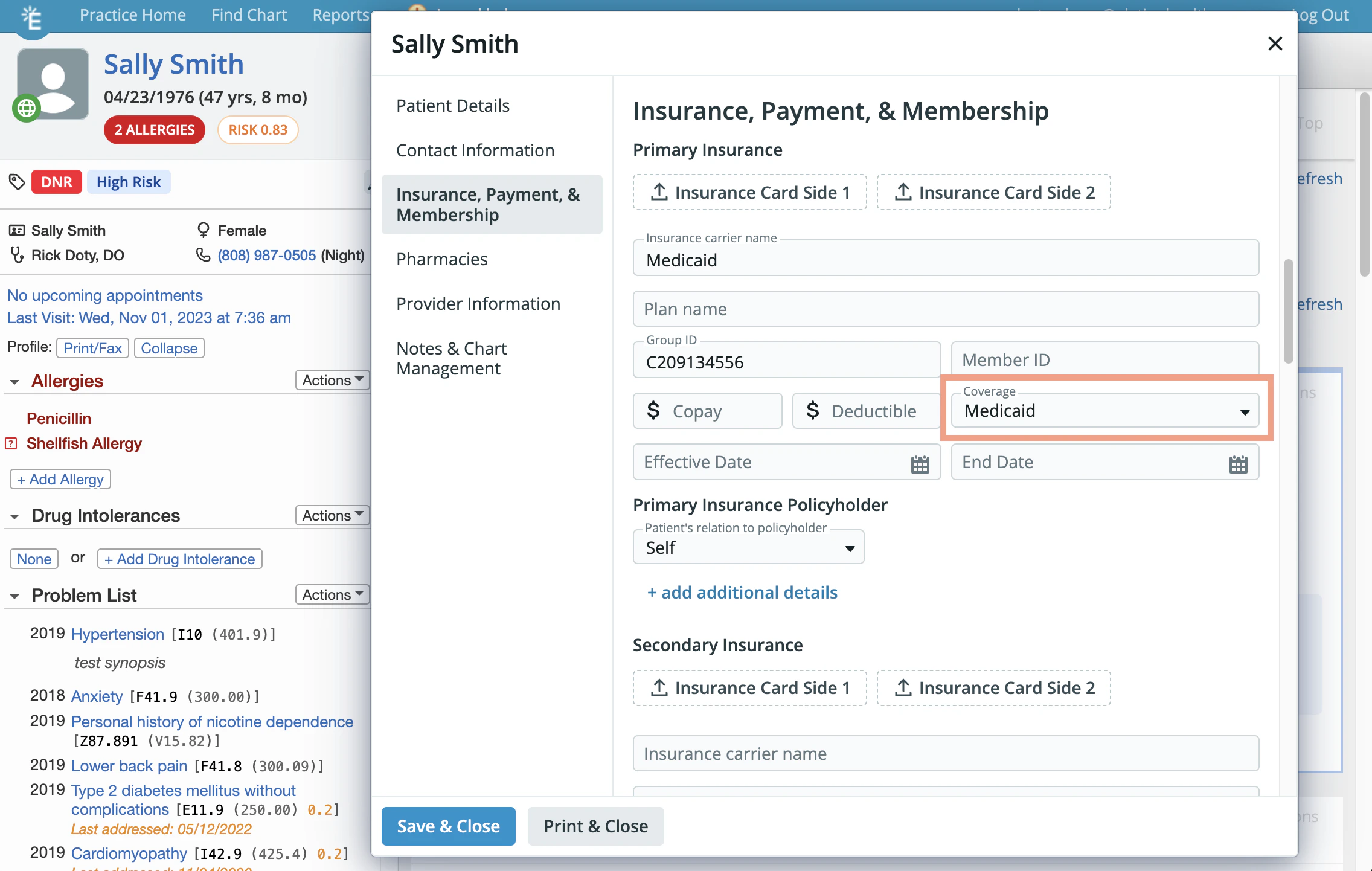
If you are sending a vaccination record for a Medicaid patient, make sure ‘Medicaid’ is selected in the Coverage field in the patient’s demographics. CT WiZ requires this field in order to receive the patient’s Medicaid Plan ID for the vaccination record.
All submissions are one-time only. If you need to edit any vaccination data after it is sent to the Immunization Registry, you will need to update the data in both the patient’s chart and the Immunization Registry directly.
How to query for vaccination history/forecast using CT WiZ
You can query for vaccination history/forecast directly within a patient’s chart by following the instructions listed in the
‘Querying for vaccination history and/or forecast using an Immunization Registry Interface’ section of the Vaccination Documentation Guide.
Frequently Asked Questions (FAQ)
How can I tell if the vaccination record was successfully submitted to the immunization registry?
You can log into your State’s registry to review vaccination records submitted from Elation to the registry through the interface from time to time. If you have questions about a specific vaccination record,
please send the patient ID and the name of the immunization to the Support Team
and we can look into the vaccination record.
How can I edit or delete a vaccination record from the registry using Elation?
At this time, vaccination records submitted through Elation can only be edited or deleted within the registry. If you do make a change to or delete the vaccination record in the registry, we also recommend making the same change in Elation.
I am running into errors when using the “Check Registry” or the “Check Forecast” buttons. What should I do?
Follow the instructions in the
‘Managing querying errors’ section of the Vaccination Documentation Guide.
Related Articles