
Viewing a list of Users
You can view a list of users and their status by either: Accessing USER_VIEW Step 1: On the left hand navigation bar clicking on Data > Databases Step 2: Clicking on ACCOUNT_MANAGEMENT > Public Step 3: Then Click on USER_VIEW and picking your warehouse under Data Preview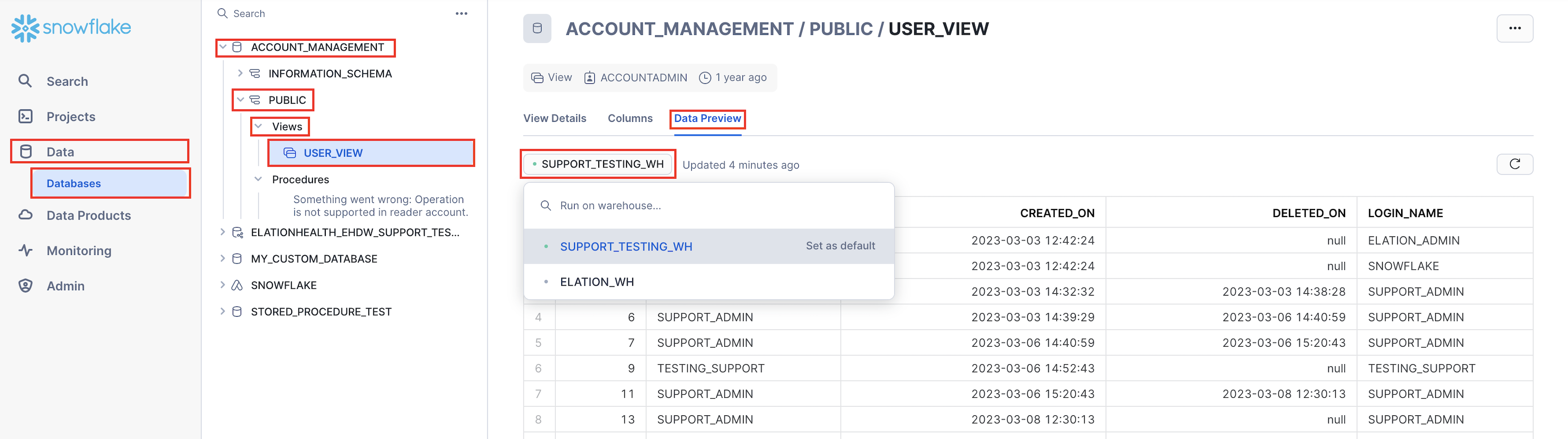
This will give you a comprehensive look at your users and their current state
Creating a new User
You can create a new user by running the below statement in a new worksheetCreating a new Role
You can create a new role by running the below statement in a new worksheetCreating a new User and assigning it to a new Role
You can create a new user and assign it to a new role by running the below statement in a new worksheet- You only have to create a ROLE once, then you can assign it to other users
- New Roles created will only have permissions to read and query the data
-
You can assign the existing USERADMIN roles to other users you create but you will be granting them permission to:
- Create users
- Create new roles
- Create tables
Granting a Role to an Existing User
You can grant an existing role to an existing user byDisable a User’s access
Please reach out to Elation Support Portal to disable a user’s access with the subject line HDB - <Disable user’s access> along with the username and email.If you have any questions about this topic please reach out to Elation Support Portal with the subject line HDB - <your_question>