
Overview
How do I send an outbound fax from Elation?
You can send faxes directly from a patient’s chart using the Provider Letter and Referral features. You can attach up to 40 pages of patient records per fax. These are sent from Elation-owned fax numbers with California area codes, not the electronic fax number assigned to your practice. All faxed pages count toward your Fax Usage.How do I pick fax as the delivery method?
In the To field of your Letter or Referral, there are two ways to trigger a fax:- Select a Contact with a fax number.
- Select a Contact from the Elation Directory or create your own. Creating a Contact is recommended if you’ll be faxing to them often.
- To add or modify a Contact’s fax number:
- In the To field, search for the Contact and select a match from the search results.
- Click Edit Contact.
- Under Contact Information, click Edit to add/edit the fax number.
- Click Save after making your edits.
- To add or modify a Contact’s fax number:
- Type a fax number directly.
- For one-time use, just type the 10-digit fax number. In this scenario, instructions for Elation Connect will NOT be sent.
If the Contact is also an Elation user then they will only receive your Letter or Referral in their Elation account, even if they have a fax number on file.When faxing to a Contact, Elation will include instructions for setting up an Elation Connect account so they can view documents digitally. Click here for more information about Elation Connect.Each fax is limited to 40 pages. If your attachments exceed the fax page limit, split them across multiple Provider Letters or Referrals and send each as a separate fax, or select Sign & Download PDF to download the full packet and send it using a conventional fax machine outside Elation.
Workflow Instructions
Sending a fax using a Provider Letter or Referral
If the Contact is also an Elation user then they will only receive your Letter or Referral in their Elation account, even if they have a fax number on file.Each fax is limited to 40 pages. If your attachments exceed the fax page limit, split them across multiple Provider Letters or Referrals and send each as a separate fax, or select Sign & Download PDF to download the full packet and send it using a conventional fax machine outside Elation.
Fax cover page & HIPAA confidentiality statement
Elation automatically adds a cover page to every outbound fax. The cover page identifies the recipient and sender, includes a reference code, and contains the following HIPAA confidentiality statement:The information contained in this facsimile transmission is privileged and confidential, and may contain confidential health information that is legally protected. All information in this transmission is intended solely for the use of the addressee listed on the cover page. The authorized recipient of this information is prohibited from disclosing this information to any other party and is required to destroy the information after its stated need has been fulfilled. If you are not the intended recipient, you are hereby notified that any disclosure, copying, distribution, or action taken in reliance on the contents of these documents is strictly prohibited (Federal Regulation 42 CFR, Part 2, and 45 CFR, Part 160). If you have received this fax in error, please notify the sender immediately.
Elation generates the cover page at the time the fax is sent, and only the recipient receives it. The cover page and its confidentiality statement do not appear in the printable version of the Letter or Referral, so you won’t see them when previewing or printing the document. A sample of the cover page the recipient receives is shown in the Frequently Asked Questions section below.
Locating & managing sent faxes
Viewing sent faxes
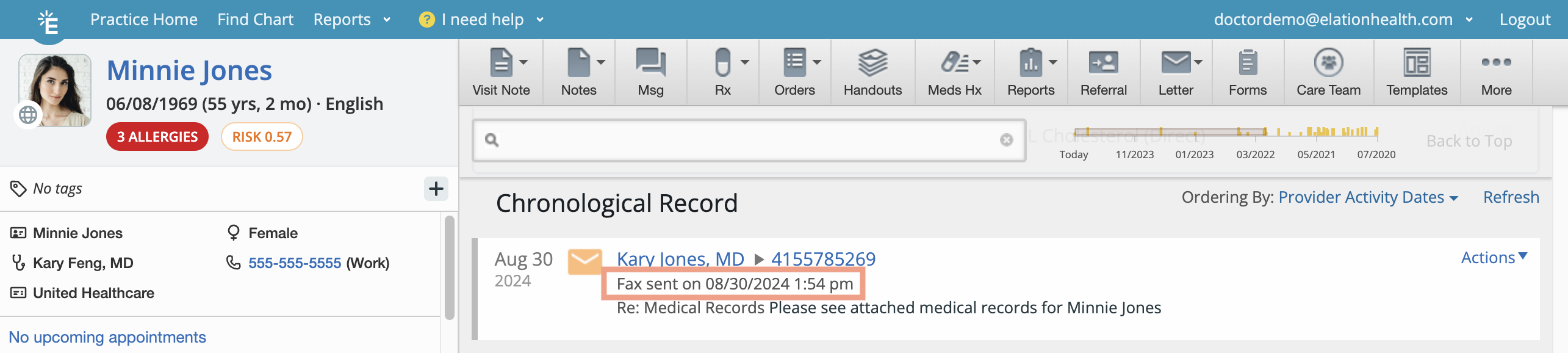
Faxed Provider Letters are Referrals appear in:- The patient’s Chronological Record.
- The Consult section of Reports.
Tracking the status of sent faxes
To check the status of a fax, look for one of the following::- Fax Pending - The fax is still in progress.
- Fax Sent - The fax went through successfully.
- Fax Failed- The fax did not go through.
Locating & managing failed faxes
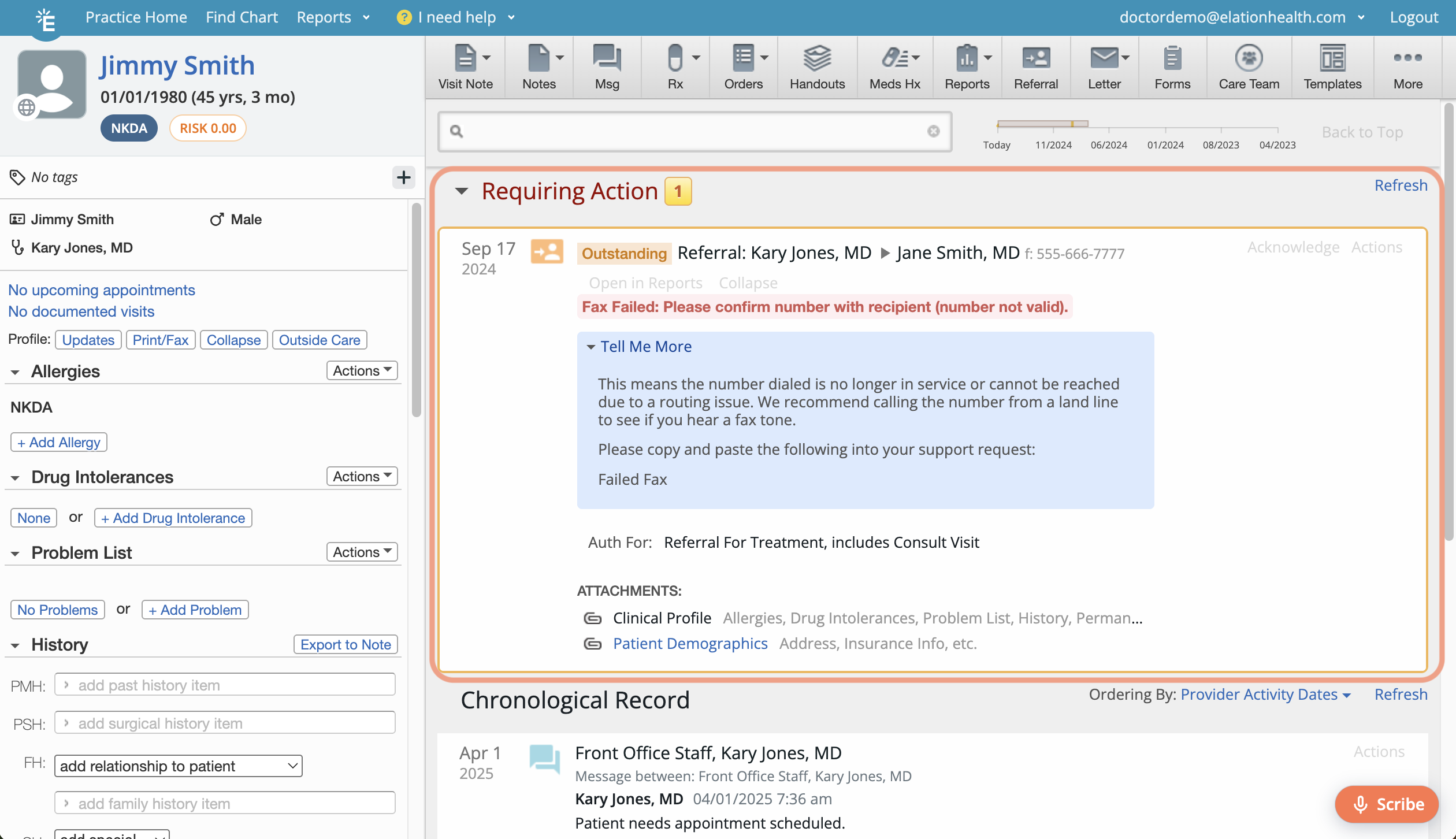
If a fax fails to send you’ll get a notification in:- the Urgent inbox of your Practice Home page
- the Requiring Action section of the patient’s chart.
- the error message received from Elation’s fax provider
- additional error details
- troubleshooting steps
What to include when contacting Support about a failed fax
If a fax fails and you need help from Elation Support, include the following details so we can investigate quickly:- Patient chart ID
- Destination fax number
- Date and approximate time of the fax attempt
- Fax ID, if available in the Tell Me More details panel
- Whether this recipient has successfully received faxes from you before
- Whether you heard a fax tone when you test-called the destination number, since this points to whether the issue is on the receiving line
Frequently Asked Questions
Can I fax to multiple recipients?
No, you can only send a fax to one recipient at a time. Create separate Letters/Referrals for each recipientHow do I send a fax that’s not related to any patients?
To send a fax that is not related to any patients, create a generic chart (e.g.. name the chart ‘Office Fax Only’) and then send a fax from that chart.After I send a Letter or Referral, how long will it take for the Sent/Failed status to display in the patient’s chart?
It can take up to 20 minutes for the Sent/Failed status to appear in the patient’s chart due to processing time.How many fax attempts will Elation make before marking the fax as ‘failed’?
When a fax transmission fails, Elation retries sending it up to 5 times within 30 seconds. If it still fails, the fax will be marked as ‘Failed’ in the patient’s chart and will appear in the your Urgent inbox on thePractice Home page and in the Requiring Action section of the patient’s chart.How do I resend a failed fax to the same fax number?
Anyone can click the “Resend” button on a failed fax to fax it again.How do I resend a failed fax to a different fax number?
To send a failed fax to the new fax number, you must create a new Provider Letter or Referral with the updated fax number or Contact. You can’t edit the fax number of the original fax.My fax keeps failing but the recipient’s fax number is correct. What should I do?
Elation uses Voice over IP (VoIP) to fax documents over the internet. This method breaks the fax into small chunks called ‘data packets’. If even a few packets get interrupted, even for a second, the fax can fail. Transmission issues can happen with any faxing method, but they are more likely if the recipient’s fax line is busy or already in use. In most cases, retrying the fax a few times often resolves the issue. If the recipient’s fax number works but faxes still fail occasionally, try the following:- Call the number to confirm a healthy fax tone before you attempt to resend the fax.
- A healthy fax tone is clear (no static) and high pitched. The number might ring like a normal telephone 2-3 times before you hear the fax tone.
- If you don’t hear a fax tone at all — for example, if the failure notification mentions the receiving line not picking up — the destination number isn’t currently set up to receive faxes. Ask the recipient’s office to check their fax equipment or provide a working fax number, then create a new Letter or Referral with the corrected number to resend.
- If the fax tone sounds good but the fax still fails, ask the recipient if they can adjust their fax to allow for longer fax transmissions, or if they’re having general fax issues (e.g. line issues, paper jams, or out of ink).
Can I fax documentation to a regulatory or government agency?
Yes. Elation doesn’t have a dedicated integration with regulatory or government agencies (such as the FMCSA or a state licensing board). To fax one, create a Custom Contact for the agency with its fax number, then send a Provider Letter or Referral to that contact the same way you would fax any other recipient.The status of my fax in the patient’s chart says ‘Fax Sent’ but the recipient said they never received it. Why?
The ‘Fax Sent’ status indicates that the fax was successfully sent. If the recipient says they did not receive the fax it may be because they misplaced it or they did not recognize the communication is from your office. Ask the recipient to check their fax inbox for a document that looks like one of these pages: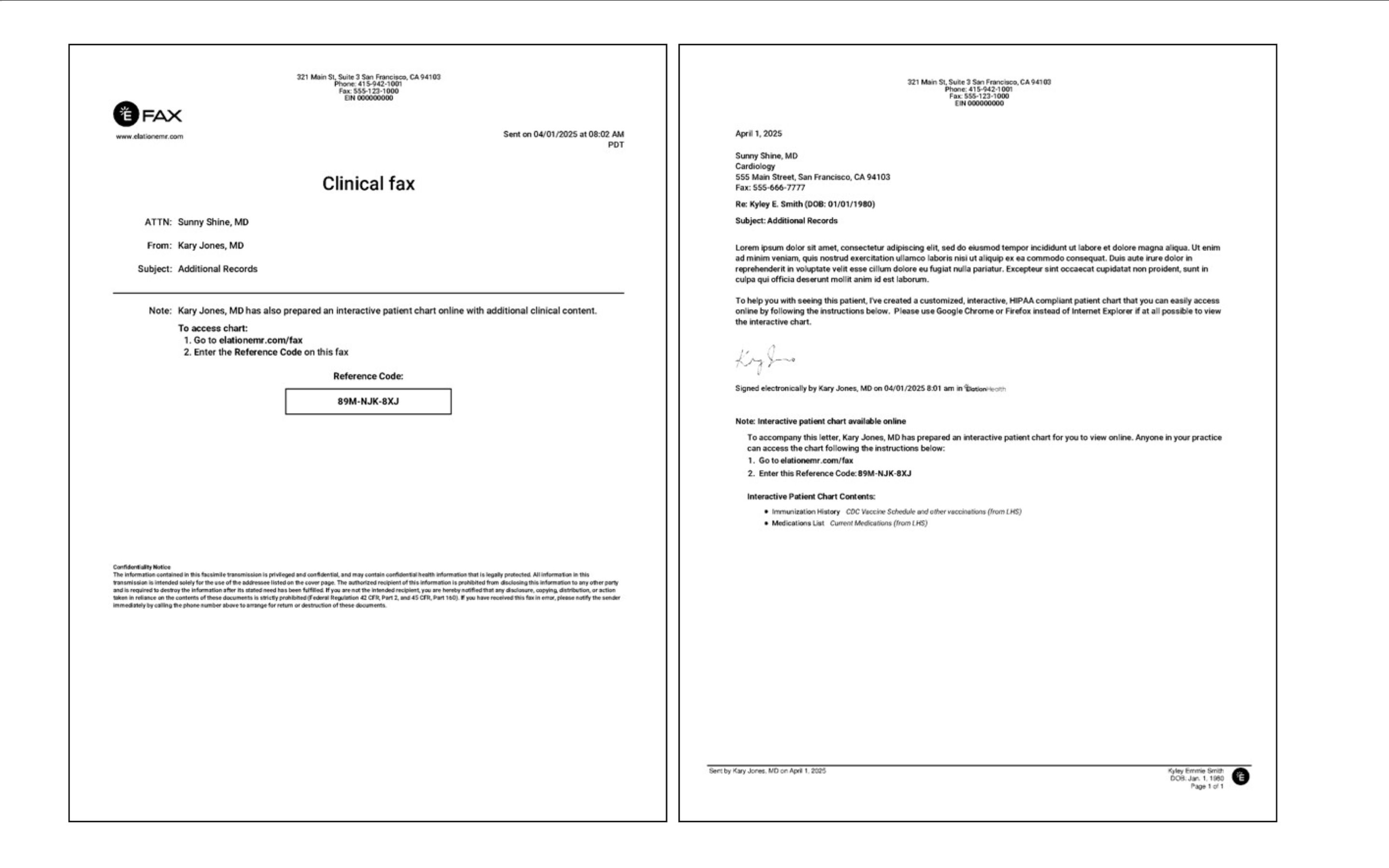
Related Articles
- Letter & Referral Introduction
- Letter & Referral Guide - Auto-drafting letters and referrals with Wordsmith
- Letter & Referral Guide - Sending correspondences to other Elation EHR Users
- Letter & Referral Guide - Sending and receiving Direct messages
- Letter & Referral Guide - Sending correspondences via a secure Provider Portal
- Letter & Referral Guide - Accessing patient information sent by an Elation EHR user
- Letter & Referral Guide - Managing & searching the provider directory
- Letter & Referral Guide - Fax Usage Settings