
Overview
What does Wordsmith do?
Wordsmith is a generative AI tool that helps you draft Referrals, Provider Letters, and Patient Letters. This feature pulls in clinical details from the patient chart, such as medications, problems, and recent visit notes, to create an initial letter draft that the user can edit. Users can also use Wordsmith in tandem with existing letter templates by first applying templates and then prompting Wordsmith to make refinements.Which chart details are used by Wordsmith?
To draft a letter or referral, Wordsmith takes the following details into account:- Patient name, date of birth, pronouns
- Medications
- Problem List
- Clinical Profile History sections (e.g. past medical history, social history, diet)
- Last three visit notes
- Last three lab reports with structured lab values
- Content from the following are not used by Wordsmith to generate drafts.
- Faxed or imported Reports
- Confidential notes and labs - unless they are explicitly attached to the letter or referral.
- Generated drafts require clinical review and editing before being sent—Wordsmith is designed to accelerate, not fully automate, communication.
What are the benefits of using Wordsmith?
Leveraging Wordsmith helps:- Increase the efficiency of drafting a letter, allowing providers to focus more on patient care.
- Reduces the risk of excluding relevant details from the patient’s chart
- Increases timeliness of outbound clinical communication
Setup
While using Wordsmith doesn’t require personalization, you have the option to tailor its tone and formatting to better match your own documentation style.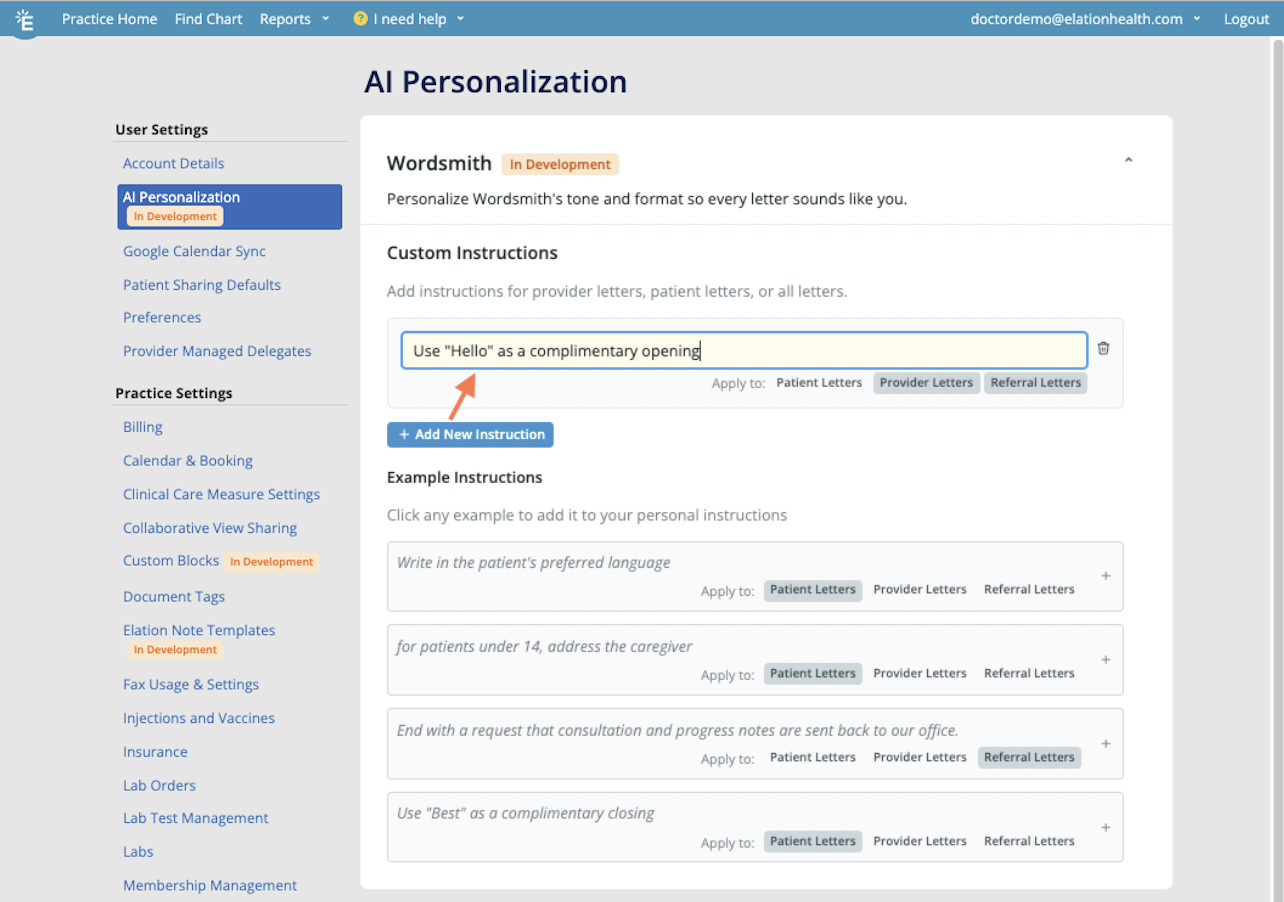
Workflow Instructions
Using Wordsmith to draft or refine a letter
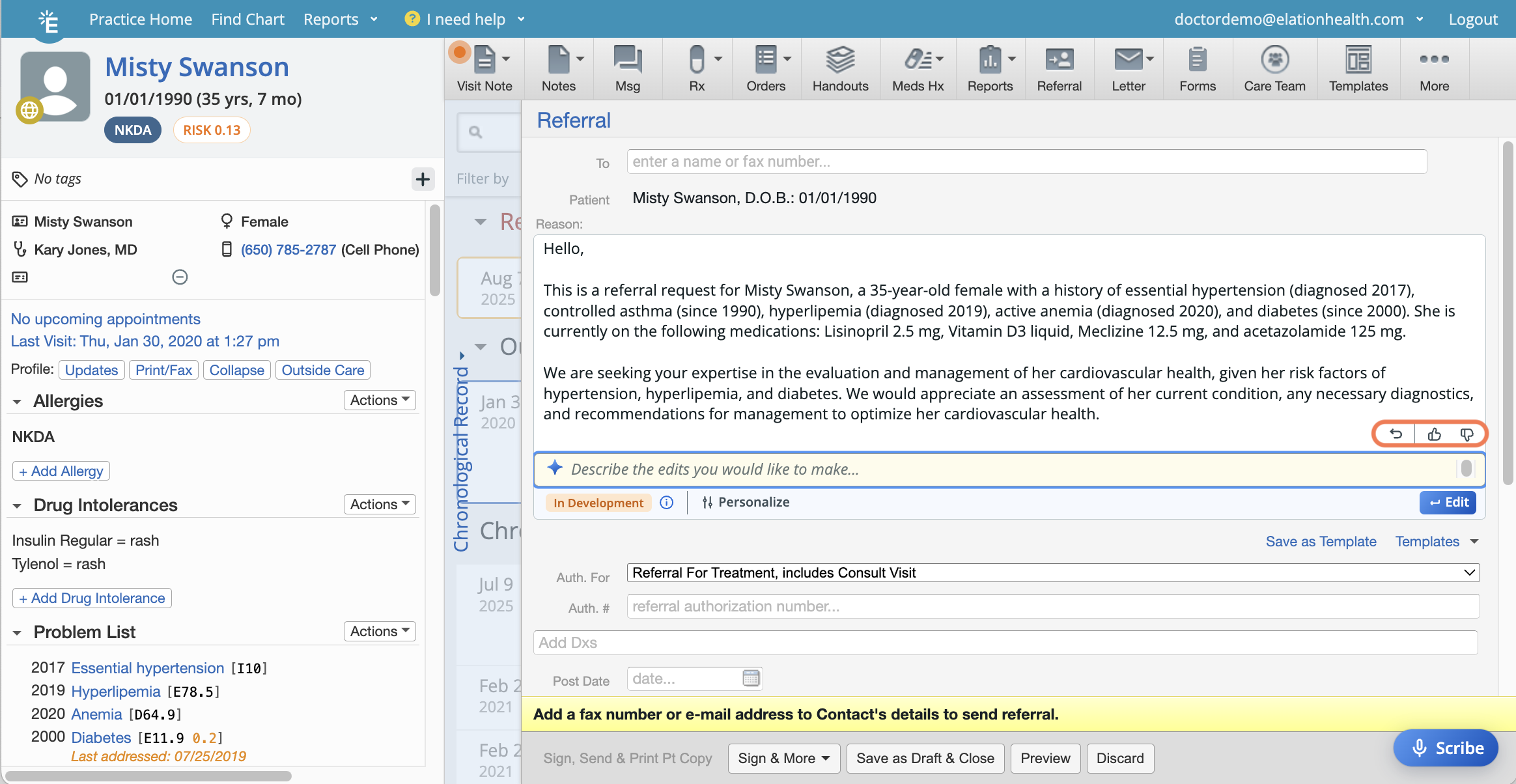
- If you like the drafted communication, let us know using the thumbs up icon.
- If the drafted communication is inaccurate, send us the feedback using the thumbs down icon so that we can continue improving on the feature.
- Click the undo icon when you want to revert to a previous draft.
Glossary
Example prompts
Frequently Asked Questions
How can I troubleshoot if Wordsmith fails to generate content?
If draft generation fails or errors occur, refresh the patient chart and within the letter draft, clear and resubmit Wordsmith instructions. If an error persists, contact support for further escalation.What happens if Wordsmith is wrong?
If the drafted communication is inaccurate, send us the feedback using the thumbs down icon so that we can continue improving on the feature. You can also click the undo button to revert to a previous draft.Can I save a prompt for future use?
Saving reusable prompts is not possible at this time. However, you can use a letter template as a starting point for Wordsmith and then prompt it to make edits or populate it with its patient context.Related Articles
- Letter & Referral Introduction
- Decision Support Interventions Regulatory Documentation
- Elation Health - Building Clinical-First AI
- Letter & Referral Guide - Sending correspondences to other Elation EHR Users
- Letter & Referral Guide - Sending and receiving Direct messages
- Letter & Referral Guide - Sending a fax
- Letter & Referral Guide - Sending correspondences via a secure Provider Portal