
The Fax Outbox is being rolled out to practices in stages and may not yet be enabled for your account. If you don’t see it, your existing fax failure notifications in the Urgent inbox and the patient chart Requiring Action section continue to work as before.
What is the Fax Outbox?
The Fax Outbox is a page in your Practice Home that lists every outbound fax sent from your practice — Letters, Referrals, and orders faxed to vendors — in one consolidated view. For each fax, it shows where it was going, who sent it, how many pages it was, and its current delivery status. Before the Fax Outbox, tracking a sent fax meant checking the status on the original correspondence in the patient chart and watching for failure notifications in your Urgent inbox. The Fax Outbox brings all of that together: every fax from every user in the practice, with the tools to resend or correct a failed fax without recreating the original Letter or Referral. You reach it from the Fax Outbox icon in the Practice Home toolbar. A badge on the icon shows how many faxes currently need your attention, so you can tell at a glance whether anything has failed.Why is the Fax Outbox valuable?
- One place for the whole practice. The Outbox shows faxes sent by everyone in the practice, not just the faxes you sent yourself — so front-office staff can monitor and recover failed faxes on a provider’s behalf. For Workspace-enabled practices, this means everyone in your current Workspace; admin-level users can switch to Return to practice view to see faxes across every Workspace.
- Know when Elation is already handling it. Failed faxes are retried automatically. The Outbox shows which faxes are still sending, which are mid-retry, and which have run out of automatic attempts and genuinely need you.
- Recover a fax in one click. Resend a fax, correct a wrong fax number, or stop the automatic retries directly from the Outbox — no need to rebuild the Letter or Referral.
- See the full history. Open any fax to view a timeline of every send attempt, including the reason each one failed.
- At-a-glance status. The toolbar badge and the summary line tell you whether anything needs attention before you even open the page.
How the Fax Outbox works
Workspaces and the Fax Outbox
For Workspace-enabled practices, the Fax Outbox is Workspace-aware:- Faxes appear in the Workspace they were created in and are not visible from other Workspaces.
- The toolbar badge counts only faxes needing attention in your current Workspace.
- Practice view is the exception. Admin-level users who switch to Return to practice view see faxes from every Workspace in one list.
Status buckets
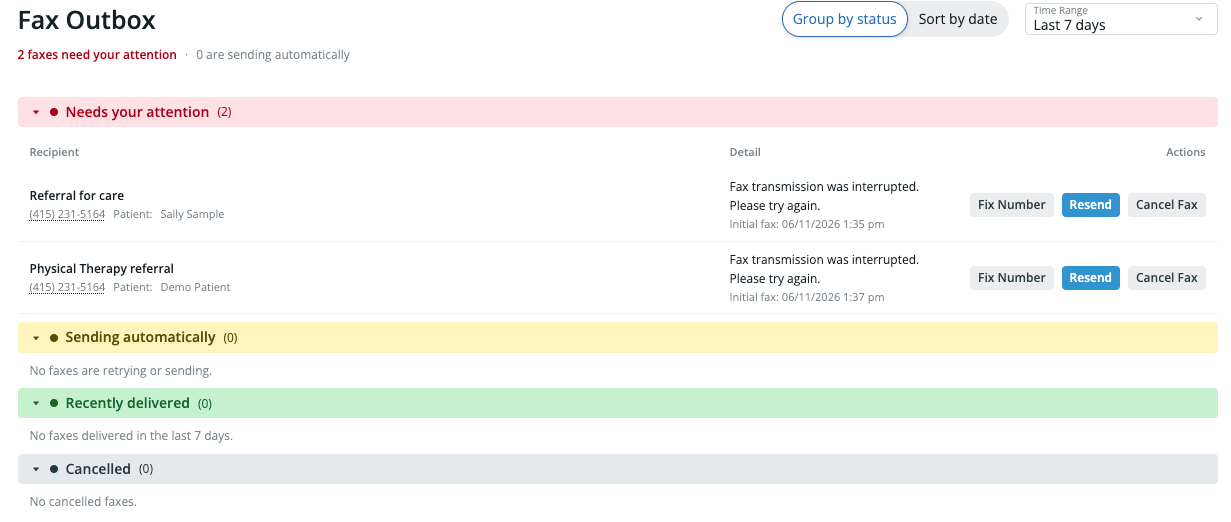
Every fax falls into one of five statuses:
At the top of the page, a summary line tells you how many faxes need your attention and how many are sending automatically. When nothing is outstanding, it reads “No faxes need your attention.”
Finding a fax
- Time range. By default the Outbox shows the last 7 days. You can switch to Last 14 days or Last 30 days. (30 days is the maximum history available.)
- Filter by number. Click a fax number in the list to filter the view down to faxes to or from that number. Clear the filter to return to the full list.
- Grouped or flat view. Faxes can be grouped by recipient, or shown as a flat, date-sorted list with Date and Status columns.
Viewing fax details and history
Open any fax to see its full detail, including a history timeline of every attempt in the retry chain — when each attempt was made, whether it was an automatic retry, and the reason any attempt failed. Because the detail view always shows the complete chain, you can trace exactly what happened even after several automatic retries.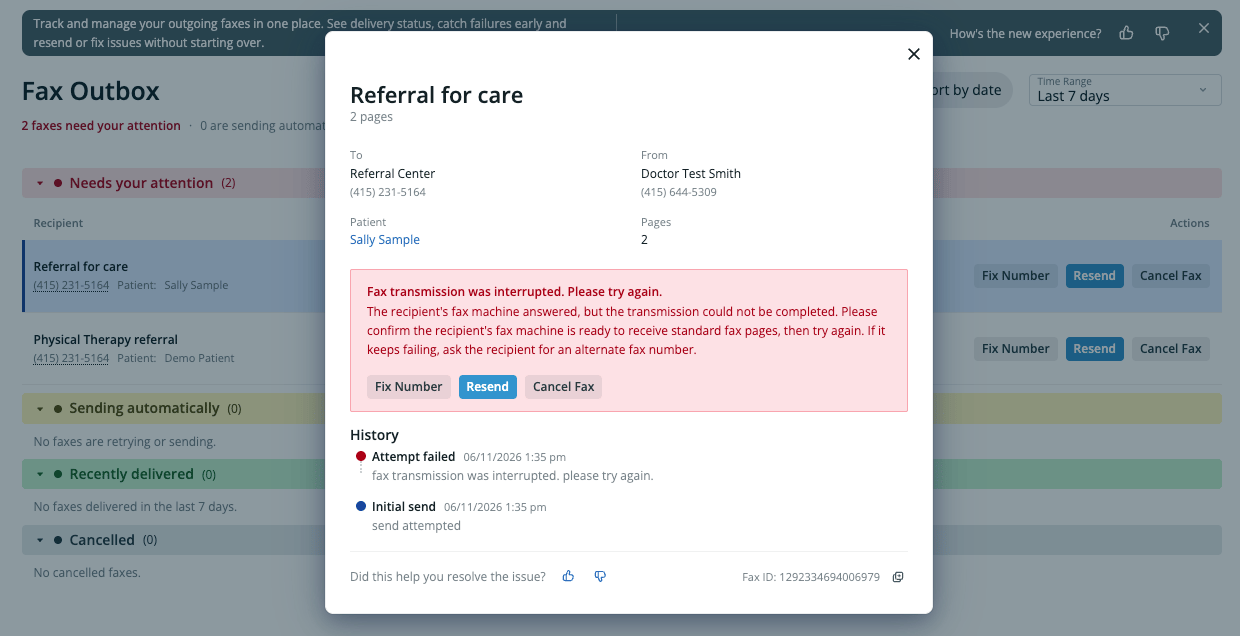
Recovering a failed fax
When a fax lands in Needs attention, the Outbox explains why it failed in plain language and offers the right next step:- Resend — Send the fax again as-is. This is the right choice when the failure was temporary, such as a busy line, no answer, or no fax tones detected.
- Fix number — Correct the destination fax number and send again. This appears when the number looks wrong or disconnected. Fixing the number here changes the number for this fax only — it does not update the recipient’s saved provider, contact, or directory records.
- Cancel — Stop the automatic retries and move the fax to the Cancelled bucket. Use this when you don’t need to resend.
Fix number is available for faxes sent from Letters and Referrals. It isn’t available for some other fax types (such as Patient Passport or clinical-profile faxes), which store their destination differently.
Automatic retries
When a fax fails, Elation automatically tries to send it again. While that’s happening the fax shows as Retrying, and the detail view shows how many attempts have been made and when the next one is scheduled. If every automatic attempt is exhausted without success, the fax moves to Needs attention so a person can decide what to do next.Faxes that appear in the Fax Outbox Needs attention bucket — including those that have exhausted all automatic retries — are also surfaced in the Practice Home Urgent queue, so you can act on them from either location.