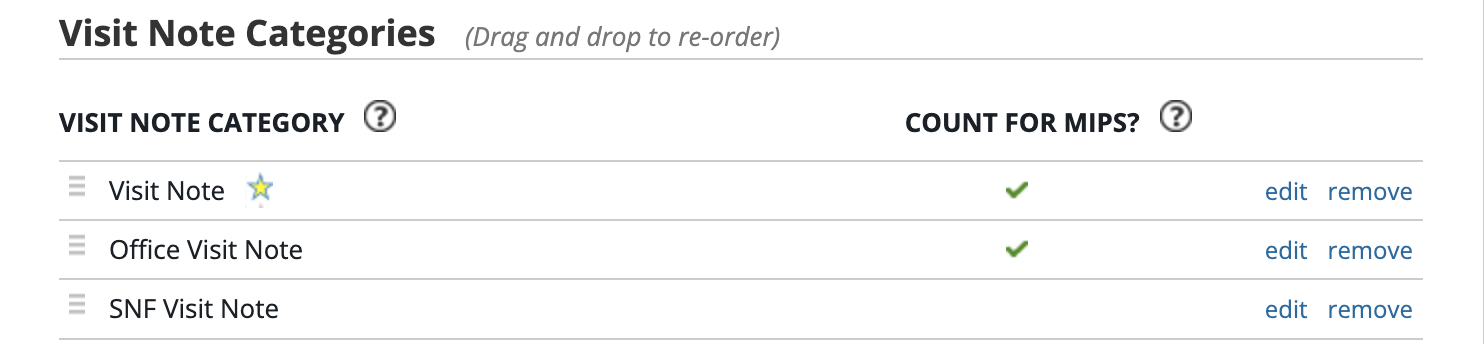
What are visit note categories?
The Visit Note Categories control the title or heading of your note, as well as whether or not that note will be counted in the denominator of eligible patient visits in Meaningful Use calculations. For example, if you create a visit note category called Procedure Note, when you print that note it will read Procedure Note at the top to indicate to other providers what kind of note it is.
How to create a new visit note category
1
Go to Settings >> Report & Visit Note Categories
2
Click
3
Enter the desired name for your visit note category
4
Select either yes or no under Count for MIPS?
- If you select yes, visit notes with this category will be counted as office visits for Promoting Interoperability measures
- If you select no, visit notes with this category will be excluded from Promoting Interoperability calculations
5
Click Save
Managing visit note categories
To edit an existing visit note categories:
1
Go to Settings >> Report & Visit Note Categories
2
Click edit on the visit note category you wish to edit
3
Change the name or MIPS toggle
4
Click Save
If you change a visit note category to start counting towards MIPS or vice versa, it will not affect historical calculations. The change will only go into affect from the point that you change it moving forward.
To remove an existing visit note categories:
Click remove on the visit note category you wish to remove.-
When you remove a visit note category and there are old notes of that category, those notes will continue to keep that visit note category. Removing a visit note category means that you will no longer be able to create new visit notes with that category.
To sort visit note categories:
Click on the handle
Default visit note category
The visit note category that you sort to the first in the list is your practice’s default visit note category and will appear with a star next to it. Unless otherwise specified via the Appointment Type, whenever anyone in your practice creates a visit note, it will have this default category.