
Adding Procedures to Visit Notes
1
In any Visit Note draft click + Add procedure or start typing the Proc: section to enter a procedure administered to the patient during a visit.
2
When your cursor is in the Proc: field, a drop-down list of your popular CPT® (procedure) codes will appear automatically. Start typing a procedure name or procedure code to narrow the list of codes in the drop-down.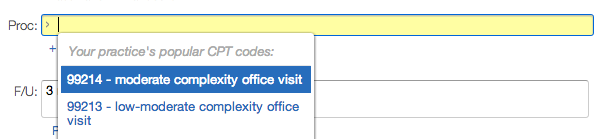
3
Click a procedure name from the drop-down list to add a procedure from your Popular CPT Codes or type in any procedure name.
Next Step: Populate your Popular CPT Codes and start using it for documenting procedures!
Related Articles
- Visit Note Documentation Guide- Visit Note Formats
- Visit Note Templates Guide
- Visit Note Documentation Guide- Assessments
- Visit Note Documentation Guide- Physical Exam (PE) & Review of Systems (ROS) Templates
- Billing Guide- Creating a Super Bill and coding for your visit
- Billing Guide- Billing Report