Overview
What is the Elation Note?
The Elation Note offers a documentation experience designed with a clinical-first focus that physicians value. It introduces three key enhancements to support your unique documentation needs:- A new flexible, block-based design that supports structured data entry and downstream reporting.
- Keyboard shortcuts for rich-text formatting and efficient editing.
- Shortcut for inserting chart data into a standard block or text field.
What are the benefits of using the Elation Note?
The Elation Note:- Promotes adherence to care protocols.
- Makes documentation more flexible and adaptable to varying workflows.
- Enhances speed and efficiency while charting.
What is different from the legacy visit note formats?
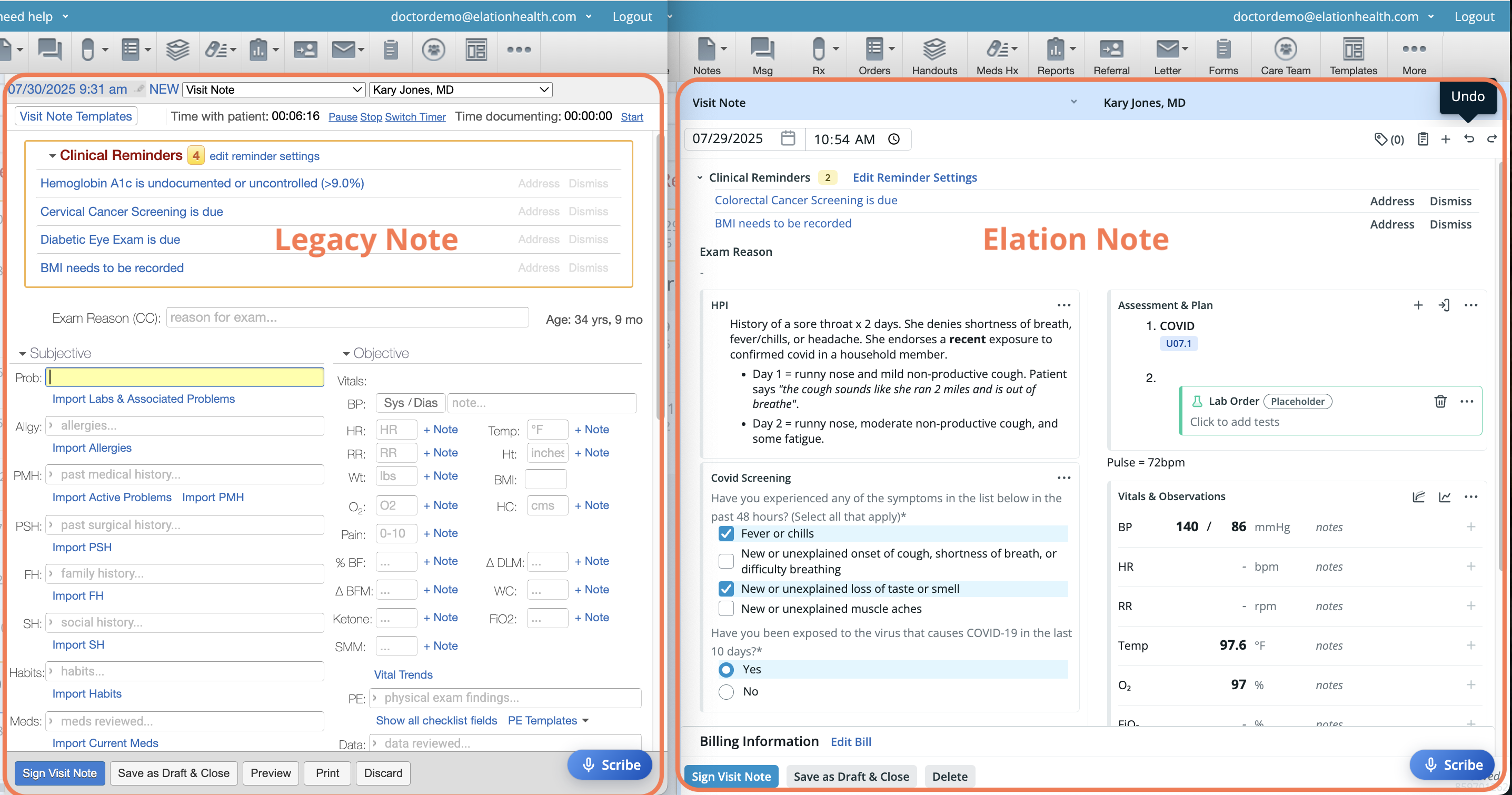
The Elation Note is modeled off of Elation’s Complete H&P Note (2 col-A/P). However, unlike the legacy note which presents the draft as a static form, the Elation Note is a dynamic editor that transforms each section of the note into a distinct block. Each block can be added, deleted and rearranged to meet the needs of the provider, visit or practice. Other capabilities now available in the Elation Note include:- Creating custom blocks to better organize and structure your documentation.
- Showing or hiding custom blocks based on applied logic to only see what’s relevant in the moment.
- Using rich text formatting to make notes clearer and easier to read.
- Undo-ing changes if you make a mistake while editing.
How frequently is the Elation Note updated with new features or improvements?
In 2025, Elation will continue building on the Elation Note in the open. You will see frequent updates and your feedback will directly shape what comes next. Click here for a summary of the updates as they come out.Anatomy of the Elation Note
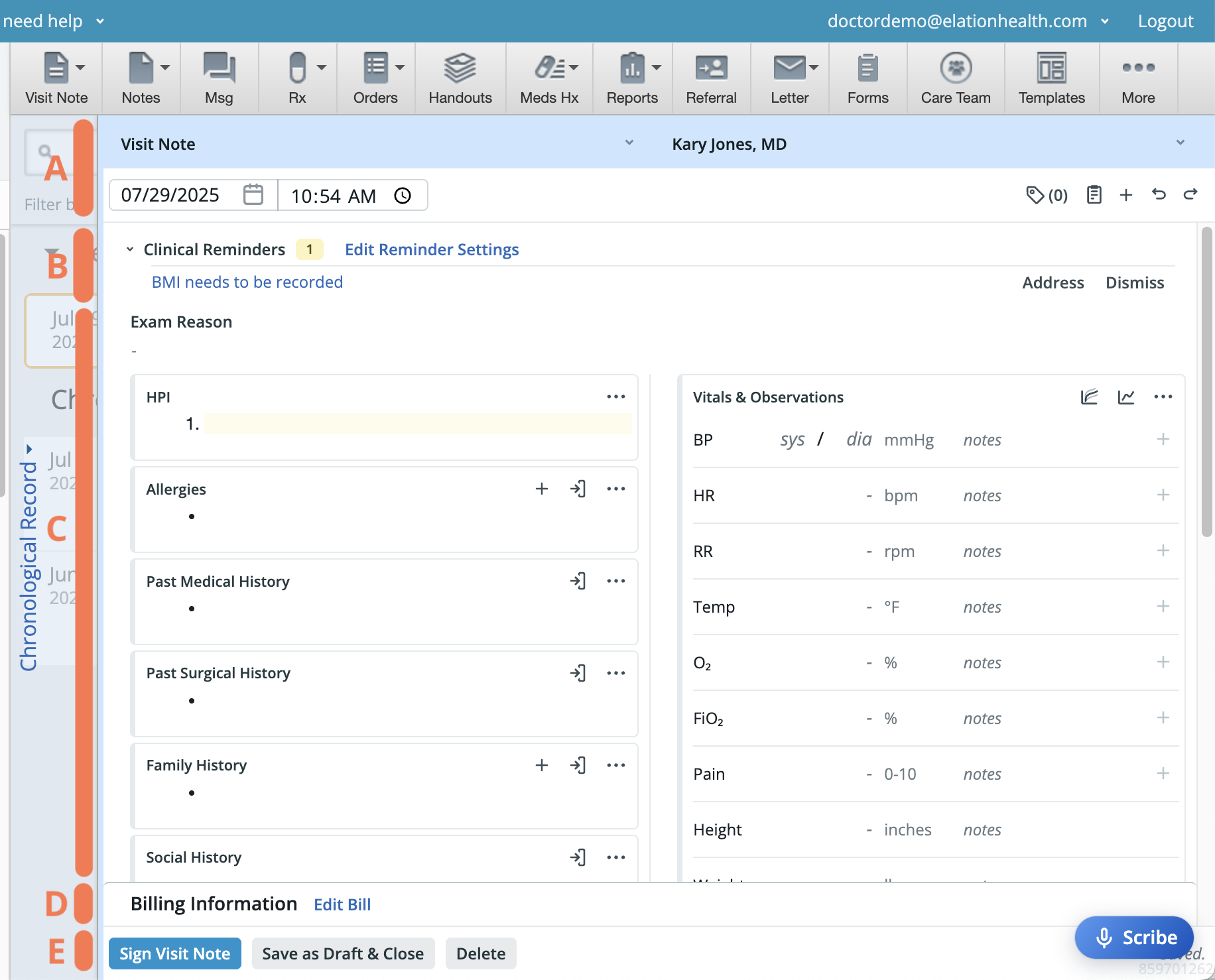
Note Header (A)
The header contains fields that can be updated as needed and buttons associated with our new block functionality.- Visit note category- Defines how the visit note gets labeled. The dropdown options can be edited by Admin users under this settings page.
- Provider- The provider to whom the note is attributed to.
- Date & Time- Defaults to the patient’s appointment or current date/time if there isn’t an appointment.
- Buttons to quickly take certain actions in the note.
- Document Tags - View/edit document tags.
- Templates - Add Elation Note Template(s).
- Add Block - Add a block to the note.
- Undo - Undo the last action.
- Redo - Redo the last action that was undone.
Clinical Reminders (B)
This section displays reminders for any electronic clinical quality measures (eCQMs) that are relevant to the patient. Refer to our Clinical Reminders guide for more details on how Clinical Reminders operate.Clinical Reminders are only available for Health Maintenance measures and customers using custom Care Gaps at this time.
Note Body (C)
The body is where users can input content for the visit note - from the exam reason (i.e. chief complaint) through follow-up instructions. At a glance, the body is nearly identical to the body of the original 2 column note. In fact, the Elation Note by default shows every section from the Complete H&P Note (2 col-A/P) with the exception of the Data section. However, each of these sections in the Elation Note is now a dynamic block, also known as a standard block.Billing Information & Confidential Indicator (D)
This section will show a summary of diagnosis and CPT codes that have been added to the note. By clicking Edit Bill, users can update more specific billing details and complete charge entry. Check the Keep this confidential checkbox to mark the note as confidential.If you create any orders during a confidential visit, be sure to mark both the orders and the visit note as confidential.
Action Buttons (E)
Users can sign, save, or delete the draft note with the buttons at the bottom of the screen. Only Provider Level Users will see the option to sign.Glossary of Features
| Feature | Details |
|---|---|
| CPT Code Command | Search for and add a CPT code to the note. |
| Custom Blocks | Insert data blocks built and maintained by members of your practice. |
| Dx Code Command | Search for and add a diagnosis code to the note. |
| Dynamic Macros | Insert real-time patient data into the note. |
| Rich Text Formatting | Style and structure text beyond plain characters |
| Standard Blocks | Insert data blocks built and maintained by Elation. |
| Templates | Insert a visit note template into the note. |
Setup
To get the most out of the Elation Note, we recommend setting up custom blocks and templates. They help you focus your documentation on the information that matters most—and make it easy to quickly add content you use often. For example, the *E Medicare Annual Wellness Visit – AWV template from Elation’s Template Library is designed to document the key information typically collected during a Medicare Annual Wellness Visit. By applying this template each time you document this type of visit, you’ll have all the relevant fields ready to fill out—helping ensure consistency and completeness in your documentation.The ability to edit the *E Medicare Annual Wellness Visit – AWV template from Elation’s Template Library will be available soon.The *E Medicare Annual Wellness Visit – AWV template won’t populate values for hosted database customers. Support for this data through the hosted database will be available soon.
Creating custom blocks
Custom blocks allow practices to create organized groups of input fields—like checkboxes, dropdowns, and text fields—for capturing structured data that standard blocks currently don’t capture. Once created, custom blocks can be added directly to an Elation Note draft or built into Elation Note Templates for repeated use. Click here for instructions on how to create custom blocks.Creating Elation Note Templates
Templates are prebuilt, reusable formats designed for specific visit types—like annual wellness exams—or procedures where documentation can follow a consistent structure. They help reduce manual typing, prevent omissions, and support a smooth, organized workflow during the visit. The Elation Note has its own template builder that lets you take advantage of both standard and custom blocks to create more flexible, structured templates. Click here for instructions on how to create templates for the Elation Note.Legacy visit note templates are still supported in the Elation Note and can be applied using the /template command. If you need to edit a legacy visit note template, refer to the instructions on this Help Center page .
Workflow Instructions
Using the / command
Use the forward slash (/) key on your keyboard to search for and add predefined content to your visit note draft.| Command | Object | Apply to visit note draft | Apply to Template |
|---|---|---|---|
| /cardiac order | Cardiac Order placeholder | Yes | Yes |
| /cpt code | Popular CPT Code search | Yes | Yes |
| /dx code | ICD-10 code search | Yes | Yes |
| /template | Legacy Visit Note Templates & Elation Note Templates | Yes | No |
| /[standard block name] | Standard Block | Yes | Yes |
| /[custom block shortcut] | Custom Block | Yes | Yes |
| /lab order | Lab Order placeholder | Yes | Yes |
| /imaging order | Imaging Order placeholder | Yes | Yes |
| /prescription | Prescription placeholder | Yes | No |
| /pulmonary order | Pulmonary Order placeholder | Yes | Yes |
| /sleep order | Sleep Order placeholder | Yes | Yes |
Using the @ command
Use the at sign (@) key on your keyboard to insert dynamic fields (also known as Dynamic Macros) into any standard block or text field to insert any of the following real-time patient data into your visit note.- Clinical Profile (Allergies)
- Bulleted list of active allergies from the Allergies section of the Clinical Profile.
- Clinical Profile (Medications)
- Bulleted list of active, permanent medications from the Permanent Rx Meds section of the patient’s Clinical Profile.
- Clinical Profile (Problems)
- Bulleted list of active problems from the Problem List section of the patient’s Clinical Profile.
- Patient age
- Patient’s age at the time of visit.
- Patient DOB
- Patient’s Date of birth from their Demographics.
- Patient name
- Patient’s Legal first name, Middle name & Legal last name from their Demographics.
Exception: Dynamic macros cannot be used in custom blocks, Vitals fields, structured PE and ROS fields or anywhere outside of the Elation Note draft or template builder.
Documenting an encounter
Click here for instructions on how to use the Elation Note to document an encounter.Frequently Asked Questions
What features from the legacy note are not yet available in the Elation Note?
| Feature | Functionality | Legacy Notes | Elation Note |
|---|---|---|---|
| Editing experience | Write + edit a note | Yes | Yes |
| Utilize dynamic data blocks | No | Yes | |
| Apply rich-text formatting | No | Yes | |
| View-only draft note | No | Yes | |
| Edit visit note concurrently | Yes | Yes | |
| Note formats | One column format | Yes | No |
| Two column format | Yes | Yes | |
| Non-visit Note format | Yes | Coming Soon | |
| Export data from Clinical Profile to note | Availability | Yes | Yes |
| Export full history | Yes | Yes | |
| Export problem list | Yes | Yes | |
| Export data from note to Clinical Profile | Availability | Yes | Coming Soon |
| Order lab tests | Open a new Lab Order Form from visit note | Yes | Yes |
| View lab order status in visit note | No | Yes | |
| Leverage order sets when adding a Lab Order block to a visit note template | No | Yes | |
| Order medications | Open a new Prescription Form from visit note | Yes | Yes |
| View prescription status in visit note | No | Yes | |
| Add a Prescription Order block to visit note templates | No | Coming Soon | |
| Create referrals | Open a new Referral from visit note | Yes | No |
| View referral status in visit note | No | Coming Soon | |
| Add a Referral block to visit note templates | No | Coming Soon | |
| Order imaging tests | Open a new Imaging Order from visit note | Yes | Yes |
| View Imaging Order status in visit note | No | Yes | |
| Add an Imaging Order block to visit note templates | No | Yes | |
| Order cardiac tests | Open a new Cardiac Order from visit note | Yes | Yes |
| View Cardiac Order status in visit note | No | Yes | |
| Add a Cardiac Order block to visit note templates | No | Yes | |
| Order sleep tests | Open a new Sleep Order from visit note | Yes | Yes |
| View Sleep Order status in visit note | No | Yes | |
| Add a Sleep Order block to visit note templates | No | Yes | |
| Order pulmonary tests | Open a new Pulmonary Order from visit note | Yes | Yes |
| View Pulmonary Order status in visit note | No | Yes | |
| Add a Sleep Order block to visit note templates | No | Yes | |
| Document injections | Open a new Document Injected Medication form from visit note | Yes (Beta) | Coming Soon |
| View status of injected medication in visit note | No | Coming Soon | |
| Add a Document Injected Medication block to visit note templates | No | Coming Soon | |
| Document vaccines | Open a new Vaccine Form from visit note | Yes | No |
| View status of vaccine in visit note | No | Coming Soon | |
| Add a Vaccination block to visit note templates | No | Coming Soon | |
| Document giving sample medications | Open a new Samples form from visit note | Yes | No |
| View status of samples in visit note | No | Coming Soon | |
| Add a Samples block to visit note templates | No | Coming Soon | |
| Document Point-of-Care Labs | Document a Point-of-Care Lab from visit note | Yes | Coming Soon |
| Export Point-of-Care lab result to visit note | Yes | Yes | |
| Document Vitals | Document blood pressure (BP) | Yes | Yes |
| Document heart rate (HR) | Yes | Yes | |
| Document temperature (Temp) | Yes | Yes | |
| Document respiratory rate (RR) | Yes | Yes | |
| Document height (Ht) | Yes | Yes | |
| Document weight (Wt) | Yes | Yes | |
| Document body mass index (BMI) | Yes | Yes | |
| Document oxygen saturation (O2) | Yes | Yes | |
| Document pain score (Pain) | Yes | Yes | |
| Document body fat %, change in dry lean mass, change in body fat mass, waist circumference, and ketones | Yes | No | |
| Document multiple values for a type of vital | Only for BP | Only for BP, HR, RR, Temp, O2, FiO2 and Pain | |
| Open vitals trend table | Yes | Yes | |
| Reference previous vital values | Only BMI | Coming Soon | |
| Use Appointment Automation | Open new visit note draft via appointment automation | Yes | Yes |
| Apply visit note templates to visit note drafts created via appointment automation | Yes | No | |
| Document Physical Exam (PE) / Review of Systems (ROS) | Create PE/ROS templates | Yes | Coming Soon |
| Apply PE/ROS templates | Yes | Yes | |
| Apply previous PE/ROS template values | Yes | Coming Soon | |
| Document Assessment & Plan | Search for diagnosis codes in Assessment field | Yes | Coming Soon |
| Use Dx Code Navigator | Yes | Yes | |
| Search for procedure codes in the Procedure field | Yes | Coming Soon | |
| Open patient handouts | Yes | Coming Soon | |
| Print visit notes | Print Care Plan from visit note draft | Yes | Yes |
| Print signed visit note | Yes | Yes | |
| Print Encounter Summary (MIPS) | Yes | Coming Soon | |
| Print Patient Summary | Yes | Yes | |
| Print Patient Instructions | Yes | Yes | |
| Print simple Invoice (without DX codes) | Yes | Yes | |
| Print claims Invoice (with ICD-10) | Yes | Yes | |
| Print claims Invoice (with ICD-9) | Yes | No | |
| Amend signed visit notes | Amend signed visit note | Yes | Yes |
| Record patient requested amendment | Yes | Coming Soon | |
| Delete amended visit note | Yes | Yes | |
| View history of amendment changes | Yes | Yes | |
| Save note amendment as draft | Yes | Yes | |
| Preview note amendment | Yes | No | |
| Manage Clinical Reminders - MIPS | View and dismiss clinical reminders in draft visit note | Yes | Yes |
| Action on clinical reminders in draft visit note | Yes | Coming Soon | |
| Manage Care Gaps | View and dismiss Care Gaps | Yes | Yes |
| Action on Care Gaps | Yes | Yes | |
| Apply Document Tags | Add Document Tags to a draft visit note | Yes | Yes |
| Add Document Tags to a signed visit note | Yes | Yes | |
| Add Document Tags to a visit note template | Yes | No | |
| Use Document Tags to automatically apply CPT Codes to the bill | Yes | No | |
| Copy forward a signed visit note | Export the entire signed visit note to a new note | Legacy Note to Legacy Note | Note 2.0 to Note 2.0 |
| Export just the HPI section of a signed visit note to a new note | Legacy Note to Legacy Note | No | |
| Send Visit Note | Via Office Message | Yes | Appears as a 2-col A/P Note format |
| Via Provider Letter | Yes | Appears as a 2-col A/P Note format | |
| Via Provider Referral | Yes | Appears as a 2-col A/P Note format | |
| Via Patient Letter | Yes | Appears as a 2-col A/P Note format | |
| Use Note Assist | Use the Scribe feature to populate free text | Yes | Yes |
| Use the Scribe feature to populate structure data | No | Yes | |
| Use the Scribe feature to trigger actions | Yes | Yes | |
| Miscellaneous | Search for visit note in chronological record. | Yes | Coming Soon |
| Assign visit note categories | Yes | Yes | |
| View Growth Charts | Yes | Yes | |
| Edit the bill of a signed note | Yes | Yes | |
| Using Billing Guidance | Yes | Coming Soon | |
| Use a built-in timer | Yes | No | |
| Specify user default setting for visit note format by encounter type | Yes | Yes | |
| Mark a visit note as confidential | Yes | Yes | |
| Apply coding automation | Yes | Coming Soon | |
| Apply lab coding templates | Yes (Beta) | Coming Soon | |
| Co-sign notes | Yes (Beta) | Coming Soon | |
| Share visit note summary with Patient via Patient Passport. | Yes | Coming Soon | |
| Share signed visit note through the Patient Longitudinal Record | Yes | Coming Soon | |
| Share signed visit note through the Collaborative Health Record. | Yes | Coming Soon | |
| View signed visit notes in Billing Home | Yes | Yes | |
| View signed visit notes in Productivity Reports | Yes | Coming Soon |
Can I apply a legacy visit note template to the Elation Note?
Yes, you can apply a legacy visit note template to the Elation Note. The data will populate in their corresponding blocks, wherever they are in the note. If the blocks don’t exist, then we will append the block to the bottom of the note (respecting their right or left location in the template).- Follow any of these 3 workflows to insert the Template block into your visit note.
- You cannot export legacy visit note templates from the Visit Note Templates shortcut at the top of the chart.
- Search for and select the template you want to add.
Can I apply legacy PE and ROS templates to the Elation Note?
Yes, you can apply legacy PE and ROS templates to the Elation Note yet. Simply click on the templatesIs the Elation Note available in the API?
The Elation Note introduces new API endpoints. If you want to leverage the Elation Note, you must either create new workflows and/or migrate existing workflows to these endpoints. We will be developing these endpoints further to take advantage of new Elation Note features like custom blocks and templates. Click here for our API documentation.Is content from the Elation Note available in the Hosted Database?
Yes, and Elation Note’s custom block feature is intended to make querying structured data easier than before. Please review our data validation guide. If you decide you would like to enable tables to reflect custom block data from Elation Note, contact your account representative and request to turn these tables on.Are the features in Elation Note designed with regulatory compliance in mind?
When an Elation Note is created, a version of it is created in the legacy note format. This backported legacy note format complies with our regulatory and certification standards using the same methods and at the same quality as the legacy note. For example, CCDA, FHIR, PLR/CHR and Patient Passport data are all being populated in the same methods and quality as legacy note. We are committed to promoting strong data quality and interoperability. As Elation Note is still in development, each time we improve the data structure of the note, we plan on making the changes available to existing signed notes when appropriate. For example. if our team discovers that data was previously missing in our backported note, we will run a migration to ensure all existing signed notes will include the missing data point to ensure a more fulsome note. We believe this is the correct thing to do, as it places the practice in a better posture for the future. A note on CMS reporting for AWVs Elation Note introduces a powerful new feature of custom blocks. Depending on how your practice is using custom blocks, it’s important to review the data you are reporting on with your reporting partners (e.g. ACOs or other third party organizations).Can I add dynamic macros to a custom block?
No, dynamic macros cannot be added to a custom block.Can I add more dynamic macros?
No, additional dynamic macros cannot be added. Elation will notify you if we add additional options.How frequently is the Elation Note updated with new features or improvements?
In 2025, Elation will continue building on the Elation Note in the open. You will see frequent updates and your feedback will directly shape what comes next.Related Articles
- Elation Note Guide - Managing custom blocks
- Elation Note Guide - Manage Elation Note Templates
- Elation Note Guide - Using visit note blocks
- Elation Note Guide - Documenting an encounter
- Elation Note Guide - Release Summary