
What are Pulmonary Order Forms?
The Pulmonary Order Form allows you order diagnostic tests to see how well the patients’ lungs are working. The Pulmonary Order Form is usually directed towards a Pulmonologist. Common forms of pulmonary tests are:- Spirometry
- Body plethysmography
- Lung diffusion capacity
- Pulse oximetry test
Creating a Pulmonary Order
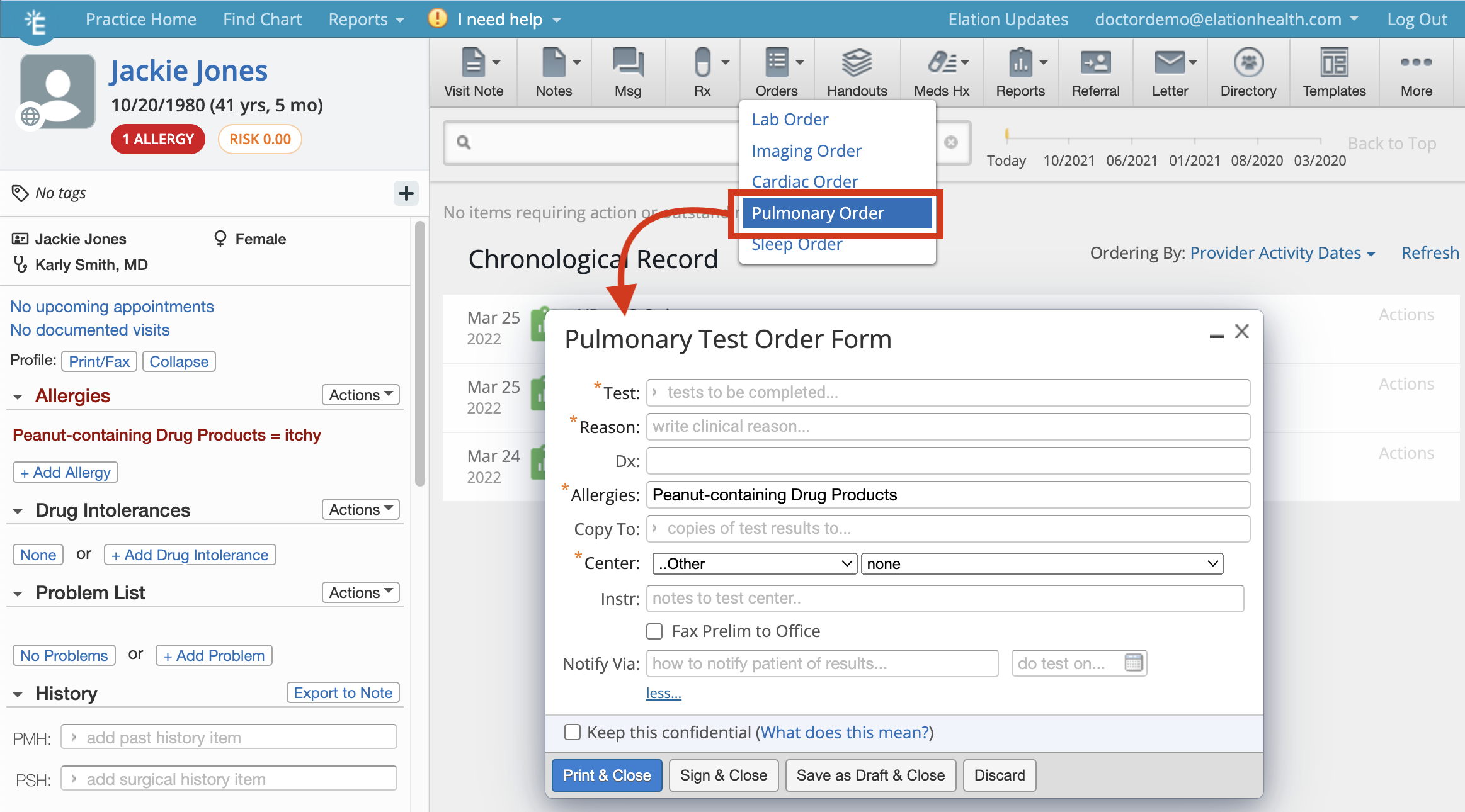
There are a few ways to initiate Pulmonary Orders in Elation:- Clicking on the Orders >> Pulmonary Order button at the top of the patient’s chart
- Clicking on the Pulmonary button in any visit note or note
- Using an existing Pulmonary Order and re-ordering the same tests
- *Test(s)- which test(s) you want the patient to complete. See below for more information about this field
- *Reason- the reason the patient needs the testing
- Dx- which health condition is related to the test(s)
- *Allergies- whether the patient has any allergies. If the patient has any allergies document in their Clinical Profile, those allergies will immediately populate this field
- Copy To- which provider do you want to also send a copy of results to
- *Center - which test center you recommend the patient goes to
- Under the more… section
- Instruction- any special instructions for the test center.
- Notify Via- how the patient should be notified of their results
- Do test on- when you want the patient to complete the test(s)
- Keep as confidential- use this checkbox to mark the order as a confidential record.
Managing pulmonary tests
When you begin typing in the Tests field you will begin to see a dropdown of tests that are part of your pulmonary test database. If there is a test you want to order that does not appear in the pulmonary test database, you can add the test to your database by typing in your own test name in the test field and completing an order. The new test will then appear in your pulmonary test database the next time you or anyone in your practice uses the Pulmonary Order Form for any patientTake caution when adding new tests to your test database. You will not be able to edit or remove test names after adding the test to your test database.
Re-ordering, changing or canceling pulmonary orders
Previous pulmonary orders can be easily re-ordered by hovering over the signed order in the Chronological Record or in the Reports tab and clicking Actions >> Reorder.Sharing pulmonary orders with patients
The best method of sharing pulmonary orders with patients is via Patient Passport as it is a secure and HIPAA-compliant portal and patients will always have access to the pulmonary order. To share a pulmonary order with a patient via Patient Passport:- Find the signed pulmonary order in the Chronological Record or in the Reports tab and click Actions >> Send Patient Letter
- A new Patient Letter draft will open up with the pulmonary order attached
- Complete the remaining fields of the Patient Letter as needed
- Click Sign & Send to send the order to the patient’s Passport account
Sending pulmonary orders to testing facilities
After you create and sign a pulmonary order, you can electronically fax it to a testing center via Elation’s Letter to Provider feature.- Find the signed pulmonary order in the Chronological Record or in the Reports tab and click Actions >> Send Provider Letter
- In the To field, type the fax number of the testing center. If a search result appears in the Provider Directory dropdown, click on the result to select an existing contact.
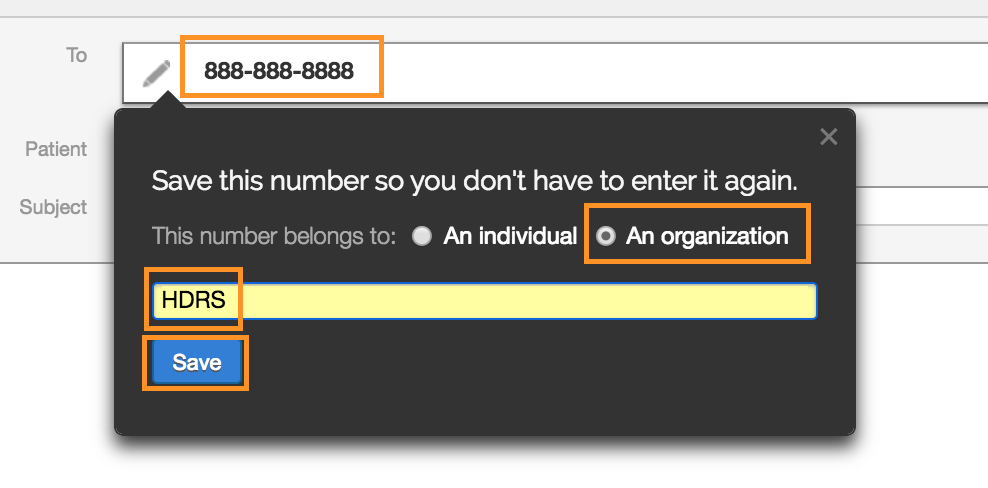
- If this is the first time you are faxing to the testing center and you are unable to find them in your directory, press the TAB key on your keyboard and a dialogue window will appear prompting you to save the fax number to a new contact. Select Organization, type the name of the vendor, and click Save. This will allow you to search for the testing center by their name moving forward.
- Type a subject and message to the testing center as needed.
- Next, click on Select Chart Items to Attach.
- Check the checkbox for Patient Demographics and click Attach Items.
- At the bottom of the letter, check the checkbox for Also fax copies of attachments.
- Click Sign & Send to fax the order to the testing center.
To fax the pulmonary order outside of Elation with your physical fax machine, you can print a copy of the pulmonary order by clicking Actions >> Print and then use your fax machine.
Receiving test results
Once a patient completes a pulmonary order and the results are finalized, the testing center should send you the test results via fax if a fax number was shared with them.- If you disclosed your Elation fax number in your practice header or you set up fax forwarding to your Elation Fax Inbox, then the fax will appear in your Fax Inbox. You can then file the report into the patient’s chart from the Fax Inbox.
Close-the-loop feature
Being aware of outstanding orders is vital to prioritizing patient outreach efforts and informing future care plans, which is why we have incorporated an optional set of features that will help your practice keep track of outstanding orders. Learn more about the **Close-the-Loop ** experience and how to request access in the Orders Guide- Following up on outstanding lab, radiology or other orders article.Frequently Asked Questions (FAQ)
Can staff members help me create pulmonary orders?
Yes! Staff Level Users can draft sleep orders for any patient. Once they are done drafting an order, Staff Level Users can click Save as Draft & Close to keep the pulmonary order in the Requiring Action section of the patient’s chart for providers to complete and sign off. When Staff Level Users draft pulmonary orders, the orders are always assigned to the Provider Assigned in Practice as noted in the patient’s demographics. If you would like staff members to sign pulmonary orders on your behalf, you can assign them as a delegate. Learn more about staff delegates here .Can I send pulmonary orders electronically to pulmonary testing centers?
You cannot send pulmonary orders electronically to pulmonary testing centers directly from the Pulmonary Order Form. You can create a pulmonary order and then send the signed order via fax to pulmonary testing centers. Learn more about faxing to pulmonary testing centers in the Sending pulmonary orders to testing facilities section.Does Elation have any integrations with pulmonary testing centers?
Elation does not have any integrations with pulmonary testing centers. You will be notified if any become available. You can always view the most up to date list of integrated partners in our Partners page.Can I order other medical tests in Elation?
Yes! You can also order lab, imaging (radiology), cardiac and sleep tests in Elation. Find out more about the different medical tests forms in the Order Forms Introduction- Ordering medical tests for your patients article.Related Articles
- Lab Orders & Results — Managing labs and centers
- Order Forms Introduction- Ordering medical tests for your patients
- Patient Chart Guide- Managing confidential records
- Elation Patient Passport Guide
- Letters & Referrals Guide- Sending messages to patients & corresponding with third party professionals
- Letters & Referrals Guide- Managing & searching the provider directory
- Orders Guide- Following up on outstanding lab, radiology or other orders
- Staff Permissions / Staff Delegates
- Problem List Guide