
Overview
What is Carequality?
Carequality is a national interoperability framework utilized to enable health information exchange across health platforms and vendors. Carequality connects different health data networks under a common set of nationwide legal, technical, and policy rules with the goal of promoting trusted and patient-consented data exchange. Carequality does not store information, but enables exchange between and among health information networks and service platforms through the Carequality framework to ensure they are upholding data exchange policies. Carequality enables practices with the Outside Care integration to receive data and share data with other EHRs, data repositories and Health Information Exchanges (HIEs) also utilizing the Carequality framework. The Carequality framework connects more than 600,000 providers, 50,000 clinics, and 4,200 hospitals in the United States. The full database of Carequality-enabled providers can be found here.What is Elation’s Carequality integration?
With the Elation’s Carequality integration, you can share data with any Carequality-enabled provider and query for data from any Carequality-enabled provider with mutual patients. Elation’s Carequality integration unlocks access to data available via Commonwell, and eHealth Exchange as well as data from other EHRs and data repositories connected to Carequality. You can query for files, such as Continuity of Care Documents (CCDs), visit notes and results in various formats (PNGs, PDFs, TIFFs, etc.) as long as the patient’s affirmative consent to query and share their data from or to outside care entities has been obtained and recorded. Elation also makes patient data available to providers on other networks connected to Carequality via a comprehensive Continuity of Care (CCD) file. Documentation in the form of images will not be shared.Is my practice the right fit for Elation’s Carequality integration?
The current Carequality experience does not have data filtering or patient filtering capabilities. For this reason, it is a good fit for practices that do not have 42 CFR Part 2 (controlled substance abuse treatment) data or psychotherapy notes within Elation. If your practice has psychotherapy notes, are controlled substance abuse treatment providers and/or provides treatment for controlled substance abuse in any way, your practice can use the Carequality integration but you must never share data for patients with these criteria via Carequality.Setup
Configuring access
To enable the Carequality integration:
To turn off access, toggle Patient Data Sharing with Outside Care OFF.
Preparing your practice for the Carequality integration
In order to ensure a compliant and smooth experience with the Carequality integration, please take the following actions before you begin using the integration:- Update your practice’s Privacy Policy - To ensure patients are informed that their data is being shared through the Carequality integration, update your practice’s Privacy Policy to reflect the patient information health information exchange (HIE) activity facilitated by the Carequality integration. Our Carequality partner suggests adding the following to your Privacy Policy:
- ‘We may make your protected health information available electronically through an electronic health information exchange to other health care providers that request your information for their treatment purposes. In all cases the requesting provider must have or have had a treating relationship with you. Participation in an electronic health information exchange also lets us see other provider’s information about you for our treatment purposes.’
- Train your staff around appropriate use of the Carequality integration.
- In order to access data through the Carequality integration, all users in your practice must understand and comply that queries should only be initiated for patients with whom your practice has a relationship with. By using the Carequality integration, you agree to uphold the permitted purposes, query only when appropriate, and record patient consent to access their information from other healthcare facilities.
- In order to comply with Carequality regulations, all users should be trained to never share data for patients with the following criteria via Carequality. These patients must always have their Consent set to ‘No, patient does not consent’.
- psychotherapy notes
- controlled substance abuse treatment notes
- other documentation for treatment for controlled substance abuse
- Verify patient demographics are up to date in Elation EHR.
- Carequality uses the patient demographics stored in your patient’s chart in Elation EHR to query the Carequality network for the patient’s data. The proprietary Carequality algorithm qualifies patient matches by comparing the patient demographics (name, gender, date of birth, address, phone number, and email) included in the query against the patient demographics available in Elation. The Carequality integration will only return any data found through qualified patient matches. Always review and update the patient’s address, phone number, and email for best matching results as patient name, date of birth, and sex at birth may not be enough to return a qualifying match.
Workflow Instructions
Accessing Carequality data
Once the Carequality integration is enabled you will see an Outside Care button at the top of the patient’s Clinical Profile. To query for Carequality data: 1 Click the Outside Care button. 2
2
Patients with any documentation of psychotherapy or controlled substance abuse treatment in their chart must always have their Consent set to No, patient does not consent.
- If the patient consents, select Yes, patient consents and then click Next.
- You will be able to query and share patient data through the Carequality integration.
- If the patient denies consent, select No, patient does not consent and then click Next.
- You will not be able to query or share patient data through the Carequality integration.
- You will not be able to remove a patient’s consent once you choose a Consent option. You can only adjust the consent from Yes to No or No to Yes.
- To remove a patient consent response from their chart, click the I need help -> Contact Elation Support button from the patient’s chart and ask our Support Team to remove the response for you. A member of the Elation Support Team will assist you with this action.

- You can select and view Continuity of Care Documents (CCDs) in the document viewer and can import CCDs into the patient chart.
- Click Sign Off to add the document to the patient chart without importing discrete data
- Click Sign Off & Import to add the document to the patient chart and select specific data within the CCD for import.
- Other types of documents, such as PDFs or images, will be visible in the document viewer but cannot be imported into the patient chart from the document viewer. To save a copy of other document types in the patient’s chart:
- Download the document to your computer/laptop.
- Drag and drop the document into the patient’s chart to upload it to the chart as a Report. Afterwards, you can assign a Report Category and Title of your choice to the document as you would for other uploaded documents. Click here to learn more about the drag-and-drop feature.
Elation has no control over what data is available in query results. Data pulled from the Carequality network is solely dependent on what data is made available by Carequality-enabled providers based on the following conditions for mutual patients: The patient’s demographics within your practice and that of other Carequality-enabled providers matches.The patient granted other Carequality-enabled providers permission to share their data in the Carequality network.
Managing patient consent for the Carequality integration
Patient consent for the Carequality integration can be recorded when initiating a query for data (as outlined above) or can be manually recorded in the patient’s demographics. To store, view or update the patient’s consent for the Carequality integration within their demographics: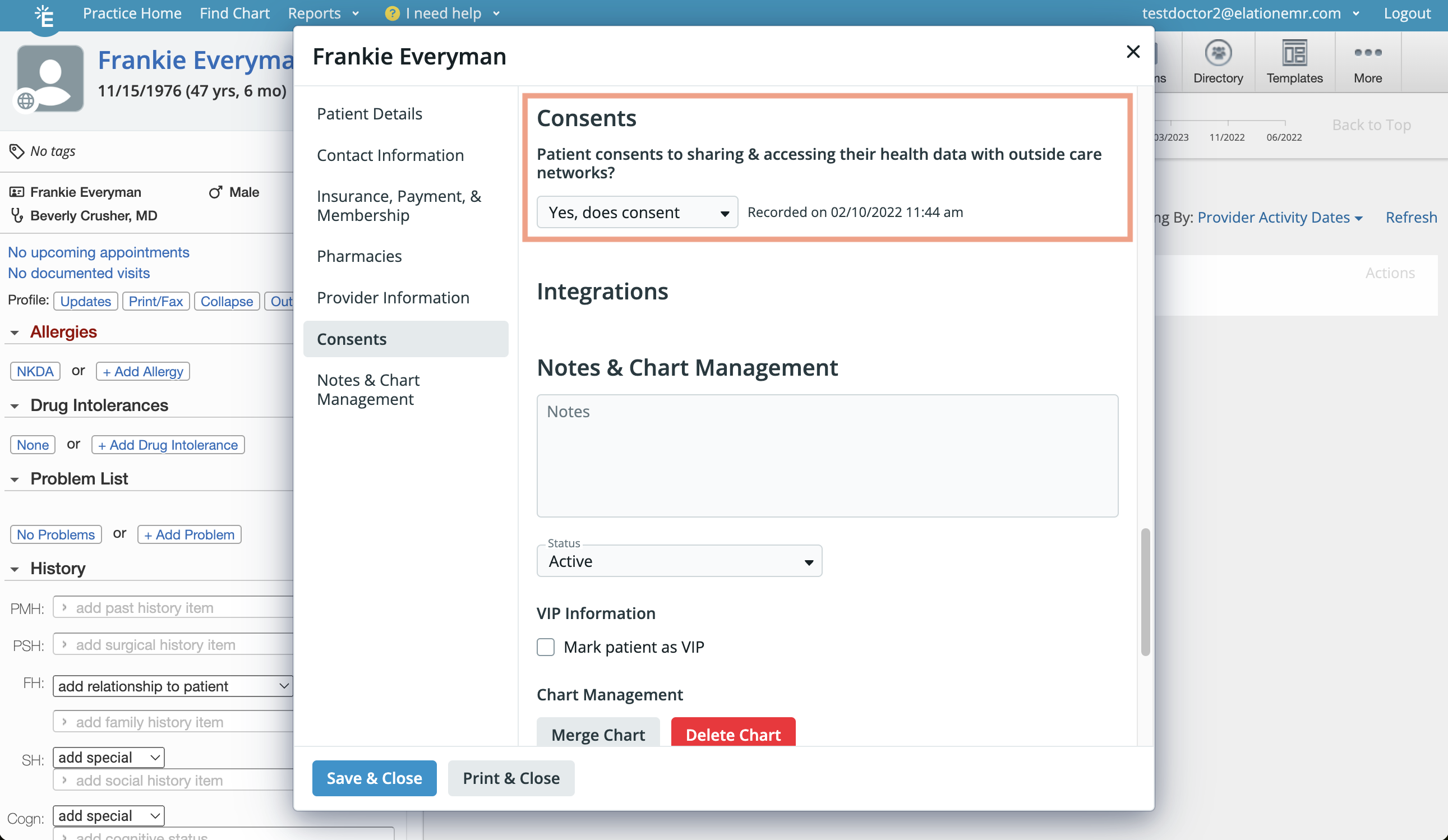
- Click the patient’s name in their chart to open the demographics dialog.
- Go to the Consents section to select, view or update the patient’s recorded consent response.
Sharing your patient’s data via the Carequality integration
When other Carequality-enabled providers query for your patient’s data via Carequality then Carequality will pull a CCDA file of your patient’s data and share it with the provider. The proprietary Carequality algorithm qualifies patient matches by comparing the patient demographics (name, gender, date of birth, address, phone number, and email) included in the query against the patient demographics available in Elation. The exact minimum required information to constitute a qualified match is not defined, and CCDA’s will only be shared when there is high confidence (i.e. a qualified match) that the patient records match.Elation will not share a patient’s data with Carequality if the patient consent on file states that the patient does not consent to sharing their health data with outside care networks.
Frequently Asked Questions
How do I prevent Carequality from sharing patient charts that have sensitive data such as reproductive health data or substance abuse data, etc?
To prevent Carequality from sharing patient charts that have sensitive data such as reproductive health data or substance abuse data, you must set the patient’s Consent status to No, patient does not consent. Any charts where Consent is not granted by the patient will not be exposed to Carequality.What type of data does Elation share in the Carequality network?
Elation shares a patient’s CCDA data which includes the following:- Reason for Referral
- Allergies, adverse reactions, alerts
- History of medication use
- Problem List
- Encounters
- Immunizations
- Vital Signs
- Social History
- History of Procedures
- Implantable Devices
- Relevant diagnostic tests and/or laboratory data
- Functional Status
- Mental Status
- Assessments
- Plan of Care
- Goals
- Health Concerns
What type of data can Elation receive from the Carequality network?
Elation can receive CCDA, PDF and TIF files from the Carequality network. The actual types of files retrieved and the actual data received depends on how other EHRs have set up their Carequality Integrations.What does Carequality look for when querying for patient data?
Carequality uses the patient demographics stored in your patient’s chart in Elation EHR to query the Carequality network for the patient’s data. The proprietary Carequality algorithm qualifies patient matches by comparing the patient demographics (name, gender, date of birth, address, phone number, and email) included in the query against the patient demographics available in Elation. The Carequality integration will only return any data found through qualified patient matches.- If there is no qualifying match at all then you will not see any results.
- If the patient’s demographics does not match across all Carequality-enabled providers then you may see only a portion of the patient’s results.
Exception: Elation has no control over what data is available in query results. Data pulled from the Carequality network is solely dependent on what data is made available by Carequality-enabled providers based on the following conditions for mutual patients: The patient’s demographics within your practice and that of other Carequality-enabled providers matches.The patient granted other Carequality-enabled providers permission to share their data in the Carequality network.
How does patient consent work in relation to Carequality?
Patients must consent to sharing their data for all Carequality-enabled providers in order for the patient’s data to be accessible in the Carequality network. For example, if a patient is associated with two Carequality-enabled providers then they must grant consent to both Carequality-enabled providers to share their data via the Carequality network.I queried for a patient’s data but there’s information/records missing, why?
Data pulled from the Carequality network is solely dependent on what data is made available by Carequality-enabled providers with mutual patients. Some reasons for why patient data might be missing are:- Elation is only able to find qualifying matches for some Carequality-enabled providers based on the patient’s demographics within your practice and that of their practice because not all Carequality-enabled providers have matching demographics.
- The patient did not grant consent to share their data across all Carequality-enabled providers.
- Other EHRs may not support a certain file type in their integration which prevents that information/record from appearing in the Carequality network.
Another Carequality-enabled provider is trying to pull my data into their EHR but there is information missing, why?
Elation only shares patient data via CCDA files in the Carequality network. Other file types such as PDFs or images of reports are not shared by Elation. Other reasons for why patient data may not be visible to other Carequality-enabled providers are:- The patient’s demographics within your practice and that of other Carequality-enabled providers does not match.
- The patient did not grant you consent to share their data with other Carequality-enabled providers.
The Carequality integration is showing me documents (PDFs & images) from other Carequality-enabled providers. Can I pull these into the patient’s chart in Elation?
Yes, you can save a copy of PDFs or images in the patient’s chart by following these instructions:- Download the document to your computer/laptop.
- Drag and drop the document into the patient’s chart to upload it to the chart as a Report. Afterwards, you can assign a Report Category and Title of your choice to the document as you would for other uploaded documents. Click here to learn more about the drag-and-drop feature.