What is Thea Health?
Thea Health is an eConsult platform that allows clinicians to conduct virtual, text based consultations with specialists, without having to leave their EHR. With Thea Health, clinicians are able to gather consultation information from specialists, which helps save the patient time and cost of having to attend an additional visit.What is the Elation-Thea Health integration?
The Elation to Thea Health integration will increase efficiency for practices and their patients by eliminating the need for additional patient visits with a specialist. Clinicians who need advice from a specialist can share patient information with specialists with the click of a button in Elation. Once the Clinician and Specialist complete their consultation, all communications, patient information and any images will be saved as a PDF consultation summary and sent back to the Elation patient chart. This in turn will reduce the cost of care for the patient.How do I get started?
If you are interested in using the Elation to Thea Health integration, send Elation an email using integrations@elationhealth.com and a member of the Elation Team will reach out to you on next steps for setting up the Thea Health integration and connect you with a Thea Health representative to set up custom workflows. You must install the Thea Health browser extension on the web browser you use for Elation to utilize the integration features.What information is synchronized?
The Elation to Thea Health integration is bidirectional, which means that information between the systems will sync both to and from each system. Patient demographics and visit note encounter details are sent to Thea Health for consultations. All communications with the specialist, patient information and any images from Thea Health will be sent back to Elation as a report once a consultation case is closed.Using the Elation-Thea Health integration
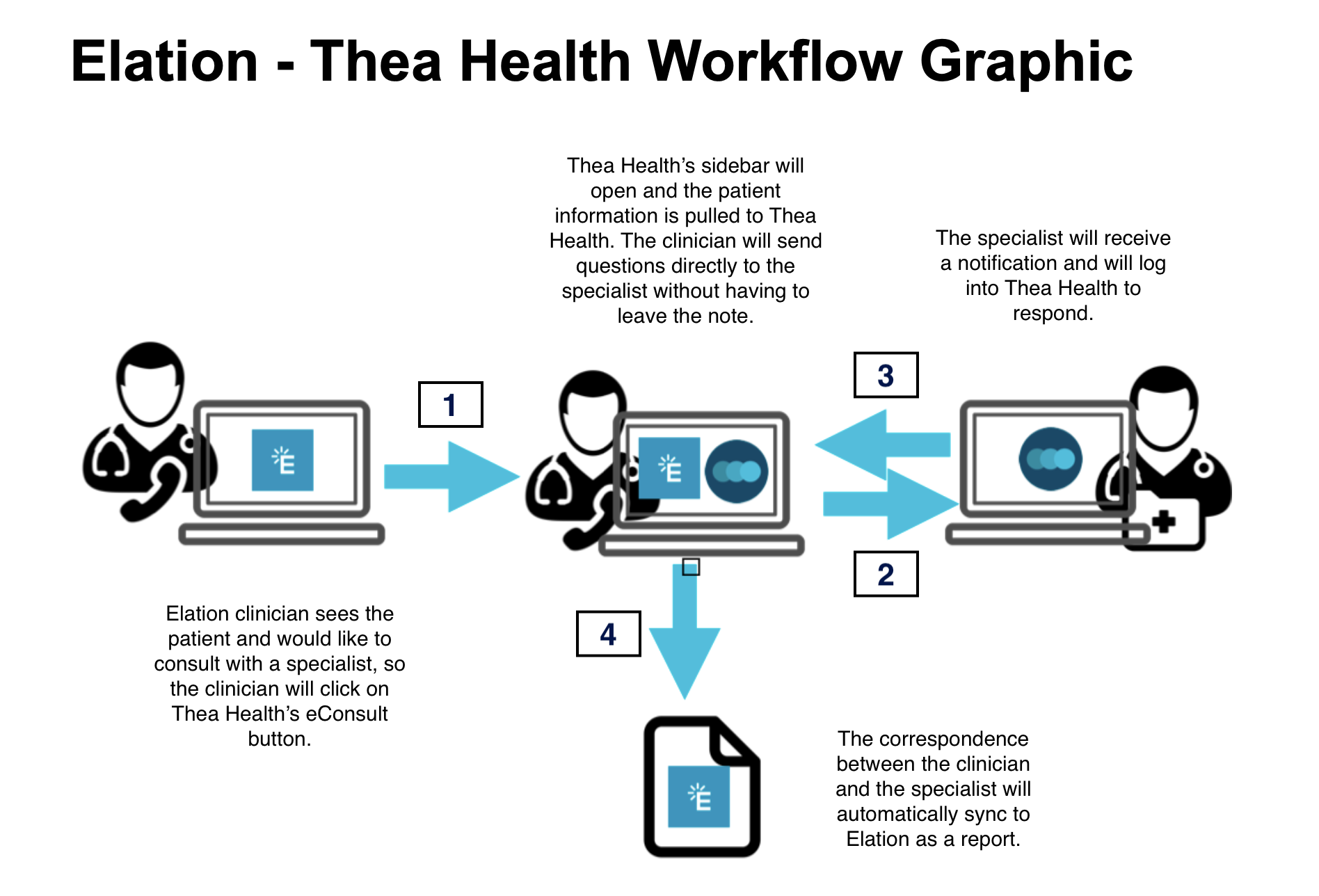
The integration workflow is detailed below when you need to begin a consultation via Thea Health:- Start in an open visit note in the Elation patient chart
- Click eConsult to open the Thea Health browser extension
- The patient demographics and information from your current visit note will be pulled into Thea Health for the specialist to reference
- Type your questions and comments for the specialist in the Thea Health window that appears on your Elation page. Once submitted, the specialist will respond typically within 24 hours in the Thea Health application.
- When the consultation in Thea Health is complete, the specialist will click Close Case and the correspondence shared between the clinician and the specialist will be combined into a PDF consultation summary report for Elation.
- The report will be uploaded automatically to Elation and can be found in the Requiring Action section of the patient chart and in the Reports queue of your Practice Home page.