What is Dock Health?
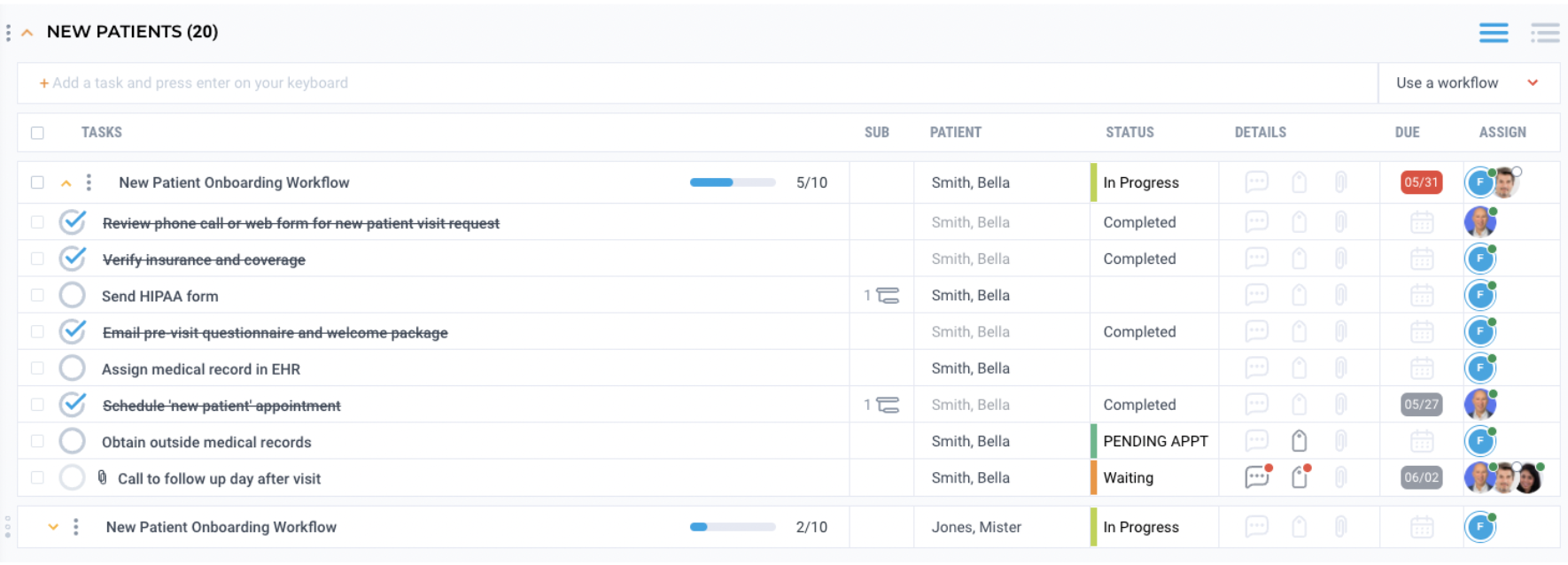
Dock Health is a HIPAA compliant task management and task collaboration platform. Dock Health allows practices to generate follow up tasks tied to specific patients that are assigned to different members of your practice for follow up. The Elation to Dock Health integration can automatically generate follow up tasks in Dock Health after a clinical action is completed in Elation. These follow up tasks can:- Facilitate new patient onboarding
- Streamline patient intake
- Assist with prior authorization management
- Prompt evaluations and testing
- Trigger post-discharge follow-up
- Creating an appointment in Elation -> Follow up task generated in Dock Health to send patients visit instructions
- Signing a Lab Order in Elation -> Follow up task generated in Dock Health to follow up on lab results in 2 weeks
- Signing a Referral in Elation -> Follow up task generated in Dock Health to follow up with referred provider on results of consultation
What is the Elation-Dock Health integration?
The Elation to Dock Health integration will improve the efficiency of your practice and reduce the administrative burden that often comes with managing downstream tasks that support patient care. With automated task creation and the ability to collaborate as a team, your office will be able to effectively manage all tasks related to delivering high quality patient care and in turn improve patient outcomes and satisfaction.How do I get started?
If you are interested in using the Elation to Dock Health integration, send Elation an email using integrations@elationhealth.com and a member of the Elation Team will reach out to you on next steps for setting up the Dock Health integration and connect you with a Dock Health representative to set up custom workflows.Dock Health will charge you separately for using their software.
What information is synchronized?
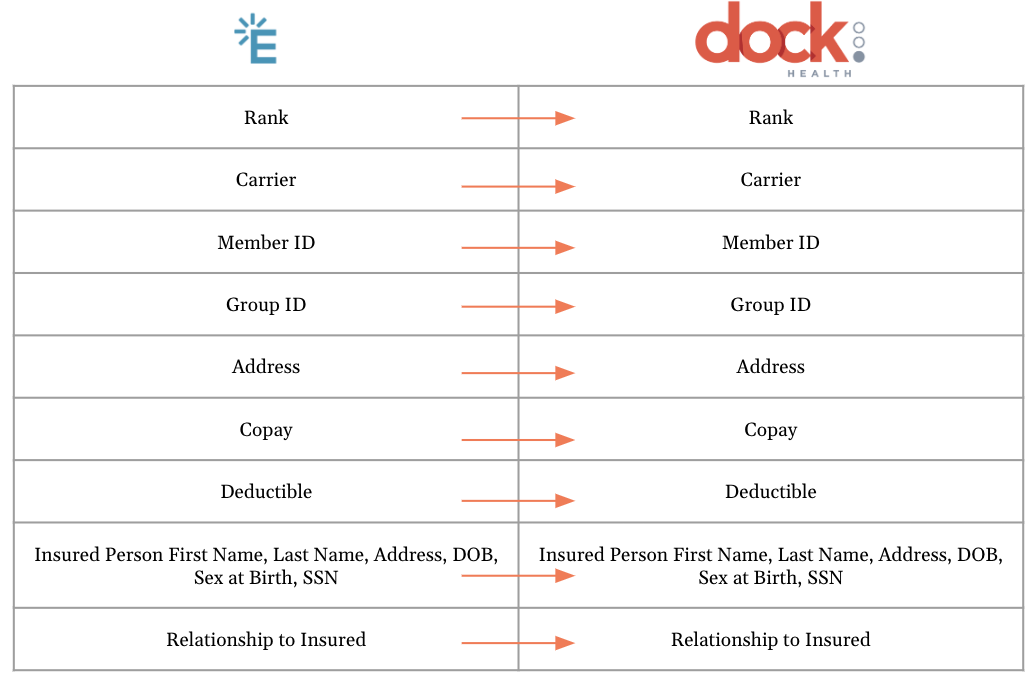
The Elation to Dock Health integration is unidirectional from Elation to Dock Health. By default, only patient demographics are pushed from Elation to Dock Health. Additional information like patient insurance and appointments can be customized to push from Elation to Dock Health. As part of this integration, certain events in Elation can trigger task creation in Dock Health. The action itself does not transfer data exactly like Patient Demographics, Insurance and Appointments do but the action can relay certain information into the task. For example, when you sign a lab order in Elation for a patient, it can generate a task in Dock Health tied to the patient’s name. The task can also have details about the lab vendor and a due date of two weeks to remind your office to follow up with the lab vendor in two weeks to make sure the lab results are returned.Patient Demographics & Insurance
Default behavior is that Elation is the source of truth and Dock Health pulls basic patient demographic fields like First Name, Last Name, Date of Birth, Chart ID, and contact info such as email, phone and address. Other demographics fields from Elation can be pushed to Dock Health during the initial configuration as discussed with Dock Health.. The following chart will show you how the demographic fields in Elation map to Dock Health: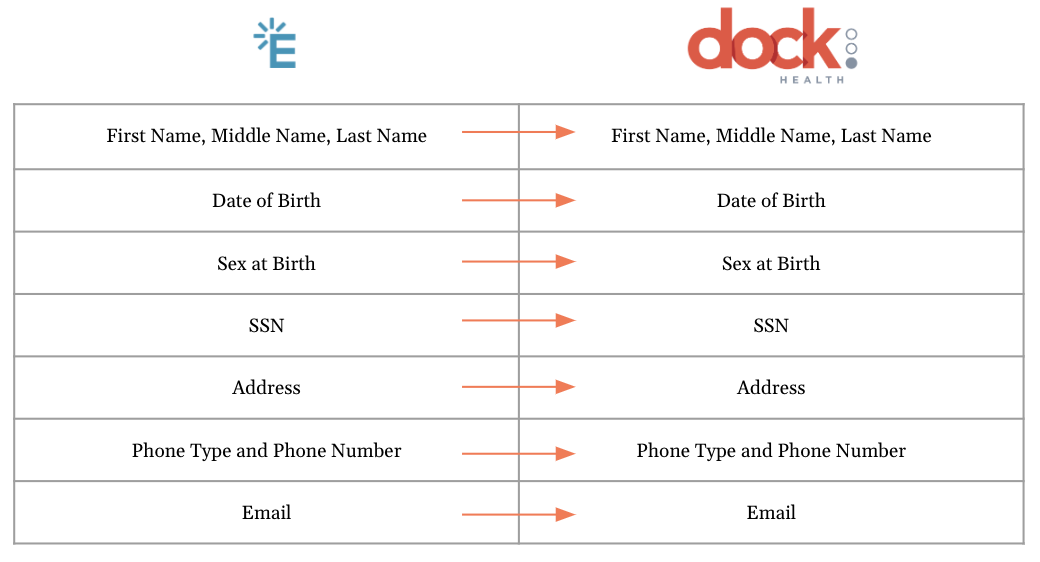
Appointments
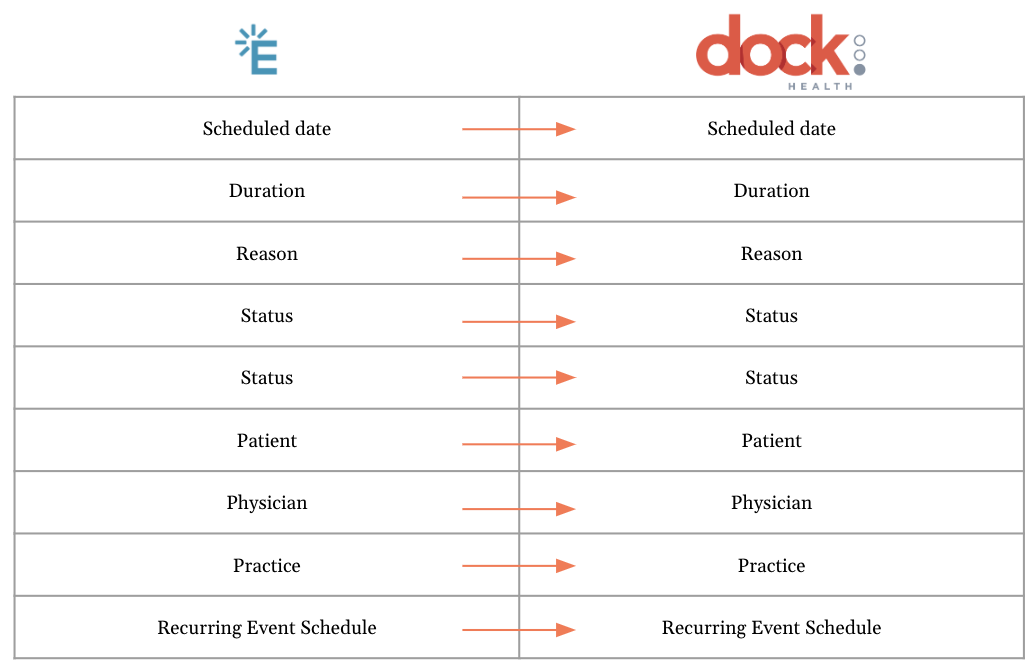
Per your request, appointment synchronization can easily be enabled on demand by the Dock Health Team and mapped to the right fields in Dock Health. After the custom configuration is set up by the Dock Health Team, you can create and update appointments in Elation and the fields below will sync from Elation to Dock Health. The following chart will show you how the appointment fields in Elation map to Dock Health: