
Overview
What are the two types of Elation accounts?
Elation EHR offers two types of accounts for users – Provider Level and Staff Level.- Provider Level accounts
- Usually used by physicians, non‑physician practitioners, or other medical providers who:
- Have patients and visit notes assigned to them
- Sign clinical documentation (visit notes, orders, referrals, prescriptions)
- Are listed as the rendering and/or billing clinician on claims
- Paid user licenses (provider seats) and come with a fee as stated on your contract with Elation. Each provider seat is intended for a single named clinician.
- Usually used by physicians, non‑physician practitioners, or other medical providers who:
- Staff Level accounts
- Usually used for administrative or clinical staff who support clinicians with scheduling, documentation, and billing. Staff Level accounts are free of charge and are ideal for roles such as:
- Front office and billing staff
- Medical assistants and clinical support staff
- Scribes and other documentation support roles
- Do not replace a Provider Level account and do not sign visit notes or bill as rendering providers.
- Usually used for administrative or clinical staff who support clinicians with scheduling, documentation, and billing. Staff Level accounts are free of charge and are ideal for roles such as:
Account Privilege Comparison
Sample Accounts View
Here are examples of what the Provider versus Staff account privileges look like: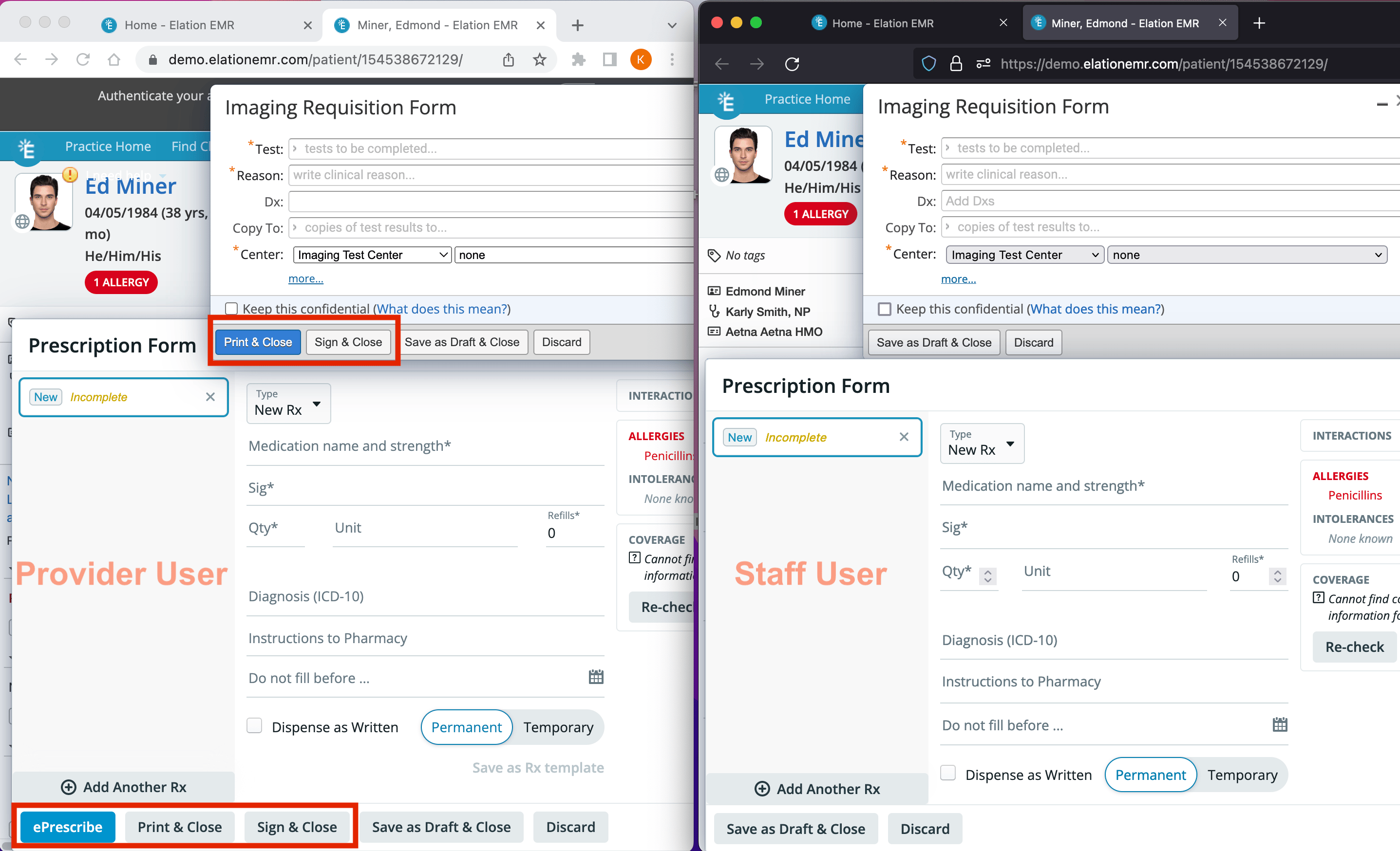
Workflow Instructions
Standard Provider Level Account privileges
Provider Level accounts are usually used by physicians, non-physician practitioners or other medical providers. For these reasons, Provider Level accounts offer functionalities that Staff Level accounts do not. Here are some common examples:- Providers can have patient charts assigned to them.
- Providers have a Calendar in Elation.
- Providers can sign all important clinical documentation such as:
- visit notes
- test orders
- prescriptions
- referrals
- electronic test reports
- Providers can amend their own visit notes after the visit note is signed.
- Providers can edit the billing information of their own visit notes after a visit note is signed.
- Providers can sign office messages that Provider Level Users are part of.
- Administrative reports are catered towards Provider Level User data.
- Providers can append their signature to Reports when using the annotate feature.
Staff Level Account privileges
Staff Level accounts are usually for administrative or clinical staff, including:- Front office staff
- Billing staff
- Medical assistants and nurses
- Scribes and other documentation support roles
- sign test orders on a provider’s behalf
- sign prescriptions and/or send prescription medications to pharmacies (controlled substance medications cannot be e-Prescribed by staff delegates) on a provider’s behalf
- sign referrals on a provider’s behalf
- edit billing information of the provider’s signed visit notes
Example: Configuring a biller who is not a provider
If your practice has a dedicated biller who is not a clinician, configure them as a Staff Level user with the appropriate billing permissions. Setup pattern:
What the biller can do as a Staff Delegate:
- Enter or edit billing information before a visit note is signed
- Edit billing information in signed visit notes for providers who have designated them as a Billing Delegate
- View and manage bills in Billing Home
- Sign visit notes or bills on behalf of providers
- Sign prescriptions, orders, or referrals (unless separately configured as a delegate for those actions)
Billing Home metrics—such as Charges, Payments, and AR—are visible to any user with access to Billing Home. You cannot hide these metrics on a per-user basis.
Using Staff Level accounts for scribes
In Elation, a scribe is not a separate account type. Instead, scribes are typically configured as Staff Level users who help one or more providers with visit documentation and billing workflows. A Staff Level “scribe” can:- Document in visit notes on behalf of a provider (for example, capturing the clinical story during or after the encounter)
- Enter or edit billing information before a visit note is signed
- Edit billing information for a provider’s signed visit notes when designated as that provider’s Billing Delegate
- Replace a Provider Level account for the clinician
- Sign visit notes as the rendering provider
- Prescribe medications under their own credentials
Licenses and seats (e.g. “scribe seats”)
Elation’s user accounts map directly to the licenses (or seats) in your contract:- Provider Level accounts are limited seats (based on your contract). Each seat is intended for one named clinician whose credentials are used to sign notes, orders, referrals, and prescriptions, and to appear as the rendering/billing provider on claims.
- Staff Level accounts are unlimited, free seats for administrative and clinical support staff, including front office, billing staff, medical assistants, and human scribes.
”Scribe” the person vs. “scribe license” the product
It’s important to distinguish between:- A scribe as a person – a staff member who helps document visits and support billing workflows. In Elation, this person should always have their own Staff Level account and, when appropriate, be configured as an Authorized Staff Delegate / Billing Delegate for the providers they support.
- A “scribe license” or Note Assist subscription – a product subscription tied to a specific Provider Level account. This is distinct from the Staff Level user accounts that human scribes use.
- The Provider Level user holds the Note Assist subscription.
- Any staff or scribes who help with documentation still log in as themselves on Staff Level accounts, following the normal delegation model.
- The provider remains the one who reviews and signs the visit note.
Note Assist “scribe license” and reassignment
Note Assist is Elation’s AI‑powered ambient scribing and note‑writing solution. Practices may purchase upgraded Note Assist subscriptions for specific providers. Key points:- A Note Assist subscription is attached to a specific Provider Level account, not to a Staff Level “scribe” account.
- When your practice wants to reassign a Note Assist subscription from one provider to another, Support or your Customer Success Manager must update the subscription assignment on your behalf.
How to reassign a Note Assist subscription between providers
If you need to move a Note Assist subscription from one provider to another, please reach out to Elation Support or your Customer Success Manager with all of the following information below. Support/CSM will make the changes as requested and then notify you once this is done.- Name of the provider to turn Note Assist OFF
- Name of the provider to turn Note Assist ON
- The date you want the switch to take effect
Setting up user accounts
Click here for instructions on how to invite members of your practice to create an Elation account based on the account type you assign.Frequently Asked Questions
I have a Supervising Physician. Do they need their own Elation account?
Yes, if you have a Supervising Physician and you need to send their credentials along with any electronic prescriptions you create, then your Supervising Physician must have their own authenticated Provider Level User account with Elation. This is required even if your Supervising Physician does not need direct access to your patient data. Once your Supervising Physician has activated and authenticated their Elation account, take the following actions to automatically send their credentials along with yours when e-Prescribing:
For more context on provider vs. staff seats and how licenses work in Elation, see the sections “What are the two types of Elation accounts?” and “Licenses, seats, and ‘scribe seats’” above.
Which account type should I use for a scribe?
Use a Staff Level account for scribes. Staff Level accounts are designed for administrative and clinical support roles, including scribes. They can:- Document in visit notes
- Enter billing information before sign‑off
- Edit billing information for a provider’s signed visit notes when configured as a Billing Delegate
How do I configure a Staff Level user as a scribe for a specific provider?
To configure a Staff Level user as a scribe for a specific provider:Can my scribe use my provider login or my MFA device?
No. Shared or generic user accounts are not permitted in Elation. Each individual must:- Log in with their own unique Elation user account, and
- Use their own multi‑factor authentication (MFA) factor(s) when MFA is enabled.