Patient name on MIPS printouts vs. QRDA submissions. MIPS printouts generated from Elation show a patient’s Full Name (preferred/actual name) when one is set in their demographics. QRDA-3 files submitted to CMS continue to use the patient’s legal name, as required for compliance. See the Patient Demographics Guide for more on the Legal Name vs. Full Name fields.
Frequently Asked Questions
- Am I required to submit anything for MIPS for the 2025 Performance Year?
- I’ve confirmed I’m eligible for MIPS in 2025 - where do I submit my data?
- What kind of data do I need to submit to CMS?
- When can I start submitting data? When is the deadline?
- How do I submit my data?
Am I required to submit anything for MIPS for the 2025 Performance Year?
Your 2025 MIPS eligibility status determines whether you’re obligated to submit any data for the MIPS program. Only providers who have exceeded a certain threshold of Medicare patients and Medicare reimbursements are required to submit data. Before proceeding with anything else, it’s critical that you check your latest eligible status. Please do so by accessing this website and entering your NPI. Instructions for interpreting your eligibility results can be found in this help center article. I’ve confirmed I’m eligible for MIPS in 2025 - where do I submit my data? MIPS data submission can be completed by logging into the Quality Payment Program (QPP) website. Each practice needs at least one person to be responsible for submitting the practice’s data. If someone from your practice submitted MIPS data in the past, they can use the same user account to submit your 2025 data. If nobody in your practice has submitted MIPS data before, access this webpage to set up HARP credentials. Once you have these credentials, you can use them later to log into the QPP website.What kind of data do I need to submit to CMS?
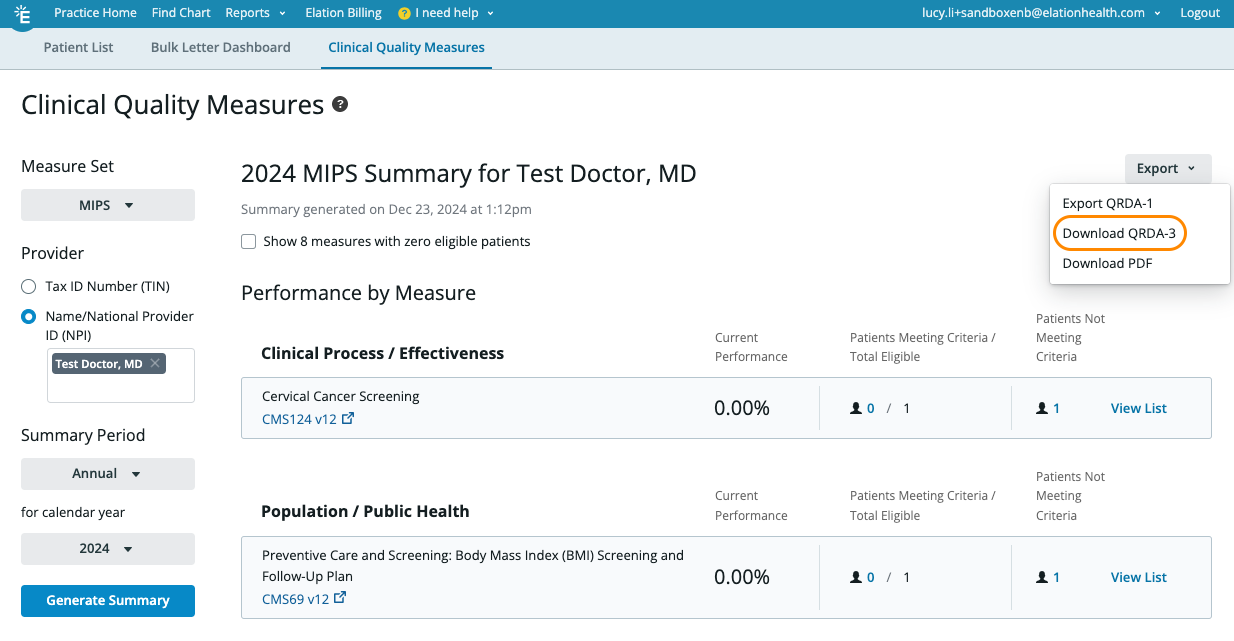
Each of the four MIPS categories has different data submission requirements. At a high level, you’ll be taking the following actions:- Quality Category: Download a QRDA-3 file from the Clinical Quality Dashboard in Elation. Upload this QRDA-3 file to the QPP portal.**
- Improvement Activities Category: Fill out a form directly in the QPP portal.
- Promoting Interoperability Category (if applicable): Reference the Promoting Interoperability Dashboard in Elation to fill out a form directly in the QPP portal.
- **Cost ** Category: No action needed.
When can I start submitting data? When is the deadline?
The MIPS submission window will open between January 2, 2026 through March 31, 2026. You will need to complete data submission by March 31, 2026, 8 pm Eastern.Logistical Recommendations
- Double check your eligibility to verify if you need to participate in MIPS.
- If you find that you’re eligible (required):
- Make sure each provider has saved your practice’s TIN under their Elation user profile details.
- Ensure at least one person in your practice has HARP credentials so that they can log into the Quality Payment (QPP) portal.
How do I submit my data?
Prepare Your Data
Quality
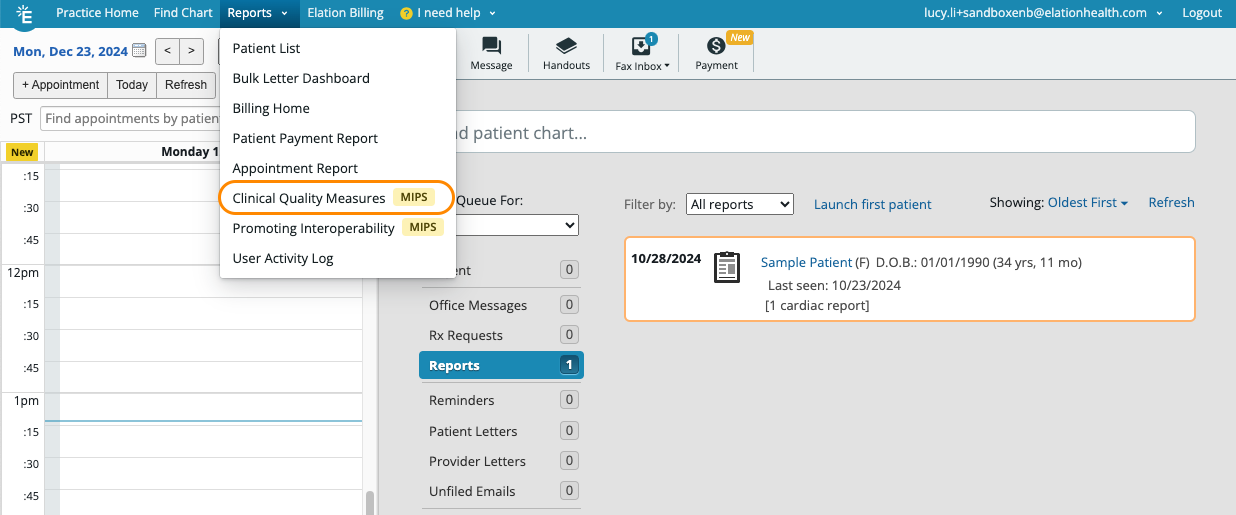
Download your QRDA-3 file from Elation. This is a standardized file with measure data that you can upload to the QPP. The QRDA-3 file can be found under Reports → Clinical Quality Measures.