
What are QRDA files?
The Quality Reporting Document Architecture (QRDA) is the standard for data submission used in various Value Based Payment Programs administered by the Centers for Medicare and Medicaid Services (CMS). This includes the Merit-based Incentive Payment System (MIPS) Quality Category under the Quality Payment Program (QPP), a federally mandated Medicare program overseen by CMS. QRDA files are also used widely across other CMS programs, specifically most Alternative Payment Models (which include ACOs). Elation is certified to the standard QRDA format written by CMS. Elation’s QRDA files are detailed and aggregate files that are built from electronic Clinical Quality Measures (eCQMs) that Elation is certified to. There are two QRDA file types:- QRDA Category I (QRDA-1)
- QRDA-1 is an individual patient-level report.
- A QRDA-1 report contains quality data for one patient for one or more eCQMs..
- QRDA-1 files are most commonly associated with programs that aggregate and de-duplicate data intended for group reporting, common among MSSP ACO with new requirements to report eCQMs.
- QRDA Category III (QRDA-3)
- QRDA-3 is an aggregate quality report.
- A QRDA-3 report contains quality data for all qualifying patients for multiple eCQMs.
- QRDA-3 files are most commonly associated with MIPS as an option to automatically upload Quality data to be scored.
Exporting QRDA-1 files from Elation EHR
Only Admin Level Users can export QRDA-1 files and have access to the Export QRDA-1 features listed below.QRDA-1 files include PHI and should only be transferred in a secure manner. Once a practice or provider has downloaded the QRDA file(s) they should follow all applicable HIPAA rules and regulations to maintain secure transfers.
Exporting a QRDA-1 file for a single patient
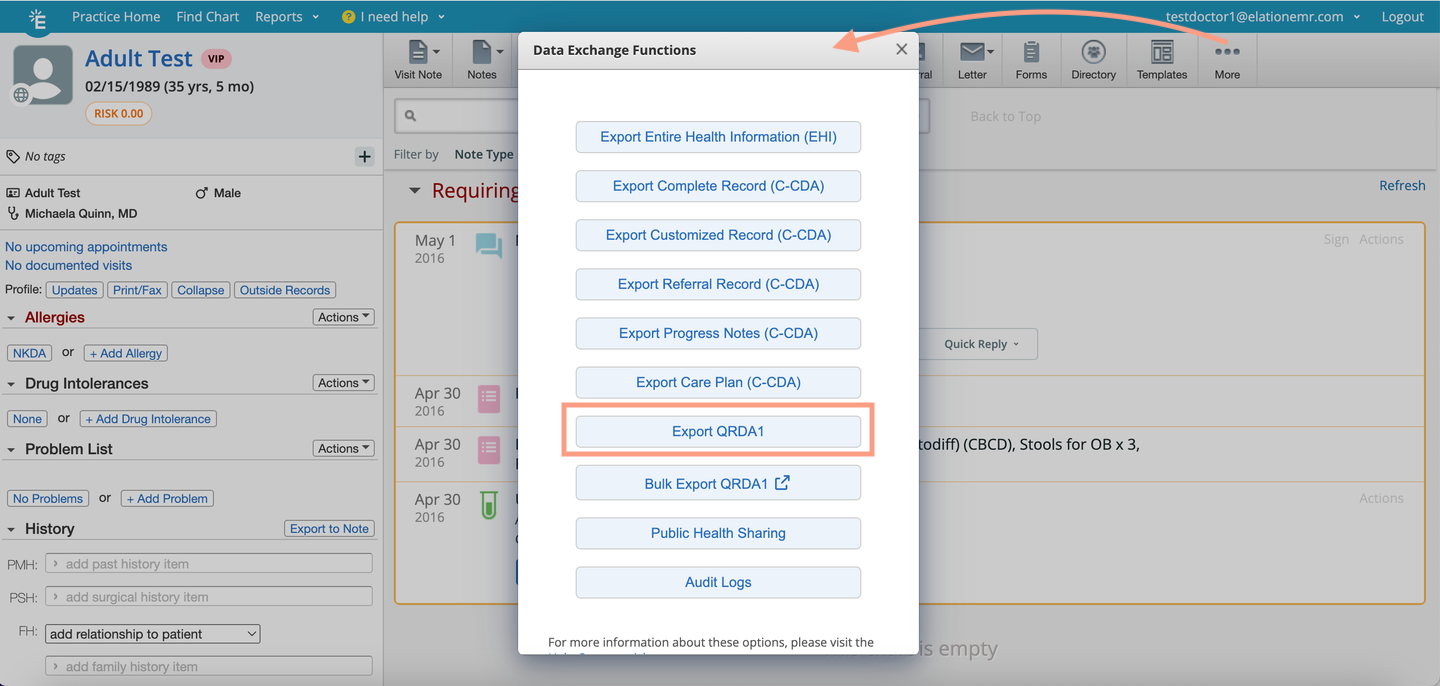
- Open the patient’s chart.
- Click on the More button in the navigation bar.
- Click Data Exchange.
- Click Export QRDA-1.
- The QRDA-1 file will be downloaded to the default location set in your web browser.
Exporting Bulk QRDA-1 files for all qualifying patients
Exporting QRDA-1 files for all qualifying patients from the Clinical Quality Measures report
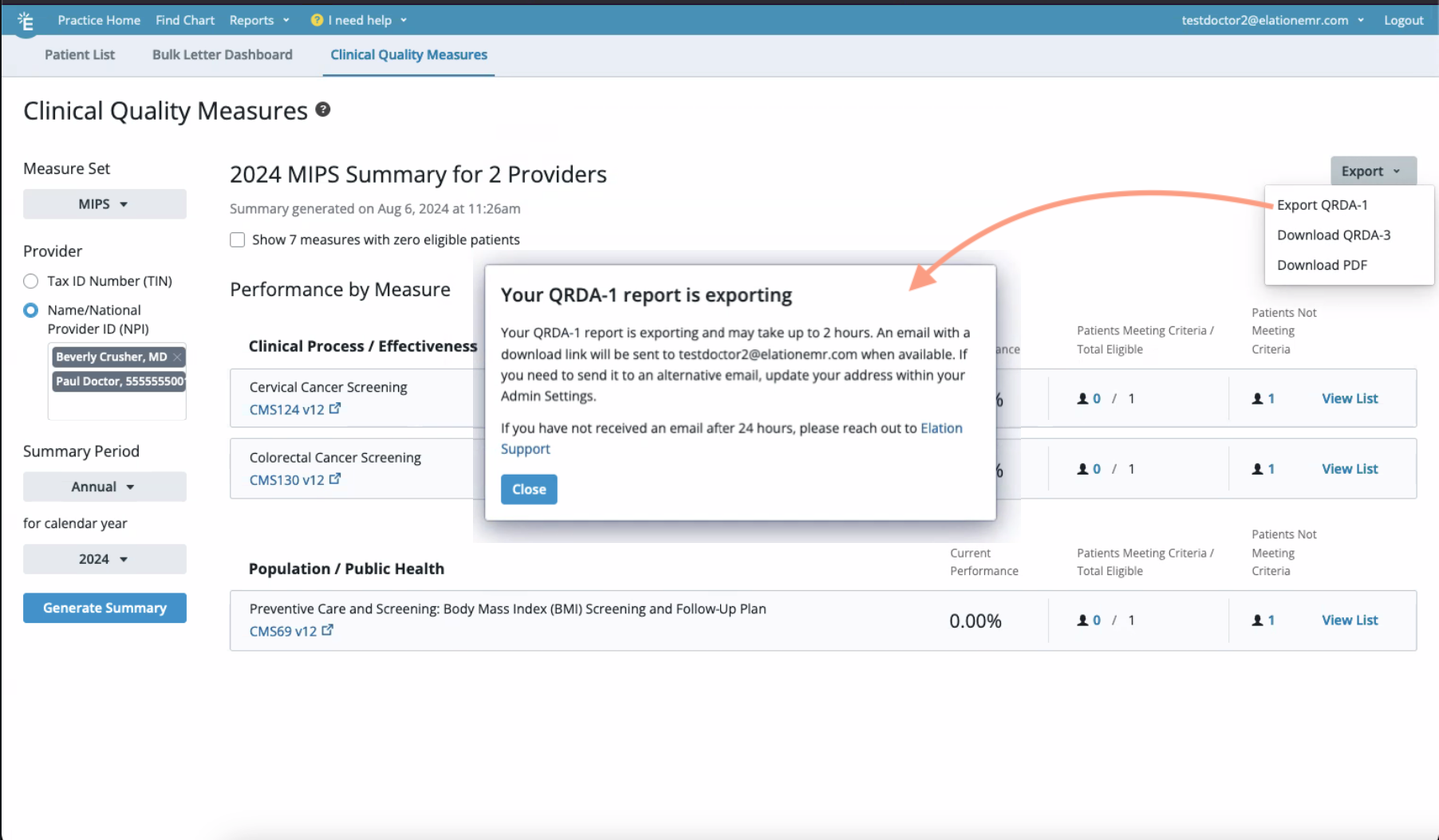
- Go to Reports at the top of any page in Elation and click Clinical Quality Measures.
- Make sure Clinical Quality Measure data is visible (you need to select a Tax ID or Providers to load data).
- Click Export at the top of the report.
- Click Export QRDA-1
- A window will appear to notify you that a download is in progress.
- Elation will send an email to the email address for your EHR account once the download is complete.
- Once you receive the email, click on the Download QRDA-1 file link in the email. For security reasons, you will be redirected to Elation EHR and you must log in to your Elation EHR account in order to be able to download the QRDA-1 .zip file and view the password for the file.
- If you are already logged in, you will not be prompted to log in again.
- If you are logged in to a different account than the account that matches the download link then you will not be able to download the files.
-
You will have 40 days to download the .zip file before the download link expires. If the download link has expired, initiate a new export.
- After logging in, you will see a pop up with the password and a Download button. Click the “Download’ button to download the file. The file will be downloaded to the default location on your device as set in your web browser Settings. Double click on the encrypted .zip file on your device and then enter the password provided to unlock the file and view its contents.
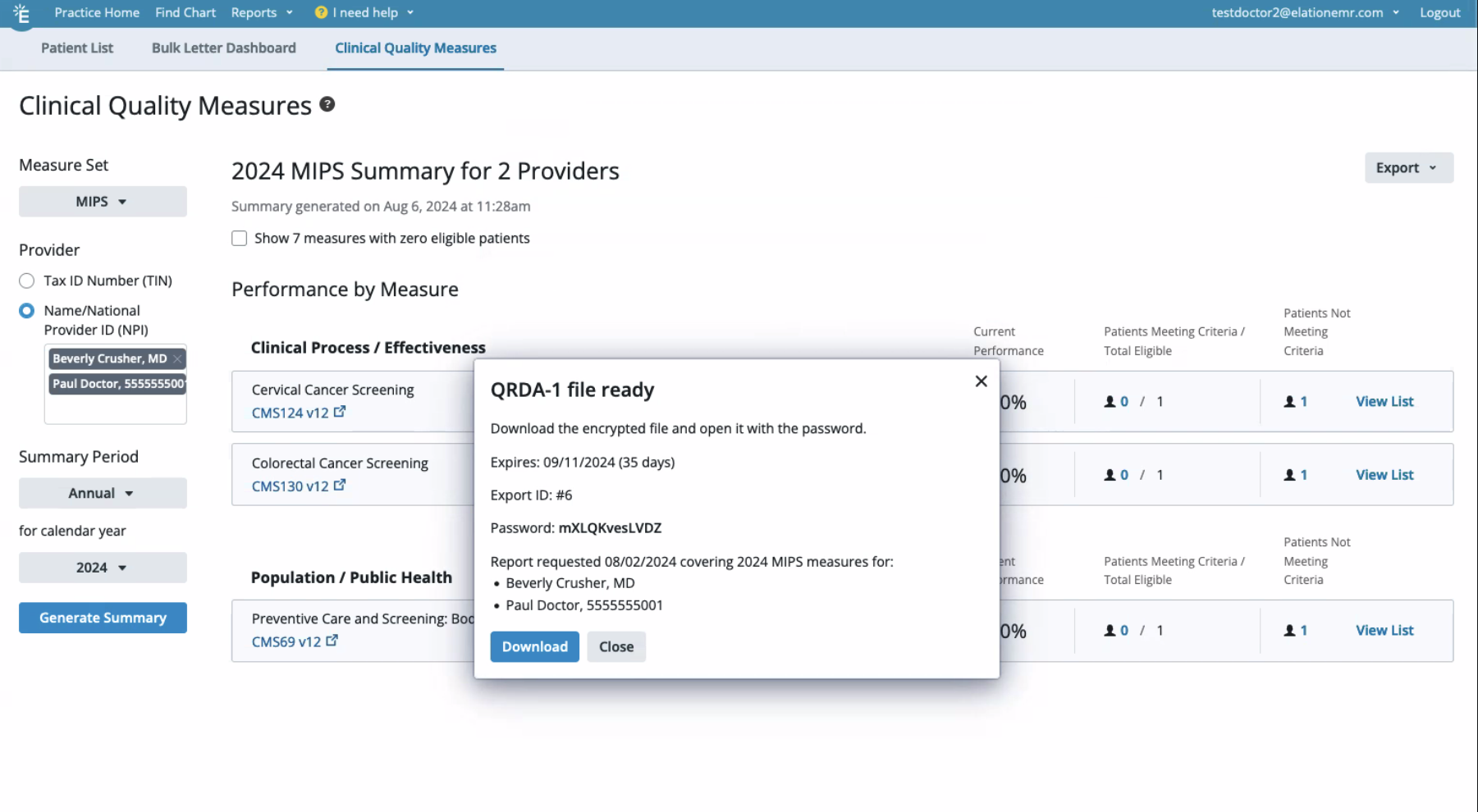
Exporting QRDA-1 files for all qualifying patients from the patient chart
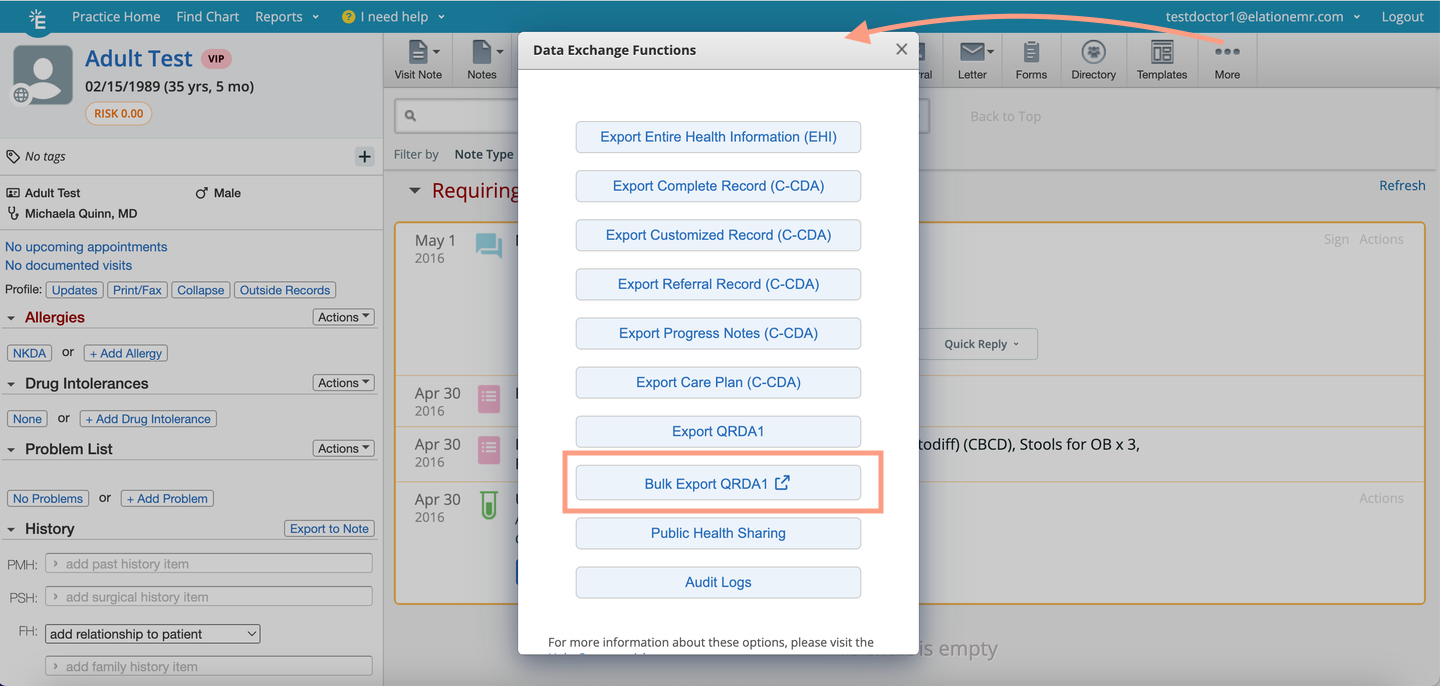
- Open a patient’s chart.
- Click on the More button in the navigation bar.
- Click Data Exchange.
- Click Bulk Export QRDA-1. This will bring you to the Clinical Quality Measures report.
- Follow the remainder of the instructions from the Exporting QRDA-1 files for all patients from the Clinical Quality Measures report section above.
Exporting QRDA-3 files from Elation EHR
The QRDA-3 file can only be exported from the Clinical Quality Measure Report. To export a QRDA-3 file with all of the Clinical Quality Measure data from your Clinical Quality Measures Report:- Go to Reports at the top of any page in Elation and click Clinical Quality Measures.
- Make sure Clinical Quality Measure data is visible (If this is your first time opening the Clinical Quality Measure Report for the reporting year, you will need to select a Tax ID or Providers to load data).
- Click Export at the top of the report.
- Click Download QRDA-3
- The QRDA-3 file will be downloaded to the default location on your device as set in your web browser Settings.
Frequently Asked Questions
What is the difference between QRDA-1 files and QRDA-3 files?
QRDA-1 and QRDA-3 files typically have different use cases and reporting programs. QRDA-3 files are typically associated with MIPS submission; submitting in the QPP Portal when it is time to submit your MIPS Quality reporting data for the year. Click here to reference any MIPS related articles. QRDA-1 files are most commonly used among PCP practices as a mechanism for an MSSP ACO or other APM to request individual eCQM measure data to then aggregate and submit to a CMS program. The ACO may request the bulk QRDA-1 files be sent to a Qualified Clinical Data Registry or other technology vendor to support aggregating the data in the standard format required by CMS beginning in CY 2024. All details related to what measures (eCQMs) should be included, where the files should go, and what data is reported, should be driven by the outside organization (ex, ACO administrator). Elation provides this tool for practices and providers to meet their reporting requirements but does not provide direction on program requirements for Value Based Payment Programs as there is significant variation between programs and even among programs.I am unable to see the Export QRDA-1 or Bulk Export QRDA-1 option. Why?
Only Admin Level Users can export QRDA-1 files and have access to the Export QRDA-1 features listed in this article.What measures are included in the QRDA-1 files?
QRDA-1 files are the detailed patient level files of how a patient was included as a qualifying patient in the eCQM specification. All measures that have qualifying patients in them will merit a QRDA-1 file.What measures are included in the QRDA-3 file?
All electronic Clinical Quality Measures (eCQMs) that Elation is certified to and have data from patients included in the numerator and denominators will be included in the QRDA-3 file. eCQMs supported in CY 2024:- [CMS124v12] Cervical Cancer Screening (MIPS 2024)
- [CMS122v12] Diabetes: Hemoglobin A1c (HbA1c) Poor Control (> 9%) (MIPS 2024)
- [CMS131v11] Diabetes: Eye Exam (MIPS 2024)
- [CMS139v12] Falls: Screening for Future Fall Risk (MIPS 2024)
- [CMS149v12] Dementia: Cognitive Assessment (MIPS 2024)
- [CMS155v12] Weight Assessment and Counseling for Nutrition and Physical Activity for Children and Adolescents (MIPS 2024)
- [CMS165v12] Controlling High Blood Pressure (MIPS 2024)
- [CMS69v12] Preventive Care and Screening: Body Mass Index (BMI) Screening and Follow-Up Plan
- [CMS125v12] Breast Cancer Screening
- [CMS130v14] Colorectal Cancer Screening
Which patients are included in QRDA files?
For each QRDA and its corresponding eCQM, the specifications outline the criteria for numerators and denominators. This information determines whether a patient meets the criteria to be included or excluded from a specific measure. Consequently, eCQMs and the associated QRDA files will only include patients who meet the numerator or denominator requirements. This is defined by eCQI specifications, not by Elation Health.How long does it take to export QRDA-1 files in bulk?
The time it takes to export QRDA-1 files in bulk depends on the number of patients that meet the numerator/denominator criteria for the relevant eCQMs. We try to provide an estimate for you. Please note, it will never exceed 24 hours. If you do not receive your bulk QRDA-1 export file via email after 24 hours, see the following FAQ.Can I change which email the bulk QRDA-1 export file is sent to?
The bulk QRDA-1 export file is sent to the email tied to your Elation account (your login email). In order to change the email which the bulk QRDA-1 export file is sent to you must update the email associated with your account.What happens if I never receive the bulk QRDA-1 export file in my email?
If you have not received the bulk QRDA-1 export file within 24 hours from when you initiated the export, reach out to Elation’s Support Team using the I need help -> Contact Elation Support option in the EHR and include “Bulk QRDA-1 Report” in the description of the issue. In the meantime try to export the QRDA-1 files in bulk again to see if you receive the files the second time around.Can I share the download link for the bulk QRDA-1 export file?
No, for security purposes only the person that initiated the export can access the emailed download link for the bulk QRDA-1 export file. Important Note: QRDA-1 files include PHI and should only be transferred in a secure manner. Once a practice or provider has downloaded the QRDA file(s) they should follow all applicable HIPAA rules and regulations to maintain secure transfers.I opened the QRDA file but the information is not in a readable format. Why?
QRDA files are .xml files and are not designed for easy reading.Can I add my own measures to the QRDA files?
QRDA files are standardized and certified files. They are built by Elation to pass rigorous testing and meet explicit standards. There is not a way to change, add, or adjust the files or they may be rendered not usable by the administering agency.I need different measures than what are included, can Elation build more measures?
Elation is certified to 13 eCQMs, some of which have been deprecated over time, or are not usable across programs. The measures Elation is certified to reflect the primary needs at the time of certification. These are significant development requirements and must be built to standard and then certified before offering to our users. If you are reporting different measures to different programs CMS expects providers to understand their technical requirements independently and as an EHR vendor all of our certified features are available on the CHPL site where users may make themselves familiar with Elation’s certified features. Additional measures may be considered as a product request, but Elation is not required to build measures that CMS requires.What measures am I required to send to [any CMS program]?
Reporting requirements and familiarity with CMS program requirements should be directed to the program you participate with. Elation does not administer programs but understands requirements to the best of product abilities to ensure our product features enable reporting needs. However, Elation does not provide consulting or guidance on reporting requirements. Those are the sole responsibility of the provider or practice. Useful places to direct questions on your reporting requirements include the QPP helpdesk or your ACO administrator. Elation provides tools to meet requirements, and you should be familiar with your requirements and the relevant eCQMs and QRDA files available in Elation to ensure they meet your needs, or find alternate means for your reporting requirements and workflows to extract the data you need. Elation does not submit data on behalf of providers.I do not believe the QRDA file captures my data accurately, can Elation change their logic?
eCQMs and QRDA files are built to standards determined by the electronic Clinical Quality Improvement Resource Center. These standards are then adopted by the Office of National Coordinator for Health IT (ONC), which administers the CEHRT program that Elation is certified for, and then required by CMS for their reporting programs. We can not change the logic of our QRDA files due to certification requirements.Can Elation send the QRDA files to someone else on my behalf?
No, Elation cannot send QRDA files to someone on your behalf. QRDA files are available for you to use at your discretion to upload, send, or submit to the relevant reporting program and following all applicable rules and regulations. To send data to your ACO, you can ask our ACO for directions on what to do once you have your QRDA-1 files and where to send them and on what cadence.My ACO told me to ask Elation for a contact to report for me, who can I contact?
Elation does not provide a consultant at this point in time to support your reporting needs. If your ACO has told you to contact Elation for reporting you should first identify:- What data is your ACO requesting?
- What is the purpose of the data for your reporting?
- Is this an integration for reporting, for data capture, or other benchmarking requirements?
- What eCQMs or CQMs does your ACO report on?
- How do you submit eCQM data to your ACO?