
Overview
When patients stop taking a medication, best practice is to discontinue the medication so that the patient’s medication history is accurate. discontinuing medications in a patient’s chart by consolidating steps and allowing you to specify whether the medication was discontinued by you, another provider, or the patient. Additionally, you can notify the patient’s pharmacy to cancel any active prescriptions from your practice during the discontinuation process.Workflow Instructions
Actions for discontinuing active medications
There are two actions you can take to discontinue any active medication in the patient’s chart. Go to any active medication and click Actions then:- Discontinue to discontinue a medication.
- Document Discontinue to document that a medication was discontinued by another provider or the patient.
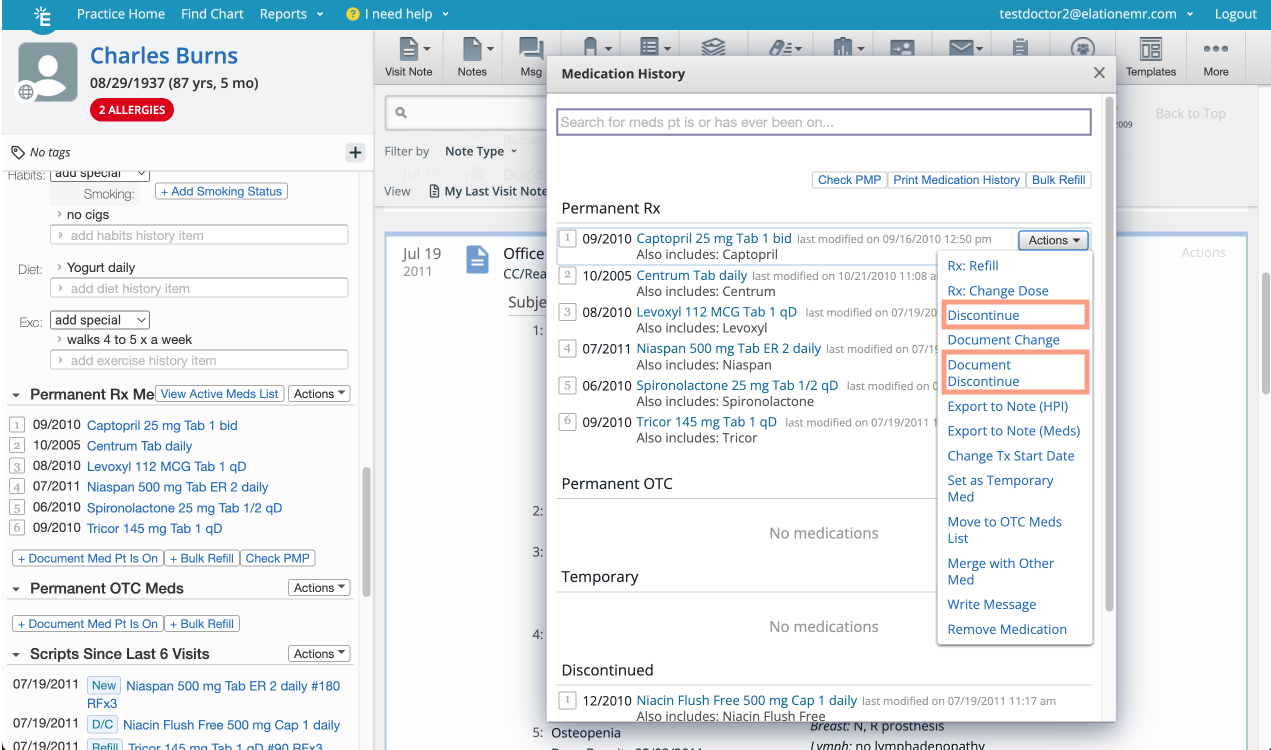
Discontinuing medications
To discontinue a medication you or your practice prescribed:- Locate the medication you want to discontinue in the patient’s Clinical Profile, Chronological Record, or Medication List.
- Click Actions next to the medication name.
- Click Discontinue.
- Select the most appropriate reason for discontinuing the medication from the following list:
- I want to discontinue this medication
- Discontinued by another prescriber
- Patient stopped taking medication
- Verify the Discontinued by field is accurate.
- If I want to discontinue this medication was selected, then your name (if you are a Provider Level User) will be in the Discontinued by field.
- If you are an Authorized Rx Delegate you must select the name of the provider you are discontinuing medications on behalf of. Authorized Rx Delegates cannot discontinue medications for providers they are not delegates for.
- Verify the Discontinued date.
- (Optional) Enter any details about the discontinuation in the Additional reason field.
- The Additional reason field is not transmitted to the pharmacy if a cancellation request is sent as part of the discontinuation workflow.
- (Conditional) If the medication was previously sent electronically from your practice to a pharmacy and that pharmacy accepts electronic cancellations, then you will be able to check a Send a cancellation request to…. box to send a cancellation request to the pharmacy as part of the medication discontinuation workflow.
- Click the blue Discontinue button to save the change.
- The Discontinue button may appear with alternative names depending on the discontinue reason selected and whether the Send a cancellation request to…. box was checked.
Documenting medications discontinued by another prescriber or the patient
To document that a medication was discontinued by another prescriber or the patient:- Locate the medication you want to discontinue in the patient’s Clinical Profile, Chronological Record, or Medication List.
- Click Actions next to the medication name.
- Click Discontinue.
- Select the most appropriate reason for discontinuing the medication from the following list:
- I want to discontinue this medication
- Discontinued by another prescriber
- Patient stopped taking medication
- Verify the Discontinued by field is accurate.
- (Optional) Enter in the name of the prescriber that discontinued the medication if Discontinued by another prescriber was selected.
- Verify the Discontinued date.
- (Optional) Enter any details about the discontinuation in the Additional reason field.
- The Additional reason field is not transmitted to the pharmacy if a cancellation request is sent as part of the discontinuation workflow.
- (Conditional) If the medication was previously sent electronically from your practice to a pharmacy and that pharmacy accepts electronic cancellations, then you will be able to check a Send a cancellation request to…. box to send a cancellation request to the pharmacy as part of the medication discontinuation workflow.
- Click the blue Discontinue button to save the change.
- The Discontinue button may appear with alternative names depending on the discontinue reason selected and whether the Send a cancellation request to…. box was checked.