What is a clinic administered medication?
A clinic administered medication is a medication or injection that was dispensed to or administered to the patient during the patient’s visit by your practice. If you wish to prescribe a medication to be dispensed by a pharmacy, reference this Prescription Form Guide .Why is it important to document clinic administered medications?
It is important to document any medication and injection given to the patient during the visit to ensure that the patient’s chart record is complete, comprehensive, and up to date.How to document clinic administered medications
Documenting clinic administered medications can be done through the Prescription Form in Elation, and can be done through the same workflow as ePrescribing, with one small change. Instead of selecting one of the options to ePrescribe, simply select Sign & Close to file the medication into the patient chart. You may add additional information on the prescription form to clarify how the medication was provided to the patient.- Open up the Prescription Form by clicking the Rx —> Prescription Form (Rx/OTC/CS) in the gray navigation bar at the top of the patient’s chart.
- Complete the required (*) areas of the form.
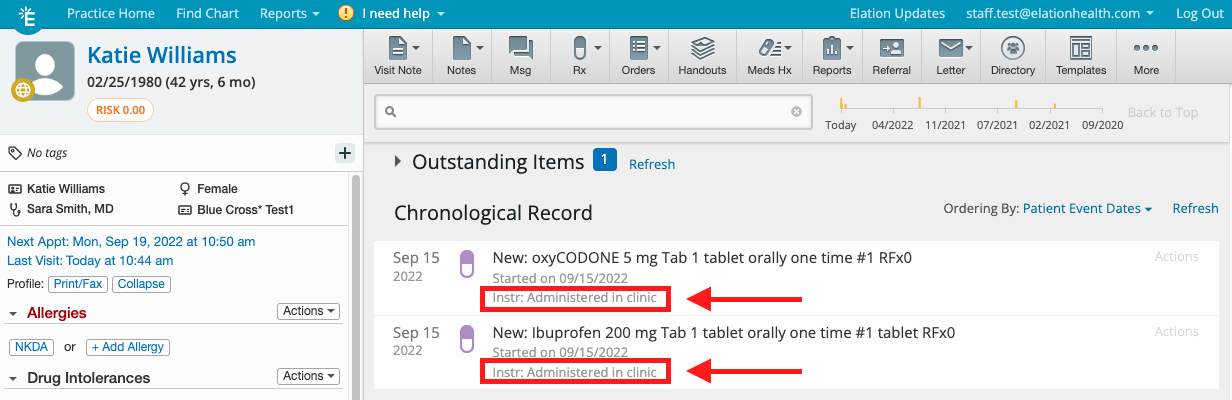
- Document that the medication was administered in the clinic in the Instructions to Pharmacy field.
- The Instructions to Pharmacy field can also be used to store additional information such as Manufacturer Name, Lot # or expiration dates, as needed.
- Click Sign & Close.
Chronological Record
Once the information is entered through either medication form, it will display in the Chronological Record of the chart as shown below: