
- Send electronic orders to Clinical Labs of Hawaii, Diagnostics Laboratory Services, LabCorp, and Quest Diagnostics
- Create custom laboratory vendors and locations for printout orders
- Documenting COVID-19 Test Results at the Point-of-Care
- Receiving and reviewing COVID-19 electronic results
- Securely send patients COVID-19 test orders and results in Patient Passport
Electronic lab ordering for COVID-19
COVID-19 tests for select vendors can be ordered electronically in Elation. To request a bi-directional or results interface see this article for more information. Lab testing facilities are requiring physicians to collect specimens for COVID-19 testing in-house. See below for instructions on how to send an electronic order for COVID-19 testing.- Select the Orders tool from a patient’s chart
- Select the Lab Vendor that is setup with electronic ordering. You will know the laboratory vendor is setup for eOrdering if you select the vendor and the blue eOrder button appears. (You can also navigate to ‘Settings > Labs’ and confirm ‘Orders’ is set to LIVE next to the lab vendor.)
- Select In-House Draw to enter the Collection Date and Time information for specimens collected during the visit
- Begin typing cov in the Tests field and the COVID-19 test for the selected vendor will display (LabCorp example below). Quest Diagnostics requires COVID-19 lab tests to be ordered separately, scroll down to see instructions for ordering COVID-19 tests through Quest.
- Select the COVID-19 test from the test dropdownmenu and complete all required information on the Lab Requisition Form. Minimum requirements to order are vendor, test name, and diagnosis. All entered information will be sent electronically and displayed on the Requisition printout.
- Once you are ready to send the order, select eOrder to electronically send the order to all laboratory locations or click ‘eOrder and Print; to send the order and also immediately generate a requisition printout.
Electronic ordering COVID-19 test through LabCorp
COVID-19 tests ordered through LabCorp are not available for Patient Service Center testing. Your practice must collect specimens for testing on site. See here for more information on ordering tests and receiving results for COVID-19 through LabCorp. Search by keyword ‘covid19’,’corona’, or the COVID-19 LabCorp test code 139900.Electronic ordering COVID-19 test through Quest Diagnostics
COVID-19 tests ordered through Quest are not available for Patient Service Center testing. Your practice must collect specimens for testing on site. See here for more information on ordering tests and receiving results for COVID-10 through Quest Diagnostics.- Note: Quest requires COVID-19 tests to be ordered separately. This requires the ordering provider to create 2 or more tests for ordering COVID-19 with other lab tests.
Electronic ordering COVID-19 test through Diagnostics Laboratory Services
COVID-19 tests ordered through Diagnostic Laboratory Services (DLS) are not available for Patient Service Center testing. Your practice must collect specimens for testing on site. See here for more information on ordering tests and receiving results for COVID-19 through DLS. Search ‘covid’ and select test code 7180 to order the COVID-19 test through DLS. Select the specimen collected and the Collection Date and Collection TimeElectronic ordering COVID-19 test through Clinical Laboratories of Hawaii
COVID-19 tests ordered through Clinical Labs of Hawaii (CLH) are not available for Patient Service Center testing. Your practice must collect specimens for testing on site. See here for more information on ordering tests and receiving results for COVID-19 through CLH. Search ‘cov’ or test code 4219Adding custom laboratories and locations to order COVID-19 test
Your practice may not be collecting specimens for COVID-19 testing at this time. Elation supports the ability to create custom lab vendors and add specific locations so your patients know where to get tested. See this article for more information on creating lab vendors. For the most up-to-date information on COVID-19 lab testing facilities, please visit your state department of health website for guidance. NBC News has also published a guide for state-specific COVID-19 lab testing updates here.Documenting COVID-19 Test Results at the Point-of-Care
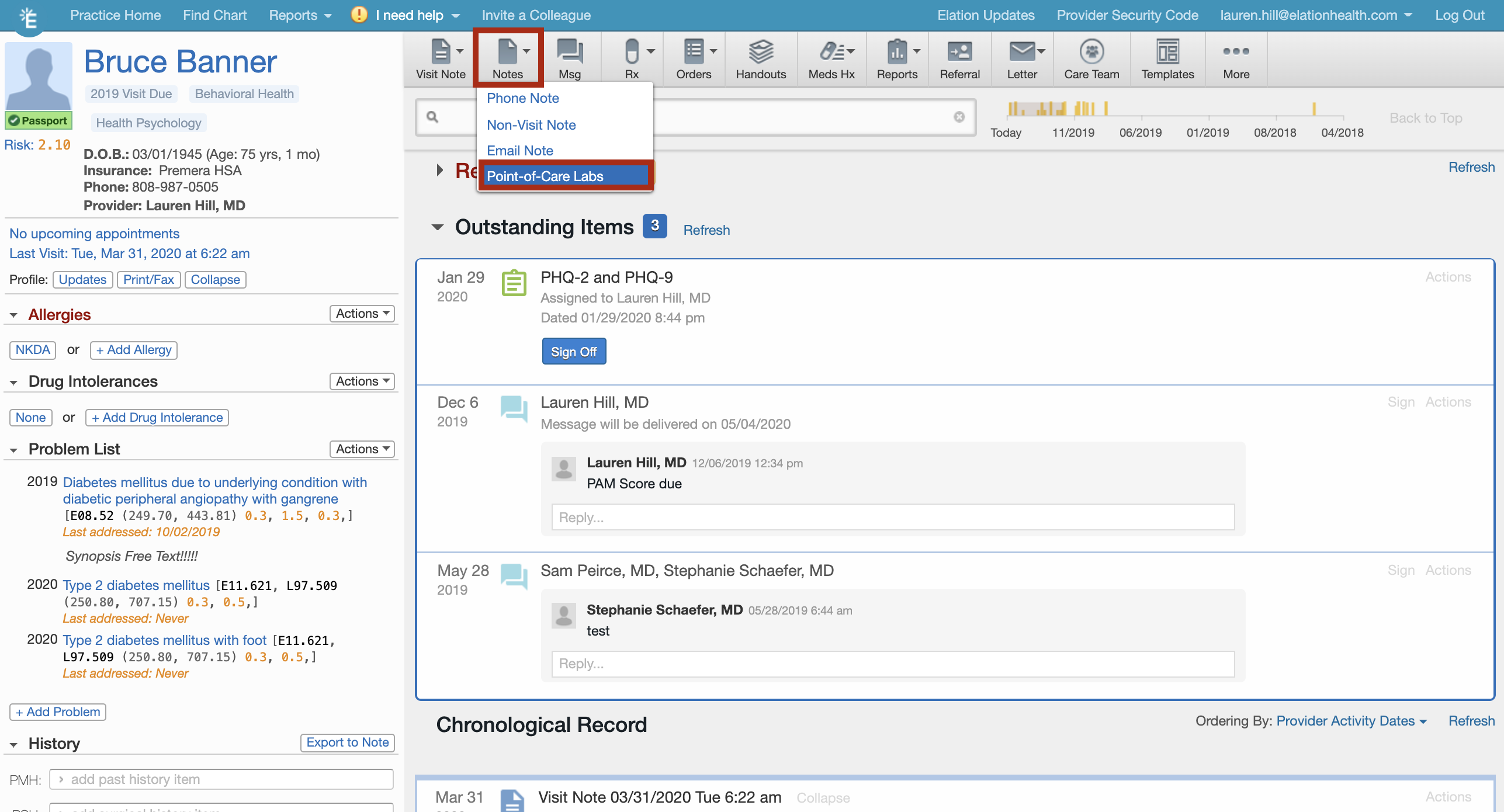
Elation has added the latest COVID-19 tests to the Point-of-Care-Labs section which will allow your practice to document structured COVID-19 lab results that are administered on-site. Learn more about documenting test results on-site in the Elation’s Point-of-Care Labs article. To document these Point-of-Care Labs:- Click Notes in the grey action bar from within a patient chart and select Point-of-Care Labs from the dropdown menu that appears
- Update the Collected & Resulted times as needed
- Scroll down to view the COVID-19 section in the window that is opened.
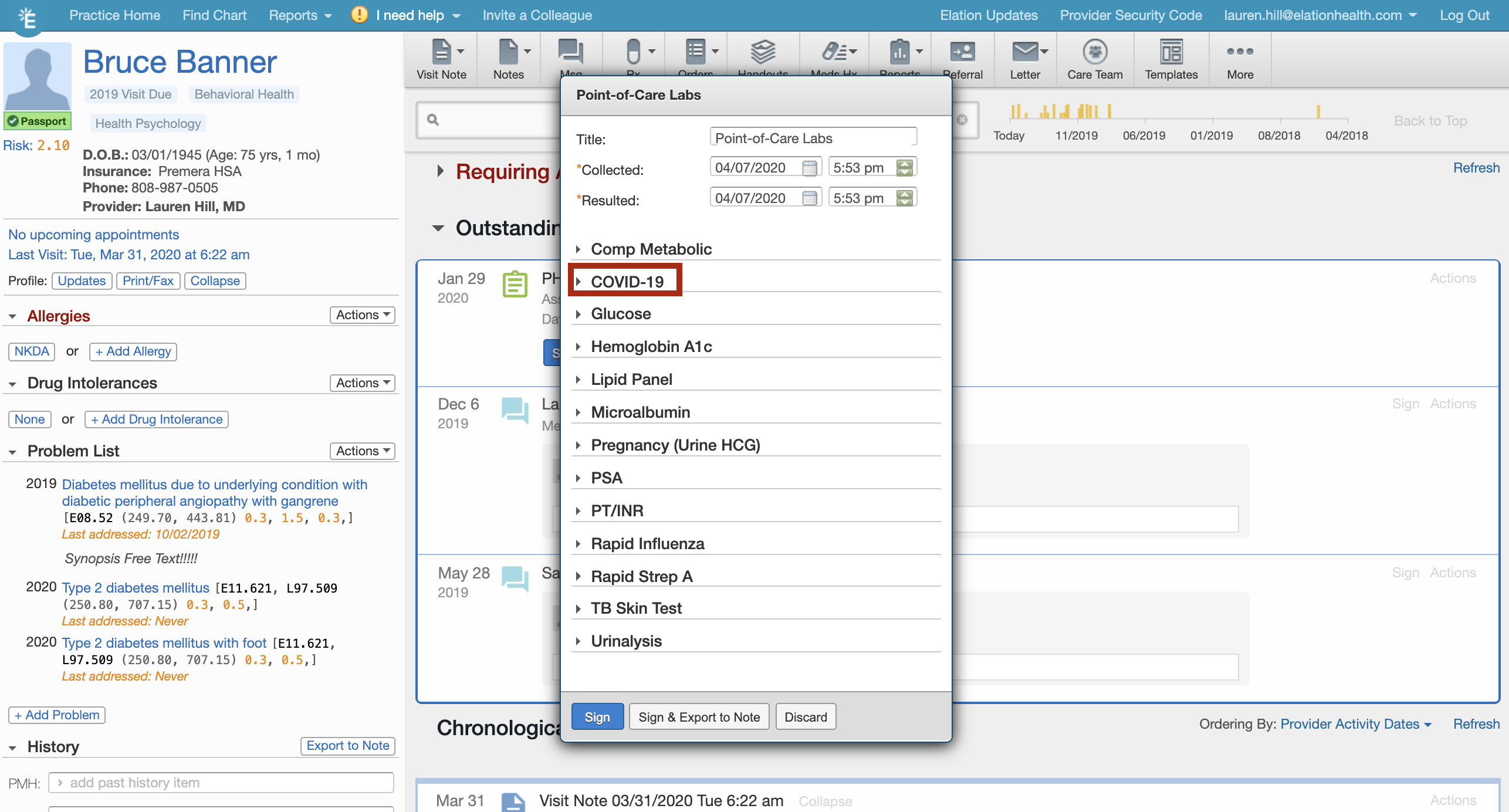
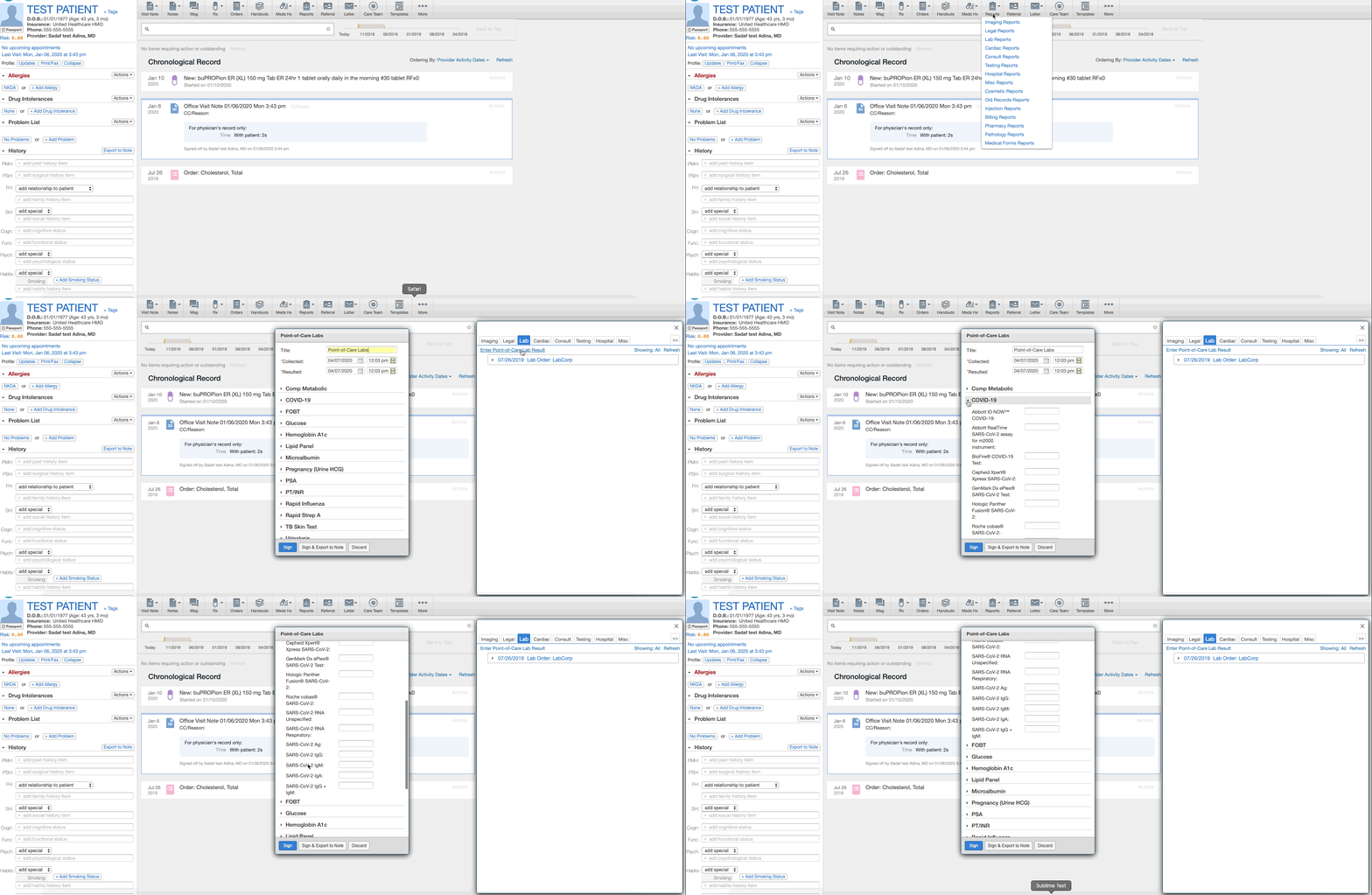
- Expand the section to find the appropriate COVID-19 test
- Enter in the COVID-19 lab result value and click Sign or Sign & Export to Note
Receiving and reviewing COVID-19 electronic results
Viewing results Results are routed to the ordering provider’s Reports queue on the practice dashboard and directly to the patient’s chart. If a matching patient is not found, a new patient chart will be created. Why does a new chart sometimes get created due to lab results Elation matches laboratory results to patient charts by first, middle, and last name, date of birth, and gender. We err on the side of caution, so all criteria must be an exact match. For example, if the patient’s name in Elation is “Jess” but laboratory results are received for a Jessica, Elation will treat the two as separate patients. This will ensure that when a user receives results for two different patients with similar names, the results are not confused. To merge these two charts together, please view this article.Elation will create an alias (i.e. “remember”) when a chart created by a laboratory result is merged into an existing patient chart so that results will deliver correctly in the future.Embedded pdfs result reports
 Electronic interfaces allow the vendor to send an embedded pdf, that is only available when the provider clicks Download PDF version of report. The HIPAA-compliant guidance is to download the report, drag and drop the report to the patient’s chart, and delete the pdf file from their computer.
Lab value trending
The last three values for a test will trend for each vendor. Values received by other vendors will not trend together. For example, if Quest tests Patient’s triglycerides and finds a value of 130 mg/dL and then LabCorp finds Patient’s triglycerides are 200 mg/dL, the Quest value will not appear as a previous value. Trending occurs within each vendor’s values. A LOINC code is required for trending to occur.
Units and reference ranges
Users must hover their mouse over the value to see units and the reference range. The units and reference range are provided by the laboratory and cannot be changed by Elation.
Electronic interfaces allow the vendor to send an embedded pdf, that is only available when the provider clicks Download PDF version of report. The HIPAA-compliant guidance is to download the report, drag and drop the report to the patient’s chart, and delete the pdf file from their computer.
Lab value trending
The last three values for a test will trend for each vendor. Values received by other vendors will not trend together. For example, if Quest tests Patient’s triglycerides and finds a value of 130 mg/dL and then LabCorp finds Patient’s triglycerides are 200 mg/dL, the Quest value will not appear as a previous value. Trending occurs within each vendor’s values. A LOINC code is required for trending to occur.
Units and reference ranges
Users must hover their mouse over the value to see units and the reference range. The units and reference range are provided by the laboratory and cannot be changed by Elation.