
Overview

What are test-level diagnosis codes for labs?

You can now assign specific diagnosis codes to individual lab tests in a lab order to improve documentation accuracy and ensure precise coding.
What are the differences between test-level diagnosis codes and order-level diagnosis codes?

The table below highlights the differences between test-level diagnosis codes and order-level diagnosis codes. Both test-level and order-level diagnosis codes are optional, as long as each test has a diagnosis code assigned at either level.
Test-level diagnosis codesOrder-level diagnosis codes
Test-level diagnosis codes link specific diagnosis codes to individual lab tests.Order-level diagnosis codes link the specified diagnosis codes to all tests in the lab order, even if those lab tests have test-level diagnosis codes.
Test-level diagnosis codes provide greater precision in explaining the medical necessity of the test.Order-level diagnosis codes conveniently apply a set of codes to all tests in the order, eliminating the need to assign the same diagnosis codes to each test individually.
Test-level diagnosis codes take precedence over order-level diagnosis codes.Order-level diagnosis codes are secondary to test-level diagnosis codes.

Workflow Instructions

Selecting test-level diagnosis codes in lab orders

1Create a new lab order using one of the methods outlined in this article .
2Enter the test(s) you want the patient to complete.
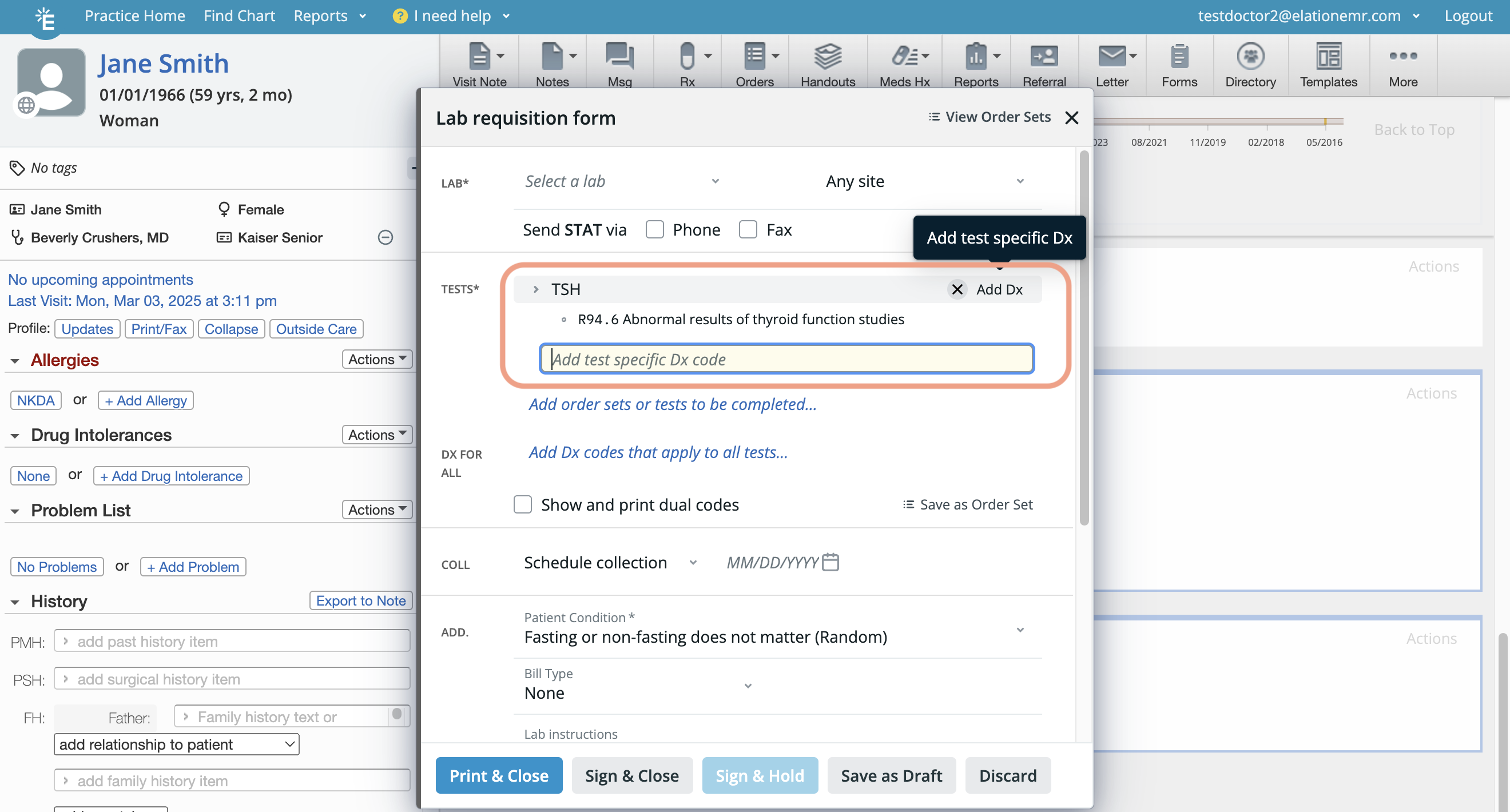
3Click Add Dx to any test to assign a test-specific diagnosis.
4Type the diagnosis code or diagnosis description in theAdd test specific Dx code field to search for and select the diagnosis you want to assign to the specific lab test. Assign as many test-level diagnosis codes as needed. Test-level diagnosis codes take precedence over order-level diagnosis codes. • If you assign multiple diagnoses for a given test, the sequence of test-level diagnosis codes indicates their level of importance. The first code in the list is considered the primary diagnosis, the second as the secondary diagnosis, and so on.
5Proceed with completing the lab order.

Selecting order-level diagnosis codes in lab orders

1Create a new lab order using one of the methods outlined in this article .
2Enter the test(s) you want the patient to complete.
3Type the diagnosis code or diagnosis description in theAdd Dx codes that apply to all tests… field to search for and select the diagnosis you want to assign to all tests in the lab order. Assign as many order-level diagnosis codes as needed, as long as the lab order does not exceed 120 unique diagnosis codes. Order-level diagnosis codes are secondary to test-level diagnosis codes (if any were added to specific tests). • If you assign multiple diagnoses to the order, the sequence of order-level diagnosis codes indicates their level of importance.
4Proceed with completing the lab order.

Assigning diagnosis codes to order sets

Both test-level diagnosis codes and order-level diagnosis can be saved to lab order sets. Follow the instructions inthis help center articleand assign diagnosis codes as needed.

Frequently Asked Questions

Do I need to add a test-level diagnosis code to every test in the lab order?
No, adding a test-level diagnosis code to every test in the lab order is not required. Tests without a test-level diagnosis code will automatically be linked to the order-level diagnosis codes.
Do I need to add order-level diagnosis codes to a lab order if it already has test-level diagnosis codes?
No, order-level diagnosis codes are not required if each test has an associated test-level diagnosis code. However, if any test lacks a test-level diagnosis code, you must either assign a test-level diagnosis code to that test or add an order-level diagnosis code.
How does the lab interpret test-level diagnosis codes versus order-level diagnosis codes?
Test-level diagnosis codes take precedence over order-level diagnosis codes. See the example below:
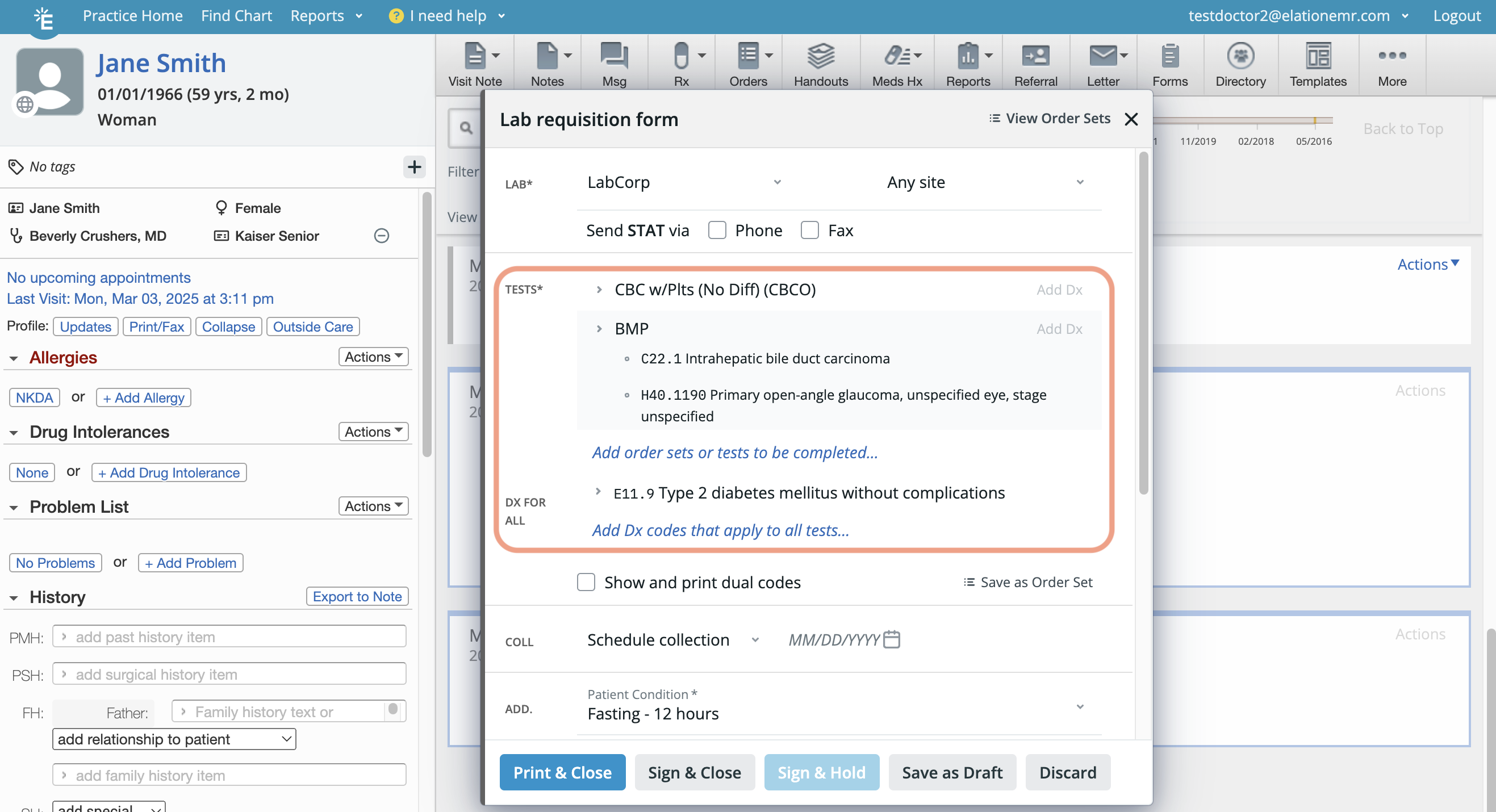
  • The CBC was not assigned any test-level diagnosis codes, so it will be linked only to the order-level diagnosis code E11.9, which will be treated as the primary diagnosis code for the CBC.
  • The BMP was assigned two test-level diagnosis codes and is also linked to the order-level diagnosis code E11.9:
    • C22.1 will be treated as the primary diagnosis code since it is the first test-level diagnosis code.
    • H40.1190 will be treated as the secondary diagnosis code as it is the second test-level diagnosis code.
    • E11.9 will be treated as the tertiary diagnosis code because it is associated at the order-level.
Can I move a diagnosis code from the test-level to the order-level or vice versa?
Diagnosis codes cannot be relocated. To change their placement, remove the code from the current location and re-add it to the desired one.
How many diagnosis codes can I add to a single lab order?
You can add up to 120 unique diagnosis codes per lab order. Related Articles