
Why is my Elation login email important?
The email address you use to login to your Elation is not only your gateway to your patient data but it is also the Elation Support Team’s primary mode of contact for you. Your login email address should be an email account that you check frequently so that you do not miss any communications on product updates or for troubleshooting.Updating Elation login email
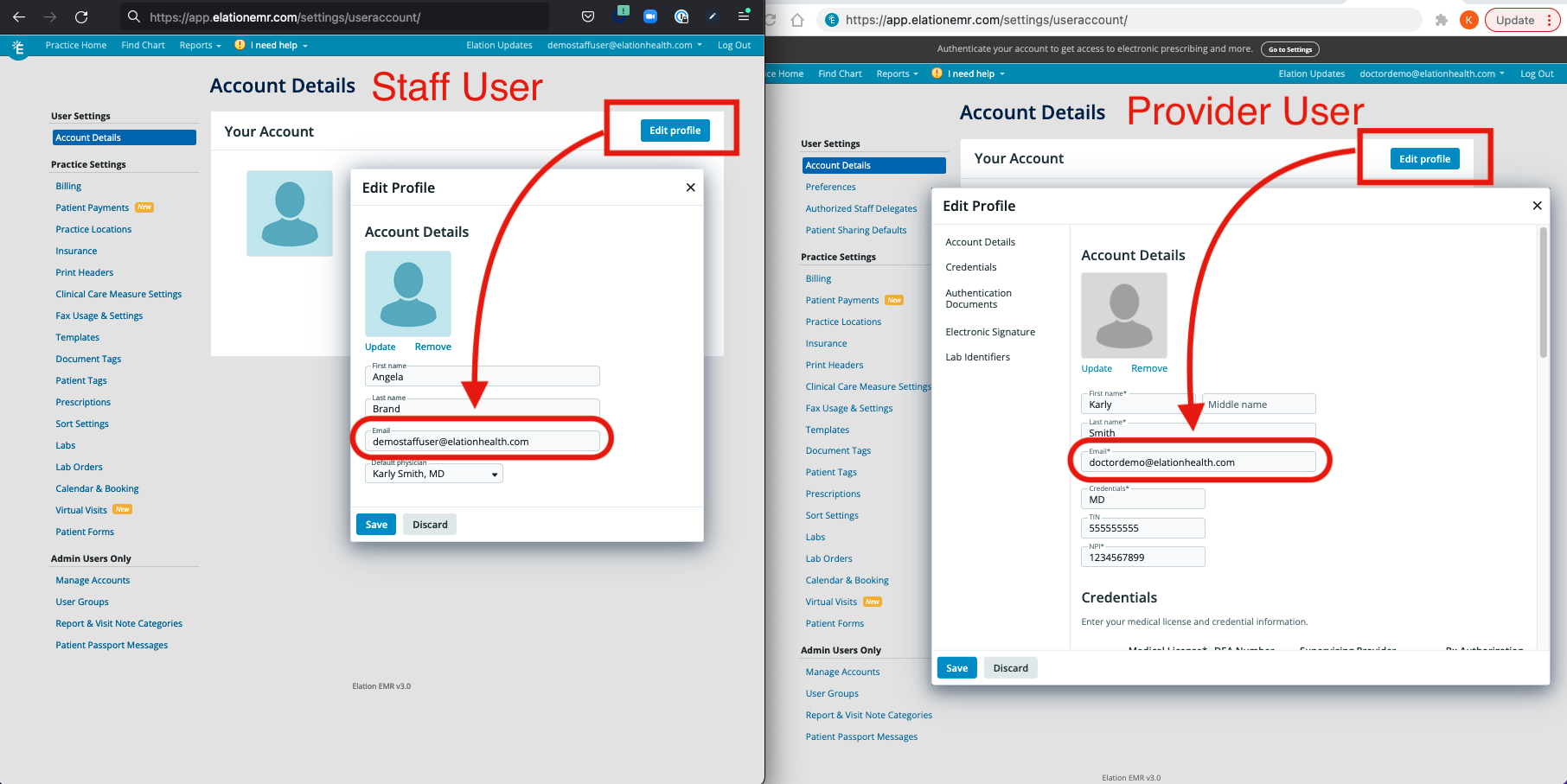
- Go to Settings
- Select Account Details
- Click Edit Profile to open the Edit Profile box
- Update your Email address and click Save
- Moving forward, use this email to log in to Elation.
Frequently Asked Questions (FAQ)
I want to update my email but I also forgot my password. What should I do?
You will need to update your password first:- Go to https://app.elationemr.com/login/ (Elation Login Page)
- Click the Forgot Password? button below the Log In button
- Enter your Elation login email address & click Submit Request
- Important Note: You must have access to the email address you use for your Elation account in order to reset your password. If you do not have access to this email address, click here to contact the Support Team for further assistance.
- You will receive an email in your email inbox from support@elationemr.com with the subject line Elation Password Reset. Click on the link in the email to reset your password.
- Enter your new password twice & then click Update Password
- Click Back to Login Page (https://app.elationemr.com/login/) to login with your email and new password.
I forgot my login email and password. What should I do?
Your login email is usually the email address you used to interact with Elation when you were first exploring the platform before joining Elation. You can try the following to see if you can locate your login email:- Search your various email accounts for an email from support@elationemr.com with the subject line Your Elation Account is Ready! This is the account invitation email and usually means the email address that received this email is your Elation login email.
- Search your various email accounts for an email from practicedevelopment@elationhealth.com with the subject line [Action Required] Finish setting up your Elation account to ERX. This is the credential reminder email we usually send providers in regards to credentialing their Elation account and usually means the email address that received this email is your Elation login email.
click here to contact the Support Team for further assistance.