
How do I get access to Patient Passport?
How do I log in?
What can I do in Patient Passport?
Can a caregiver access my chart?
Getting started
Do I need to create a new account?
Do I need to create a new account?
How do I get access to Patient Passport?
How do I get access to Patient Passport?
What does signing up look like?
What does signing up look like?
- Select the link in your invitation email
- Create an account with your email address and a password
- Confirm your identity using your date of birth
- You’re in
What if I never received my invitation email?
What if I never received my invitation email?
What is the difference between Patient Passport and the booking site?
What is the difference between Patient Passport and the booking site?
- Patient Passport (app.elationpassport.com) is your secure health portal — for messaging your care team, viewing visit summaries, accessing your health records, and managing your account.
- The booking site is a separate page where you can request or schedule appointments online. Your provider’s office may share a link to it directly.
Logging in
How do I log in?
How do I log in?
What if I forgot my password?
What if I forgot my password?
What if I am locked out of my account?
What if I am locked out of my account?
I never received my invitation email or password reset email. What should I do?
I never received my invitation email or password reset email. What should I do?
How long does a login session last?
How long does a login session last?
How do I log out?
How do I log out?
Using Patient Passport
What can I see and do in Patient Passport?
What can I see and do in Patient Passport?
- Send and receive secure messages with your care team (depending on practice settings)
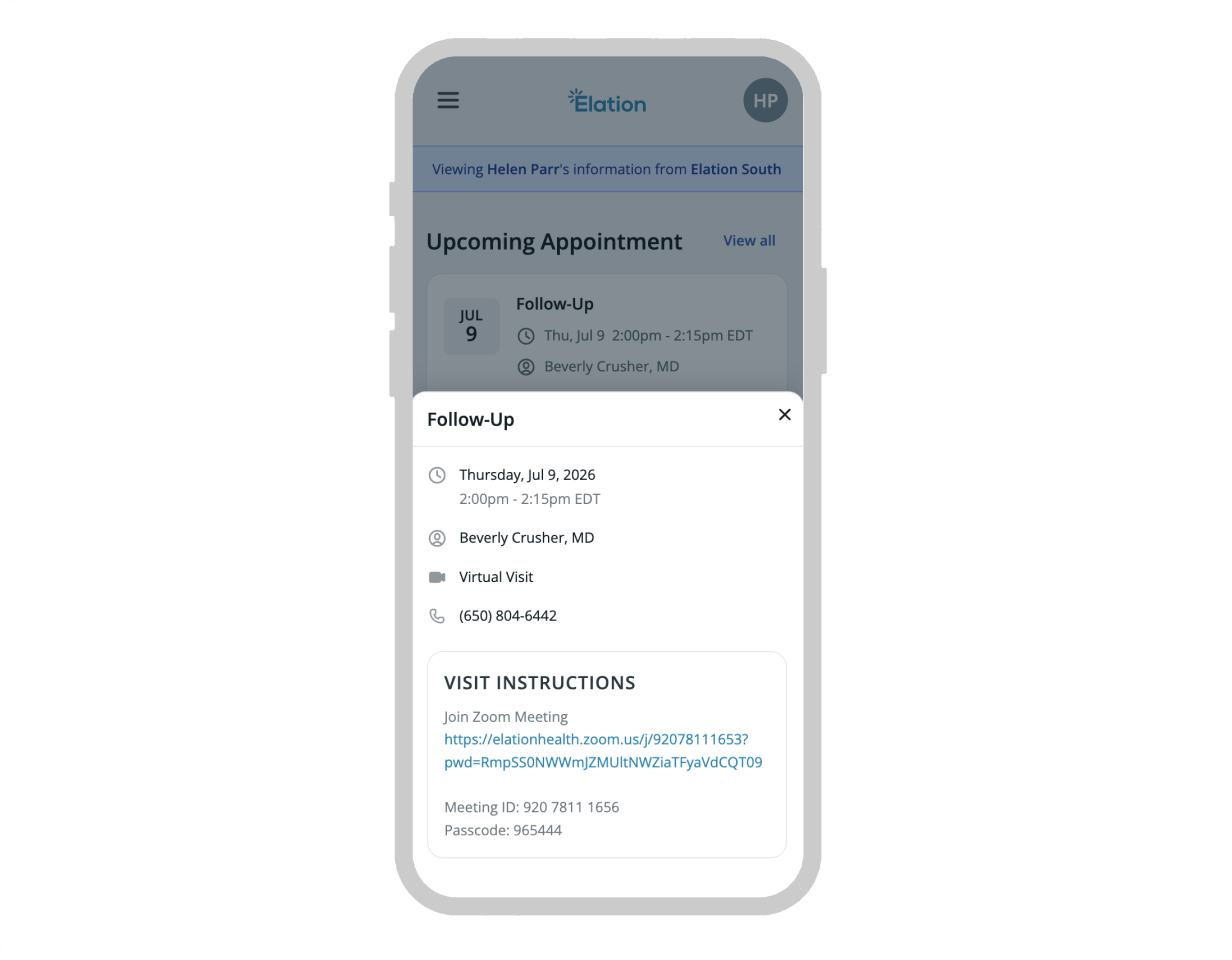
- View upcoming and past appointments, including visit instructions, patient forms, and — for virtual appointments — the meeting join link
- View your health summary, medications, allergies, and vaccines
- Read visit summaries after each signed visit
- View, download, email, fax, or print records and documents your provider has shared with you
- Print message threads from your inbox
- Update your demographics, contact details and account information
Can I manage my appointments?
Can I manage my appointments?
- Visit instructions your provider’s office has added to help you prepare for the visit
- A meeting join link if the appointment is virtual — tap it to open the video call
- Patient forms attached to the appointment, with their completion status — you can open and complete any incomplete forms directly from this view
Can I send messages to my provider?
Can I send messages to my provider?
Can I send attachments?
Can I send attachments?
Can I download an attachment my provider sent me in a message?
Can I download an attachment my provider sent me in a message?
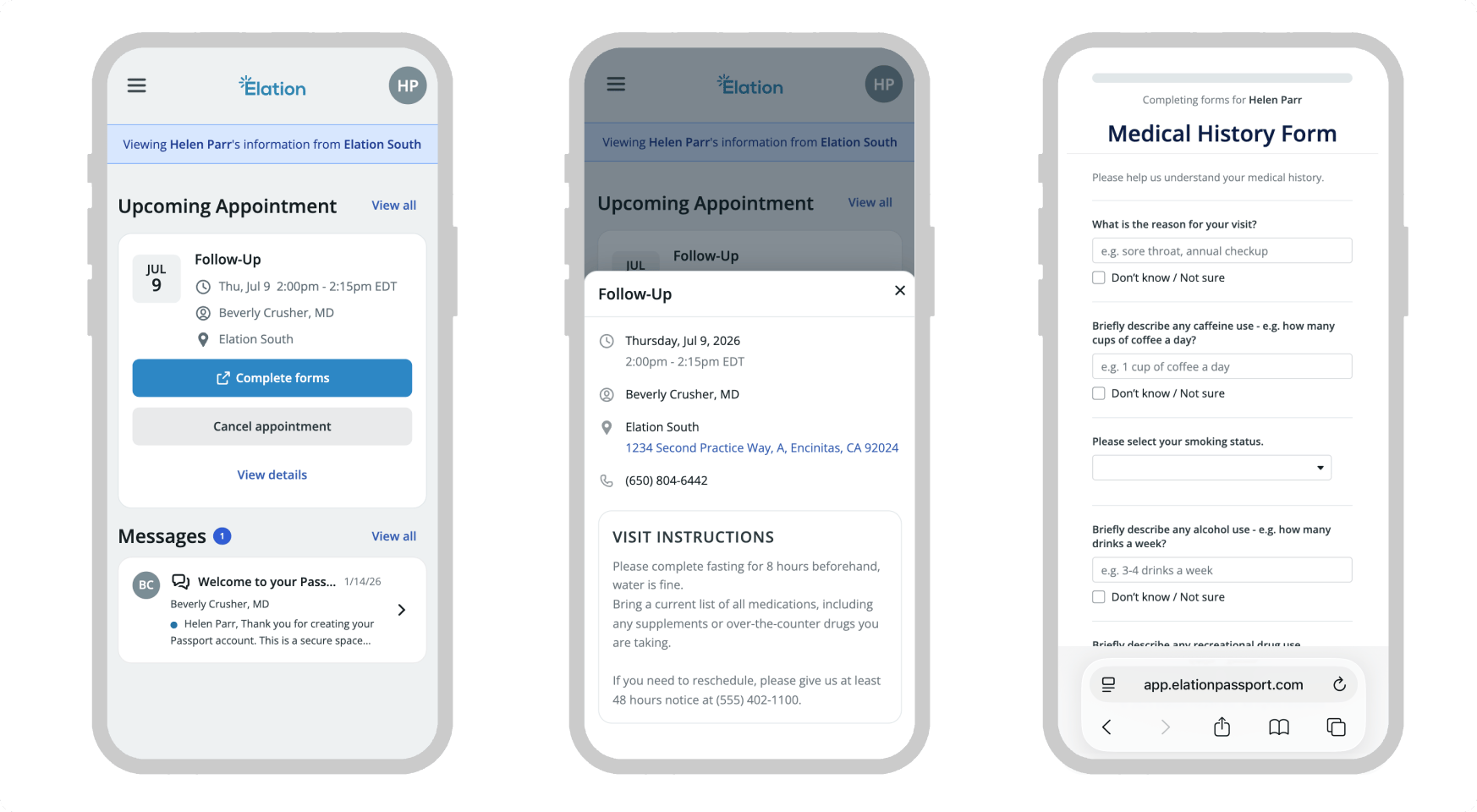
How do I complete patient forms my provider sent me?
How do I complete patient forms my provider sent me?
- Go to Appointments and open the upcoming appointment.
- Find the Complete patient forms link and click it to complete any incomplete forms.
Can I download my records?
Can I download my records?
- Download my records — Downloads a structured data file containing your health summary — including medications, allergies, diagnoses, and immunizations. This file is in a technical format called a C-CDA (Clinical Document Architecture), which is designed to be imported into another provider’s electronic health record (EHR) system, not opened and read like a regular document.
- Email my records — Send your clinical summary directly to another provider’s email address.
- Download or print immunization history — Save or print just your immunization history separately, useful for school enrollment or sports physicals.
- Fax my clinical profile — Send your clinical profile to a fax number.
- Print — Print a copy of your clinical profile.
Can I comment on visit summaries?
Can I comment on visit summaries?
Can I delete messages?
Can I delete messages?
I replied to an email from Patient Passport but my doctor didn't respond. Why?
I replied to an email from Patient Passport but my doctor didn't respond. Why?
Where do I find my visit summary after my appointment?
Where do I find my visit summary after my appointment?
- Log in to Patient Passport
- Select Visit Summaries in the navigation
- Summaries are listed most recent first — select any entry to read the full details
Can I print my messages?
Can I print my messages?
How do I join my virtual appointment?
How do I join my virtual appointment?
Your account
How do I update my contact information?
How do I update my contact information?
- Contact Information
- Primary phone number and phone type
- Address
- Emergency contact
- Patient Details
- Full Name (if different from legal) — the chosen name for the patient, shown throughout Passport and visible to the care team
- Pronouns
- Gender identity
- Sexual orientation
Can I add or change my profile picture?
Can I add or change my profile picture?
How do I change my email address or password?
How do I change my email address or password?
What languages are supported?
What languages are supported?
How do I use Patient Passport on my phone?
How do I use Patient Passport on my phone?
Why does my old name still appear on my messages?
Why does my old name still appear on my messages?
What is the difference between my Account Name and the patient's chosen name?
What is the difference between my Account Name and the patient's chosen name?
- Account Name — Your name as the person signed in to Passport. It appears on every message you send to your care team. You set it during your first login and can change it in Account Settings.
- Patient’s chosen name — The name shown for the patient throughout Passport. This is the Full Name (if different from legal) field on the patient’s chart. You can update it in Patient Profile > Patient Demographics > Patient Details. Changes flow back to the practice.
Which name appears on my downloaded immunization history?
Which name appears on my downloaded immunization history?
How do I delete my Patient Passport account?
How do I delete my Patient Passport account?
- Removes your login from Patient Passport.
- Removes your access to all charts linked to that account.
Family and caregiver access
Can a parent or caregiver access Patient Passport on behalf of a patient?
Can a parent or caregiver access Patient Passport on behalf of a patient?
Can one person manage records for multiple family members?
Can one person manage records for multiple family members?
What is the 'confirm your relationship' step?
What is the 'confirm your relationship' step?
- This is me — You are the patient.
- I manage their care — You are the parent, guardian, or caregiver.
- Remove this chart — You do not recognize it or do not want access.
Does a parent or guardian's access automatically end when a minor reaches a certain age?
Does a parent or guardian's access automatically end when a minor reaches a certain age?
Records from multiple providers
I see records from an old doctor. How do I switch to my new doctor?
I see records from an old doctor. How do I switch to my new doctor?
How do I remove an old provider's chart from my account?
How do I remove an old provider's chart from my account?
- Log in to Patient Passport and select your profile icon in the top right corner.
- Select Manage access.
- Remove the chart for the provider you no longer see.
Privacy and security
Is Patient Passport secure?
Is Patient Passport secure?
How do I stop receiving messages from a provider?
How do I stop receiving messages from a provider?