
What is Elation AI?
Elation AI is a conversational interface built into the patient chart that lets you ask questions in natural language and get answers grounded in the patient’s record. It brings together several AI-powered tools — Clinical Insights, Quick Actions, and the PREVENT™ Calculator — into a single, unified experience. Instead of navigating to separate features, you can open Elation AI and type or speak a question. Elation AI identifies the right tool, retrieves the relevant information, and returns a response — all within the patient chart you are currently viewing.Who can use Elation AI?
Elation AI is available to all paying Note Assist user. No separate activation is required.Where to find Elation AI
You can open Elation AI from two places while viewing a patient chart:- Elation AI button — Located in the top navigation bar across the EHR.
- Middle pane — Available within the Requiring Actions queue.
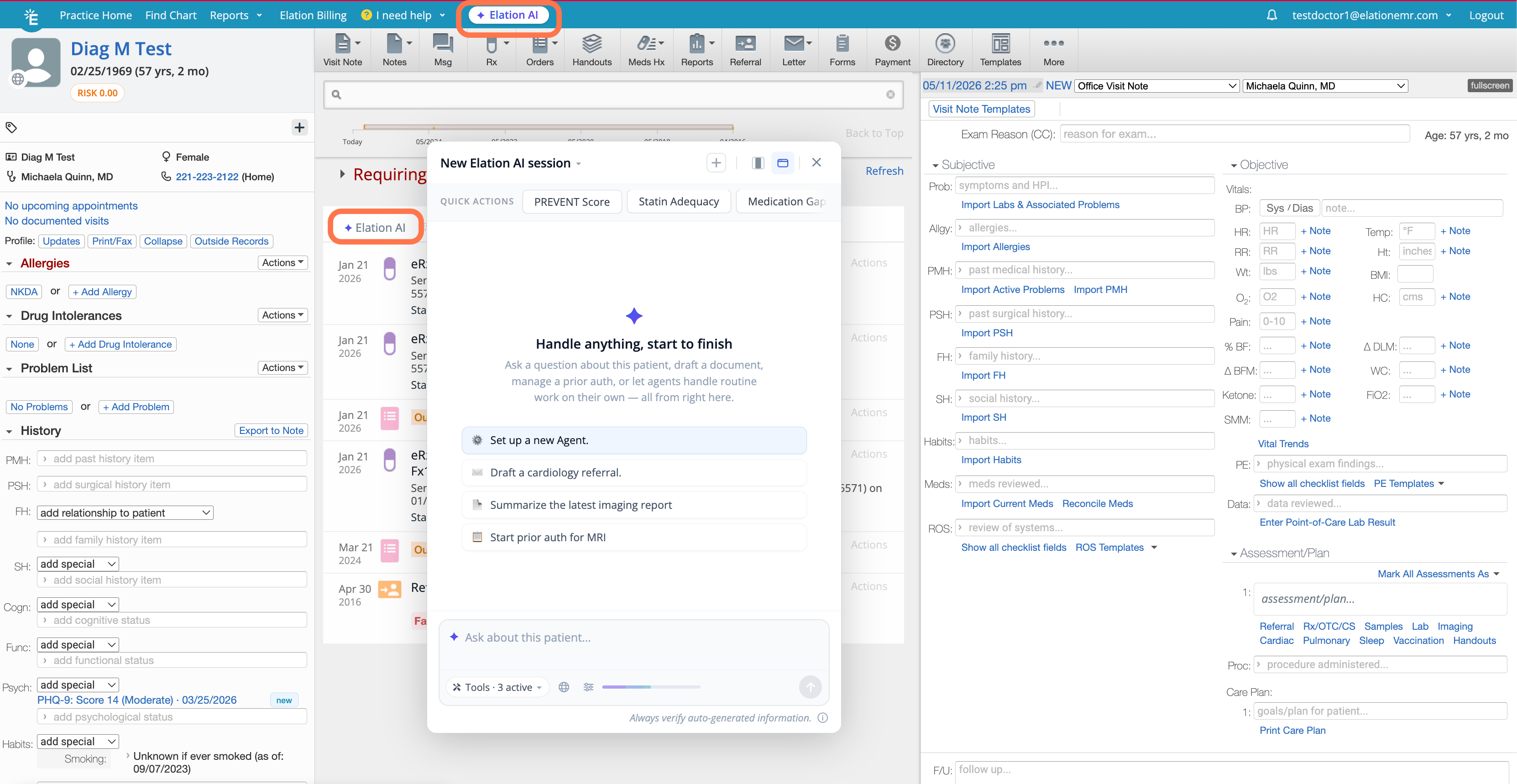
What Elation AI can do
Elation AI currently supports the following capabilities:Chart Insights
Ask questions about a patient’s clinical history and get answers sourced from their chart. Chart Insights searches through the patient record and identifies patterns, trends, and relevant clinical context. Example prompts:- “How does this patient’s latest A1c compare to their previous labs?”
- “Summarize this patient’s medication changes over the past year.”
- “What is the status of this patient’s care plan?”
Chart Insights surfaces clinical context and evidence-based guidance. It does not include clinical decision support.
Quick Actions
Use pre-built prompts for common clinical scenarios. Quick Actions are predefined queries layered on top of the patient chart that help you quickly retrieve relevant information without crafting a prompt from scratch. Example prompts:- “Patient is coming in for a sick appointment. When did I last see them and what is the status of their care plan?”
- “Summarize this patient’s recent visit history.”
PREVENT™ Calculator
Assess cardiovascular risk using the AHA PREVENT™ equations directly within the Elation AI conversation. This is helpful when you want to have a conversation with your patient about their cardiovascular health during a yearly physical or wellness visit. For detailed information about the PREVENT™ Calculator, see the PREVENT™ Cardiovascular Risk Calculator Guide.Speech-to-text
You can speak your questions instead of typing them. Elation AI supports speech-to-text input so you can interact hands-free while working with a patient. Simply click the microphone button to use speech-to-text.Letter drafting
Ask Elation AI to draft a letter based on the patient’s chart. For more information on auto-drafting letters, see Auto-drafting letters and referrals with Wordsmith.What Elation AI cannot do yet
Elation AI does not currently take actions on your behalf such as placing orders, scheduling appointments, or sending messages. When a request falls outside its current capabilities, Elation AI will let you know and indicate whether the capability is planned for a future release.Privacy and session ownership
Elation AI conversations are private. Each conversation is scoped to both the patient chart and the individual provider — your colleagues cannot see your Elation AI sessions when they open the same patient chart. Your Elation AI conversations are also not part of the patient record.Settings and customization
Elation AI settings are managed in AI Settings, where you can:- Configure custom instructions for Elation AI to tailor how AI responds to your questions.
- Create Quick Actions with a custom query and title that appear as preset buttons in the Elation AI interface.
Tips for getting started
If you are new to Elation AI, start with a question you already ask during a typical visit:- “Does this patient have a current tetanus vaccine?”
- “Summarize their CHF management plan.”
- “When was their last colonoscopy?”
Frequently asked questions
Can my colleagues see my Elation AI conversations?
Can my colleagues see my Elation AI conversations?
No. Conversations are scoped to the chart and the individual provider. Other providers opening the same chart will not see your session.
Do my AI conversations become part of the patient record?
Do my AI conversations become part of the patient record?
No. Elation AI conversations are kept separate from the patient’s chart record. They are not clinical documentation.
Is Elation AI generating new information?
Is Elation AI generating new information?
No. Answers are grounded in the patient’s actual chart data or established clinical sources. Elation AI surfaces and synthesizes information that already exists in the record.
Does this replace Clinical Insights?
Does this replace Clinical Insights?
No. Elation AI unifies Clinical Insights, Quick Actions, and other tools under a single entry point. Your existing Clinical Insights workflows, custom instructions, and settings remain unchanged in AI Settings.
Is there a usage limit?
Is there a usage limit?
There is a usage cap, but it is set high enough that the vast majority of practices will not reach it.
What happens when Elation AI cannot answer my question?
What happens when Elation AI cannot answer my question?
When a request is outside the current scope, Elation AI responds with a clear explanation rather than a generic error. It will distinguish between capabilities that are coming soon, requests that are outside EHR scope, and requests that are being tracked for future development.