> ## Documentation Index
> Fetch the complete documentation index at: https://help.elationhealth.com/llms.txt
> Use this file to discover all available pages before exploring further.
# Get started with Core Developer
> Request a free Elation sandbox, generate API credentials, make your first API call and Hosted Database query, and understand what it takes to reach production.
**CORE DEVELOPER · GET STARTED**
Getting to production runs in one direction: request a sandbox, build against it, then clear three requirements before production credentials are issued. Sandbox access is free and does not require a Core Developer subscription, so you can validate your use case before you commit to one.
***
**01 — SANDBOX**
## Start free
Email [support@elationhealth.com](mailto:support@elationhealth.com) and ask for a Developer Sandbox. Sandbox access is open to current Elation customers and to organizations looking to partner with Elation.
Sandbox access requires an executed [API License and Usage Agreement](https://www.elationhealth.com/api-license-and-usage-agreement/).
Sandboxes are typically ready within **1–2 business days**. Your sandbox starts with only the account used to provision it. Add more providers under **Settings > Manage Accounts**.
### What the sandbox is
The sandbox is a blank replica of Elation EHR. You create your own users, sample patient charts, and account settings. It runs with the same security controls as production and is simply designated non-PHI.
**Never put PHI in the sandbox.** Sandbox practices are PHI-free by design. Use synthetic or sample data only.
Sandbox and production stay permanently separate. There is no way to copy data or configuration between them in either direction, so don't plan a cutover that depends on promoting sandbox content. Production credentials are also newly generated rather than carried over.
***
**02 — API CREDENTIALS**
## Generating and managing keys
Practice admins manage API credentials from **Settings > API Access**. You can issue multiple credentials rather than reusing one, which is worth doing: separate keys per integration, per vendor, or per internal service mean you can revoke one without breaking the rest.
| | Sandbox | Production |
| ---------------------------------- | ---------------------------------------------- | --------------------------------------------------------------------------- |
| Self-service credential management | Available now | Available on request. Contact Support to have it enabled for your practice. |
| Choose API type at creation | Elation APIv2 or FHIR R4 | Elation APIv2 or FHIR R4 |
| Scopes | Editable after creation, effective immediately | Editable after creation, effective immediately |
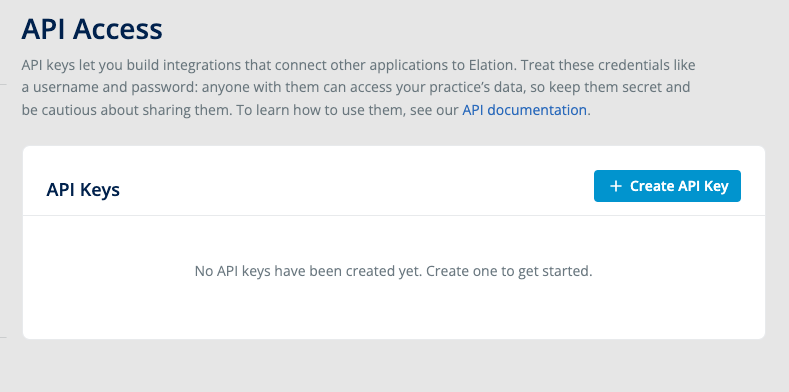 Two things to know when you create a credential.
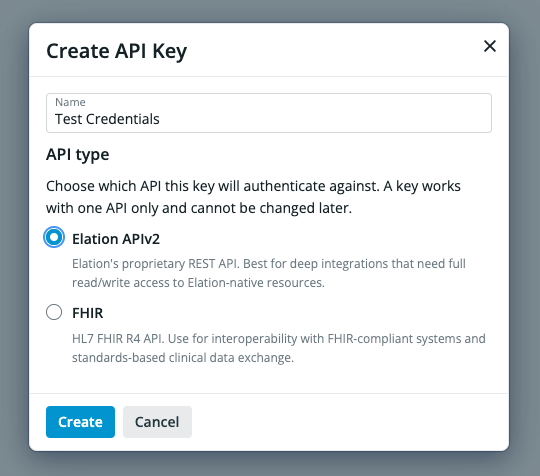
**The API type is fixed at creation.** You choose Elation APIv2 or FHIR R4 up front, and it cannot be changed afterward. A REST credential cannot mint FHIR tokens, so if you need both, create two.
Two things to know when you create a credential.
**The API type is fixed at creation.** You choose Elation APIv2 or FHIR R4 up front, and it cannot be changed afterward. A REST credential cannot mint FHIR tokens, so if you need both, create two.
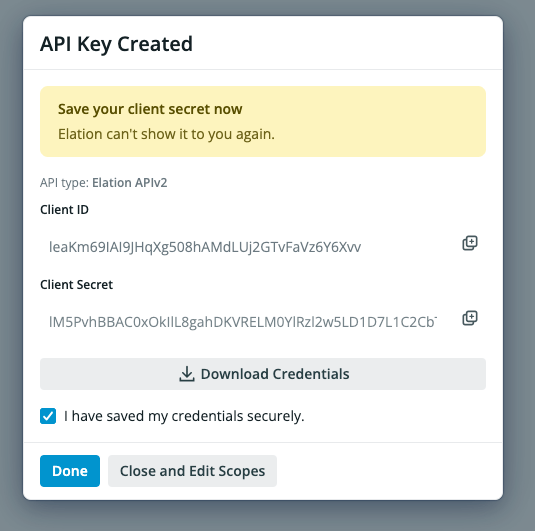
 **The client secret is shown once.** It cannot be retrieved later. Copy or download it before you close the dialog.
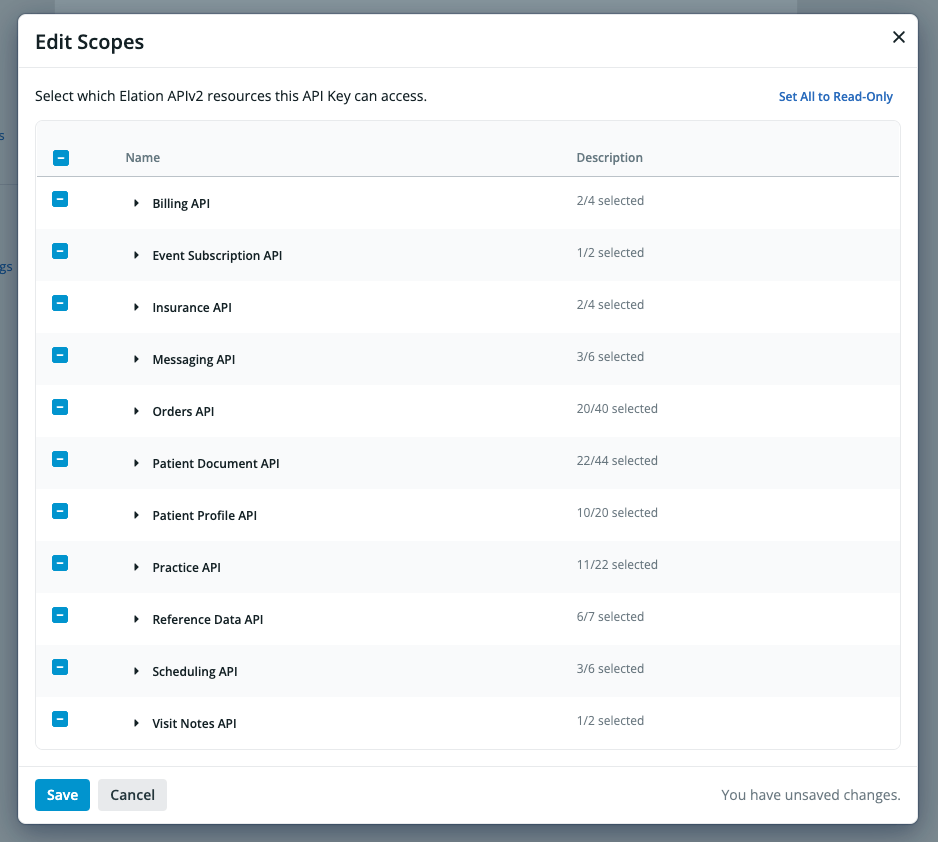
 Scopes are the exception to all of this: you can edit them any time after creation and changes take effect immediately. Narrow them to what the integration actually needs, so an exposed key can't reach the whole practice.
 See [Self-Service API Credential Management](/articles/self-service-api-credential-management) for the full walkthrough.
***
**03 — YOUR FIRST CALL**
## Get a token, then call an endpoint
Elation uses the OAuth2 **Client Credentials** grant. Exchange your client ID and secret for an access token, then send that token as a Bearer token on every request.
```bash Get a token theme={null}
curl -X POST https://sandbox.elationemr.com/api/2.0/oauth2/token/ \
-H "Content-Type: application/x-www-form-urlencoded" \
-d "grant_type=client_credentials&client_id=YOUR_CLIENT_ID&client_secret=YOUR_CLIENT_SECRET"
```
```bash Call an endpoint theme={null}
curl https://sandbox.elationemr.com/api/2.0/patients/ \
-H "Authorization: Bearer YOUR_ACCESS_TOKEN"
```
Tokens expire. The response includes `expires_in`, typically 3600 seconds, so request a new token when the old one lapses rather than caching it indefinitely. See [Scopes](/articles/rest/overview/scopes) if you are limiting what a credential can reach.
Opens the token endpoint with its playground expanded. Paste in your sandbox client ID and secret to get a real token back, no local setup.
Swap the hostname for `https://app.elationemr.com` when you move to production. Everything else about the flow is the same.
***
**04 — WEBHOOKS**
## Get notified when data changes
If your workflow needs to react to changes rather than poll for them, create a subscription through the Event Subscription API. No separate enablement request is required.
```bash theme={null}
POST /api/2.0/app/subscriptions/
```
See [Subscribe to a resource's updates](/articles/rest/event-subscription-api/event-subscriptions/subscribe-to-a-resource-updates) for the request body, and [Webhooks](/articles/rest/overview/webhooks) for the full list of event models, Ed25519 signature verification, and retry behavior.
***
**05 — HOSTED DATABASE**
## Run your first query
Hosted Database access is provisioned separately from API credentials. You will use either an Elation-managed **Reader Account** or a **Direct Share** into a Snowflake account your organization owns. Reader Account credentials arrive over a secure channel rather than in the app; see [Hosted Database access](/articles/hdb/accessing-your-hosted-database) for how they are delivered.
Once you are logged in, set your database and schema context in a worksheet, then confirm your data is there:
```sql theme={null}
SELECT COUNT(*) AS patient_count FROM patient;
SELECT * FROM patient LIMIT 10;
```
If the count returns a number and the preview shows rows, your login, warehouse, and data share are all working.
To find where anything else lives before you write a query, browse the [full Hosted Database schema](https://dbdocs.io/hosteddb_support/hosted_database_snowflake). It is public, searchable by table, and shows every column and the relationships between tables.
How to request a Direct Share into your own Snowflake account, including the 30-day window before you lose access to your Elation Reader Account.
Step-by-step with screenshots: selecting your database, schema, and warehouse, then running a query.
Every table, column, and relationship in an interactive diagram. No login needed.
***
**06 — ELATION AI**
## Build and explore faster
| Tool | Best for |
| ------------------------------- | -------------------------------------------------------------------------------------------------------------------------------------------------------------------------------------------------------------------------------------------------------------------------------------------------------------------------------------------------------------------------------------------------------------- |
| **Elation API Docs MCP Server** | Connecting Elation's product documentation and full API reference to your AI coding tools (Cursor, Windsurf, Claude). Your assistant can then answer technical questions, generate requests with accurate field names, and help you design against real schemas without leaving your editor. Free, no signup: `https://help.elationhealth.com/mcp`. See the [setup guide](/articles/rest/overview/mcp-server). |
| **In-app AI assistant** | Documentation and integration questions while you build. Open it from the **Help** menu, then **Contact Elation Support**. For account-specific issues or production access, contact Support. |
| **Elation Analyst** *(Beta)* | Asking questions about your Hosted Database data in plain language, across appointments, diagnoses, medications, orders, vitals, and patient tags. Review the generated SQL before you rely on it. See [Elation Analyst](/articles/Elation-Analyst). |
| **Help Center AI** | Finding product and support guidance. Open it with the Ask Assistant button, or ⌘K on Mac and Ctrl+K on Windows. Verify answers against the docs. |
**Never put production secrets in an AI prompt.** Use your own sandbox credentials when testing, and keep client secrets, tokens, and PHI out of anything you paste into an assistant.
***
**07 — RUNNING IN PRODUCTION**
## Keeping your integration healthy
### Handle rate limits
The [API License and Usage Agreement](https://www.elationhealth.com/api-license-and-usage-agreement/) limits usage to fewer than 3 calls per second and fewer than 150,000 calls per 24 hours, and Elation may adjust those limits. The API returns `429` when you go over. Build in retry with exponential backoff, and reuse an access token until it expires rather than requesting a fresh one per call. See [errors](/articles/rest/overview/errors).
**The budget is counted per credential**, not per endpoint, so every call your integration makes draws from the same pool. If one integration is genuinely constrained by the ceiling, contact [support@elationhealth.com](mailto:support@elationhealth.com) about splitting the work across additional credentials.
### Confirm what's switched on for your account
Granular API scopes and user impersonation are in closed beta and available to select customers only, and Elation Analyst is in Beta and not yet enabled on every account. Ask Support what is active for your practice before you design around any of them.
### Watch for changes before they reach you
The [API 2.0 Changelog](/articles/rest/changelog/changelog) and the [Hosted Database Release Notes](/articles/hdb/hdb-snowflake) both publish RSS, so wire them into Slack or a feed reader. See [Subscribe to Elation Release Feeds](/articles/subscribe-to-release-feeds).
Hosted Database schema changes carry advance notice: 30 calendar days for breaking changes, 7 for behavior changes, and an announcement at release for additive ones. See [change management](/articles/hdb/change-management) for the policy, or [Early Release](/articles/hdb/early-release) to test a change against your pipelines before it goes GA.
### Check status before opening a ticket
Live platform status is at [elation.status.io](https://elation.status.io). For anything account-specific, email [support@elationhealth.com](mailto:support@elationhealth.com).
## Related articles
* [Core Developer overview](/core-developer) — what it is and who it's for
* [Pricing and add-ons](/core-developer-pricing) — cost, seat rules, and add-ons
* [API Overview](/articles/rest/overview/api-overview) — the API 2.0 categories and the resources each exposes
* [Authentication](/articles/rest/overview/get-token) — exchanging credentials for a token
* [Webhooks](/articles/rest/overview/webhooks) — event models, signature verification, retries
* [Hosted Database access](/articles/hdb/accessing-your-hosted-database) — how your Reader Account credentials are delivered
* [Hosted Database schema](https://dbdocs.io/hosteddb_support/hosted_database_snowflake) — every table and column
* [Snowflake documentation](https://docs.snowflake.com/) — SQL syntax, connectors, and warehouse concepts
See [Self-Service API Credential Management](/articles/self-service-api-credential-management) for the full walkthrough.
***
**03 — YOUR FIRST CALL**
## Get a token, then call an endpoint
Elation uses the OAuth2 **Client Credentials** grant. Exchange your client ID and secret for an access token, then send that token as a Bearer token on every request.
```bash Get a token theme={null}
curl -X POST https://sandbox.elationemr.com/api/2.0/oauth2/token/ \
-H "Content-Type: application/x-www-form-urlencoded" \
-d "grant_type=client_credentials&client_id=YOUR_CLIENT_ID&client_secret=YOUR_CLIENT_SECRET"
```
```bash Call an endpoint theme={null}
curl https://sandbox.elationemr.com/api/2.0/patients/ \
-H "Authorization: Bearer YOUR_ACCESS_TOKEN"
```
Tokens expire. The response includes `expires_in`, typically 3600 seconds, so request a new token when the old one lapses rather than caching it indefinitely. See [Scopes](/articles/rest/overview/scopes) if you are limiting what a credential can reach.
Opens the token endpoint with its playground expanded. Paste in your sandbox client ID and secret to get a real token back, no local setup.
Swap the hostname for `https://app.elationemr.com` when you move to production. Everything else about the flow is the same.
***
**04 — WEBHOOKS**
## Get notified when data changes
If your workflow needs to react to changes rather than poll for them, create a subscription through the Event Subscription API. No separate enablement request is required.
```bash theme={null}
POST /api/2.0/app/subscriptions/
```
See [Subscribe to a resource's updates](/articles/rest/event-subscription-api/event-subscriptions/subscribe-to-a-resource-updates) for the request body, and [Webhooks](/articles/rest/overview/webhooks) for the full list of event models, Ed25519 signature verification, and retry behavior.
***
**05 — HOSTED DATABASE**
## Run your first query
Hosted Database access is provisioned separately from API credentials. You will use either an Elation-managed **Reader Account** or a **Direct Share** into a Snowflake account your organization owns. Reader Account credentials arrive over a secure channel rather than in the app; see [Hosted Database access](/articles/hdb/accessing-your-hosted-database) for how they are delivered.
Once you are logged in, set your database and schema context in a worksheet, then confirm your data is there:
```sql theme={null}
SELECT COUNT(*) AS patient_count FROM patient;
SELECT * FROM patient LIMIT 10;
```
If the count returns a number and the preview shows rows, your login, warehouse, and data share are all working.
To find where anything else lives before you write a query, browse the [full Hosted Database schema](https://dbdocs.io/hosteddb_support/hosted_database_snowflake). It is public, searchable by table, and shows every column and the relationships between tables.
How to request a Direct Share into your own Snowflake account, including the 30-day window before you lose access to your Elation Reader Account.
Step-by-step with screenshots: selecting your database, schema, and warehouse, then running a query.
Every table, column, and relationship in an interactive diagram. No login needed.
***
**06 — ELATION AI**
## Build and explore faster
| Tool | Best for |
| ------------------------------- | -------------------------------------------------------------------------------------------------------------------------------------------------------------------------------------------------------------------------------------------------------------------------------------------------------------------------------------------------------------------------------------------------------------- |
| **Elation API Docs MCP Server** | Connecting Elation's product documentation and full API reference to your AI coding tools (Cursor, Windsurf, Claude). Your assistant can then answer technical questions, generate requests with accurate field names, and help you design against real schemas without leaving your editor. Free, no signup: `https://help.elationhealth.com/mcp`. See the [setup guide](/articles/rest/overview/mcp-server). |
| **In-app AI assistant** | Documentation and integration questions while you build. Open it from the **Help** menu, then **Contact Elation Support**. For account-specific issues or production access, contact Support. |
| **Elation Analyst** *(Beta)* | Asking questions about your Hosted Database data in plain language, across appointments, diagnoses, medications, orders, vitals, and patient tags. Review the generated SQL before you rely on it. See [Elation Analyst](/articles/Elation-Analyst). |
| **Help Center AI** | Finding product and support guidance. Open it with the Ask Assistant button, or ⌘K on Mac and Ctrl+K on Windows. Verify answers against the docs. |
**Never put production secrets in an AI prompt.** Use your own sandbox credentials when testing, and keep client secrets, tokens, and PHI out of anything you paste into an assistant.
***
**07 — RUNNING IN PRODUCTION**
## Keeping your integration healthy
### Handle rate limits
The [API License and Usage Agreement](https://www.elationhealth.com/api-license-and-usage-agreement/) limits usage to fewer than 3 calls per second and fewer than 150,000 calls per 24 hours, and Elation may adjust those limits. The API returns `429` when you go over. Build in retry with exponential backoff, and reuse an access token until it expires rather than requesting a fresh one per call. See [errors](/articles/rest/overview/errors).
**The budget is counted per credential**, not per endpoint, so every call your integration makes draws from the same pool. If one integration is genuinely constrained by the ceiling, contact [support@elationhealth.com](mailto:support@elationhealth.com) about splitting the work across additional credentials.
### Confirm what's switched on for your account
Granular API scopes and user impersonation are in closed beta and available to select customers only, and Elation Analyst is in Beta and not yet enabled on every account. Ask Support what is active for your practice before you design around any of them.
### Watch for changes before they reach you
The [API 2.0 Changelog](/articles/rest/changelog/changelog) and the [Hosted Database Release Notes](/articles/hdb/hdb-snowflake) both publish RSS, so wire them into Slack or a feed reader. See [Subscribe to Elation Release Feeds](/articles/subscribe-to-release-feeds).
Hosted Database schema changes carry advance notice: 30 calendar days for breaking changes, 7 for behavior changes, and an announcement at release for additive ones. See [change management](/articles/hdb/change-management) for the policy, or [Early Release](/articles/hdb/early-release) to test a change against your pipelines before it goes GA.
### Check status before opening a ticket
Live platform status is at [elation.status.io](https://elation.status.io). For anything account-specific, email [support@elationhealth.com](mailto:support@elationhealth.com).
## Related articles
* [Core Developer overview](/core-developer) — what it is and who it's for
* [Pricing and add-ons](/core-developer-pricing) — cost, seat rules, and add-ons
* [API Overview](/articles/rest/overview/api-overview) — the API 2.0 categories and the resources each exposes
* [Authentication](/articles/rest/overview/get-token) — exchanging credentials for a token
* [Webhooks](/articles/rest/overview/webhooks) — event models, signature verification, retries
* [Hosted Database access](/articles/hdb/accessing-your-hosted-database) — how your Reader Account credentials are delivered
* [Hosted Database schema](https://dbdocs.io/hosteddb_support/hosted_database_snowflake) — every table and column
* [Snowflake documentation](https://docs.snowflake.com/) — SQL syntax, connectors, and warehouse concepts