> ## Documentation Index
> Fetch the complete documentation index at: https://help.elationhealth.com/llms.txt
> Use this file to discover all available pages before exploring further.
# PREVENT™ Cardiovascular Risk Calculator Guide
> Learn how to use the PREVENTᵀᴹ Calculator in Elation to assess patients' cardiovascular risk. This guide covers required patient data, how to access the calculator through Elation AI, and how to interpret risk results and clinical guidance.
## What is the PREVENT™ Calculator?
The PREVENT™ Calculator integrates the American Heart Association (AHA) PREVENT cardiovascular risk equations directly into Elation. It calculates 10-year and 30-year risk estimates for total cardiovascular disease (CVD), atherosclerotic cardiovascular disease (ASCVD), and heart failure (HF) using chart data — eliminating the need to use external tools like MDCalc or the ACC estimator.
Elation automatically pre-fills required inputs from the patient's chart, including demographics, vitals, labs, medications, problem list, and social history. Results appear immediately with AHA/ACC-aligned guidance, intended to support shared decision-making between clinician and patient regarding potential interventions.
PREVENT™ may be used as
* a screening tool to help determine a person's potential risk of cardiovascular disease, atherosclerotic cardiovascular disease, and heart failure.
* one of the shared decision-making tools to evaluate treatment decisions between a patient and their healthcare professional.
## Who can use PREVENT™?
The PREVENT™ calculator is a tool in [Elation AI](/articles/using-the-search-tool-in-your-patient-chart#what-is-elation-ai) for clinicians and other healthcare professionals to estimate patients’ risk for cardiovascular disease (CVD). Risk estimates are intended to be guides and a starting point for a clinician-patient discussion for the primary prevention of CVD.
## Identifying patients for PREVENT™ risk assessments
The PREVENT™ calculator serves as a tool for patients aged 30-79 without a documented history of cardiovascular disease. Elation AI will flag the PREVENT™ calculator as inappropriate when a patient's Problem List includes one or more of the following conditions:
* cardiovascular diseases
* severe subclinical cardiovascular diseases
* end-stage kidney disease
* limited life expectancy
## What information is required for PREVENT™ calculations?
The following structured information is required for PREVENT™ calculations and will be pulled directly from the patient's demographics, vitals, and lab results if they're in the chart.
* Patient's age
* Patient's sex assigned at birth
* Systolic blood pressure
* BMI
* Total cholesterol
* HDL cholesterol
* eGFR
* History of diabetes
* Active smoking status
* Active blood pressure medication(s)
* Active statin medication(s)
The following optional information will also be factored into the calculations if available in the chart:
* HbA1c
* UACR
* Patient's zip code (to estimate Social Deprivation Index (SDI))
## Workflow Instructions
### Accessing the PREVENT™ Calculator through Elation AI
1. Open the patient chart.
2. Go to the search bar a the top of the chart and type a query about cardiovascular risk, such as "What is this patient's PREVENT™ score?" or "cardiovascular risk."
3. If [all required fields](#what-information-is-required-for-prevent-calculations) are available, Elation AI runs the PREVENT™ calculation and displays [the results](#understanding-prevent-results).
4. If any required fields are missing, Elation AI will notify you to obtain or provide the missing information in a follow up response.
### Understanding PREVENT™ results
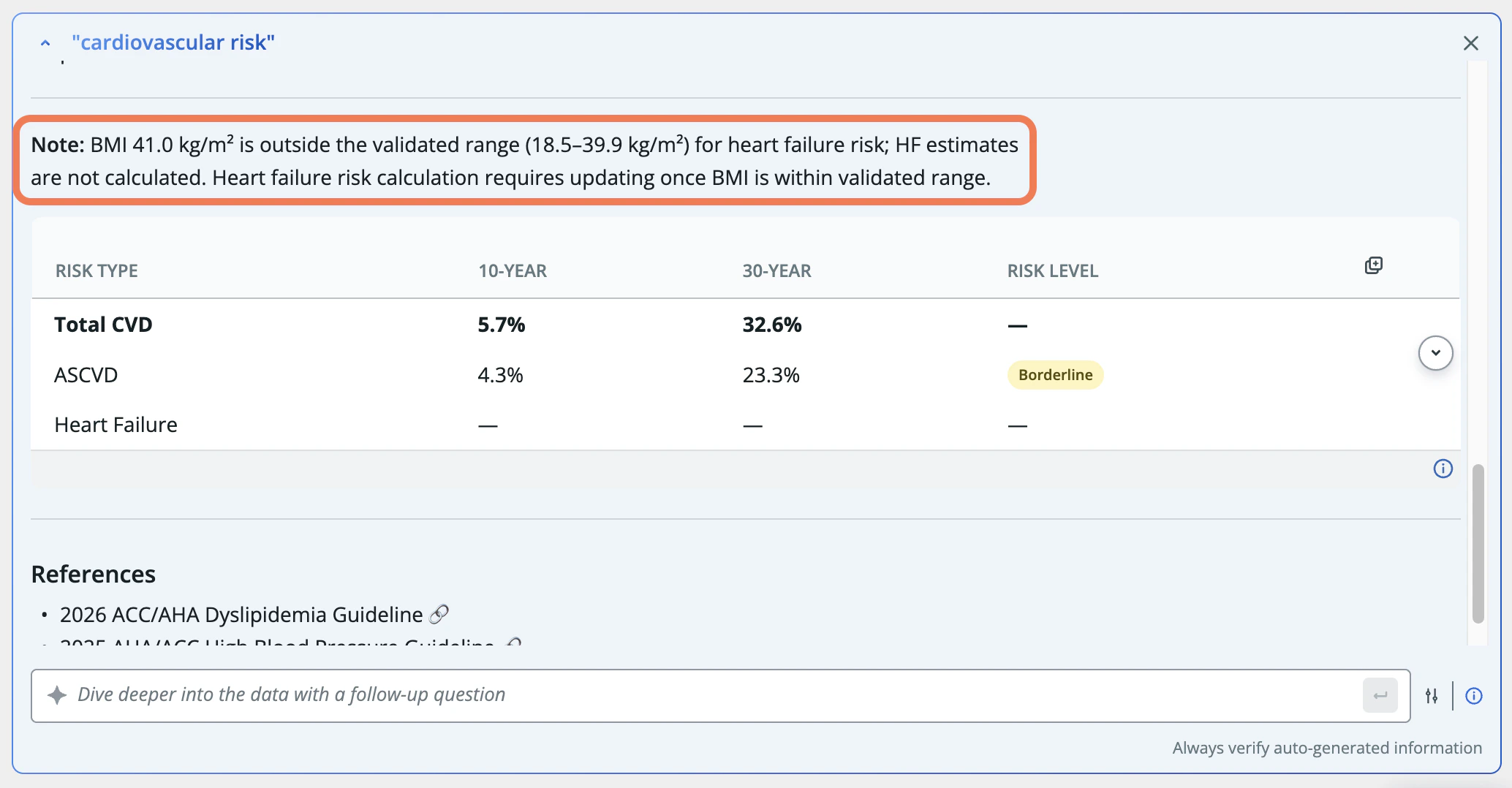
PREVENT™ may be used as a screening and shared decision-making tool to help determine a person's potential risk of cardiovascular disease, atherosclerotic cardiovascular disease, and heart failure, as well as to evaluate treatment decisions between a patient and their healthcare professional. PREVENT™ results include:
* Risk category
* Low Risk, Borderline Risk, Intermediate Risk, or High Risk
* 10-year and 30-year risk estimates for total cardiovascular disease (CVD), atherosclerotic cardiovascular disease (ASCVD), and heart failure (HF).
* Clinical guidance based on the results
* AHA/ACC-aligned guidance for statin therapy, blood pressure treatment, lifestyle modifications, kidney and diabetes considerations, and heart failure notes
* A summary of the current status of the patient's condition.
### Copying PREVENT™ results
Click the copy icon to copy PREVENT™ results and then paste them into notes or letters.
 ## Missing or out-of-range data
### Missing inputs
If some inputs are missing (e.g., HbA1c or UACR), PREVENT™ uses the appropriate base model or adjusted model (base + HbA1c, base + UACR) to calculate risk where mathematically valid. This matches the behavior of the official AHA online calculator.
### Out-of-range values
If a patient's values fall outside the PREVENT™-indicated range, Elation flags the out-of-range condition, runs the calculation using the nearest in-range values, and labels the results as directional. The calculation is not blocked.
## Missing or out-of-range data
### Missing inputs
If some inputs are missing (e.g., HbA1c or UACR), PREVENT™ uses the appropriate base model or adjusted model (base + HbA1c, base + UACR) to calculate risk where mathematically valid. This matches the behavior of the official AHA online calculator.
### Out-of-range values
If a patient's values fall outside the PREVENT™-indicated range, Elation flags the out-of-range condition, runs the calculation using the nearest in-range values, and labels the results as directional. The calculation is not blocked.
 ## Resources
[American Heart Association PREVENTᵀᴹ Equations Frequently Asked Questions](https://professional.heart.org/en/-/media/PHD-Files/Guidelines-and-Statements/PREVENT/PREVENT-FAQs-FINAL.pdf?sc_lang=en)
## Frequently Asked Questions
### Can I use PREVENT™ for patients already on statins or blood pressure medications?
Yes. PREVENT™ accepts medication status inputs. Guidance messaging differentiates patients on vs. not on statins or antihypertensives, focusing on treatment intensity and monitoring rather than initiation alone.
### Can I request other risk calculators (e.g., ASCVD pooled cohort)?
Not yet. PREVENT™ is the only integrated calculator available. For other tools, use MDCalc in the meantime. Additional calculators may be added in the future.
### Where are PREVENT™ results stored?
During each calculation session, results can be accessed via the calculator dialog or Elation AI and copied directly into notes or messages.
The PREVENT™ equations were developed by select members of the American Heart Association Cardiovascular-Kidney-Metabolic Scientific Advisory Group. The risk equations were derived and validated in a large, diverse sample of over 6 million individuals.\[1], \[2]
The information derived from the use of PREVENT™ is based on PREVENT™ 1.0.0. Updates and future adaptations of PREVENTᵀᴹ may yield different results and conclusions.
\[1] Khan SS, Matsushita K, Sang Y, et al. Development and Validation of the American Heart Association Predicting Risk of Cardiovascular Disease EVENTs (PREVENT™) Equations. Circulation 2023. DOI: [10.1161/CIRCULATIONAHA.123.067626](https://www.ahajournals.org/doi/10.1161/CIRCULATIONAHA.123.067626)(link opens in new window).
\[2] Khan SS, Coresh J, Pencina MJ, et al. Novel Prediction Equations for Absolute Risk Assessment of Total Cardiovascular Disease Incorporating Cardiovascular-Kidney-Metabolic Health: A Scientific Statement From the American Heart Association. Circulation 2023;148(24):1982-2004. DOI: [10.1161/CIR.0000000000001191](https://www.ahajournals.org/doi/10.1161/CIR.0000000000001191)(link opens in new window).
## Related Articles
[Chronological Record Guide - Searching for records in the patient's chart](/articles/using-the-search-tool-in-your-patient-chart#what-is-elation-ai)
[Predictive Decision Support Interventions](https://help.elationhealth.com/articles/Decision-Support-Interventions-Regulatory-Documentation)
## Resources
[American Heart Association PREVENTᵀᴹ Equations Frequently Asked Questions](https://professional.heart.org/en/-/media/PHD-Files/Guidelines-and-Statements/PREVENT/PREVENT-FAQs-FINAL.pdf?sc_lang=en)
## Frequently Asked Questions
### Can I use PREVENT™ for patients already on statins or blood pressure medications?
Yes. PREVENT™ accepts medication status inputs. Guidance messaging differentiates patients on vs. not on statins or antihypertensives, focusing on treatment intensity and monitoring rather than initiation alone.
### Can I request other risk calculators (e.g., ASCVD pooled cohort)?
Not yet. PREVENT™ is the only integrated calculator available. For other tools, use MDCalc in the meantime. Additional calculators may be added in the future.
### Where are PREVENT™ results stored?
During each calculation session, results can be accessed via the calculator dialog or Elation AI and copied directly into notes or messages.
The PREVENT™ equations were developed by select members of the American Heart Association Cardiovascular-Kidney-Metabolic Scientific Advisory Group. The risk equations were derived and validated in a large, diverse sample of over 6 million individuals.\[1], \[2]
The information derived from the use of PREVENT™ is based on PREVENT™ 1.0.0. Updates and future adaptations of PREVENTᵀᴹ may yield different results and conclusions.
\[1] Khan SS, Matsushita K, Sang Y, et al. Development and Validation of the American Heart Association Predicting Risk of Cardiovascular Disease EVENTs (PREVENT™) Equations. Circulation 2023. DOI: [10.1161/CIRCULATIONAHA.123.067626](https://www.ahajournals.org/doi/10.1161/CIRCULATIONAHA.123.067626)(link opens in new window).
\[2] Khan SS, Coresh J, Pencina MJ, et al. Novel Prediction Equations for Absolute Risk Assessment of Total Cardiovascular Disease Incorporating Cardiovascular-Kidney-Metabolic Health: A Scientific Statement From the American Heart Association. Circulation 2023;148(24):1982-2004. DOI: [10.1161/CIR.0000000000001191](https://www.ahajournals.org/doi/10.1161/CIR.0000000000001191)(link opens in new window).
## Related Articles
[Chronological Record Guide - Searching for records in the patient's chart](/articles/using-the-search-tool-in-your-patient-chart#what-is-elation-ai)
[Predictive Decision Support Interventions](https://help.elationhealth.com/articles/Decision-Support-Interventions-Regulatory-Documentation)