> ## Documentation Index
> Fetch the complete documentation index at: https://help.elationhealth.com/llms.txt
> Use this file to discover all available pages before exploring further.
# Prescriptions Guide - Delivering prescription reminders to patients through RxInform
## Overview
### What is RxInform?
[RxInform](https://www.rxinform.org/) is a tool from DrFirst that delivers SMS messages with prescription details, educational content, and cost-saving information to patients after an ePrescription is sent from Elation.
### What are the benefits of using RxInform with Elation?
Since 2016, over 50 million patients have received prescription-related texts via RxInform, with more than 95% expressing satisfaction. Integrating RxInform with Elation helps patients adhere to their medication schedules by notifying them when their prescriptions are ready for pickup and simplifies the process of sharing discount information.
### How does RxInform work?
When you send an ePrescription from Elation for an eligible patient and prescription, the patient receives an SMS prescription reminder from the number **64556**. The message includes:
* Your practice name
* A secure link to the RxInform portal containing medication details, instructions, and discount offers.
## Setup
Only Admin Level Users can configure this feature. [Click here to learn more about administrative privileges](/articles/administrative-privileges).
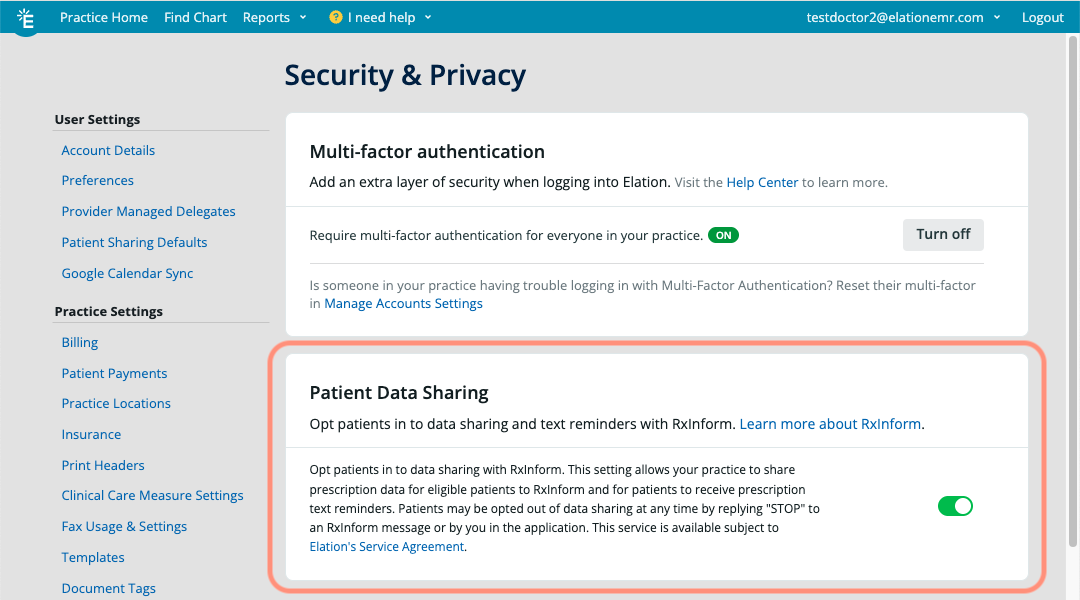
### Opting in or out of using RxInform
To view or update your opt-in status:
| **1** | Navigate to **Settings** > **Security & Privacy** . |
| ----- | --------------------------------------------------------- |
| **2** | Scroll to **Patient Data Sharing** . |
| **3** | Toggle **Patient Data Sharing** ON (green) or OFF (grey). |
 ### Determining patient eligibility
To receive RxInform texts, patients must:
* Be 18 years or older.
* Have an SMS-capable mobile number on file (must be categorized as **Mobile** in the patient’s demographics).
A guardian cannot receive prescription reminders on behalf of a minor, even if the minor has an SMS-capable mobile number on file.
## Workflow Instructions
### Managing patient consent preferences
To update the patient’s reminder preference:
| **1** | Open the patient’s chart. |
| ----- | ---------------------------------------------------------------------------------------------- |
| **2** | Click the patient’s name to open their Demographics. |
| **3** | Under **Contact Preferences** , check or uncheck the box labeled **Opt-out of Rx reminders** . |
| **4** | Click **Save** . |
Once your practice opts into RxInform under Settings, all patients will automatically be opted into receiving SMS from RxInform. If a patient decides to opt out, you can still send a one-time prescription reminder using the workflow in the following section.
### Opting-in a patient while prescribing
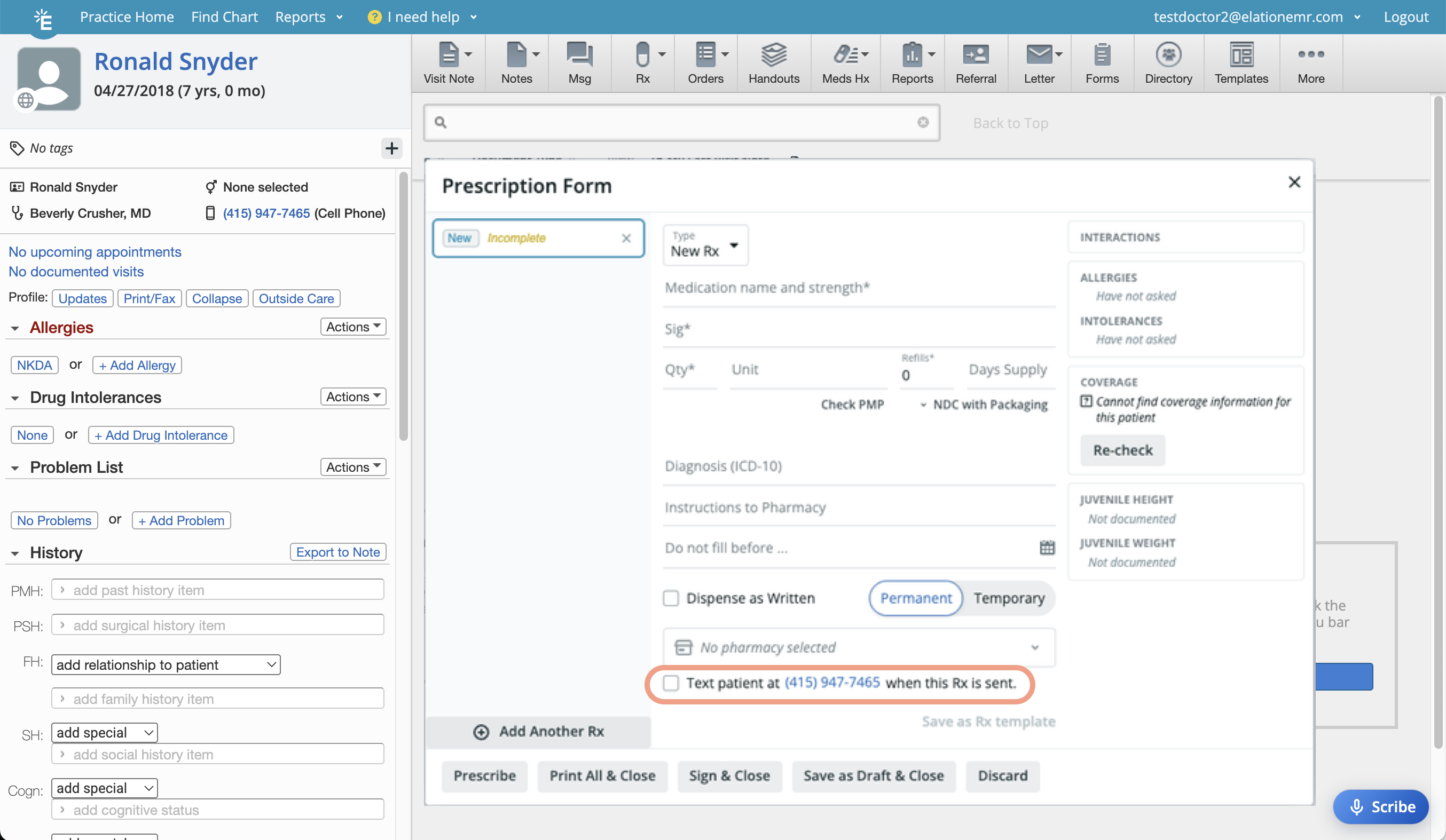
If a patient has opted out of prescription reminders, you can still send a one-time reminder by selecting the **Text patient at \[number] when this Rx is sent** checkbox when [ePrescribing](/articles/Prescriptions-Forms-Guide-ePrescribing-and-ordering-meds).
If the patient does not have a Mobile phone number on file at the time, you will see the option **Add a mobile number to text patient Rx Reminders**. Click it to add a mobile number in the patient’s demographics.
### Determining patient eligibility
To receive RxInform texts, patients must:
* Be 18 years or older.
* Have an SMS-capable mobile number on file (must be categorized as **Mobile** in the patient’s demographics).
A guardian cannot receive prescription reminders on behalf of a minor, even if the minor has an SMS-capable mobile number on file.
## Workflow Instructions
### Managing patient consent preferences
To update the patient’s reminder preference:
| **1** | Open the patient’s chart. |
| ----- | ---------------------------------------------------------------------------------------------- |
| **2** | Click the patient’s name to open their Demographics. |
| **3** | Under **Contact Preferences** , check or uncheck the box labeled **Opt-out of Rx reminders** . |
| **4** | Click **Save** . |
Once your practice opts into RxInform under Settings, all patients will automatically be opted into receiving SMS from RxInform. If a patient decides to opt out, you can still send a one-time prescription reminder using the workflow in the following section.
### Opting-in a patient while prescribing
If a patient has opted out of prescription reminders, you can still send a one-time reminder by selecting the **Text patient at \[number] when this Rx is sent** checkbox when [ePrescribing](/articles/Prescriptions-Forms-Guide-ePrescribing-and-ordering-meds).
If the patient does not have a Mobile phone number on file at the time, you will see the option **Add a mobile number to text patient Rx Reminders**. Click it to add a mobile number in the patient’s demographics.
 ### Interacting with RxInform (Patient’s perspective)
#### Viewing prescription reminders
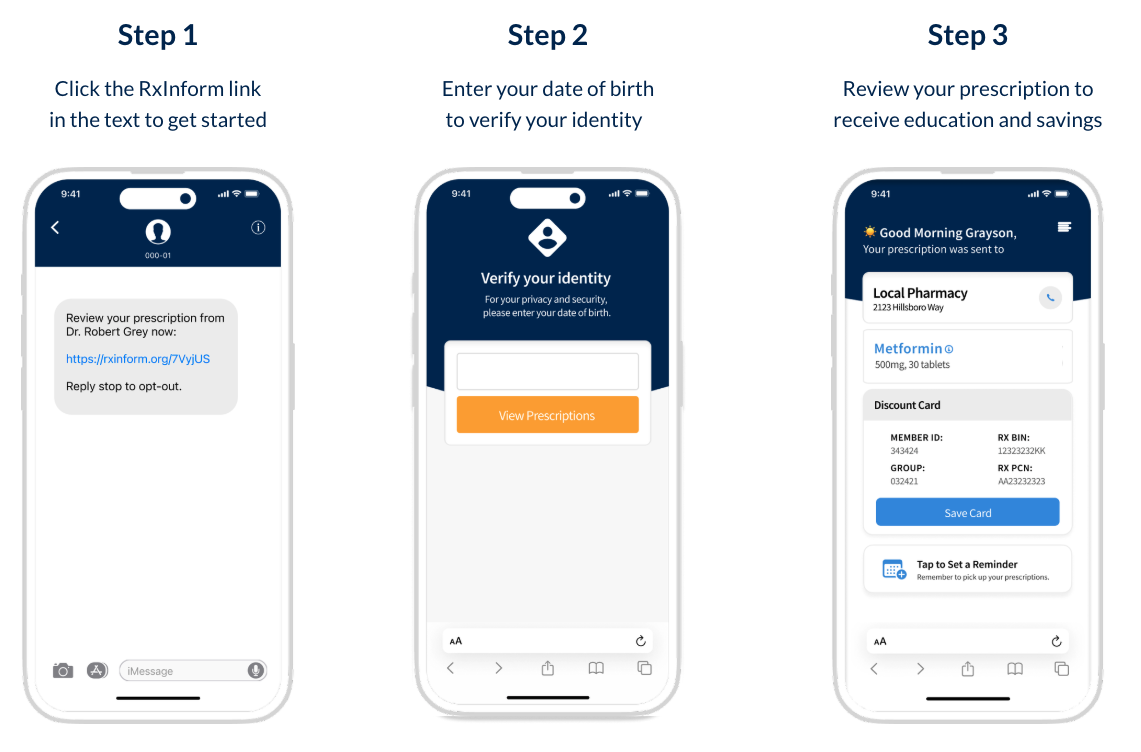
After you sign an ePrescription in Elation, an SMS prescription reminder is sent to the patient from the number **64556** with:
* Your practice name
* A secure link to the RxInform Portal.
When patients click the secure link, it will open in their device’s default browser. They’ll need to enter their date of birth (MM/DD/YYYY) to verify their identity to view their prescription details, instructions, and any discount offers. If there are multiple prescriptions, they can access them by tapping the **hamburger menu** → **Prescriptions**.
### Interacting with RxInform (Patient’s perspective)
#### Viewing prescription reminders
After you sign an ePrescription in Elation, an SMS prescription reminder is sent to the patient from the number **64556** with:
* Your practice name
* A secure link to the RxInform Portal.
When patients click the secure link, it will open in their device’s default browser. They’ll need to enter their date of birth (MM/DD/YYYY) to verify their identity to view their prescription details, instructions, and any discount offers. If there are multiple prescriptions, they can access them by tapping the **hamburger menu** → **Prescriptions**.
 #### Updating contact preferences
If a patient wants:
* To opt-out of receiving prescription reminders on their own, text **STOP** to **64556** or reply to a prescription reminder with the word **STOP**.
* To opt back in, text **START** to the same number.
* To receive communications in Spanish, reply to a prescription reminder with the word **Si**.
If the same mobile number is saved to multiple Elation charts, opting out will apply to all of the charts that have this number.
## Resources
* [Overview of patient experience with reminders](/files/rx-reminders-patient-overview.pdf)
* [1 Page Poster Version 1](/files/rx-reminders-poster-v1.pdf)
* [1 Page Poster Version 2](/files/rx-reminders-poster-v2.pdf)
## Frequently Asked Questions
### Are RxInform messages secure?
RxInform is HIPAA-compliant and no PHI is stored on the patient’s phone.
### What phone number do RxInform texts come from?
All RxInform messages are sent from **64556**.
### Can patients receive messages in other languages?
Only English and Spanish are supported. Patients can reply **Si** to any prescription reminder to switch the language to Spanish.
### What happens when a patient opts out of receiving messages from RxInform?
Once a patient opts-out from RxInform, they will no longer receive any prescription reminders until they opt-in again.
### Can I customize the text in prescription reminders?
No, the prescription reminders text, format, and branding cannot be customized.
### Can a guardian receive prescription reminders on behalf of a minor?
No, a guardian cannot receive prescription reminders on behalf of a minor.
### One of my patients is having trouble accessing the RxInform Portal, what should they do?
If the patient is having trouble accessing the RxInform Portal, try the following troubleshooting steps:
1. Check that your practice has the correct date of birth and name stored for the patient.
2. Make sure the patient is entering the date of birth using the MM/DD/YYYY (month/day/year) format.
* If the patient fails to enter the correct date of birth 3 times, then they will be prompted to enter their first name.
If all of the above fails, contact us using the **I need help** → **Contact Elation Support** button and we will reach out to RxInform for assistance.
## Related Articles
* [Prescription Form Guide- ePrescribing and ordering medications](/articles/Prescriptions-Forms-Guide-ePrescribing-and-ordering-meds)
#### Updating contact preferences
If a patient wants:
* To opt-out of receiving prescription reminders on their own, text **STOP** to **64556** or reply to a prescription reminder with the word **STOP**.
* To opt back in, text **START** to the same number.
* To receive communications in Spanish, reply to a prescription reminder with the word **Si**.
If the same mobile number is saved to multiple Elation charts, opting out will apply to all of the charts that have this number.
## Resources
* [Overview of patient experience with reminders](/files/rx-reminders-patient-overview.pdf)
* [1 Page Poster Version 1](/files/rx-reminders-poster-v1.pdf)
* [1 Page Poster Version 2](/files/rx-reminders-poster-v2.pdf)
## Frequently Asked Questions
### Are RxInform messages secure?
RxInform is HIPAA-compliant and no PHI is stored on the patient’s phone.
### What phone number do RxInform texts come from?
All RxInform messages are sent from **64556**.
### Can patients receive messages in other languages?
Only English and Spanish are supported. Patients can reply **Si** to any prescription reminder to switch the language to Spanish.
### What happens when a patient opts out of receiving messages from RxInform?
Once a patient opts-out from RxInform, they will no longer receive any prescription reminders until they opt-in again.
### Can I customize the text in prescription reminders?
No, the prescription reminders text, format, and branding cannot be customized.
### Can a guardian receive prescription reminders on behalf of a minor?
No, a guardian cannot receive prescription reminders on behalf of a minor.
### One of my patients is having trouble accessing the RxInform Portal, what should they do?
If the patient is having trouble accessing the RxInform Portal, try the following troubleshooting steps:
1. Check that your practice has the correct date of birth and name stored for the patient.
2. Make sure the patient is entering the date of birth using the MM/DD/YYYY (month/day/year) format.
* If the patient fails to enter the correct date of birth 3 times, then they will be prompted to enter their first name.
If all of the above fails, contact us using the **I need help** → **Contact Elation Support** button and we will reach out to RxInform for assistance.
## Related Articles
* [Prescription Form Guide- ePrescribing and ordering medications](/articles/Prescriptions-Forms-Guide-ePrescribing-and-ordering-meds)