> ## Documentation Index
> Fetch the complete documentation index at: https://help.elationhealth.com/llms.txt
> Use this file to discover all available pages before exploring further.
# Manually Applying a Patient Payment
> Learn how to manually apply patient payments to claims in Elation Billing
This article explains how to manually apply patient payments to claims in Elation Billing.
## Overview
Elation EHR + Billing practices with Integrated Payments will automatically have copayments collected in the EHR posted to Elation Billing.
While copays typically apply automatically (if the Copay's Payment Date matches the DOS and once balance responsibility is transferred to the patient), there may be cause to manually apply the copay to a Superbill.
## Workflow Instructions
### Step 1 - Navigate to the Payment
#### From the Superbill (Copay only)
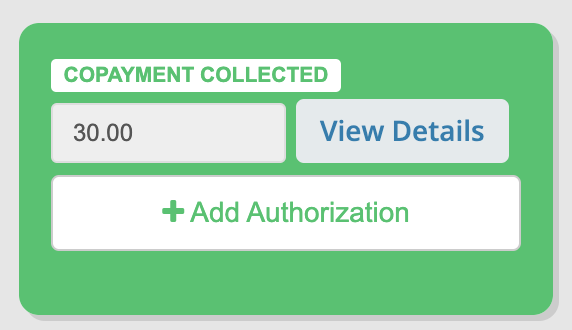
Within the Superbill's **Copayment Collected** box, select **View Details**.
 #### From Patient History
From the Patient's Page, view their History for a full list of Patient Payments.
#### From Payments
From **Payments**, search for the Patient.
***
### Step 2 - Add Claims to the Payment
Select **View Patient Claims**.
#### From Patient History
From the Patient's Page, view their History for a full list of Patient Payments.
#### From Payments
From **Payments**, search for the Patient.
***
### Step 2 - Add Claims to the Payment
Select **View Patient Claims**.
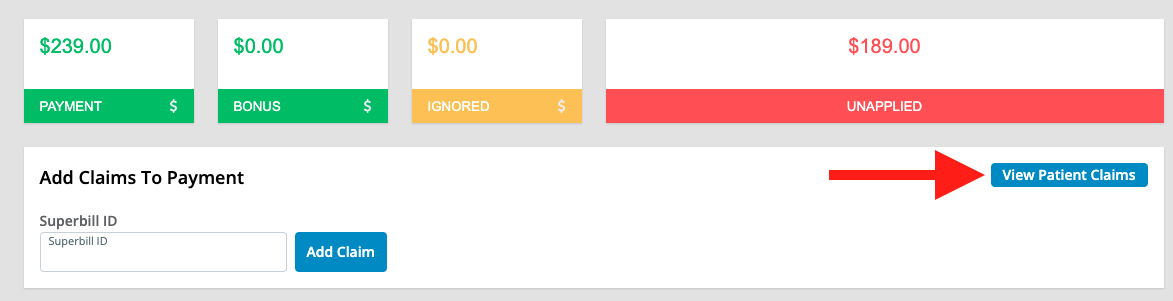 View all patient claims with Balance Responsibility. Select the Claim(s) to add to the Payment.
 Alternatively, add claims by entering the superbill number and clicking **+ Claims**.
 ***
### Step 3 - Use Quick Links
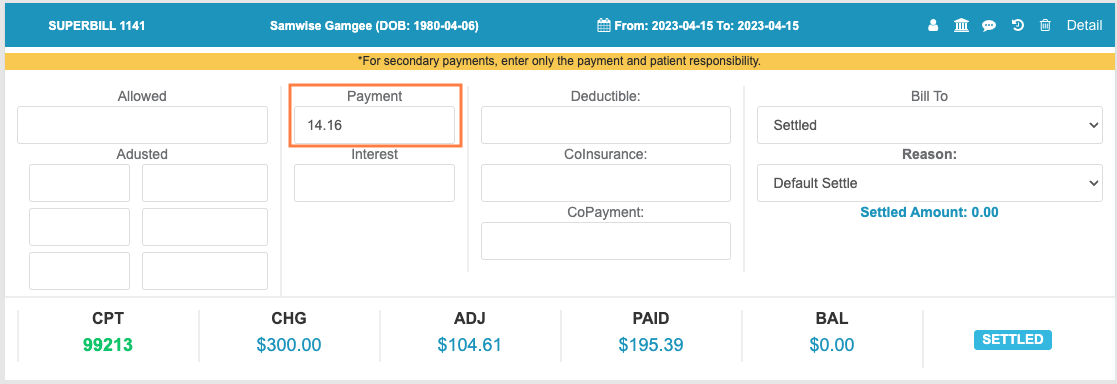
Click quick links in the blue claim header to open the superbill, patient, view claim history, or delete the claim from the payment.
***
### Step 3 - Use Quick Links
Click quick links in the blue claim header to open the superbill, patient, view claim history, or delete the claim from the payment.
 ***
### Step 4 - Apply the Payment
We do not advise applying Patient payments before Insurance payments have been applied.
Add the payment amount in the **Payment** field.
***
### Step 4 - Apply the Payment
We do not advise applying Patient payments before Insurance payments have been applied.
Add the payment amount in the **Payment** field.
 ***
### Step 5 - Set Bill To
Designate where the claim will be routed next. If the balance is fully covered, the claim will likely be Settled.
***
### Step 6 - Save the Payment
When the patient's payment is fully applied, the Unapplied box will show \$0.00 in green. Save the payment to apply the funds.
## Related Articles
* [Applying Patient Payments with ⚡️Apply Patient Payments](/articles/applying-patient-payments-with-apply-patient-payments)
* [Posting a Payment in Elation Billing](/articles/posting-a-payment-in-elation-billing)
***
### Step 5 - Set Bill To
Designate where the claim will be routed next. If the balance is fully covered, the claim will likely be Settled.
***
### Step 6 - Save the Payment
When the patient's payment is fully applied, the Unapplied box will show \$0.00 in green. Save the payment to apply the funds.
## Related Articles
* [Applying Patient Payments with ⚡️Apply Patient Payments](/articles/applying-patient-payments-with-apply-patient-payments)
* [Posting a Payment in Elation Billing](/articles/posting-a-payment-in-elation-billing)