> ## Documentation Index
> Fetch the complete documentation index at: https://help.elationhealth.com/llms.txt
> Use this file to discover all available pages before exploring further.
# How to Edit/Cancel an Appointment (Legacy Practices Only)
> Learn how to edit and cancel appointments in Elation Billing (Legacy)
This article explains how to edit and cancel appointments in Elation Billing for Legacy practices.
## Overview
Elation EHR + Billing Practices will use the EHR Calendar instead of the Elation Billing Calendar. This article applies to Legacy practices only.
## Workflow Instructions
### Editing or Canceling an Appointment
1. **Navigate** - Click on the **Appointment Calendar** option under the **Patients** drop-down menu.
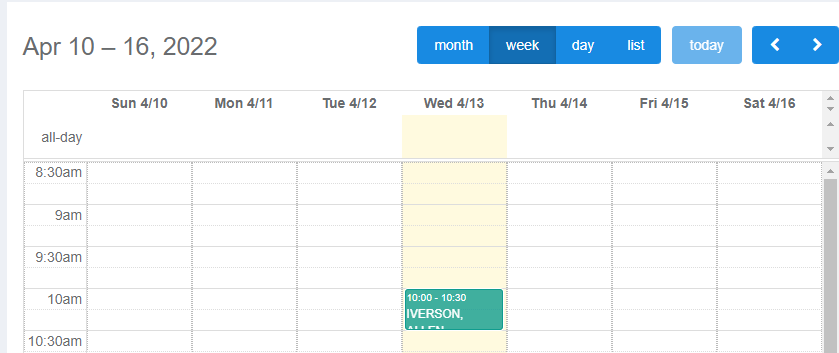
2. **Select Calendar View** - The default is by month, but viewing by week or day is easier when managing appointments.
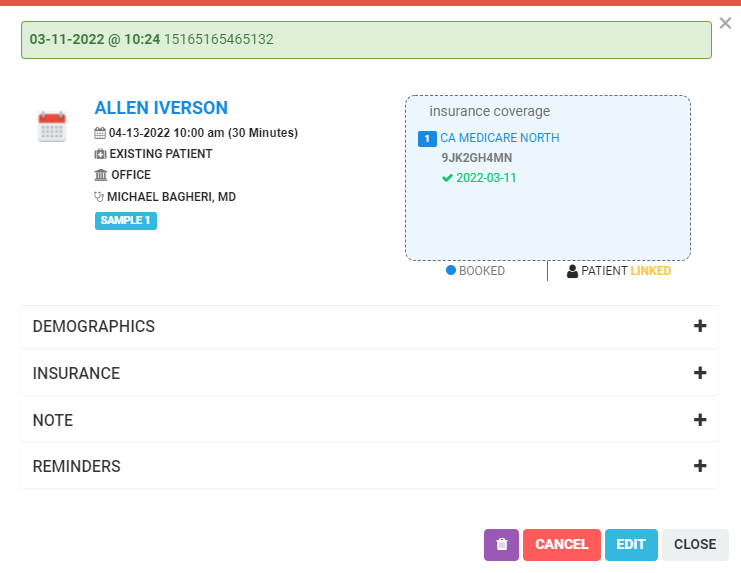
 3. **Click on an Existing Appointment** - This will open a dialogue display of your appointment.
 ***
### Available Actions
From the appointment dialogue, you can:
* View a summary of the **appointment**, **patient alerts**, **patient tags**, and a **preview of their insurance and eligibility**
* Click on the insurance drop-down to quickly run eligibility
* Click **EDIT** to make adjustments or reschedule
* Click **CANCEL** to cancel the appointment
* Click **DELETE** to delete the appointment
* Adjust the status of the appointment in the **WAITING ROOM**
## Related Articles
* [How to Create an Appointment (Legacy Practices Only)](/articles/how-to-create-an-appointment-legacy-practices-only)
* [How to Adjust Your Appointment Calendar Settings (Legacy Practices Only)](/articles/how-to-adjust-your-appointment-calendar-settings-legacy-practices-only)
* [How to Use the Waiting Room (Legacy Practices Only)](/articles/how-to-use-the-waiting-room-legacy-practices-only)
***
### Available Actions
From the appointment dialogue, you can:
* View a summary of the **appointment**, **patient alerts**, **patient tags**, and a **preview of their insurance and eligibility**
* Click on the insurance drop-down to quickly run eligibility
* Click **EDIT** to make adjustments or reschedule
* Click **CANCEL** to cancel the appointment
* Click **DELETE** to delete the appointment
* Adjust the status of the appointment in the **WAITING ROOM**
## Related Articles
* [How to Create an Appointment (Legacy Practices Only)](/articles/how-to-create-an-appointment-legacy-practices-only)
* [How to Adjust Your Appointment Calendar Settings (Legacy Practices Only)](/articles/how-to-adjust-your-appointment-calendar-settings-legacy-practices-only)
* [How to Use the Waiting Room (Legacy Practices Only)](/articles/how-to-use-the-waiting-room-legacy-practices-only)