> ## Documentation Index
> Fetch the complete documentation index at: https://help.elationhealth.com/llms.txt
> Use this file to discover all available pages before exploring further.
# View When Your Data Was Last Refreshed
## View last refresh date from the UI
Start by accessing your data by
* Viewing left navigation bar
* Clicking on Data > Databases
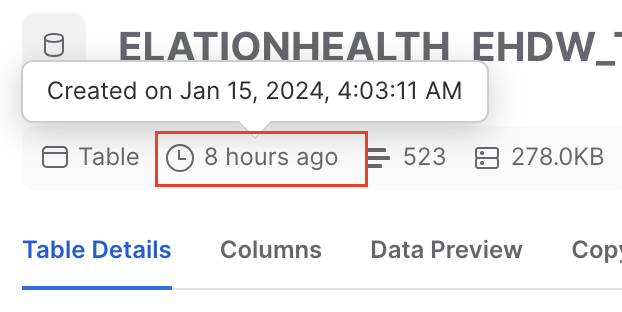
* Click on any table in the ELATIONHEALTH*EHDW* database
* Then hover over the clock icon located underneath the header.
This will tell you the last time your practice had a full refresh of your data.
 ## View last refresh data via query
You can also run the below query to get insight into when your data was last refreshed
This assumes your practice most often modifies appointments, visit note, or patient information and results the last time any of those tables were last\_modified.
```sql sql theme={null}
with visits_cte as(
select max(hdb_last_sync) as last_modified
from visit_note
)
,appointment_cte as(
select max(hdb_last_sync) as last_modified
from appointment
)
,patient_cte as(
select max(hdb_last_sync) as last_modified
from patient
)
,last_refreshed_date as(
select
*
from(
select
last_modified
from visits_cte
union all
select last_modified
from appointment_cte
union all
select last_modified
from patient_cte
)
)
select
max(last_modified) as last_refresh_date
from last_refreshed_date;
```
***
*If you have any questions about this topic please reach out to [Elation Support Portal](/articles/support-portal-introduction) with the subject line HDB - \*
## View last refresh data via query
You can also run the below query to get insight into when your data was last refreshed
This assumes your practice most often modifies appointments, visit note, or patient information and results the last time any of those tables were last\_modified.
```sql sql theme={null}
with visits_cte as(
select max(hdb_last_sync) as last_modified
from visit_note
)
,appointment_cte as(
select max(hdb_last_sync) as last_modified
from appointment
)
,patient_cte as(
select max(hdb_last_sync) as last_modified
from patient
)
,last_refreshed_date as(
select
*
from(
select
last_modified
from visits_cte
union all
select last_modified
from appointment_cte
union all
select last_modified
from patient_cte
)
)
select
max(last_modified) as last_refresh_date
from last_refreshed_date;
```
***
*If you have any questions about this topic please reach out to [Elation Support Portal](/articles/support-portal-introduction) with the subject line HDB - \*