> ## Documentation Index
> Fetch the complete documentation index at: https://help.elationhealth.com/llms.txt
> Use this file to discover all available pages before exploring further.
# Getting to Know The Software
> Introduction to Elation Billing features and workflows
This article provides an introduction to Elation Billing, including how to find support and an overview of key features.
## Elation Billing Quick Start Video
This video walks you through the basics of using Elation Billing to submit claims to payers and manage submitted claims.
## Claim Creation Workflow
## Overview
### Browser Recommendation
While Elation Billing will function in most standard internet browsers, it is optimized for use in **Google Chrome**.
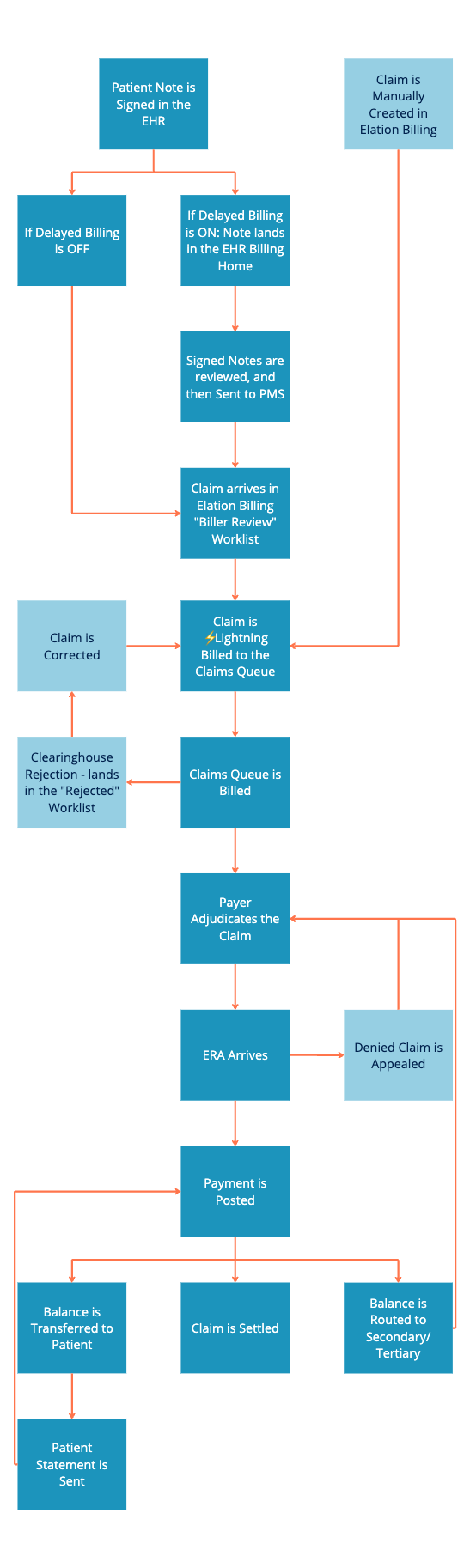
### Lifecycle of a Claim
Elation All-in-One Customers will rarely create a claim manually in Elation Billing. Manual claim creation is generally reserved for tracking payments from Capitation, Prop 56, etc.
 ## Finding Support
There are a few ways to get help with Elation Billing:
1. **Chat Support** - Click the chat bubble in the lower-right corner of any Elation Billing page.
## Finding Support
There are a few ways to get help with Elation Billing:
1. **Chat Support** - Click the chat bubble in the lower-right corner of any Elation Billing page.
 2. **Support Ticket Portal** - Use the toolbar: select **Support** → **Support Ticket Portal**.
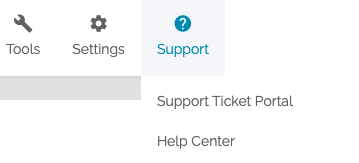 3. **Help Center** - Navigate to the Help Center's dedicated page from the Support button.
## Key Features
### Favorite Payers and EDI Enrollments
Selecting your favorite (commonly used) payers and [enrolling in their EDI](/articles/enrolling-for-claims-submission-era-and-real-time-eligibility-edi) is one of the first steps in establishing your practice.
### Claims
* **Filing a Claim** - Create superbills and submit claims. For All-in-One users, claims are generally created in the EHR by signing a Note with Billing Information.
* **Claims Queue** - Where claims land when you bill. Print paper claims, review what's ready, and transmit.
* **Claims Manager** - Manage all claims with filters and bulk updates.
* **Worklist** - Tag claims requiring further action with default or custom tags.
* **Notes and Alerts** - Leave permanent notes or temporary alerts on patients and claims.
* **Running Eligibility** - Get real-time eligibility updates for enrolled payers.
### Payments
* **Auto-Post ERAs** - Automatically generate payments from ERA data.
* **Collect Patient Payments** - Initiate collection from EHR or Elation Billing.
* **Post Payments Manually** - Full control for paper EOBs or ERAs with denials.
* **Claim Appeals** - Handle appeals from Claims Manager or Patient page.
* **Capitation Payments** - Track capitation, Prop 56, and similar payments.
### Statements and Patient Billing
* **Send Statements** - Available via mail, email, and text.
* **View and Print Statements** - Access previously sent statements.
* **Payment Plans** - Establish automatic payment plan statements.
### Reports & Tools
* **Document Center** - Upload and store files linked to Patients, Claims, or Payments.
* **⚡️Lightning Insights** - Powerful reporting tools for practice performance.
* **⚡️Lightning Reports** - Focused views of practice data.
## Related Articles
* [Filing a Claim](/articles/filing-a-claim)
* [Enrolling for Claims Submission, ERA, and Real-Time Eligibility](/articles/enrolling-for-claims-submission-era-and-real-time-eligibility-edi)
* [Posting a Payment in Elation Billing](/articles/posting-a-payment-in-elation-billing)
3. **Help Center** - Navigate to the Help Center's dedicated page from the Support button.
## Key Features
### Favorite Payers and EDI Enrollments
Selecting your favorite (commonly used) payers and [enrolling in their EDI](/articles/enrolling-for-claims-submission-era-and-real-time-eligibility-edi) is one of the first steps in establishing your practice.
### Claims
* **Filing a Claim** - Create superbills and submit claims. For All-in-One users, claims are generally created in the EHR by signing a Note with Billing Information.
* **Claims Queue** - Where claims land when you bill. Print paper claims, review what's ready, and transmit.
* **Claims Manager** - Manage all claims with filters and bulk updates.
* **Worklist** - Tag claims requiring further action with default or custom tags.
* **Notes and Alerts** - Leave permanent notes or temporary alerts on patients and claims.
* **Running Eligibility** - Get real-time eligibility updates for enrolled payers.
### Payments
* **Auto-Post ERAs** - Automatically generate payments from ERA data.
* **Collect Patient Payments** - Initiate collection from EHR or Elation Billing.
* **Post Payments Manually** - Full control for paper EOBs or ERAs with denials.
* **Claim Appeals** - Handle appeals from Claims Manager or Patient page.
* **Capitation Payments** - Track capitation, Prop 56, and similar payments.
### Statements and Patient Billing
* **Send Statements** - Available via mail, email, and text.
* **View and Print Statements** - Access previously sent statements.
* **Payment Plans** - Establish automatic payment plan statements.
### Reports & Tools
* **Document Center** - Upload and store files linked to Patients, Claims, or Payments.
* **⚡️Lightning Insights** - Powerful reporting tools for practice performance.
* **⚡️Lightning Reports** - Focused views of practice data.
## Related Articles
* [Filing a Claim](/articles/filing-a-claim)
* [Enrolling for Claims Submission, ERA, and Real-Time Eligibility](/articles/enrolling-for-claims-submission-era-and-real-time-eligibility-edi)
* [Posting a Payment in Elation Billing](/articles/posting-a-payment-in-elation-billing)