> ## Documentation Index
> Fetch the complete documentation index at: https://help.elationhealth.com/llms.txt
> Use this file to discover all available pages before exploring further.
# Fax Outbox
> A single, practice-wide view of every outbound fax, with delivery status, automatic retry progress, and one-click tools to recover failed faxes.
The Fax Outbox gives your practice one place to see every fax you've sent and to fix the ones that didn't go through.
The Fax Outbox is being rolled out to practices in stages and may not yet be enabled for your account. If you don't see it, your existing fax failure notifications in the **Urgent** inbox and the patient chart **Requiring Action** section continue to work as before.
## What is the Fax Outbox?
The Fax Outbox is a page in your Practice Home that lists every outbound fax sent from your practice — Letters, Referrals, and orders faxed to vendors — in one consolidated view. For each fax, it shows where it was going, who sent it, how many pages it was, and its current delivery status.
Before the Fax Outbox, tracking a sent fax meant checking the status on the original correspondence in the patient chart and watching for failure notifications in your **Urgent** inbox. The Fax Outbox brings all of that together: every fax from every user in the practice, with the tools to resend or correct a failed fax without recreating the original Letter or Referral.
You reach it from the **Fax Outbox** icon in the Practice Home toolbar. A badge on the icon shows how many faxes currently need your attention, so you can tell at a glance whether anything has failed.
## Why is the Fax Outbox valuable?
* **One place for the whole practice.** The Outbox shows faxes sent by everyone in the practice, not just the faxes you sent yourself — so front-office staff can monitor and recover failed faxes on a provider's behalf.
* **Know when Elation is already handling it.** Failed faxes are retried automatically. The Outbox shows which faxes are still sending, which are mid-retry, and which have run out of automatic attempts and genuinely need you.
* **Recover a fax in one click.** Resend a fax, correct a wrong fax number, or stop the automatic retries directly from the Outbox — no need to rebuild the Letter or Referral.
* **See the full history.** Open any fax to view a timeline of every send attempt, including the reason each one failed.
* **At-a-glance status.** The toolbar badge and the summary line tell you whether anything needs attention before you even open the page.
## How the Fax Outbox works
### Status buckets
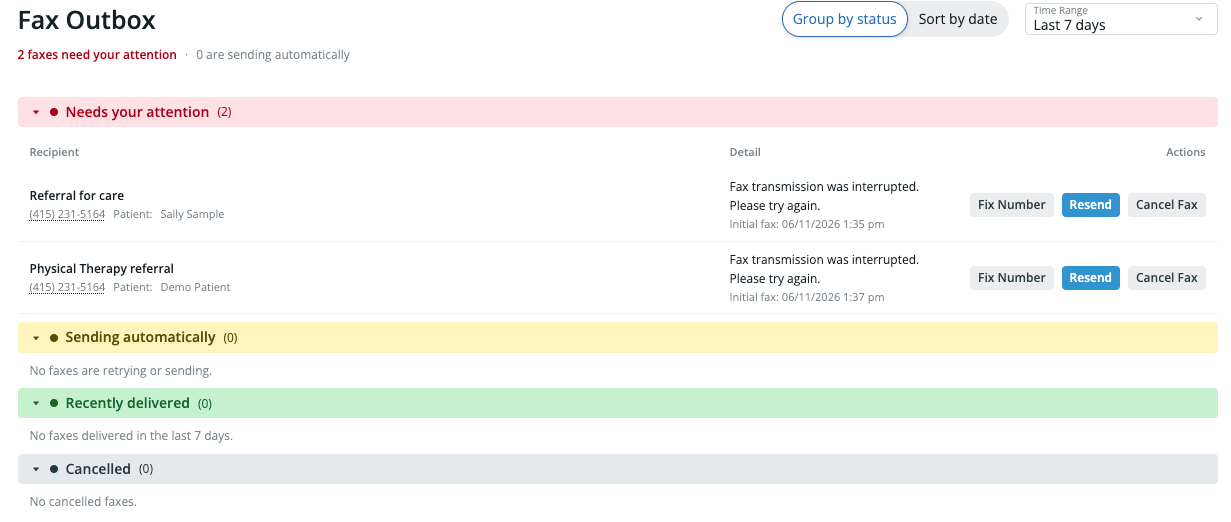
Every fax falls into one of five statuses:
| Status | What it means |
| ------------------- | --------------------------------------------------------------------------------------------------------------------- |
| **Delivered** | The fax transmitted successfully (including faxes that succeeded on an automatic retry). |
| **Sending** | The fax is currently being sent. |
| **Retrying** | A previous attempt failed and Elation is automatically trying again. |
| **Needs attention** | The fax failed and automatic retries are finished (or weren't possible). This is the bucket the toolbar badge counts. |
| **Cancelled** | Automatic retries were stopped, either by Elation or by a user. |
At the top of the page, a summary line tells you how many faxes **need your attention** and how many are **sending automatically**. When nothing is outstanding, it reads *"No faxes need your attention."*
 ### Finding a fax
* **Time range.** By default the Outbox shows the **last 7 days**. You can switch to **Last 14 days** or **Last 30 days**. (30 days is the maximum history available.)
* **Filter by number.** Click a fax number in the list to filter the view down to faxes to or from that number. Clear the filter to return to the full list.
* **Grouped or flat view.** Faxes can be grouped by recipient, or shown as a flat, date-sorted list with **Date** and **Status** columns.
### Viewing fax details and history
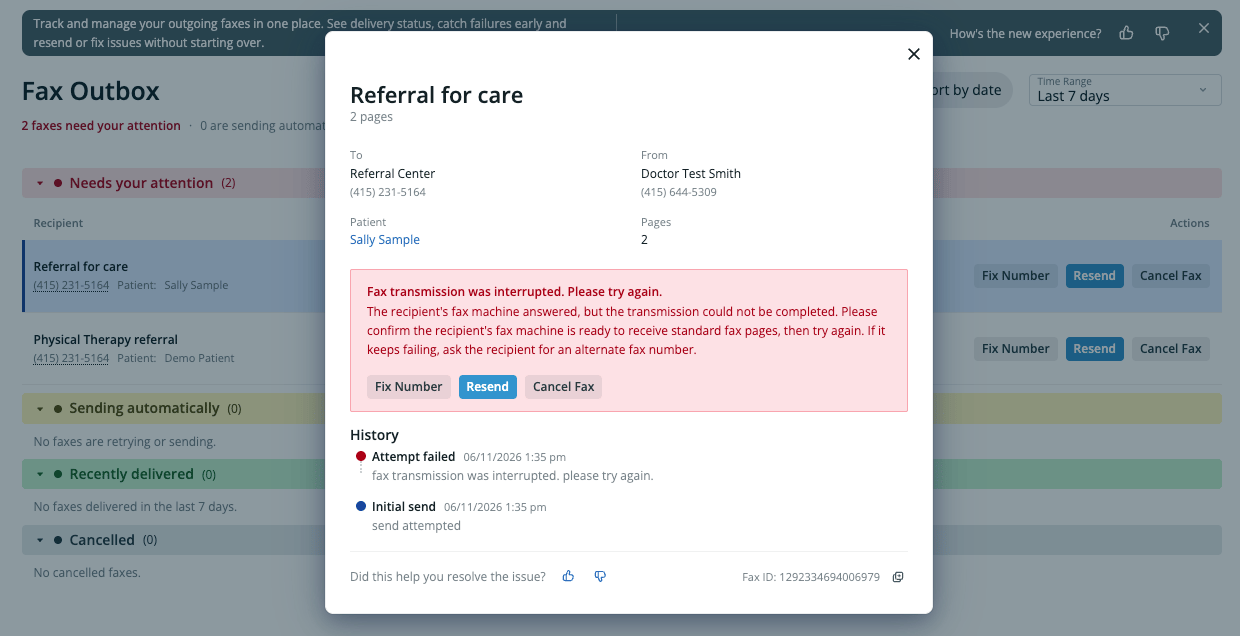
Open any fax to see its full detail, including a **history timeline** of every attempt in the retry chain — when each attempt was made, whether it was an automatic retry, and the reason any attempt failed. Because the detail view always shows the complete chain, you can trace exactly what happened even after several automatic retries.
### Finding a fax
* **Time range.** By default the Outbox shows the **last 7 days**. You can switch to **Last 14 days** or **Last 30 days**. (30 days is the maximum history available.)
* **Filter by number.** Click a fax number in the list to filter the view down to faxes to or from that number. Clear the filter to return to the full list.
* **Grouped or flat view.** Faxes can be grouped by recipient, or shown as a flat, date-sorted list with **Date** and **Status** columns.
### Viewing fax details and history
Open any fax to see its full detail, including a **history timeline** of every attempt in the retry chain — when each attempt was made, whether it was an automatic retry, and the reason any attempt failed. Because the detail view always shows the complete chain, you can trace exactly what happened even after several automatic retries.
 ### Recovering a failed fax
When a fax lands in **Needs attention**, the Outbox explains why it failed in plain language and offers the right next step:
* **Resend** — Send the fax again as-is. This is the right choice when the failure was temporary, such as a busy line, no answer, or no fax tones detected.
* **Fix number** — Correct the destination fax number and send again. This appears when the number looks wrong or disconnected. Fixing the number here changes the number for **this fax only** — it does not update the recipient's saved provider, contact, or directory records.
* **Cancel** — Stop the automatic retries and move the fax to the **Cancelled** bucket. Use this when you don't need to resend.
**Fix number** is available for faxes sent from Letters and Referrals. It isn't available for some other fax types (such as Patient Passport or clinical-profile faxes), which store their destination differently.
### Automatic retries
When a fax fails, Elation automatically tries to send it again. While that's happening the fax shows as **Retrying**, and the detail view shows how many attempts have been made and when the next one is scheduled. If every automatic attempt is exhausted without success, the fax moves to **Needs attention** so a person can decide what to do next.
Faxes that appear in the Fax Outbox **Needs attention** bucket — including those that have exhausted all automatic retries — are also surfaced in the Practice Home **Urgent** queue, so you can act on them from either location.
## Frequently Asked Questions
### Who can see the Fax Outbox?
The Fax Outbox is practice-wide. It shows faxes sent by all users in your practice, so anyone with access can monitor and recover failed faxes — not just the original sender.
### How far back does the Fax Outbox go?
It shows the last 7 days by default, and you can extend the view to 14 or 30 days. 30 days is the maximum.
### What's the difference between Resend and Fix number?
Use **Resend** when the fax number is correct and the failure was temporary (busy line, no answer, no fax tones). Use **Fix number** when the failure suggests the number is wrong or disconnected — it lets you correct the number before sending again.
### Does fixing the number update the recipient's saved record?
No. **Fix number** changes the destination for that single fax only. It does not change the recipient's provider, contact, or directory information.
### Can I resend a fax that already delivered?
Not from the Outbox. A fax that already succeeded won't offer a resend action. If you need to send the same document again, use **Re-fax** from the patient chart.
### Does the Fax Outbox replace my failure notifications?
No — it complements them. You'll still receive failure notifications in your Practice Home **Urgent** inbox and in the patient chart **Requiring Action** section. The Outbox adds a single place to see and act on all of them together.
## Related Articles
* [Letter & Referral Guide — Sending a fax](/articles/how-to-send-a-fax)
* [Troubleshooting Outbound Fax Failures in Elation EHR](/articles/Troubleshooting-Outbound-Fax-Failures-in-Elation-EHR)
* [Fax Inbox Introduction](/articles/Fax-Inbox-Introduction)
* [Letter & Referral Guide — Monitoring fax usage](/articles/fax-usage)
### Recovering a failed fax
When a fax lands in **Needs attention**, the Outbox explains why it failed in plain language and offers the right next step:
* **Resend** — Send the fax again as-is. This is the right choice when the failure was temporary, such as a busy line, no answer, or no fax tones detected.
* **Fix number** — Correct the destination fax number and send again. This appears when the number looks wrong or disconnected. Fixing the number here changes the number for **this fax only** — it does not update the recipient's saved provider, contact, or directory records.
* **Cancel** — Stop the automatic retries and move the fax to the **Cancelled** bucket. Use this when you don't need to resend.
**Fix number** is available for faxes sent from Letters and Referrals. It isn't available for some other fax types (such as Patient Passport or clinical-profile faxes), which store their destination differently.
### Automatic retries
When a fax fails, Elation automatically tries to send it again. While that's happening the fax shows as **Retrying**, and the detail view shows how many attempts have been made and when the next one is scheduled. If every automatic attempt is exhausted without success, the fax moves to **Needs attention** so a person can decide what to do next.
Faxes that appear in the Fax Outbox **Needs attention** bucket — including those that have exhausted all automatic retries — are also surfaced in the Practice Home **Urgent** queue, so you can act on them from either location.
## Frequently Asked Questions
### Who can see the Fax Outbox?
The Fax Outbox is practice-wide. It shows faxes sent by all users in your practice, so anyone with access can monitor and recover failed faxes — not just the original sender.
### How far back does the Fax Outbox go?
It shows the last 7 days by default, and you can extend the view to 14 or 30 days. 30 days is the maximum.
### What's the difference between Resend and Fix number?
Use **Resend** when the fax number is correct and the failure was temporary (busy line, no answer, no fax tones). Use **Fix number** when the failure suggests the number is wrong or disconnected — it lets you correct the number before sending again.
### Does fixing the number update the recipient's saved record?
No. **Fix number** changes the destination for that single fax only. It does not change the recipient's provider, contact, or directory information.
### Can I resend a fax that already delivered?
Not from the Outbox. A fax that already succeeded won't offer a resend action. If you need to send the same document again, use **Re-fax** from the patient chart.
### Does the Fax Outbox replace my failure notifications?
No — it complements them. You'll still receive failure notifications in your Practice Home **Urgent** inbox and in the patient chart **Requiring Action** section. The Outbox adds a single place to see and act on all of them together.
## Related Articles
* [Letter & Referral Guide — Sending a fax](/articles/how-to-send-a-fax)
* [Troubleshooting Outbound Fax Failures in Elation EHR](/articles/Troubleshooting-Outbound-Fax-Failures-in-Elation-EHR)
* [Fax Inbox Introduction](/articles/Fax-Inbox-Introduction)
* [Letter & Referral Guide — Monitoring fax usage](/articles/fax-usage)