> ## Documentation Index
> Fetch the complete documentation index at: https://help.elationhealth.com/llms.txt
> Use this file to discover all available pages before exploring further.
# Elation EHR + Billing - Collecting a Patient Payment in Elation Billing
> Learn how to collect patient payments from Elation Billing for EHR + Billing practices
This article explains the different ways to collect patient payments from within Elation Billing for Elation EHR + Billing practices.
## Overview
### What is Collecting a Patient Payment in Elation Billing?
For Elation EHR + Billing practices, there are several ways to initiate patient payment collection from Elation Billing. All paths lead back to the EHR for payment processing.
At this time, opening the Patient Payment Request dialogue from Elation Billing will not automatically open a dialogue for that specific patient. This workflow will be streamlined in the near future.
## Workflow Instructions
### Collect From the Patient's Page
1. Within the patient's Elation Billing page, select the **Collect Now** button.
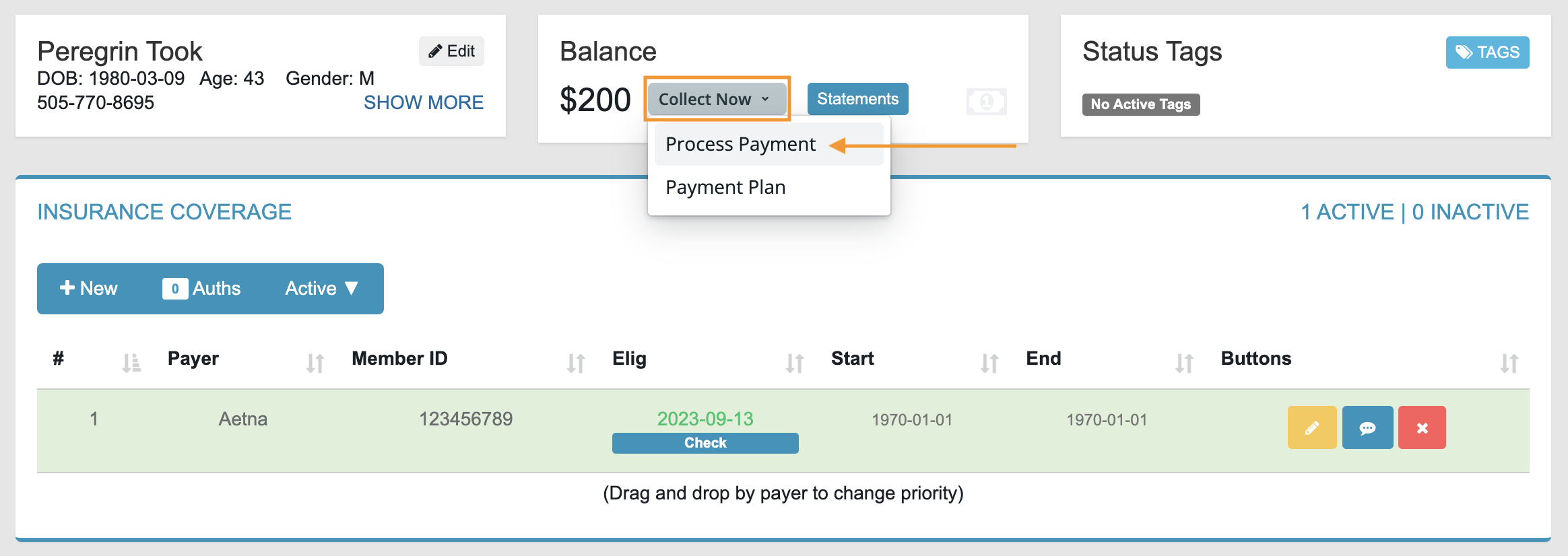 2. Select **Process Payment** to automatically open the Patient Payment tool in the EHR.
3. Follow the instructions in [Collecting a Patient Payment in the EHR](/articles/elation-ehr-billing-collecting-a-patient-payment-in-the-ehr).
***
### Collect From the Superbill
1. In the **Copayment Collected** panel, select **Collect Now** to automatically open the EHR's Patient Payment tool.
2. Make sure the Date of Payment matches the Date of Service, then follow the EHR payment instructions.
If dates don't match, the copay will not automatically apply to the claim once balance responsibility transfers to the patient. Copays can always be applied manually.
***
### Patient Pays via Elation Billing Statement (ElationPay.com)
When a patient receives an Elation Billing statement, they are directed to pay online at ElationPay.com. After entering their DOB and Account ID and reviewing their balance, they are redirected to your Practice's Payment Page.
See [Sending Statements](/articles/sending-statements) for more information.
## Related Articles
* [Elation EHR + Billing - Collecting a Patient Payment in the EHR](/articles/elation-ehr-billing-collecting-a-patient-payment-in-the-ehr)
* [Sending Statements](/articles/sending-statements)
* [Activate Online Payments](/articles/activate-online-payments)
2. Select **Process Payment** to automatically open the Patient Payment tool in the EHR.
3. Follow the instructions in [Collecting a Patient Payment in the EHR](/articles/elation-ehr-billing-collecting-a-patient-payment-in-the-ehr).
***
### Collect From the Superbill
1. In the **Copayment Collected** panel, select **Collect Now** to automatically open the EHR's Patient Payment tool.
2. Make sure the Date of Payment matches the Date of Service, then follow the EHR payment instructions.
If dates don't match, the copay will not automatically apply to the claim once balance responsibility transfers to the patient. Copays can always be applied manually.
***
### Patient Pays via Elation Billing Statement (ElationPay.com)
When a patient receives an Elation Billing statement, they are directed to pay online at ElationPay.com. After entering their DOB and Account ID and reviewing their balance, they are redirected to your Practice's Payment Page.
See [Sending Statements](/articles/sending-statements) for more information.
## Related Articles
* [Elation EHR + Billing - Collecting a Patient Payment in the EHR](/articles/elation-ehr-billing-collecting-a-patient-payment-in-the-ehr)
* [Sending Statements](/articles/sending-statements)
* [Activate Online Payments](/articles/activate-online-payments)