> ## Documentation Index
> Fetch the complete documentation index at: https://help.elationhealth.com/llms.txt
> Use this file to discover all available pages before exploring further.
# Adding an NDC
> Learn how to add National Drug Codes (NDC) to claims in Elation Billing
This article provides step-by-step instructions on how to add National Drug Codes (NDC) to claims in Elation Billing.
## Overview
### What is an NDC?
A National Drug Code (NDC) is a unique identifier for medications. NDCs are required on claims when billing for certain injectable drugs, vaccines, and other medications administered in the office.
### Why is Adding an NDC important?
Many payers require NDC information for drug-related claims. Including the correct NDC ensures proper reimbursement and helps avoid claim denials.
The NDC editor can be accessed on ANY Superbill that has at least one claim line.
## Workflow Instructions
### Adding an NDC to a Claim
1. **Click NDC** - On the Superbill's Claim lines, under the **Optional** column, select **NDC**.
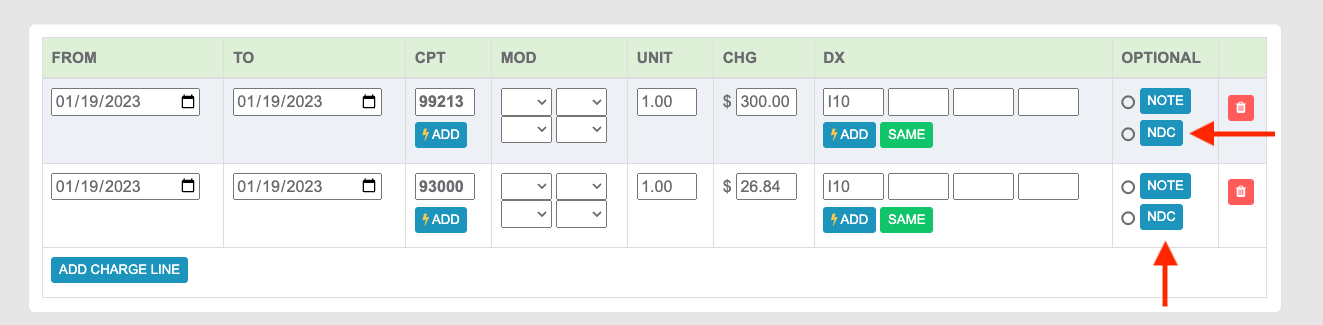 Clicking NDC will open the Charge NDC panel, which allows you to add an NDC without adding it to your Saved NDCs.
***
### Managing Saved NDCs
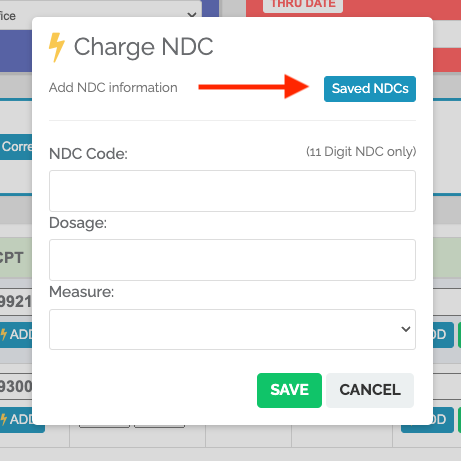
2. **View and Create NDCs** - To create new NDCs to be saved and to view your Saved NDCs, select **Saved NDCs**.
Clicking NDC will open the Charge NDC panel, which allows you to add an NDC without adding it to your Saved NDCs.
***
### Managing Saved NDCs
2. **View and Create NDCs** - To create new NDCs to be saved and to view your Saved NDCs, select **Saved NDCs**.
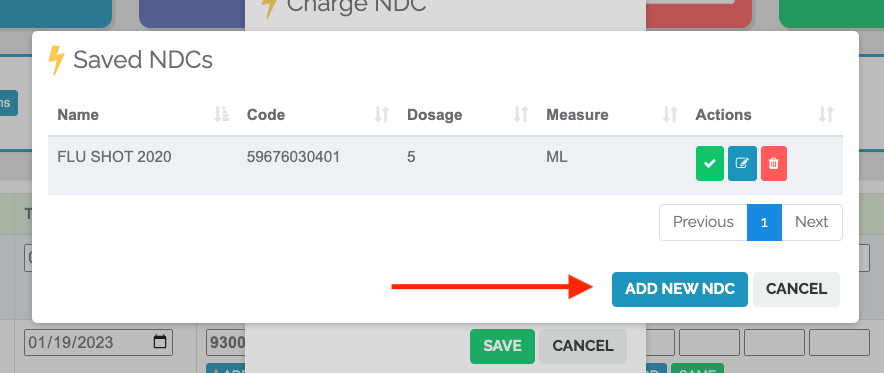
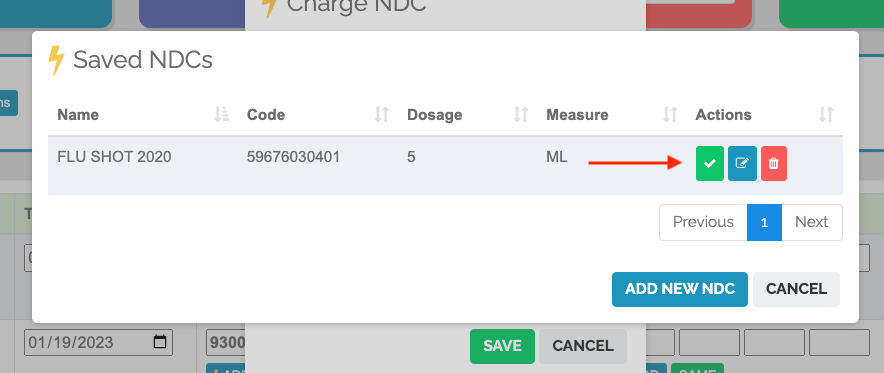
 On clicking Saved NDCs, you will see the list of NDCs on file along with the option to **ADD NEW NDC**.
The Action buttons allow you to:
* Add the NDC to the Claim Line
* Edit the NDC
* Delete an NDC
On clicking Saved NDCs, you will see the list of NDCs on file along with the option to **ADD NEW NDC**.
The Action buttons allow you to:
* Add the NDC to the Claim Line
* Edit the NDC
* Delete an NDC
 #### Adding a New NDC to Saved Codes
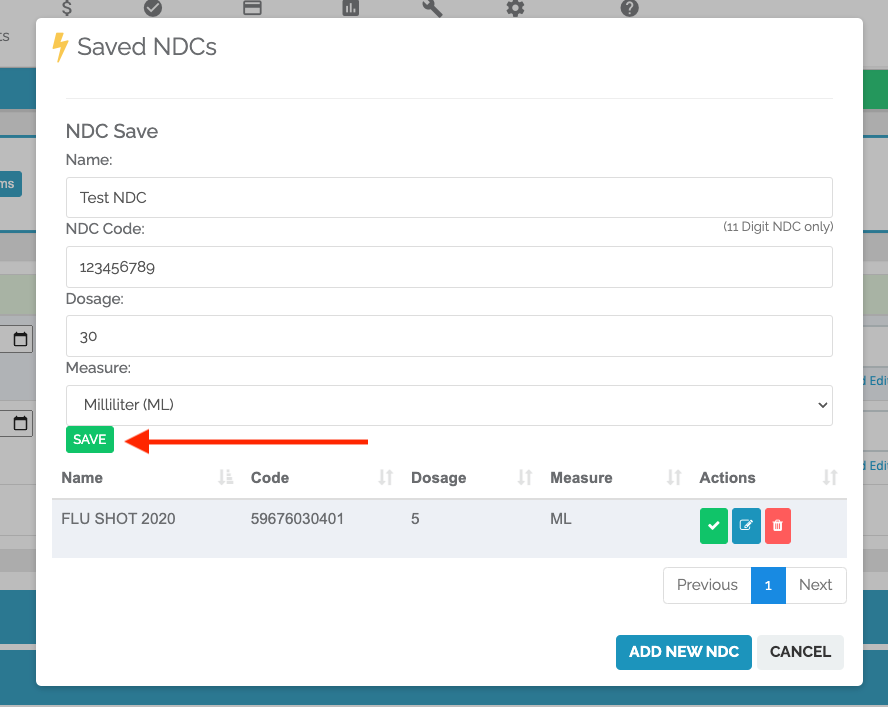
**ADD NEW NDC** unlocks the fields to add an NDC to your saved codes. The list of already-saved NDCs will still be visible. Once you've added the info for the NDC, make sure to **Save**.
#### Adding a New NDC to Saved Codes
**ADD NEW NDC** unlocks the fields to add an NDC to your saved codes. The list of already-saved NDCs will still be visible. Once you've added the info for the NDC, make sure to **Save**.
 ***
### Applying an NDC to the Superbill
3. **Add the NDC** - Click the ✅ on the NDC you'd like to add.
***
### Applying an NDC to the Superbill
3. **Add the NDC** - Click the ✅ on the NDC you'd like to add.
 ## Related Articles
* [Filing a Claim](/articles/filing-a-claim)
* [Add/Update a Fee Schedule](/articles/add-update-a-fee-schedule)
## Related Articles
* [Filing a Claim](/articles/filing-a-claim)
* [Add/Update a Fee Schedule](/articles/add-update-a-fee-schedule)