> ## Documentation Index
> Fetch the complete documentation index at: https://help.elationhealth.com/llms.txt
> Use this file to discover all available pages before exploring further.
# Add New Provider
> Learn how to add a new provider in Elation Billing
This article provides step-by-step instructions on how to add a new provider in Elation Billing.
## Overview
### What is Adding a New Provider?
Adding a new provider registers a healthcare provider in Elation Billing so they can be selected as the rendering provider on claims. Providers are added using their individual NPI (National Provider Identifier).
### Why is Adding a New Provider important?
Claims require a rendering provider to be specified. Adding providers to your practice settings ensures they appear in drop-down options when creating or editing claims on superbills.
## Workflow Instructions
### Adding a New Provider
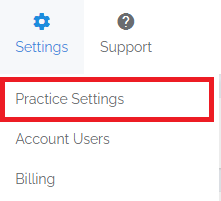
1. **Navigate** - Select the **Practice Settings** option from the **Settings** drop-down menu, then select the **Providers** tab.
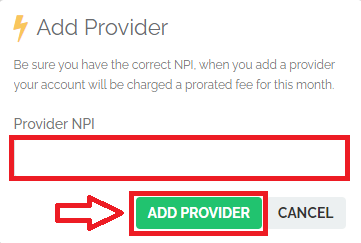
 2. **Add Provider** - Click on the **+Add Provider** button, then enter the provider's NPI (usually this is the individual NPI) and click **Add Provider** to confirm.
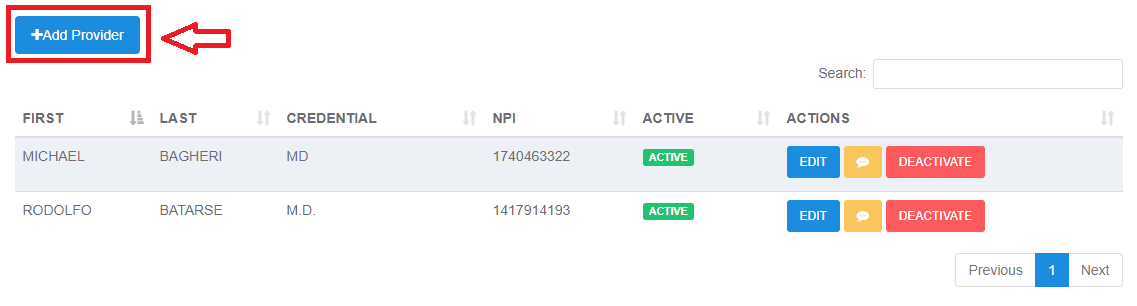
 3. **Verify Completion** - You should now see your provider on the list as well as in the drop-down options when creating or editing claims on a superbill.
## Related Articles
* [Add or Edit a Service Location](/articles/add-or-edit-a-service-location)
* [Practice Settings Setup and Overview](/articles/practice-settings-setup-and-overview)
* [Filing a Claim](/articles/filing-a-claim)
3. **Verify Completion** - You should now see your provider on the list as well as in the drop-down options when creating or editing claims on a superbill.
## Related Articles
* [Add or Edit a Service Location](/articles/add-or-edit-a-service-location)
* [Practice Settings Setup and Overview](/articles/practice-settings-setup-and-overview)
* [Filing a Claim](/articles/filing-a-claim)