> ## Documentation Index
> Fetch the complete documentation index at: https://help.elationhealth.com/llms.txt
> Use this file to discover all available pages before exploring further.
# User Accounts Guide- Chart access permission control options (Premium)
> This guide will describe the various chart access permission control options available in Elation EHR.
## Overview
### What are chart access permission controls?
Chart access permission controls allow you to prevent certain staff members from gaining unauthorized access to certain patient charts in your EHR. The various control options enable you to grant chart access to:
* exclusively the provider assigned to the chart
* certain providers or staff for specific cohorts of charts
* exclusively clinical staff for all charts
### What are the benefits of chart access permission controls?
Patient data contains sensitive information that must be protected to ensure confidentiality and comply with privacy regulations. Limiting chart access helps prevent unauthorized access, protects patient privacy, and maintains data integrity by ensuring that only authorized personnel can view or modify information.
## Workflow Instructions
Chart access permission controls are part of Elation's [Premium EHR](/articles/Premium-EHR-Features-Guide) offering. If you are already a Premium EHR user and you are interested in using any of the features listed in this article, click the **I need help** button to notify Elation and a member of the Elation Team will activate the feature for you.
If you are interested in upgrading to Premium EHR to use any of the features listed in this article, click the **I need help** -> **Contact Elation Support** button and a member of the Elation team will assist you.
There are three (3) chart access permission control options in Elation EHR:
* **VIP Charts** - Manually apply chart access restrictions to specific charts to protect patient privacy and meet compliance needs. [Click here to learn more about the VIP Charts feature](/articles/vip-chart-feature).
* **Patient Cohorts** - Automatically provision chart access permissions according to present criteria to protect patient privacy and meet compliance needs.
* [Click here to learn more about the Patient Cohorts feature](/articles/Patient-Chart-Guide-Restricting-access-to-patient-charts-based-on-patient-criteria).
* **Block All Chart Access** - Prevent specific users from accessing any patient charts.
* [Jump to the Block All Chart Access section below to learn more about the feature](#block_all_chart_access).
### Using the VIP Charts feature
The VIP Charts feature allows you to manually apply chart access restrictions to specific charts to protect patient privacy and meet compliance needs. [Click here to learn more about the VIP Charts feature](/articles/vip-chart-feature).
### Using the Patient Cohorts feature
The Patient Cohorts feature allows you to automatically provision chart access permissions according to present criteria to protect patient privacy and meet compliance needs. [Click here to learn more about the Patient Cohorts feature](/articles/Patient-Chart-Guide-Restricting-access-to-patient-charts-based-on-patient-criteria).
### Using the Block All Chart Access feature
The Block All Chart feature allows Admin Level Users to designate which users have permission to access all patient charts within the practice.
*
To use this feature, you must have [Admin level privileges](/articles/administrative-privileges) . To become an Admin, you must ask an existing Admin Level User in your practice (most likely a primary provider level account holder) to grant you privileges via the [Manage Accounts Settings Page](/articles/managing-user-accounts) .
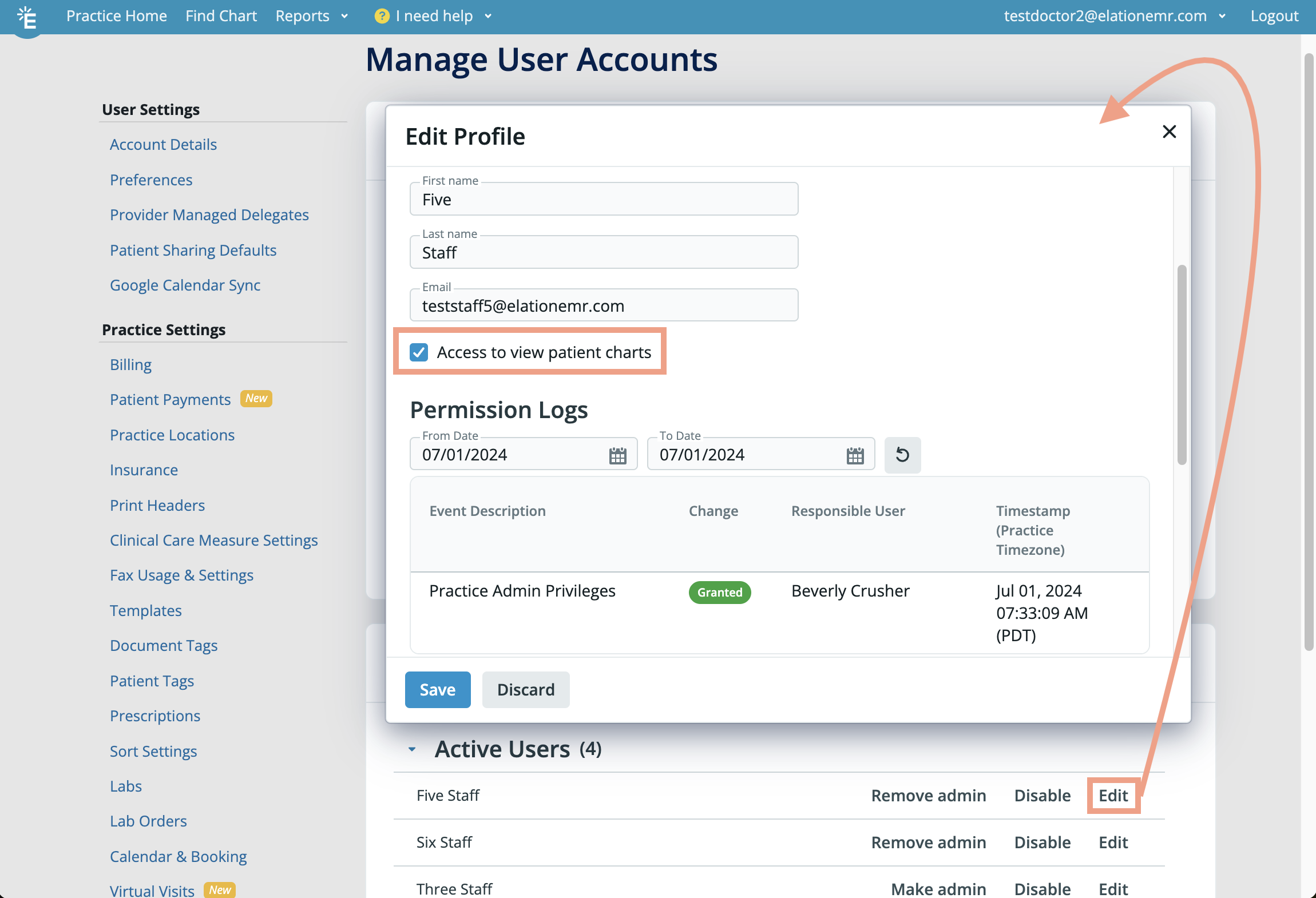 #### Revoking a user's access to all patient charts
To revoke a user's access to all patient charts:
| **1** | Go to **Settings** -> **Manage User Accounts** . |
| ----- | ----------------------------------------------------------------------------------------------------------------------- |
| **2** | Click the **Edit** button next to their name. |
| **3** | Uncheck the **Access to view charts** checkbox in the Account Details section to revoke their access to patient charts. |
| **4** | Click **Update** or **Save** to save the changes. |
Users without chart access permissions will
* see an **Unauthorized access** page when they attempt to open any patient charts.
* continue to have access to all other pages in the EHR such as the Practice Home, Reports and Settings.
#### Granting a user access to all patient charts
To grant a user access to all patient charts:
| **1** | Go to **Settings** -> **Manage User Accounts** . |
| ----- | ------------------------------------------------------------------------------------------------------------------- |
| **2** | Click the **Edit** button next to their name. |
| **3** | Check the **Access to view charts** checkbox in the Account Details section to grant them access to patient charts. |
| **4** | Click **Update** or **Save** to save the changes. |
Users with chart access permissions will be able to view patient charts as usual.
## Related Articles
* [Patient Chart Guide- Limiting access to patient charts based on patient criteria (Premium)](/articles/Patient-Chart-Guide-Restricting-access-to-patient-charts-based-on-patient-criteria)
* [Patient Chart Guide- Marking charts as VIP for restricting access (Premium)](/articles/vip-chart-feature)
* [User Accounts Guide- Administrative privileges](/articles/administrative-privileges)
* [User Accounts Guide- Managing Elation accounts for providers and staff](/articles/managing-user-accounts)
#### Revoking a user's access to all patient charts
To revoke a user's access to all patient charts:
| **1** | Go to **Settings** -> **Manage User Accounts** . |
| ----- | ----------------------------------------------------------------------------------------------------------------------- |
| **2** | Click the **Edit** button next to their name. |
| **3** | Uncheck the **Access to view charts** checkbox in the Account Details section to revoke their access to patient charts. |
| **4** | Click **Update** or **Save** to save the changes. |
Users without chart access permissions will
* see an **Unauthorized access** page when they attempt to open any patient charts.
* continue to have access to all other pages in the EHR such as the Practice Home, Reports and Settings.
#### Granting a user access to all patient charts
To grant a user access to all patient charts:
| **1** | Go to **Settings** -> **Manage User Accounts** . |
| ----- | ------------------------------------------------------------------------------------------------------------------- |
| **2** | Click the **Edit** button next to their name. |
| **3** | Check the **Access to view charts** checkbox in the Account Details section to grant them access to patient charts. |
| **4** | Click **Update** or **Save** to save the changes. |
Users with chart access permissions will be able to view patient charts as usual.
## Related Articles
* [Patient Chart Guide- Limiting access to patient charts based on patient criteria (Premium)](/articles/Patient-Chart-Guide-Restricting-access-to-patient-charts-based-on-patient-criteria)
* [Patient Chart Guide- Marking charts as VIP for restricting access (Premium)](/articles/vip-chart-feature)
* [User Accounts Guide- Administrative privileges](/articles/administrative-privileges)
* [User Accounts Guide- Managing Elation accounts for providers and staff](/articles/managing-user-accounts)