> ## Documentation Index
> Fetch the complete documentation index at: https://help.elationhealth.com/llms.txt
> Use this file to discover all available pages before exploring further.
# Medication List Management Guide - Reconciling active medications
## Overview
### What is the medication reconciliation feature?
The Medication Reconciliation feature displays all active medications for a patient and provides a streamlined workflow to document adherence and discontinue inactive medications.
AI-powered algorithms analyze patient, medication, and fill data to identify drugs that are likely no longer being taken. The data referenced by AI includes:
* Patient's problem list
* Patient risk factors (e.g. age)
* Prescription/dispensing history
### What are the benefits of the medication reconciliation feature?
The Medication Reconciliation feature streamlines the process of reviewing and updating a patient’s active medication list by consolidating all current medications into a single, easy-to-navigate workflow allowing you to make real-time updates during patient encounters, including discontinuing medications in bulk. AI-powered suggestions highlight medications that the patient may no longer be taking based on prescription fill patterns and clinical history, allowing you to make faster, more informed decisions. This improves the accuracy of the patient’s chart, supports safer prescribing, and enhances the overall quality of care.
## Workflow Instructions
### Reconciling active medications
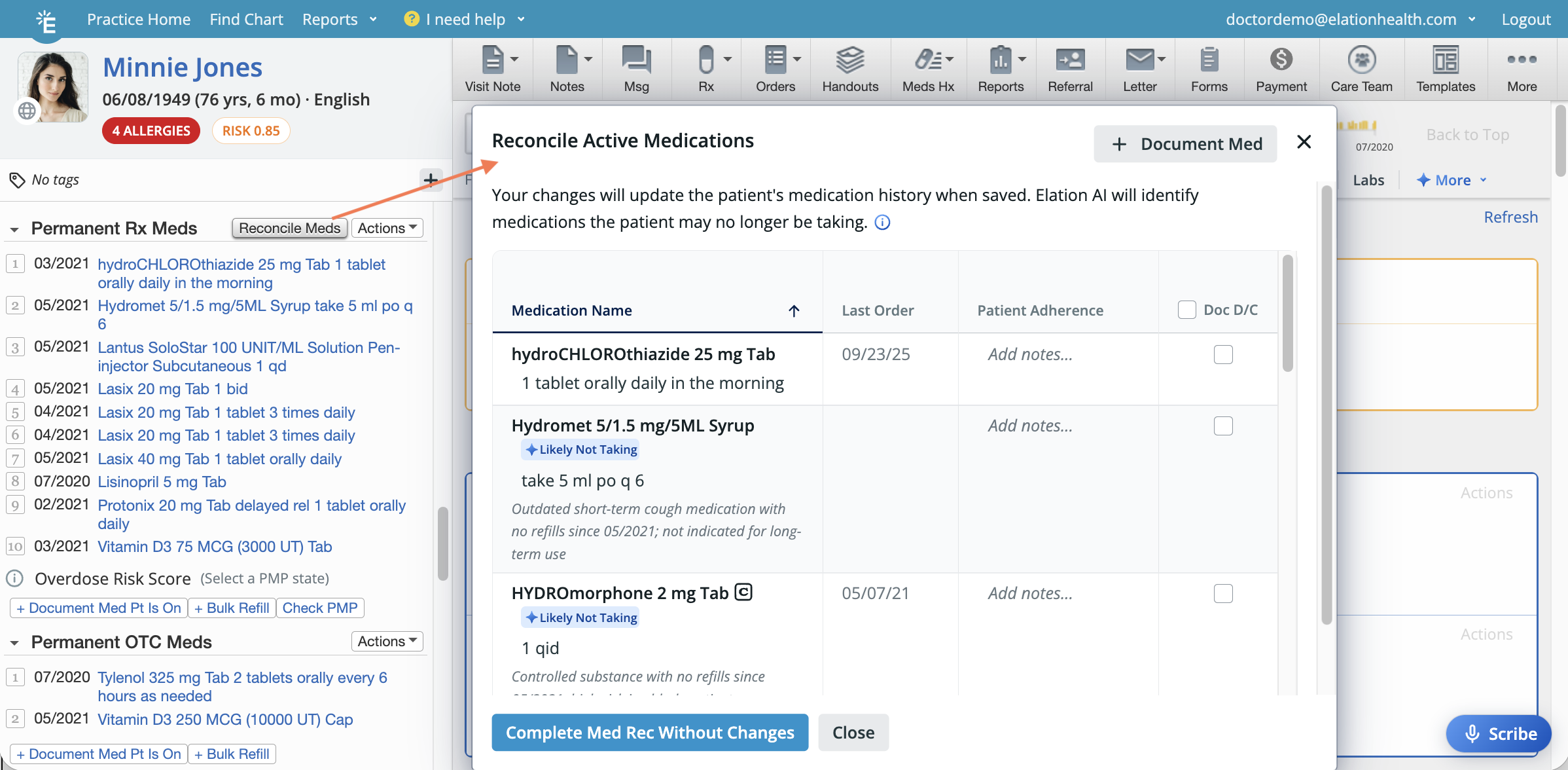 | **1** | Open the medication reconciliation window using one of these workflows: Click **Reconcile Meds** at the top of the Permanent Rx Meds section of the Clinical Profile. • Click **MedsHx** -> **Reconcile Medications**. • Click **MedsHx** -> **Medication History** -> **Reconcile Active Medications**. • Open a legacy visit note and click **Reconcile Meds**. • Open an [Elation Note](/articles/Elation-Note) and click the **Medication Reconciliation** icon in the Reconciled Medications block. |
| ----- | -------------------------------------------------------------------------------------------------------------------------------------------------------------------------------------------------------------------------------------------------------------------------------------------------------------------------------------------------------------------------------------------------------------------------------------------------------------------------------------------------------- |
| **2** | Elation AI will quickly analyze the patient’s chart to identify medications the patient may no longer be taking. Any such medications will be flagged with a **Likely Not Taking** label, accompanied by context or notes explaining why the medication was flagged. If you would like to share your feedback about the AI suggestions with Elation, click on the rating scale at the bottom of the form and provide any additional context as needed. |
| **3** | Add patient adherence notes to the **Patient Adherence** column as needed. |
| **4** | Click on the **Sig** to add, edit or remove the sig as needed. This option will not be available if the **Cancel Request** box is checked. |
| **5** | To add additional medications to the medication list, click \*\*+ Document Med \*\* at the top of the window. |
| **6** | To discontinue inactive medications, check the **Document Discontinue** box for each medication you want to continue. You can also check the box at the top of the **Doc D/C** column to select/unselect all medications at once. Select the reason for discontinuing the medication in the **Discontinue Reason** dropdown that appears. • Check the **Cancel Request** box if you want to send a cancellation request to the pharmacy — this option is only available when the following is true: |
| **7** | Click the **Complete Med Rec..** button to proceed with your changes OR **Complete Med Rec Without Changes** if no changes are needed. |
| 8 | A **Last Reconciled** date will display at the top of the Medication History section to indicate when the medication list was last reviewed and updated.
| **1** | Open the medication reconciliation window using one of these workflows: Click **Reconcile Meds** at the top of the Permanent Rx Meds section of the Clinical Profile. • Click **MedsHx** -> **Reconcile Medications**. • Click **MedsHx** -> **Medication History** -> **Reconcile Active Medications**. • Open a legacy visit note and click **Reconcile Meds**. • Open an [Elation Note](/articles/Elation-Note) and click the **Medication Reconciliation** icon in the Reconciled Medications block. |
| ----- | -------------------------------------------------------------------------------------------------------------------------------------------------------------------------------------------------------------------------------------------------------------------------------------------------------------------------------------------------------------------------------------------------------------------------------------------------------------------------------------------------------- |
| **2** | Elation AI will quickly analyze the patient’s chart to identify medications the patient may no longer be taking. Any such medications will be flagged with a **Likely Not Taking** label, accompanied by context or notes explaining why the medication was flagged. If you would like to share your feedback about the AI suggestions with Elation, click on the rating scale at the bottom of the form and provide any additional context as needed. |
| **3** | Add patient adherence notes to the **Patient Adherence** column as needed. |
| **4** | Click on the **Sig** to add, edit or remove the sig as needed. This option will not be available if the **Cancel Request** box is checked. |
| **5** | To add additional medications to the medication list, click \*\*+ Document Med \*\* at the top of the window. |
| **6** | To discontinue inactive medications, check the **Document Discontinue** box for each medication you want to continue. You can also check the box at the top of the **Doc D/C** column to select/unselect all medications at once. Select the reason for discontinuing the medication in the **Discontinue Reason** dropdown that appears. • Check the **Cancel Request** box if you want to send a cancellation request to the pharmacy — this option is only available when the following is true: |
| **7** | Click the **Complete Med Rec..** button to proceed with your changes OR **Complete Med Rec Without Changes** if no changes are needed. |
| 8 | A **Last Reconciled** date will display at the top of the Medication History section to indicate when the medication list was last reviewed and updated.  |
### What happens after completing medication reconciliation?
When you click **Complete Med Rec**, all changes you made during reconciliation are applied immediately to the patient's permanent medication list:
* Sig edits update the corresponding medication in the permanent medication list right away.
* New medications added via **+ Document Med** appear in the **Permanent Rx Meds** or **Permanent OTC Meds** section of the Clinical Profile.
* Discontinued medications move to the **Discontinued** section of the Medication History with the reason you selected.
* The **Last Reconciled** date updates at the top of the Medication History section, showing when the list was last reviewed.
* If you complete medication reconciliation while a visit note is open, the MIPS toggle to confirm a patient's active medications are documented is toggled **On**.
#### Example: Before and after medication reconciliation
| Stage | What you see |
| ------------------------------------ | -------------------------------------------------------------------------------------------------------------------------------------------------------------------------------------------- |
| **Before medication reconciliation** | *Metformin 500 mg BID* appears in **Permanent Rx Meds** in the Clinical Profile. |
| **During medication reconciliation** | You check the **Document Discontinue** box for **Metformin** and select **Patient is not taking the medication** as the reason. |
| **After medication reconciliation** | *Metformin* no longer appears in **Permanent Rx Meds** . It now appears in the **Discontinued** section of the Medication History with the reason **Patient is not taking the medication** . |
## Frequently Asked Questions
### How does the AI decide which medications to flag?
The AI flags “likely not taking” medications by reviewing medication duration, fill patterns, the problem list, and the patient's age, providing an explanation for each suggestion.
### Can I bulk discontinue medications?
Yes, select multiple active medications to apply discontinue actions in bulk. Alternatively, you can also check the box at the top of the Doc D/C column to select all medications at once.
### Can I document patient-reported adherence?
Yes, each medication thread has a free-text note field for adherence.
### Is documentation visible for audits, MIPS, or billing?
If medication reconciliation is completed while a visit note is open, the MIPS toggle to confirm a patient's active medications are documented is toggled on.
### Who can use the Medication Reconciliation feature?
Any user in the practice can complete the medication reconciliation.
### Can I open the Medication Reconciliation window from the visit note?
You can only open the Medication Reconciliation window from\*\* an [Elation Note](/articles/Elation-Note).
### Does completing medication reconciliation update the permanent medication list immediately?
Yes. When you click **Complete Med Rec**, all changes—including sig edits, new medications, and discontinuations—are saved to the patient's permanent medication list immediately. You do not need to take any additional steps for these changes to take effect.
**Related Articles**
* [Decision Support Interventions Regulatory Documentation](/articles/Decision-Support-Interventions-Regulatory-Documentation)
* [Medication List Management Guide- Documenting, discontinuing or merging medications](/articles/medication-history)
* [Elation Health - Building Clinical-First AI](/articles/Building-Clinical-First-AI)
|
### What happens after completing medication reconciliation?
When you click **Complete Med Rec**, all changes you made during reconciliation are applied immediately to the patient's permanent medication list:
* Sig edits update the corresponding medication in the permanent medication list right away.
* New medications added via **+ Document Med** appear in the **Permanent Rx Meds** or **Permanent OTC Meds** section of the Clinical Profile.
* Discontinued medications move to the **Discontinued** section of the Medication History with the reason you selected.
* The **Last Reconciled** date updates at the top of the Medication History section, showing when the list was last reviewed.
* If you complete medication reconciliation while a visit note is open, the MIPS toggle to confirm a patient's active medications are documented is toggled **On**.
#### Example: Before and after medication reconciliation
| Stage | What you see |
| ------------------------------------ | -------------------------------------------------------------------------------------------------------------------------------------------------------------------------------------------- |
| **Before medication reconciliation** | *Metformin 500 mg BID* appears in **Permanent Rx Meds** in the Clinical Profile. |
| **During medication reconciliation** | You check the **Document Discontinue** box for **Metformin** and select **Patient is not taking the medication** as the reason. |
| **After medication reconciliation** | *Metformin* no longer appears in **Permanent Rx Meds** . It now appears in the **Discontinued** section of the Medication History with the reason **Patient is not taking the medication** . |
## Frequently Asked Questions
### How does the AI decide which medications to flag?
The AI flags “likely not taking” medications by reviewing medication duration, fill patterns, the problem list, and the patient's age, providing an explanation for each suggestion.
### Can I bulk discontinue medications?
Yes, select multiple active medications to apply discontinue actions in bulk. Alternatively, you can also check the box at the top of the Doc D/C column to select all medications at once.
### Can I document patient-reported adherence?
Yes, each medication thread has a free-text note field for adherence.
### Is documentation visible for audits, MIPS, or billing?
If medication reconciliation is completed while a visit note is open, the MIPS toggle to confirm a patient's active medications are documented is toggled on.
### Who can use the Medication Reconciliation feature?
Any user in the practice can complete the medication reconciliation.
### Can I open the Medication Reconciliation window from the visit note?
You can only open the Medication Reconciliation window from\*\* an [Elation Note](/articles/Elation-Note).
### Does completing medication reconciliation update the permanent medication list immediately?
Yes. When you click **Complete Med Rec**, all changes—including sig edits, new medications, and discontinuations—are saved to the patient's permanent medication list immediately. You do not need to take any additional steps for these changes to take effect.
**Related Articles**
* [Decision Support Interventions Regulatory Documentation](/articles/Decision-Support-Interventions-Regulatory-Documentation)
* [Medication List Management Guide- Documenting, discontinuing or merging medications](/articles/medication-history)
* [Elation Health - Building Clinical-First AI](/articles/Building-Clinical-First-AI)