> ## Documentation Index
> Fetch the complete documentation index at: https://help.elationhealth.com/llms.txt
> Use this file to discover all available pages before exploring further.
# Product Updates — March 2026
> New features and improvements released across Elation EHR, Elation Billing, and the Developer Platform in March 2026.
## What's new
Elation Health is excited to announce our latest updates designed to enhance your experience with Elation EHR, Elation Billing, Note Assist, and the Developer Platform. All of our releases focus on reducing documentation burden, streamlining workflows, and improving efficiency.
## Elation EHR
### Review Charts Faster with Intelligent AI Caching
AI medication analysis now uses intelligent caching to instantly return medication insights when you review the same patient multiple times within a 24-hour period. The cache automatically refreshes when clinical prompts or models change, so recommendations stay accurate while wait times for repeat chart reviews drop significantly. Learn more in our [Clinical Insights AI FAQ](/articles/clinical-insights-ai-faq).
### Complete Reports Without Leaving Your Inbox
Clinicians can now preview reports, add annotations (text, signatures, dates, and checkmarks), and generate Provider Letters directly from the **Practice Home** Reports queue. The new workflow eliminates the need to open patient charts or rely on print-sign-scan processes, helping you complete high-volume report tasks faster and reduce after-hours administrative work. See our [Requiring Action Guide](/articles/check-for-your-offices-daily-to-do-list) for more on managing your daily inbox.
### Streamline Vaccination Records Across Multiple Locations
Vaccination records can now be saved with location-specific details, automatically populating fields like lot number and expiration date based on both the vaccine and the location where it was administered. For practices with multiple sites where vaccine inventory varies by location, this saves time while reducing documentation errors and supporting accurate, compliant records. See the [Vaccination Form Guide](/articles/Vaccination-Form-Guide) for related workflows.
### Simplify Workflows with Workspace-Specific Controls
Admins can now control the visibility of appointment types, rooms, and prescription templates within specific workspaces. Users only see the options relevant to their workspace when scheduling appointments, updating appointment statuses, or prescribing medications. For practices with multiple locations, these controls simplify decision-making, reduce errors, and streamline workflows by surfacing only context-appropriate options. Learn more in our [Workspaces Guide](/articles/workspaces-guide).
### Start Visit Notes with Pre-Configured Templates
Elation Note templates can now be configured for appointment types in **Settings → Calendar & Booking**. When a clinician clicks **Start Visit Note** from the calendar, Elation automatically creates an Elation Note and applies the configured template in a single step. Clinicians save clicks and setup time, and practices can drive more consistent documentation across visits with centrally managed templates. See our [Calendar and Booking Settings](/articles/calendar-and-booking-settings) article for related configuration steps.
### Reconcile Medications with Automatic Merging
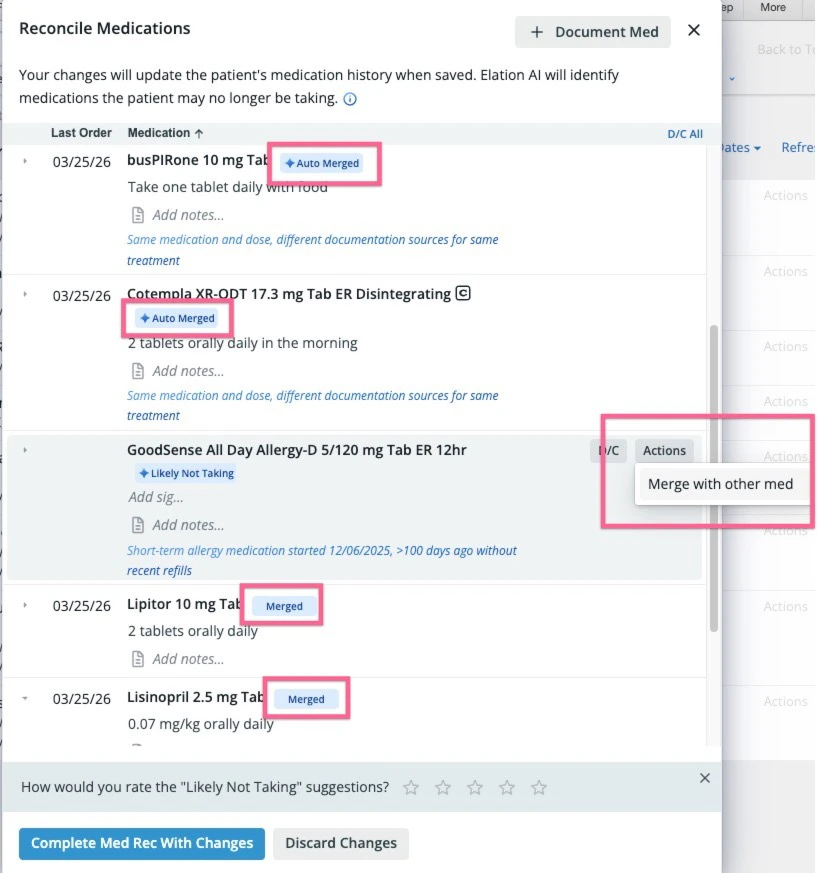
The medication reconciliation workflow now automatically merges identical medications, and users can also merge and unmerge medication threads manually. Only identical medications merge automatically — brand and generic medications and different dosages remain separate. With automatic assistance from Elation, managing medication lists becomes far less laborious, streamlining the entire medication reconciliation workflow. See our [Reconciling Active Medications](/articles/Reconciling-active-medications) and [Merging and Reconciling Downloaded Medications](/articles/mergingreconciling-downloaded-meds-with-existing-meds) guides for details.
 ## Elation Billing
### Activate AI Billing on Your Own Timeline
Practices can now enable AI Billing independently through a new self-service workflow in settings, complete with built-in guidance and configuration prompts. The feature removes the need for support calls or onboarding appointments, allowing your practice to explore AI-assisted billing workflows when it works best for you. Read more in [AI Billing Introduction](https://help.elationhealth.com/articles/AI-Billing-Introduction).
### Capture More Revenue with Smarter Coding Suggestions
AI Billing now includes enhanced quality coding logic that analyzes encounter documentation more deeply to suggest clinically appropriate diagnosis and procedure codes with greater accuracy. The improved AI-generated suggestions help practices capture appropriate revenue, reduce claim denials, and maintain documentation standards while reducing cognitive load during charge entry.
### Manage Multi-Entity Configurations with Confidence
Practice entity configuration now provides clearer visibility and more intuitive controls for managing legal entities, locations, and associated billing settings. Administrators can review and edit entity-level configurations — including NPI, Tax ID, and address details — with improved validation and inline guidance. Read more in the [Entity Configuration article](https://help.elationhealth.com/articles/practice-settings-setup-and-overview#practice-entities).
### Tag Emergency Charges for Accurate Reimbursement
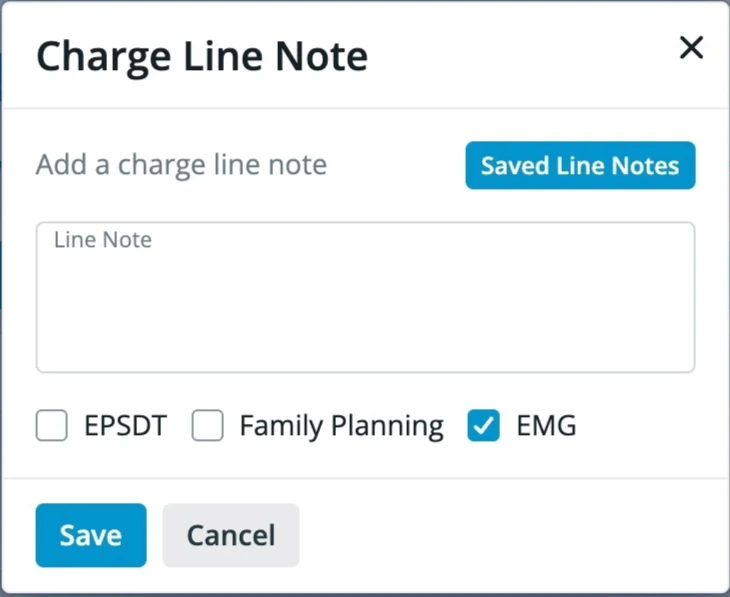
Elation Billing users can now tag appropriate charges with the **EMG / Emergency Indicator** attribute at the charge level. Practices have a way to indicate when the emergency indicator (box 24c on the CMS-1500 form) should be tagged, helping ensure timely and correct payment while removing the need for workarounds such as printing the claim form to fill it out manually.
## Elation Billing
### Activate AI Billing on Your Own Timeline
Practices can now enable AI Billing independently through a new self-service workflow in settings, complete with built-in guidance and configuration prompts. The feature removes the need for support calls or onboarding appointments, allowing your practice to explore AI-assisted billing workflows when it works best for you. Read more in [AI Billing Introduction](https://help.elationhealth.com/articles/AI-Billing-Introduction).
### Capture More Revenue with Smarter Coding Suggestions
AI Billing now includes enhanced quality coding logic that analyzes encounter documentation more deeply to suggest clinically appropriate diagnosis and procedure codes with greater accuracy. The improved AI-generated suggestions help practices capture appropriate revenue, reduce claim denials, and maintain documentation standards while reducing cognitive load during charge entry.
### Manage Multi-Entity Configurations with Confidence
Practice entity configuration now provides clearer visibility and more intuitive controls for managing legal entities, locations, and associated billing settings. Administrators can review and edit entity-level configurations — including NPI, Tax ID, and address details — with improved validation and inline guidance. Read more in the [Entity Configuration article](https://help.elationhealth.com/articles/practice-settings-setup-and-overview#practice-entities).
### Tag Emergency Charges for Accurate Reimbursement
Elation Billing users can now tag appropriate charges with the **EMG / Emergency Indicator** attribute at the charge level. Practices have a way to indicate when the emergency indicator (box 24c on the CMS-1500 form) should be tagged, helping ensure timely and correct payment while removing the need for workarounds such as printing the claim form to fill it out manually.
 ### Access Multiple Stripe Accounts
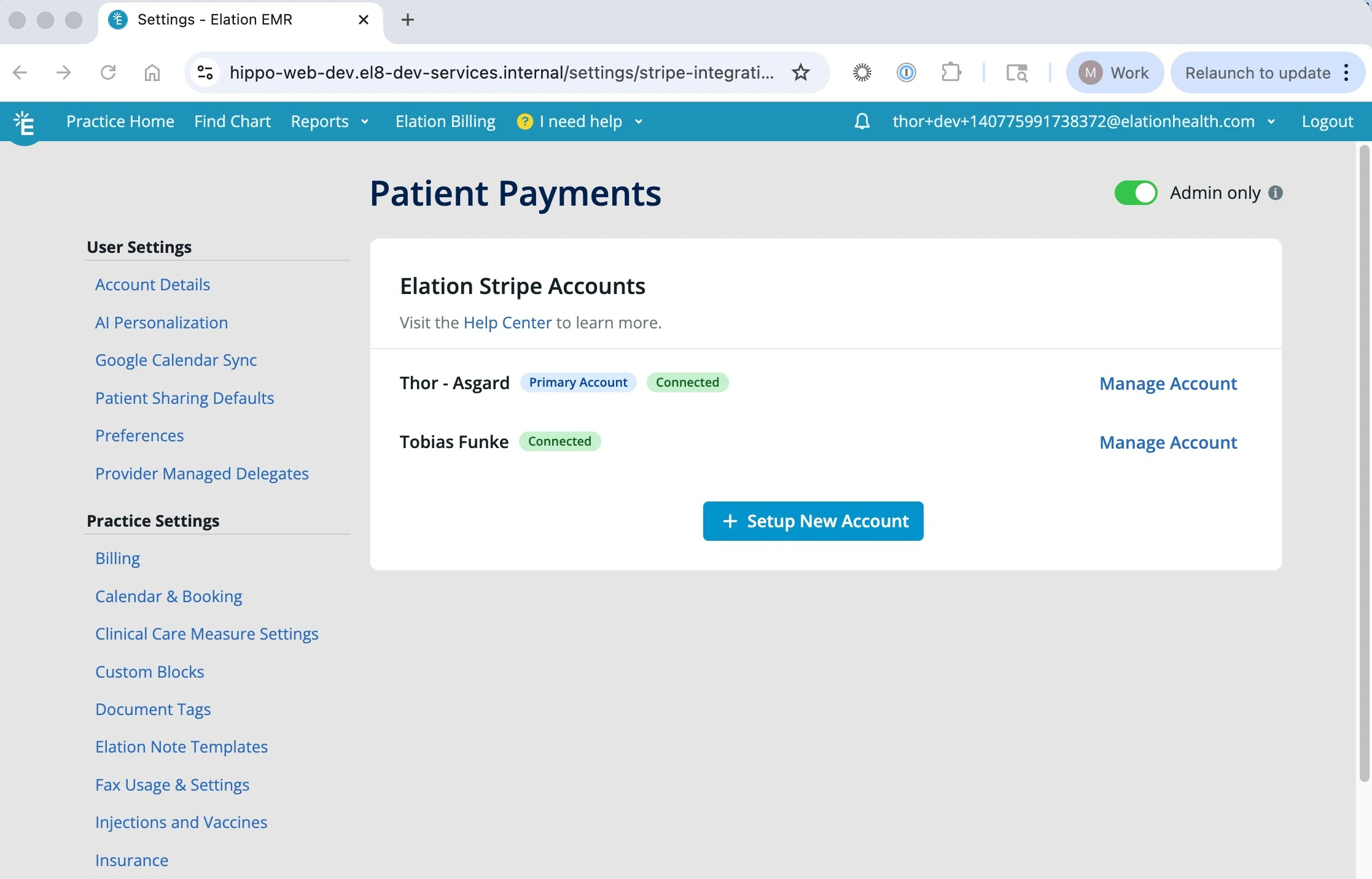
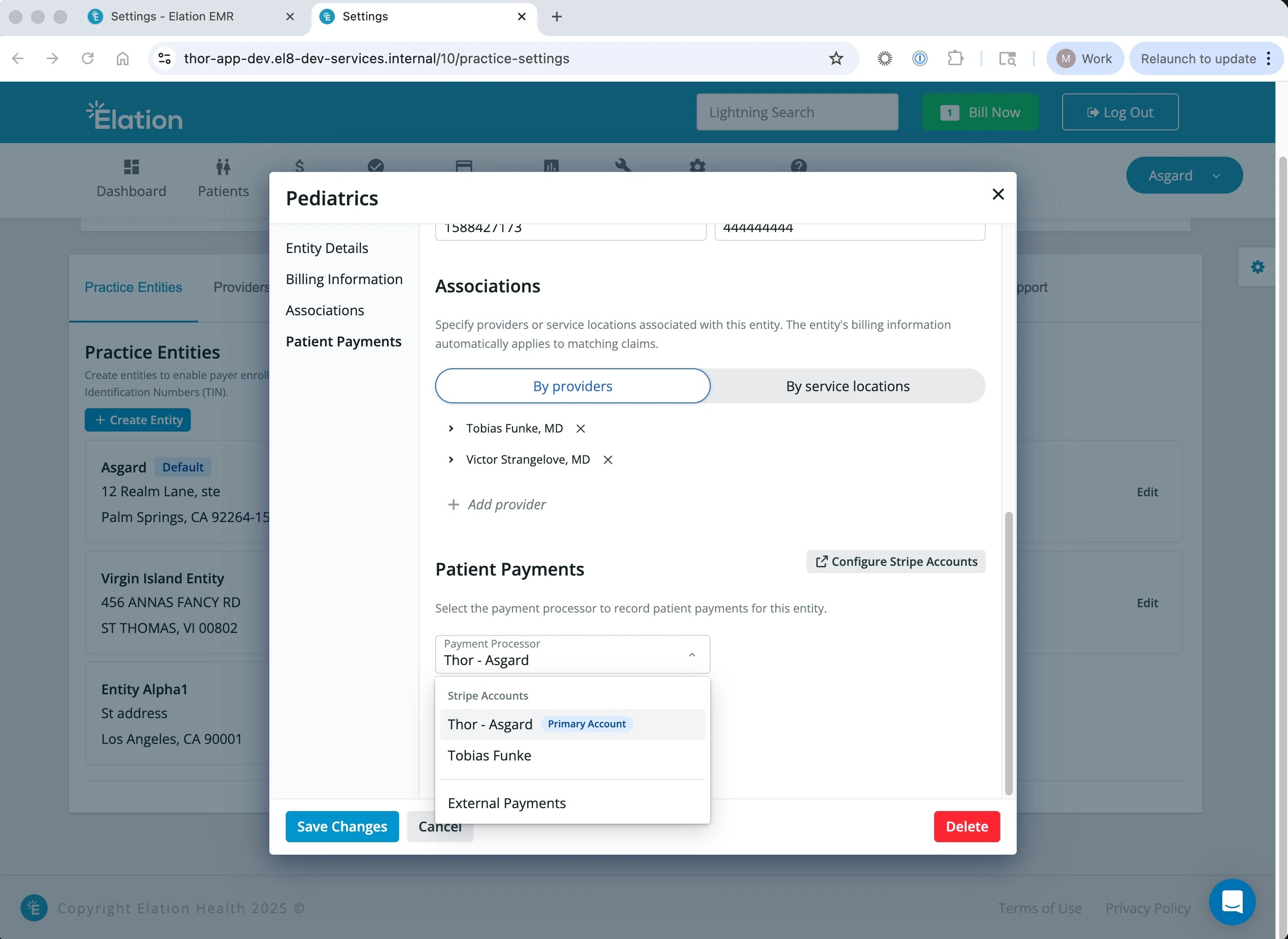
Practices that bill under multiple Tax IDs can now connect and manage separate Stripe accounts for each entity. The flexible payment configuration ensures patient payments are processed through the appropriate Stripe account based on the billing entity, streamlining revenue collection while maintaining accurate financial records across your organization.
### Access Multiple Stripe Accounts
Practices that bill under multiple Tax IDs can now connect and manage separate Stripe accounts for each entity. The flexible payment configuration ensures patient payments are processed through the appropriate Stripe account based on the billing entity, streamlining revenue collection while maintaining accurate financial records across your organization.
 ## Stay Updated
To stay informed of all the latest updates to our Developer Platform services, bookmark the individual changelogs and monitor them regularly:
* [API V2 changelog](https://docs.elationhealth.com/changelog)
* [Hosted Database changelog](https://docs.elationhealth.com/reference/hosted-database-changelog)
## Stay Updated
To stay informed of all the latest updates to our Developer Platform services, bookmark the individual changelogs and monitor them regularly:
* [API V2 changelog](https://docs.elationhealth.com/changelog)
* [Hosted Database changelog](https://docs.elationhealth.com/reference/hosted-database-changelog)