> ## Documentation Index
> Fetch the complete documentation index at: https://help.elationhealth.com/llms.txt
> Use this file to discover all available pages before exploring further.

# Note Assist Guide - Microphone Setup and Troubleshooting

> This article covers how to set up your microphone for Note Assist and how to troubleshoot common microphone issues.

## Overview

Use the instruction below for your device type and operating system (OS) to properly enable your microphone. We advise doing this prior to using Note Assist to avoid potential audio issues.

## Workflow Instructions

### Setup for laptop and desktop devices

<Tabs>
  <Tab title="Windows">
    | **1** | Click the **Start** menu and select **Settings** (gear icon).                                                                                                                                                                                                                                      |
    | ----- | -------------------------------------------------------------------------------------------------------------------------------------------------------------------------------------------------------------------------------------------------------------------------------------------------- |
    | **2** | In the left-hand menu of the Settings window, click **Privacy & Security** .                                                                                                                                                                                                                       |
    | **3** | Manage your **Microphone Permissions** . Under the App permissions section, scroll down and click **Microphone**.                                                                                                                                                                                  |
    | **4** | Check your **Microphone Input.** In the left-hand menu of the Settings window, click **System** and then **Sound**. • Under **Input**, go to Choose a device for speaking or recording, and select the device you want.                                                                            |
    | **5** | Enable **Ambient Listening** (via 3rd-party apps) Windows does not have a built-in ambient listening feature, but third-party applications or **Windows Dictation** can be used for continuous listening. • Check specific app settings for ambient listening features (e.g., accessibility apps). |
    | **6** | **Test** your microphone. Search for and open the **Voice Recorder** app on your computer. • Click the record button to test if your microphone is working properly.                                                                                                                               |
  </Tab>

  <Tab title="Mac">
    | **1** | Click the Apple logo in the top-left corner of the screen.                                                                                                                                                                                                                                                                                                                                                                                                                                                                                                                                                                                                                                                                                                                                                                                                                                                                                                                                                                                                                                                                                                                                                                                                                                                                                                                                                                                                                                                                                                                                                                                              |
    | ----- | ------------------------------------------------------------------------------------------------------------------------------------------------------------------------------------------------------------------------------------------------------------------------------------------------------------------------------------------------------------------------------------------------------------------------------------------------------------------------------------------------------------------------------------------------------------------------------------------------------------------------------------------------------------------------------------------------------------------------------------------------------------------------------------------------------------------------------------------------------------------------------------------------------------------------------------------------------------------------------------------------------------------------------------------------------------------------------------------------------------------------------------------------------------------------------------------------------------------------------------------------------------------------------------------------------------------------------------------------------------------------------------------------------------------------------------------------------------------------------------------------------------------------------------------------------------------------------------------------------------------------------------------------------- |
    | **2** | Click **System Settings** (or **System Preferences** in older macOS versions).                                                                                                                                                                                                                                                                                                                                                                                                                                                                                                                                                                                                                                                                                                                                                                                                                                                                                                                                                                                                                                                                                                                                                                                                                                                                                                                                                                                                                                                                                                                                                                          |
    | **3** | Manage your **Microphone Permissions** . In the left-hand menu of the System Settings window, click **Privacy & Security.** • Under the **Privacy** section, click **Microphone**. • You’ll see a list of applications and toggles for controlling microphone access. Ensure the toggle next to the internet browser with which you use Elation is toggled **ON**.                                                                                                                                                                                                                                                                                                                                                                                                                                                                                                                                                                                                                                                                                                                                                                                                                                                                                                                                                                                                                                                                                                                                                                                                                                                                                      |
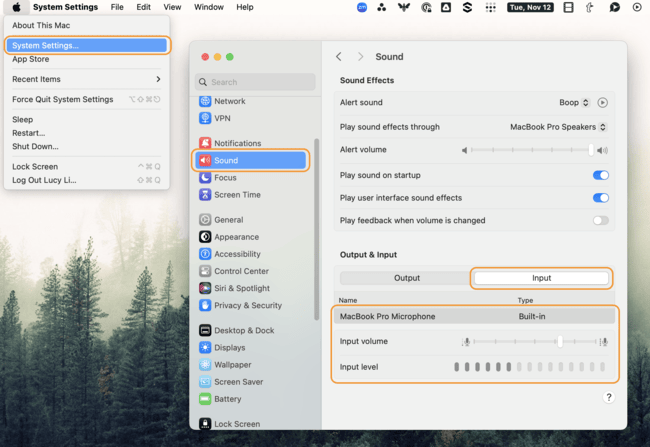
    | **4** | Check your **Microphone Input.** In the left-hand menu of the same System Settings window, click **Sound**. • Click the **Input** tab. • Select your **preferred microphone** and adjust the **input volume slider** to the desired level. <img src="https://mintcdn.com/elationhealth/UqzWvHczff-C5a1z/images/0EMUi000006pOKz.png?fit=max&auto=format&n=UqzWvHczff-C5a1z&q=85&s=33f0f269c83306c32e9559a6c7adb2f6" alt="macinput.png" width="650" height="447" data-path="images/0EMUi000006pOKz.png" /> |
    | **5** | Enable **Ambient Listening** (if available) macOS does not have a direct ambient listening mode, but some apps or accessibility features (e.g., **Live Listen** with AirPods) can offer this functionality. Check app settings for such features.                                                                                                                                                                                                                                                                                                                                                                                                                                                                                                                                                                                                                                                                                                                                                                                                                                                                                                                                                                                                                                                                                                                                                                                                                                                                                                                                                                                                       |
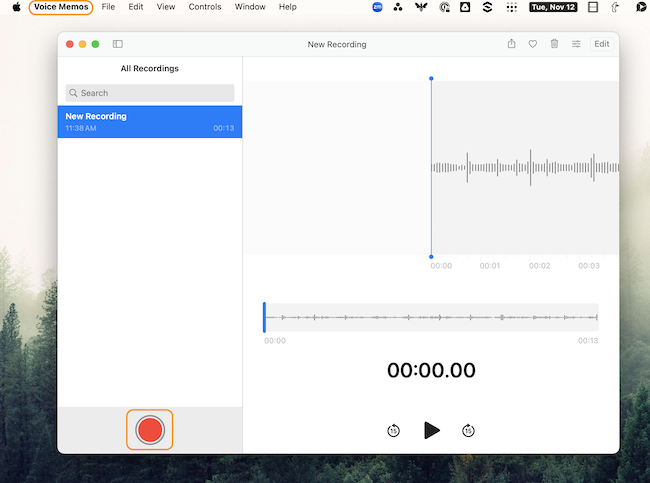
    | **6** | **Test** your microphone. Search for and open the **Voice Memo** app on your computer. • Click the record button to test if your microphone is working properly. <img src="https://mintcdn.com/elationhealth/UqzWvHczff-C5a1z/images/0EMUi000006pOXt.png?fit=max&auto=format&n=UqzWvHczff-C5a1z&q=85&s=dc97c92b796beedbc4e009f7a1bf2e18" alt="voicememo.png" width="650" height="483" data-path="images/0EMUi000006pOXt.png" />                                                                          |
  </Tab>
</Tabs>

### Setup for mobile devices

<Tabs>
  <Tab title="Safari">
    | **1** | Open the **Settings** app on your iOS device.                                                                                                                                                                                                                                                                                                                                                                                                                                                                                                                                                                                                                                                                                                                                                                                                                                                                                                                                                                                                                                                                                                                                                                                                                                                                                                                                                                                                                                                                                                                                                                                                                                                                                                                                                                                                                                                                                                                                                                                                                                                                                                                                                                                                                                                                                                                                                                                                                                                                                                                                                                                                                                                                                                                                                                                                                                                                                           |
    | ----- | --------------------------------------------------------------------------------------------------------------------------------------------------------------------------------------------------------------------------------------------------------------------------------------------------------------------------------------------------------------------------------------------------------------------------------------------------------------------------------------------------------------------------------------------------------------------------------------------------------------------------------------------------------------------------------------------------------------------------------------------------------------------------------------------------------------------------------------------------------------------------------------------------------------------------------------------------------------------------------------------------------------------------------------------------------------------------------------------------------------------------------------------------------------------------------------------------------------------------------------------------------------------------------------------------------------------------------------------------------------------------------------------------------------------------------------------------------------------------------------------------------------------------------------------------------------------------------------------------------------------------------------------------------------------------------------------------------------------------------------------------------------------------------------------------------------------------------------------------------------------------------------------------------------------------------------------------------------------------------------------------------------------------------------------------------------------------------------------------------------------------------------------------------------------------------------------------------------------------------------------------------------------------------------------------------------------------------------------------------------------------------------------------------------------------------------------------------------------------------------------------------------------------------------------------------------------------------------------------------------------------------------------------------------------------------------------------------------------------------------------------------------------------------------------------------------------------------------------------------------------------------------------------------------------------------------- |
    | **2** | Scroll down and tap **Safari.**                                                                                                                                                                                                                                                                                                                                                                                                                                                                                                                                                                                                                                                                                                                                                                                                                                                                                                                                                                                                                                                                                                                                                                                                                                                                                                                                                                                                                                                                                                                                                                                                                                                                                                                                                                                                                                                                                                                                                                                                                                                                                                                                                                                                                                                                                                                                                                                                                                                                                                                                                                                                                                                                                                                                                                                                                                                                                                         |
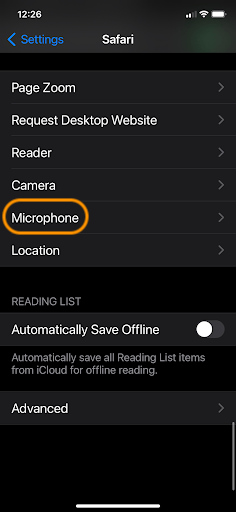
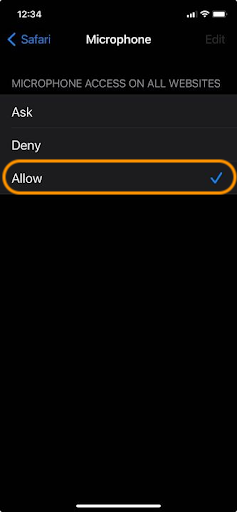
    | **3** | Manage your **Microphone Permissions** . Scroll down and tap **Microphone**. • Select **Ask** or **Allow**. <img src="https://mintcdn.com/elationhealth/UqzWvHczff-C5a1z/images/0EMUi000006pOrF.png?fit=max&auto=format&n=UqzWvHczff-C5a1z&q=85&s=2989249f65990690b21e3a07fe28f6de" alt="safari-mic.png" width="236" height="512" data-path="images/0EMUi000006pOrF.png" /> <img src="https://mintcdn.com/elationhealth/UqzWvHczff-C5a1z/images/0EMUi000006pMRH.png?fit=max&auto=format&n=UqzWvHczff-C5a1z&q=85&s=0bba043d40471ac66fc141e6d5c840db" alt="micallow.png" width="237" height="512" data-path="images/0EMUi000006pMRH.png" /> |
    | **4** | (optional) Enabling **Ambient Listening (Live Listen)** *To use Live Listen with your AirPods, AirPods Pro, AirPods Max, Powerbeats Pro, or Beats Fit Pro, your iPhone or iPad device needs iOS or iPadOS 14.3 or later.* Connect your AirPods or compatible hearing devices. • Open **Settings** > **Control Center**, then tap the **+** button next to **Hearing**. • Return to your home screen. • From the top right corner of your device, [swipe down to reveal the Control Center](https://support.apple.com/en-us/108330). • Tap the **ear button** and turn on **Live Listen** and use your device's microphone to listen to the environment through your AirPods.                                                                                                                                                                                                                                                                                                                                                                                                                                                                                                                                                                                                                                                                                                                                                                                                                                                                                                                                                                                                                                                                                                                                                                                                                                                                                                                                                                                                                                                                                                                                                                                                                                                                                                                                                                                                                                                                                                                                                                                                                                                                                                                                                                                                                                                            |
    | **5** | **Test** your microphone. You can test the microphone in any audio or video app (e.g., Voice Memos) to ensure it’s working properly.                                                                                                                                                                                                                                                                                                                                                                                                                                                                                                                                                                                                                                                                                                                                                                                                                                                                                                                                                                                                                                                                                                                                                                                                                                                                                                                                                                                                                                                                                                                                                                                                                                                                                                                                                                                                                                                                                                                                                                                                                                                                                                                                                                                                                                                                                                                                                                                                                                                                                                                                                                                                                                                                                                                                                                                                    |
  </Tab>

  <Tab title="Android">
    | **1** | Open the **Settings** app on your Android device.                                                                                                                                                                                                                     |
    | ----- | --------------------------------------------------------------------------------------------------------------------------------------------------------------------------------------------------------------------------------------------------------------------- |
    | **2** | Scroll down and tap on **Privacy** or **Apps** (varies by device).                                                                                                                                                                                                    |
    |       | Select **Permissions Manager** (or **App Permissions** ).                                                                                                                                                                                                             |
    | **3** | Manage your **Microphone Permissions** . Tap **Microphone** to view apps that have requested microphone access. • Toggle the switch **On** next to the internet browser with which you use Elation.                                                                   |
    | **4** | Check your **Microphone Input.** You can test your microphone by using apps like **Google Assistant**, **Voice Recorder**, or a similar app to ensure it’s working properly.                                                                                          |
    | **5** | (optional) Enable **Ambient Listening (Live Transcribe/Accessibility Features)** Android doesn’t have a direct ambient listening feature, but you can use **Live Transcribe** for live speech-to-text: • Some third-party apps also offer ambient listening features. |
  </Tab>
</Tabs>

## Troubleshooting

### General Tips

If you’ve followed the setup instructions above, but Note Assist is still not recognizing your microphone device, test a two-person call on a third-party microphone test site such as: [https://www.onlinemictest.com](https://www.onlinemictest.com)

If the audio indicator line doesn’t move during your microphone test:

* Check that your microphone is connected to the correct (normally pink) socket in your computer. If it's a mic with a USB connector just make sure it is properly connected to the USB socket (you will not use the pink microphone in this case).
* Check that your microphone is not muted - sometimes the mic has a mute button on it or on the wire that is connected to it.
* Check that the volume on the microphone is not turned all the way down.

If the microphone doesn’t work with this type of test, it’s a strong indicator that the issue is unrelated to Note Assist. We recommend that you connect directly with your microphone’s hardware or IT support.

* Additional troubleshooting tips:
  * For [Windows 10](https://www.onlinemictest.com/microphone-settings/windows-10/) or [Windows 11](https://support.microsoft.com/en-us/windows/fix-microphone-problems-5f230348-106d-bfa4-1db5-336f35576011)
  * For [Mac OS](https://www.onlinemictest.com/microphone-settings/mac-os-x/)
  * For [additional OS](https://www.onlinemictest.com/) tips

### Virtual Visit Tips

During a virtual visit, if Note Assist is only picking up the provider's audio but not the patient's audio, it’s important to disable **all** noise suppression, cancellation, and enhancement features for audio recording across all software, operating system, and hardware. This includes disabling noise cancellation in both the **operating system sound settings** and in any additional **audio control software associated with the microphone**.

Below are some steps to help:

* **Use the browser version of the video conferencing tool** and run it in a separate tab within the same browser instance as the Elation App.
* **Disable Zoom Noise Suppression or Filters (Desktop and Web Client).**
  * Follow these instructions for [Configuring Professional Audio Settings for Zoom Meetings](https://support.zoom.com/hc/en/article?id=zm_kb\&sysparm_article=KB0059985) to ensure noise suppression is not enabled.
* **Disable Noise Suppression in Windows.**
  * Go to **System Sound Settings.**
  * Right-click on the sound icon in the taskbar and select **Sound Settings**.
  * Click on **More Sound Settings**, switch to the **Communications** tab, and select **Do nothing** to prevent Windows from altering audio during calls.
* **Check Audio Control Software from Manufacturer.**
  * Check if any model/manufacturer-specific audio software is installed, as it may include advanced microphone settings. Examples include:
    * Realtek Audio Console
    * Realtek HD Audio Manager
    * Dell Audio / Dell Optimizer / Waves MaxxAudio
    * HP Audio Control / Omen Audio Control
    * Acer Purified Audio Console
    * Lenovo Vantage
  * Refer to this[Zoom Community Thread](https://community.zoom.com/t5/Zoom-Meetings/Disable-Any-sort-of-quot-Suppress-Background-noise-quot/m-p/68152) for more information on disabling noise suppression in these applications.
* **Use an External Microphone and Speaker Setup**:
  * If issues persist, consider using an external microphone and speaker setup. Disable your built-in microphone and configure the external devices as the input and output sources.

## Related Articles

* [Note Assist Introduction (Add-On)](/articles/Note-Assist-Guide)
* [Note Assist Guide - Preparing to use Note Assist](/articles/Note-Assist-Guide-Preparation)
* [Note Assist Guide - Using Note Assist for encounters](/articles/Note-Assist-Guide-Using-Note-Assist)
* [Note Assist Guide - Best Practice Recommendations](/articles/Note-Assist-Guide-Best-Practice-Recommendations)
* [Note Assist Guide - Frequently Asked Questions](/articles/Note-Assist-Guide-FAQ)
* [Note Assist Guide - Feature Updates](/articles/Note-Assist-Guide-Feature-Updates)