 #### Allowing third-party cookies from all sites
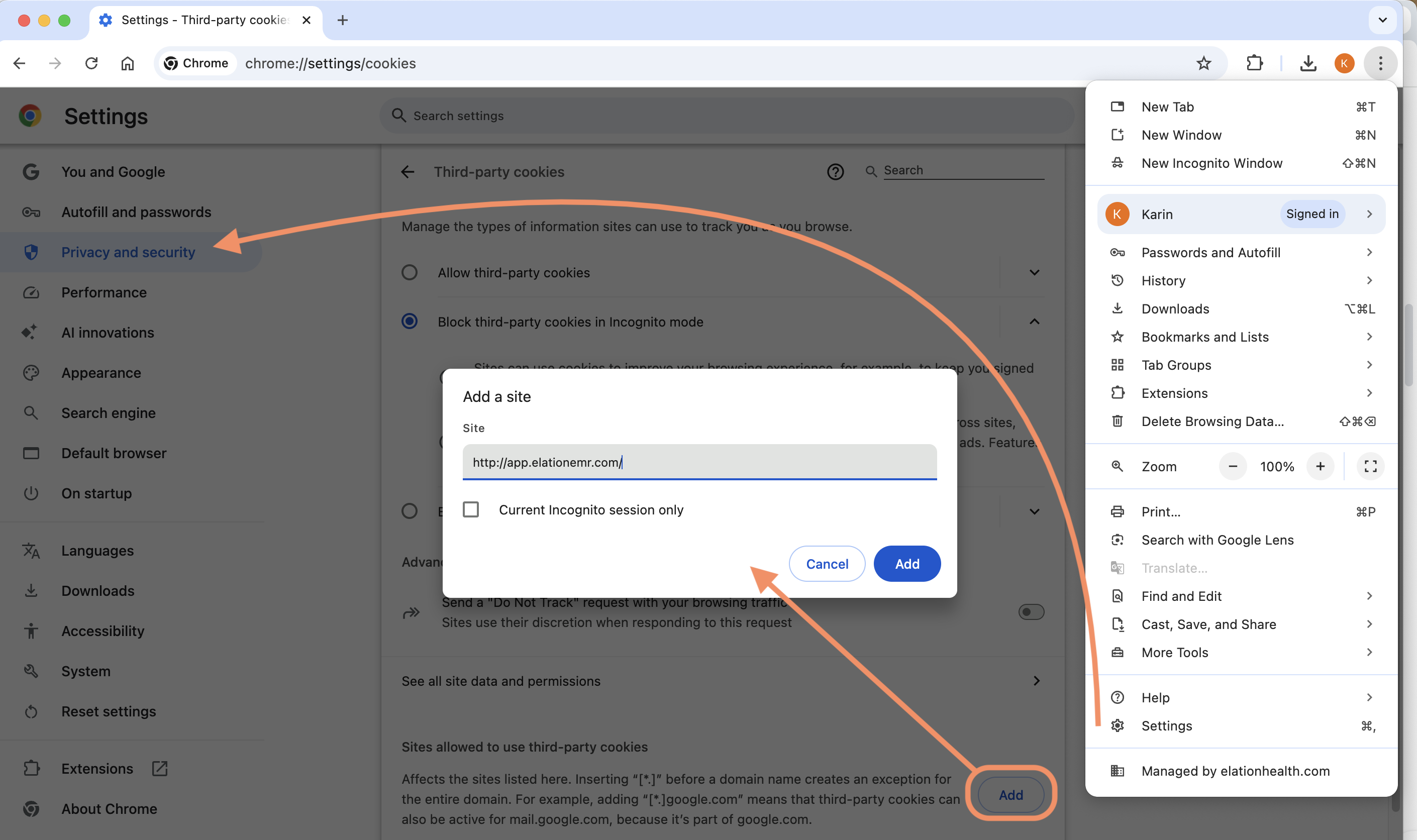
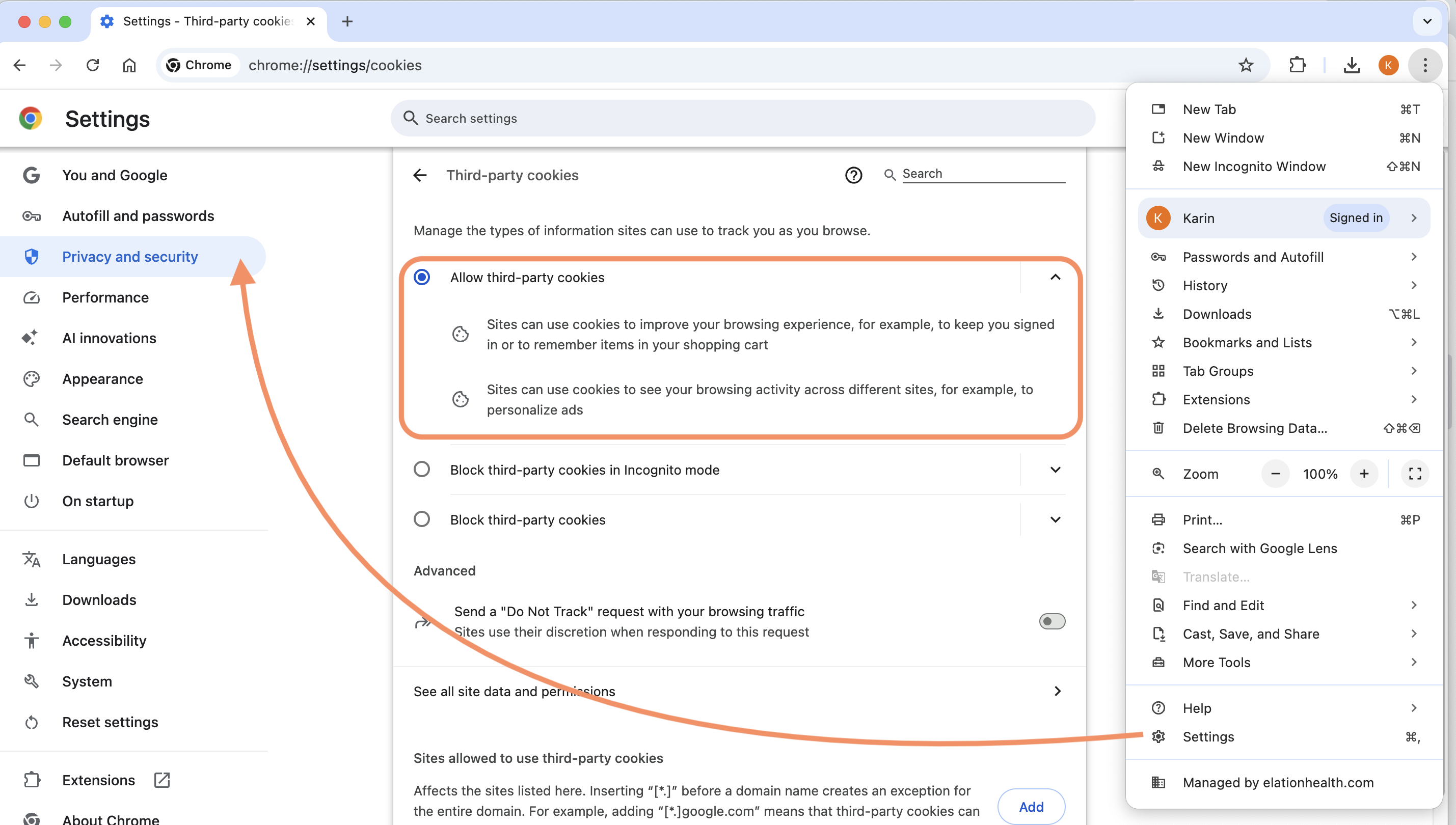
To allow cookies from all third-party sites:
| **1** | Click the button that looks like **three vertical dots** in the top right-hand corner of Google Chrome. |
| ----- | ------------------------------------------------------------------------------------------------------- |
| **2** | Click **Settings** . |
| **3** | Click **Privacy and Security** -> **Third-party cookies** . |
| **4** | Select **All third-party cookies** . |
#### Allowing third-party cookies from all sites
To allow cookies from all third-party sites:
| **1** | Click the button that looks like **three vertical dots** in the top right-hand corner of Google Chrome. |
| ----- | ------------------------------------------------------------------------------------------------------- |
| **2** | Click **Settings** . |
| **3** | Click **Privacy and Security** -> **Third-party cookies** . |
| **4** | Select **All third-party cookies** . |
 #### Enabling third-party cookies only when accessing specific pages in Elation
To only allow third-party cookies while you’re on specific pages in Elation:
| **1** | Click the **View site information** button next to Elation’s URL.
#### Enabling third-party cookies only when accessing specific pages in Elation
To only allow third-party cookies while you’re on specific pages in Elation:
| **1** | Click the **View site information** button next to Elation’s URL. 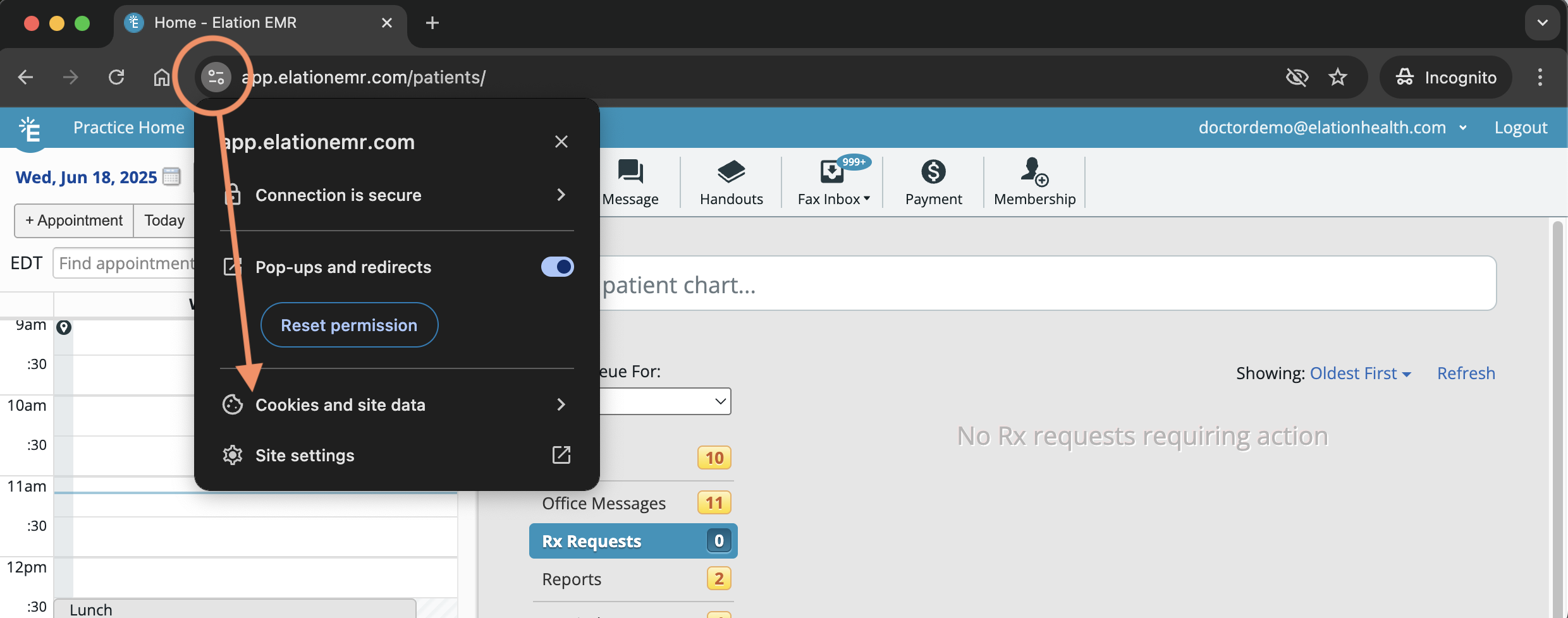 |
| ----- | ----------------------------------------------------------------------------------------------------------------------------------------------------------------------------------------------------------------------------------------------------------------------------------------------------------------------------------------------------------------------------------------------------------------------------------------------------------------------------------------------------------------------------------------------------------------------------------------------------------------------------------------------------------------------------------------------------------------------------------------------------------------------------------------------------------------------------------------------------------------------------------------------------------------------------------------------------------------------------------------------------------------------------------------------------------------------------------------------------------------------------------------------------------------------------------------------------------------------------------------------------------------------------------------------------------------------------------------------------------------------------------------------------------------------------------------------------------------------------------------------------------------------------------------------------------------------------------------------------------------------------------------------- |
| **2** | Click **Cookie and site data** . |
| **3** | Toggle on **Third-party cookies**.
|
| ----- | ----------------------------------------------------------------------------------------------------------------------------------------------------------------------------------------------------------------------------------------------------------------------------------------------------------------------------------------------------------------------------------------------------------------------------------------------------------------------------------------------------------------------------------------------------------------------------------------------------------------------------------------------------------------------------------------------------------------------------------------------------------------------------------------------------------------------------------------------------------------------------------------------------------------------------------------------------------------------------------------------------------------------------------------------------------------------------------------------------------------------------------------------------------------------------------------------------------------------------------------------------------------------------------------------------------------------------------------------------------------------------------------------------------------------------------------------------------------------------------------------------------------------------------------------------------------------------------------------------------------------------------------------- |
| **2** | Click **Cookie and site data** . |
| **3** | Toggle on **Third-party cookies**. 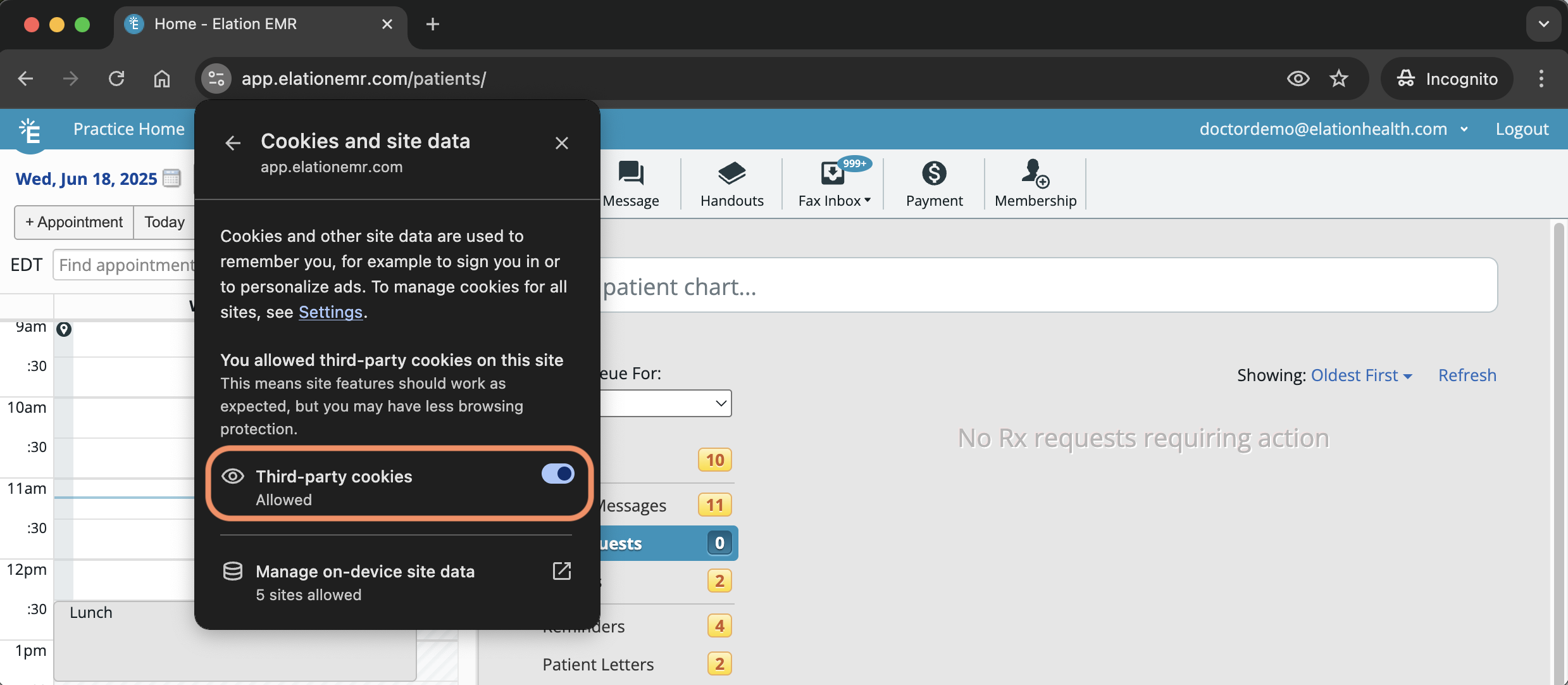 |
### Microsoft Edge
| **1** | Click the button that looks like **three horizontal dots** in the top right-hand corner of Edge. |
| ----- | ----------------------------------------------------------------------------------------------------------------------------------------------------------------------------------------------------------------------------------------------------------------------------------------------------------------------------------------------------------------------------------------------------------------------------------------------------------------------------------------------------------------------------------------------------------------------------------------------------------------------------------------------------------------------------------------------------------------------------------------------------------------------------------------------------------------------------------------------------------------------------------------------------------------------------------------------------------------------------------------------------------------------------------------------------------------------------------------------------------------------------------------------------------------------------------------------------------------------------------------------------------------------------------------------------------------------------------------------------------------------------------------------------------------------------------------------------------------------------------------------------------------------------------------------------------------------------------------------------- |
| **2** | Click **Settings** . |
| **3** | Click **Cookies and site permissions**. If your browser is too small, expand your browser to see the Settings Menu or click on the button that looks like three horizontal lines at the top left corner. |
| **4** | Click **Cookies and site data** . |
| **5** | Turn off **Block third-party cookies**.
|
### Microsoft Edge
| **1** | Click the button that looks like **three horizontal dots** in the top right-hand corner of Edge. |
| ----- | ----------------------------------------------------------------------------------------------------------------------------------------------------------------------------------------------------------------------------------------------------------------------------------------------------------------------------------------------------------------------------------------------------------------------------------------------------------------------------------------------------------------------------------------------------------------------------------------------------------------------------------------------------------------------------------------------------------------------------------------------------------------------------------------------------------------------------------------------------------------------------------------------------------------------------------------------------------------------------------------------------------------------------------------------------------------------------------------------------------------------------------------------------------------------------------------------------------------------------------------------------------------------------------------------------------------------------------------------------------------------------------------------------------------------------------------------------------------------------------------------------------------------------------------------------------------------------------------------------- |
| **2** | Click **Settings** . |
| **3** | Click **Cookies and site permissions**. If your browser is too small, expand your browser to see the Settings Menu or click on the button that looks like three horizontal lines at the top left corner. |
| **4** | Click **Cookies and site data** . |
| **5** | Turn off **Block third-party cookies**. 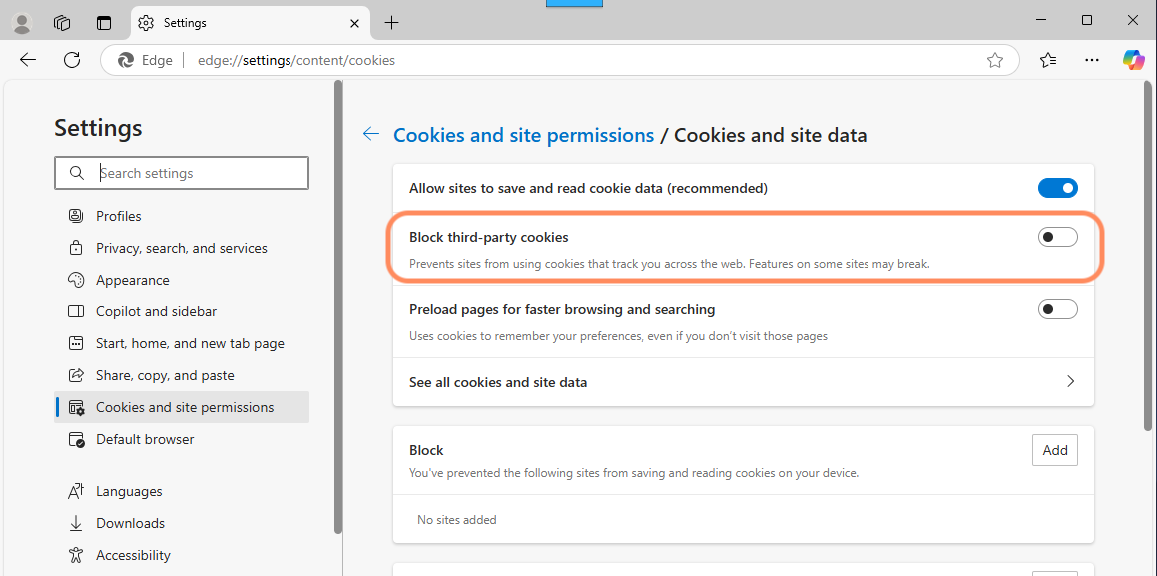 |
### Mozilla Firefox
| **1** | Click the button that looks like **three horizontal lines** at the top right corner of Firefox. |
| ----- | --------------------------------------------------------------------------------------------------------------------- |
| **2** | Click **Settings** . |
| **3** | Click **Privacy & Security** . |
| **4** | Click **Custom** . |
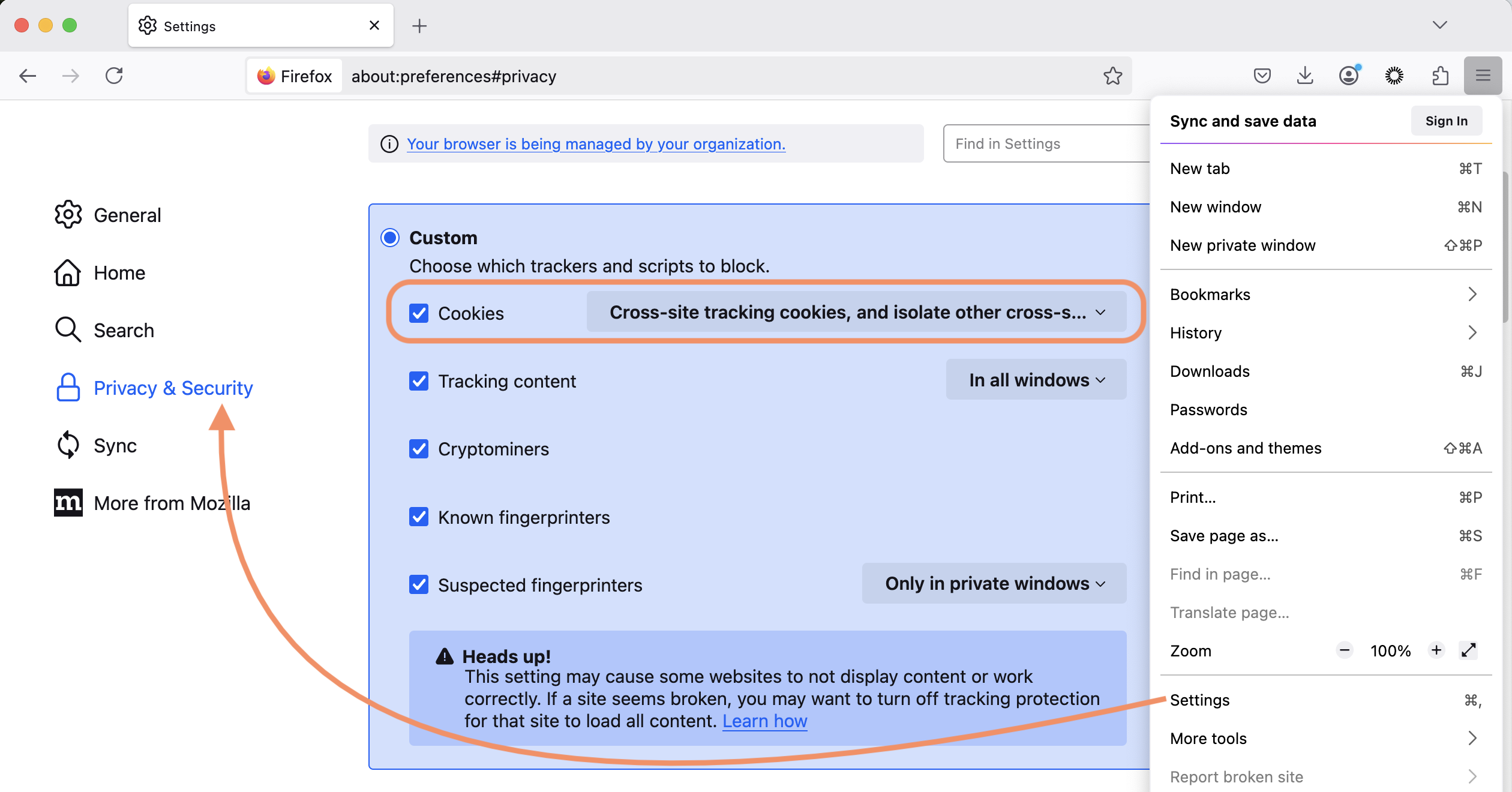
| **5** | Check off the **Cookies** box and then select **Cross-site tracking cookies, and isolate other cross-site cookies** . |
|
### Mozilla Firefox
| **1** | Click the button that looks like **three horizontal lines** at the top right corner of Firefox. |
| ----- | --------------------------------------------------------------------------------------------------------------------- |
| **2** | Click **Settings** . |
| **3** | Click **Privacy & Security** . |
| **4** | Click **Custom** . |
| **5** | Check off the **Cookies** box and then select **Cross-site tracking cookies, and isolate other cross-site cookies** . |
 ### Safari
| **1** | Click **Safari** at the top of your Mac device. |
| ----- | ----------------------------------------------- |
| **2** | Click **Settings…** . |
| **3** | Click **Advanced** . |
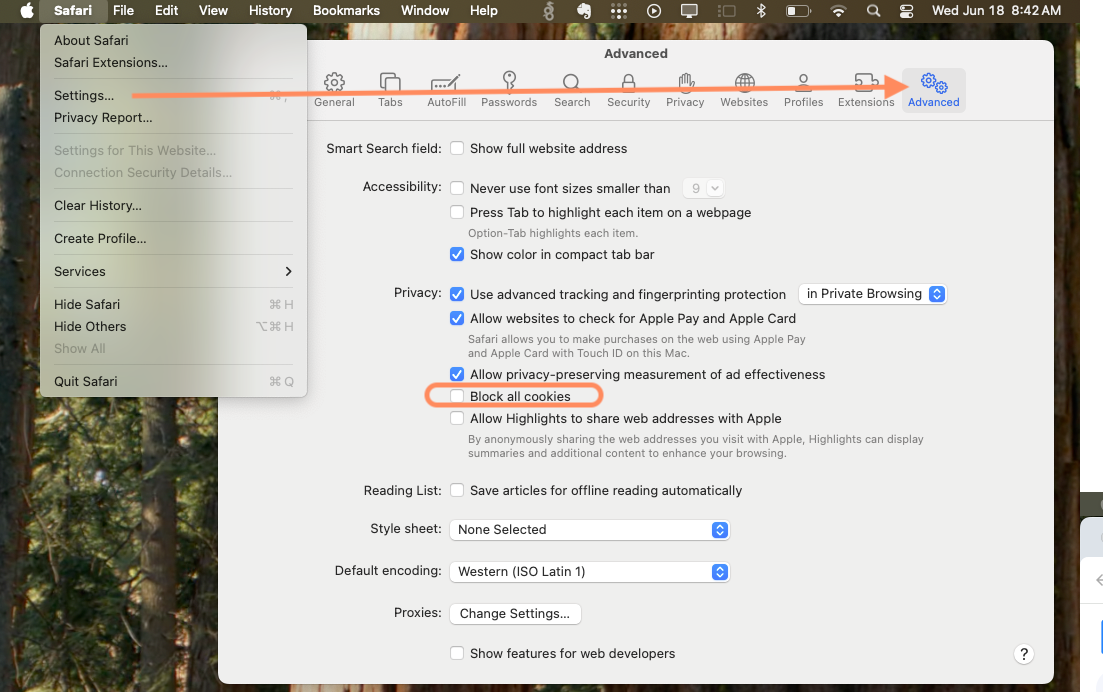
| **4** | Uncheck **Block all cookies** . |
### Safari
| **1** | Click **Safari** at the top of your Mac device. |
| ----- | ----------------------------------------------- |
| **2** | Click **Settings…** . |
| **3** | Click **Advanced** . |
| **4** | Uncheck **Block all cookies** . |
 ## Related Articles
* [Prescriptions Guide - Managing electronic prior authorizations](/articles/Managing-electronic-prior-authorizations)
## Related Articles
* [Prescriptions Guide - Managing electronic prior authorizations](/articles/Managing-electronic-prior-authorizations)