> ## Documentation Index
> Fetch the complete documentation index at: https://help.elationhealth.com/llms.txt
> Use this file to discover all available pages before exploring further.
# Elation Note Guide - Using visit note blocks
## Overview
### What are blocks?
The Elation Note is built from modular parts called blocks, which you can customize to fit the visit. Add, remove, or rearrange blocks based on what you need to document. This flexibility helps you organize your notes in a way that works best for your workflow.
### What types of blocks are there?
There are two types of blocks:
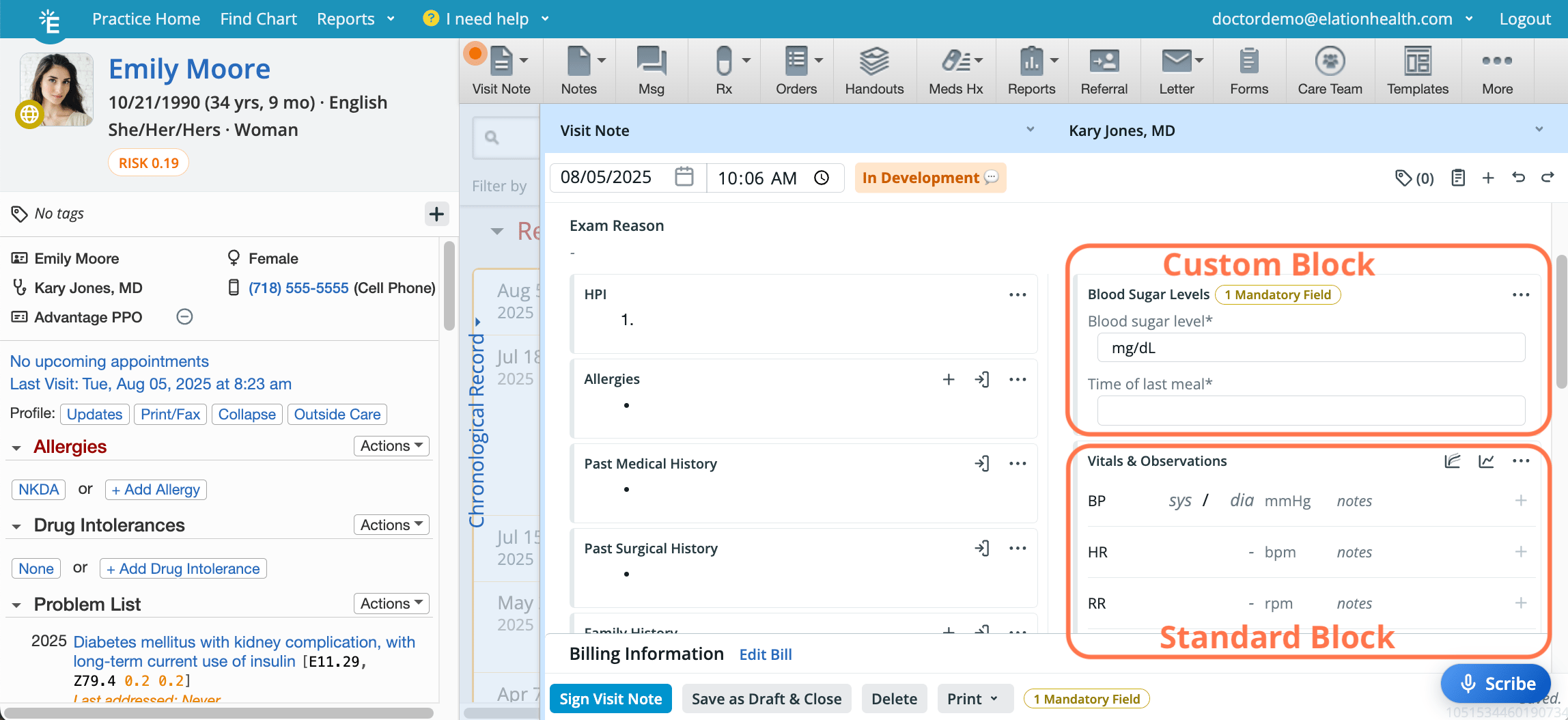
* Standard blocks
* These are created and managed by Elation.
* They represent the common parts of a SOAP note.
* A default set of standard blocks will be available.
* Use a standard block when you want to include commonly used, structured sections in your note—such as History of Present Illness (HPI), Vitals, Physical Exam, or Assessment and Plan. Standard blocks help ensure consistency across documentation
* Each standard block can only be added once to an Elation Note with the exception of:
* lab order
* imaging order
* prescription
* Populates[USCDI](/articles/Cures-Act-Patient-Data-and-USCDI)data classes.
* Included in [CCDA exports](/articles/Supported-Elation-CCDA-types) if corresponding standard blocks are used.
* Custom blocks
* These are created and managed by you and your practice.[Click here to learn more about Custom blocks](/articles/Elation-Note-Guide-custom-blocks).
* Use a custom block when the standard options don’t quite fit what you need to document across multiple patients.
* Custom blocks can be added multiple times to an Elation Note.
* Populates the[USCDI](/articles/Cures-Act-Patient-Data-and-USCDI)data class for **data**.
* Custom blocks must be nested inside standard blocks to ensure ensure that custom block data is included in the parent block's data class for USCDI/CCDA. For example, a custom block nested in allergies will have its results included in the allergies data class for the [CCDA export](/articles/Supported-Elation-CCDA-types).
Any data your practice needs or relies on for CCDA or FHIR will not include data from custom blocks unless the custom block is nested in a standard block.
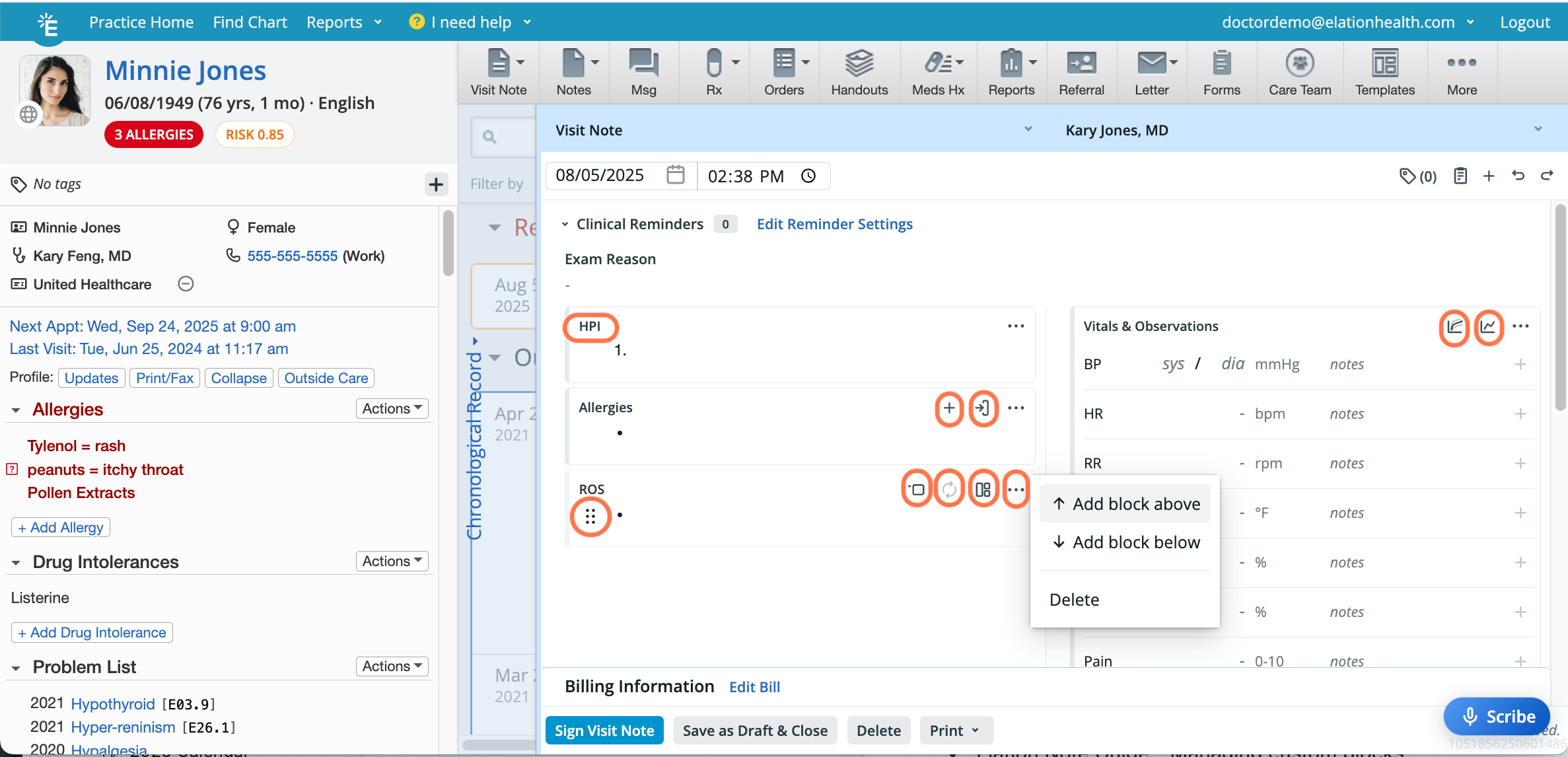
 ### What does a standard block look like?
Standard blocks display the block name and several quick action icons, allowing you to perform common tasks directly from the block.
### What does a standard block look like?
Standard blocks display the block name and several quick action icons, allowing you to perform common tasks directly from the block.
 | **Icon** | **Name** | **Description** | **Availability** |
| ---------------------------------------------------------------------------------------------------------------------------------------------------------------------------------------------------------------------------------------------------------------------------------------------------------------------------------------------------------------------------------------------------------------------------------------------------------------------------------------------------------------------------------------------------------------------------------------------------------------------------------------------------------------------------------------------------------------------------------------------------------------------------------------------------------------------------------------------------------------------------------------------------------------------------------------------------------------------------------------------------------------------------------------------------------------------------------------------------------------------------------------------------------------------------------------------------------------------------------------------------------------------------------------------------------------------------------------------------------------------------------------------------------------------------------------------------------------------------------------------------------------------- | ------------ | --------------------------------------------------------------------------------------------------------------------------------------------------------------------------------------------------------------------------------- | ---------------------------------------------------------------------------------------------------------------------------------- |
| | Name | Name of the block. | All blocks |
|
| **Icon** | **Name** | **Description** | **Availability** |
| ---------------------------------------------------------------------------------------------------------------------------------------------------------------------------------------------------------------------------------------------------------------------------------------------------------------------------------------------------------------------------------------------------------------------------------------------------------------------------------------------------------------------------------------------------------------------------------------------------------------------------------------------------------------------------------------------------------------------------------------------------------------------------------------------------------------------------------------------------------------------------------------------------------------------------------------------------------------------------------------------------------------------------------------------------------------------------------------------------------------------------------------------------------------------------------------------------------------------------------------------------------------------------------------------------------------------------------------------------------------------------------------------------------------------------------------------------------------------------------------------------------------------- | ------------ | --------------------------------------------------------------------------------------------------------------------------------------------------------------------------------------------------------------------------------- | ---------------------------------------------------------------------------------------------------------------------------------- |
| | Name | Name of the block. | All blocks |
|  | More Actions | Reveal the actions menu. | All blocks |
|
| More Actions | Reveal the actions menu. | All blocks |
|  | Grid | Appears when you hover near the top of the block. Allows you to click-and-drag the block to a different position and access the same actions menu as the … button. | All blocks |
|
| Grid | Appears when you hover near the top of the block. Allows you to click-and-drag the block to a different position and access the same actions menu as the … button. | All blocks |
|  | Add | Opens a form to add new information to both the block and the Clinical Profile simultaneously. • For Procedures Administered - Opens a form to add a procedure code to both the block and the billing information simultaneously. | **Allergies**, **Family History**, **Reconciled Medications**, **Assessment & Plan**, and **Procedures Administered** blocks only. |
|
| Add | Opens a form to add new information to both the block and the Clinical Profile simultaneously. • For Procedures Administered - Opens a form to add a procedure code to both the block and the billing information simultaneously. | **Allergies**, **Family History**, **Reconciled Medications**, **Assessment & Plan**, and **Procedures Administered** blocks only. |
|  | Import | Imports data from the corresponding Clinical Profile section to the block. | Clinical Profile related blocks only. |
|
| Import | Imports data from the corresponding Clinical Profile section to the block. | Clinical Profile related blocks only. |
|  | Reveal | Reveals the systems within the **ROS** and **PE** blocks. | **ROS** and **PE** blocks only. |
|
| Reveal | Reveals the systems within the **ROS** and **PE** blocks. | **ROS** and **PE** blocks only. |
|  | Hide | Hides the systems within the **ROS** and **PE** blocks. | **ROS** and **PE** blocks only. |
|
| Hide | Hides the systems within the **ROS** and **PE** blocks. | **ROS** and **PE** blocks only. |
|  | Clear | Deletes all content from the block. | **ROS** and **PE** blocks only. |
|
| Clear | Deletes all content from the block. | **ROS** and **PE** blocks only. |
|  | Templates | Opens the template selector for the block. | **ROS** and **PE** blocks only. |
|
| Templates | Opens the template selector for the block. | **ROS** and **PE** blocks only. |
|  | Growth Chart | Opens the growth chart. | **Vitals** block only. |
|
| Growth Chart | Opens the growth chart. | **Vitals** block only. |
|  | Vitals Trend | Opens the vitals trend table. | **Vitals** block only. |
|
| Vitals Trend | Opens the vitals trend table. | **Vitals** block only. |
|  | Delete | Deletes the order placeholder. | **Prescription**, **Lab Order** and **Imaging Order** blocks only. |
Click here for a list of all the standard blocks.
* allergies
* assessment & plan
* care plan
* cognitive status
* data
* diet
* exercise history
* family history
* follow up
* functional status
* habits
* hpi
* past medical history
* past surgical history
* physical exam
* procedures administered
* psychological status
* reconciled medications
* review of systems
* social history
* vitals
The **Vitals & Observations** block supports inline unit parsing and auto-conversion for height, weight, and head circumference. You can type values in any common unit format — including compound inputs (e.g. `5'10"`), fractions (e.g. `13 3/4 in`), European-style decimal commas (e.g. `12,5 kg`), and case-insensitive units (`CM`, `Kg`, `LBS`) — and Elation will automatically convert and store the value in the standard unit for each field. If the input cannot be recognized, the field reverts to the last valid value.
### What does a custom block look like?
Custom blocks display only the block Name, the **Grid** icon
| Delete | Deletes the order placeholder. | **Prescription**, **Lab Order** and **Imaging Order** blocks only. |
Click here for a list of all the standard blocks.
* allergies
* assessment & plan
* care plan
* cognitive status
* data
* diet
* exercise history
* family history
* follow up
* functional status
* habits
* hpi
* past medical history
* past surgical history
* physical exam
* procedures administered
* psychological status
* reconciled medications
* review of systems
* social history
* vitals
The **Vitals & Observations** block supports inline unit parsing and auto-conversion for height, weight, and head circumference. You can type values in any common unit format — including compound inputs (e.g. `5'10"`), fractions (e.g. `13 3/4 in`), European-style decimal commas (e.g. `12,5 kg`), and case-insensitive units (`CM`, `Kg`, `LBS`) — and Elation will automatically convert and store the value in the standard unit for each field. If the input cannot be recognized, the field reverts to the last valid value.
### What does a custom block look like?
Custom blocks display only the block Name, the **Grid** icon  , the **More Actions** icon
  , and the contents within the block. If a custom block contains any mandatory fields, you’ll see an indicator at the top of the block to let you know.
[Click here to learn more about Custom blocks](/articles/Elation-Note-Guide-custom-blocks).
## Workflow Instructions
### Adding a block
The Calendar is designed to provide an intuitive experience for managing appointments and providing visibility into each Provider Level User’s schedule.
#### Option 1 (Recommended for inserting a block between existing blocks)
| **1** | At the top of any existing block, click the **Grid** icon on the left or the **More Actions** icon on the right. |
| ----- | -------------------------------------------------------------------------------------------------------------------------------------------------------------------------------------------------------------------------------------------------------------------------------------------------------------------------------------------------------------------------------------------------------------------------------------------------------------------------------------------------------------------------------------------------------------------------------------------------------------------------------------------------------------------------------------------------------------------------------------------------------------------------------------------------------------------------------------------------------------------------------------------------------------------------------------------------------------------------------------------------------------------------------------------------------------------------------------------------------------------------------------------------------------------------------------------------------------------------------------------------------------------------------------------------------------------------------------------------------------------------------------------------------------------------------------------------------------------------------------------------------------------------------------------------------------------------------------------------------------------------------------------------------------------------------------------------------------------------------------------------------------------------------------------------------------------------------------------------------------------------------------------------------------------------------------------------------------------------------------------------------------------------------------------------------------------------------------------------------------------------------------------------------------------------------------------------------------------------------------------------------------------------------------------------------------------------------------------------------------------------------------------------------------------------------------------------------------------------------------------------------------------------------------------------------------------------------------------------------------------------------------------------------------------------------------------------------------------------------------------------------------------------------------------------------------------------------------------------------------------------------------------------------------------------------------------------------------------------------------------------------- |
| **2** | Select **Add block above** or **Add block below** depending on where you want the new block to appear. |
| **3** | From the dropdown menu, select the block that you want to add. |
#### Option 2 (Recommended for placing a block in a specific text field or location within the note)
| **1** | Place your cursor where you want the new block to appear. |
| ----- | ------------------------------------------------------------------------------------- |
| **2** | At the top of the visit note draft, click the **+** button. |
| **3** | From the dropdown menu, select the block that you want to add from the dropdown menu. |
#### Option 3 (Recommended if you prefer using your keyboard over your mouse)
| **1** | Place your cursor where you want the new block to appear. |
| ----- | ----------------------------------------------------------------------------------------------------------------------------------------------------------- |
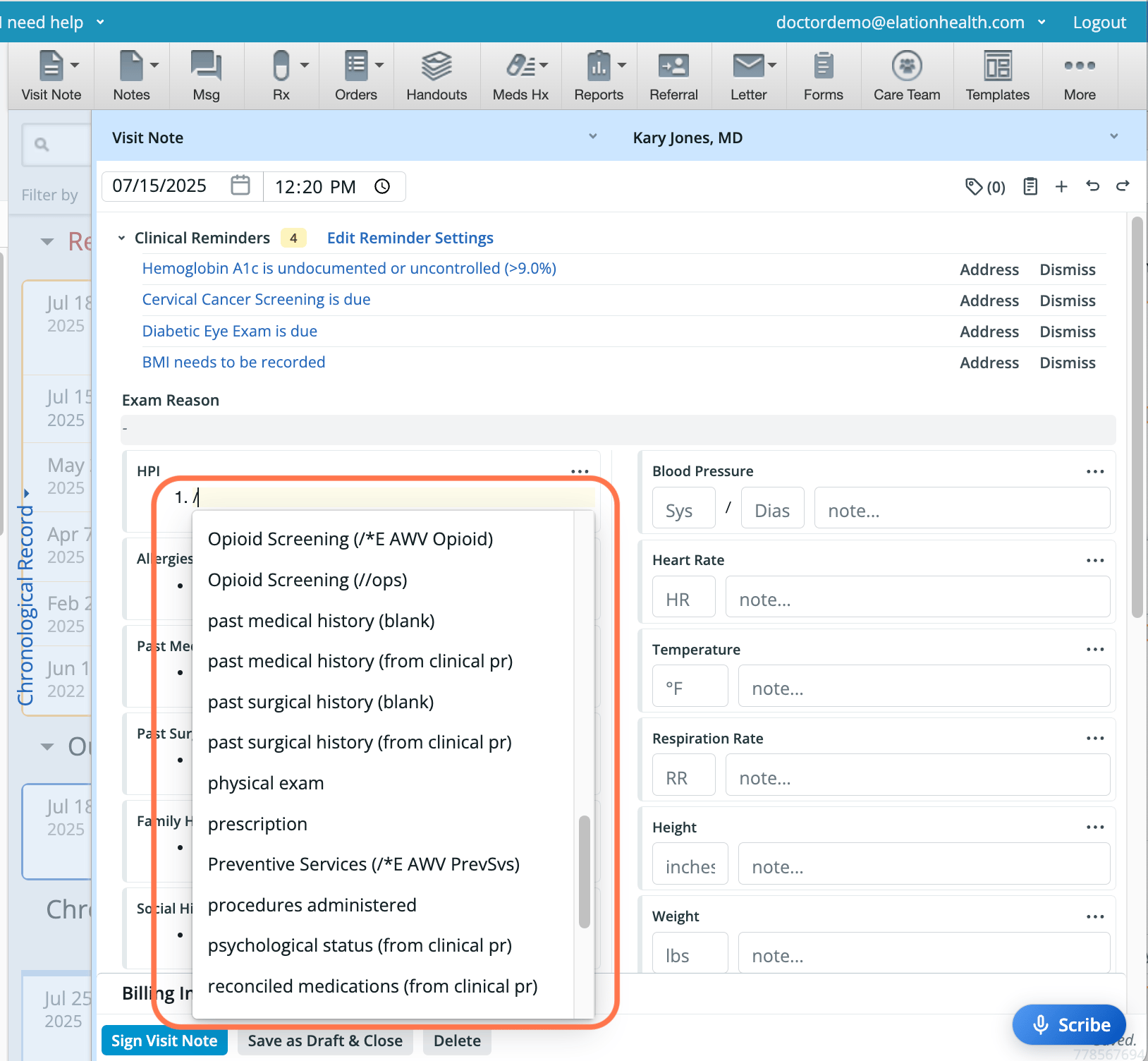
| **2** | Press the forward slash ( **/** ) key on your keyboard to initiate a slash command. |
| **3** | From the dropdown menu, start typing the block name to search for the block that you want to add. |
| **4** | Use the **down arrow** or **up arrow** keys to navigate to the block you want to add and then use the **Return**/**Enter** key to select and add the block. |
, and the contents within the block. If a custom block contains any mandatory fields, you’ll see an indicator at the top of the block to let you know.
[Click here to learn more about Custom blocks](/articles/Elation-Note-Guide-custom-blocks).
## Workflow Instructions
### Adding a block
The Calendar is designed to provide an intuitive experience for managing appointments and providing visibility into each Provider Level User’s schedule.
#### Option 1 (Recommended for inserting a block between existing blocks)
| **1** | At the top of any existing block, click the **Grid** icon on the left or the **More Actions** icon on the right. |
| ----- | -------------------------------------------------------------------------------------------------------------------------------------------------------------------------------------------------------------------------------------------------------------------------------------------------------------------------------------------------------------------------------------------------------------------------------------------------------------------------------------------------------------------------------------------------------------------------------------------------------------------------------------------------------------------------------------------------------------------------------------------------------------------------------------------------------------------------------------------------------------------------------------------------------------------------------------------------------------------------------------------------------------------------------------------------------------------------------------------------------------------------------------------------------------------------------------------------------------------------------------------------------------------------------------------------------------------------------------------------------------------------------------------------------------------------------------------------------------------------------------------------------------------------------------------------------------------------------------------------------------------------------------------------------------------------------------------------------------------------------------------------------------------------------------------------------------------------------------------------------------------------------------------------------------------------------------------------------------------------------------------------------------------------------------------------------------------------------------------------------------------------------------------------------------------------------------------------------------------------------------------------------------------------------------------------------------------------------------------------------------------------------------------------------------------------------------------------------------------------------------------------------------------------------------------------------------------------------------------------------------------------------------------------------------------------------------------------------------------------------------------------------------------------------------------------------------------------------------------------------------------------------------------------------------------------------------------------------------------------------------------------------- |
| **2** | Select **Add block above** or **Add block below** depending on where you want the new block to appear. |
| **3** | From the dropdown menu, select the block that you want to add. |
#### Option 2 (Recommended for placing a block in a specific text field or location within the note)
| **1** | Place your cursor where you want the new block to appear. |
| ----- | ------------------------------------------------------------------------------------- |
| **2** | At the top of the visit note draft, click the **+** button. |
| **3** | From the dropdown menu, select the block that you want to add from the dropdown menu. |
#### Option 3 (Recommended if you prefer using your keyboard over your mouse)
| **1** | Place your cursor where you want the new block to appear. |
| ----- | ----------------------------------------------------------------------------------------------------------------------------------------------------------- |
| **2** | Press the forward slash ( **/** ) key on your keyboard to initiate a slash command. |
| **3** | From the dropdown menu, start typing the block name to search for the block that you want to add. |
| **4** | Use the **down arrow** or **up arrow** keys to navigate to the block you want to add and then use the **Return**/**Enter** key to select and add the block. |
 ### Deleting a block
Delete with caution. You can only recover deleted blocks with the **Undo** button at the top of the visit note while editing in the same session. Once you save the visit note draft or leave the chart you will not be able to undelete deleted blocks, even with the **Undo** button.
#### Option 1 (Recommended for deleting one block at a time)
| **1** | At the top of the block that you wish to delete, click the **Grid** icon on the left or the **More Actions** icon on the right. |
| ----- | ----------------------------------------------------------------------------------------------------------------------------------------------------------------------------------------------------------------------------------------------------------------------------------------------------------------------------------------------------------------------------------------------------------------------------------------------------------------------------------------------------------------------------------------------------------------------------------------------------------------------------------------------------------------------------------------------------------------------------------------------------------------------------------------------------------------------------------------------------------------------------------------------------------------------------------------------------------------------------------------------------------------------------------------------------------------------------------------------------------------------------------------------------------------------------------------------------------------------------------------------------------------------------------------------------------------------------------------------------------------------------------------------------------------------------------------------------------------------------------------------------------------------------------------------------------------------------------------------------------------------------------------------------------------------------------------------------------------------------------------------------------------------------------------------------------------------------------------------------------------------------------------------------------------------------------------------------------------------------------------------------------------------------------------------------------------------------------------------------------------------------------------------------------------------------------------------------------------------------------------------------------------------------------------------------------------------------------------------------------------------------------------------------------------------------------------------------------------------------------------------------------------------------------------------------------------------------------------------------------------------------------------------------------------------------------------------------------------------------------------------------------------------------------------------------------------------------------------------------------------------------------------------------------------------------------------------------------------------------------------------------------------------- |
| **2** | Select **Delete** . |
#### Option 2 (Recommended for deleting more than one block at the same time)
| **1** | Highlight the contents of the block(s) and block name(s) with your cursor. |
| ----- | -------------------------------------------------------------------------- |
| **2** | Press **Delete** / **Backspace** on your keyboard. |
#### Option 3 (Recommended if a block is empty and you prefer using your keyboard over your mouse)
| **1** | R epeatedly press **Delete** / **Backspace** on your keyboard until all contents and the block are removed. |
| ----- | ----------------------------------------------------------------------------------------------------------- |
#### Option 4 (Recommended for deleting all blocks from the note)
| **1** | Select all contents of the note by pressing **ctrl** / **command** + **A** on your keyboard. |
| ----- | -------------------------------------------------------------------------------------------- |
| **2** | Press **Delete** / **Backspace** on your keyboard until all blocks are removed. |
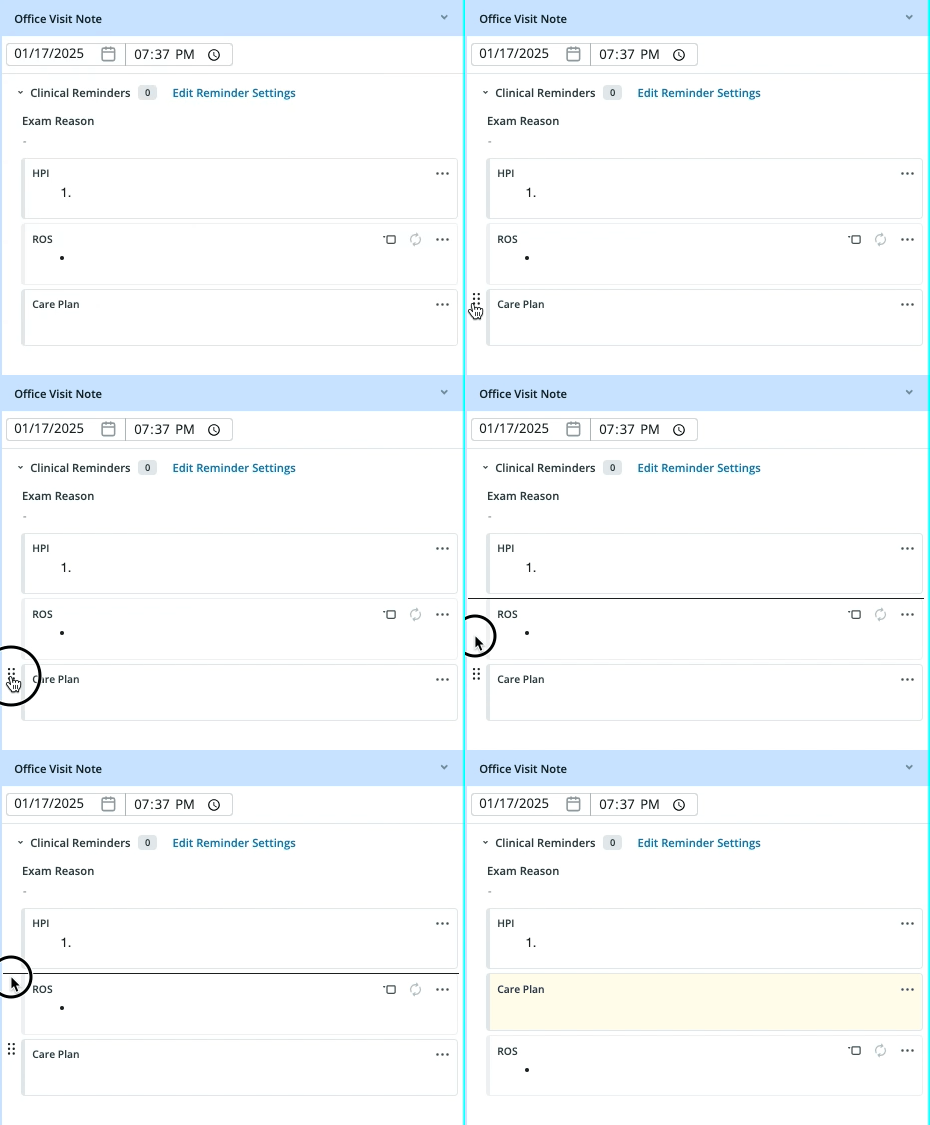
### Moving a block
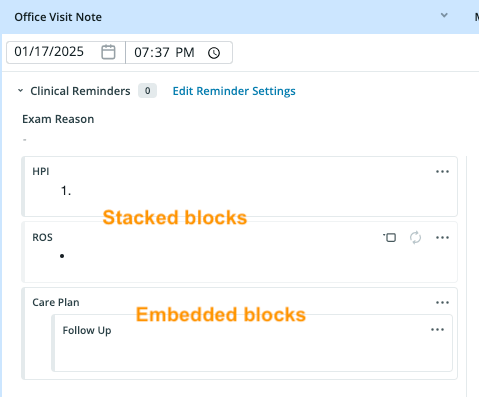
You can change the position of your blocks within the visit note. They can be stacked or embedded in text fields.
### Deleting a block
Delete with caution. You can only recover deleted blocks with the **Undo** button at the top of the visit note while editing in the same session. Once you save the visit note draft or leave the chart you will not be able to undelete deleted blocks, even with the **Undo** button.
#### Option 1 (Recommended for deleting one block at a time)
| **1** | At the top of the block that you wish to delete, click the **Grid** icon on the left or the **More Actions** icon on the right. |
| ----- | ----------------------------------------------------------------------------------------------------------------------------------------------------------------------------------------------------------------------------------------------------------------------------------------------------------------------------------------------------------------------------------------------------------------------------------------------------------------------------------------------------------------------------------------------------------------------------------------------------------------------------------------------------------------------------------------------------------------------------------------------------------------------------------------------------------------------------------------------------------------------------------------------------------------------------------------------------------------------------------------------------------------------------------------------------------------------------------------------------------------------------------------------------------------------------------------------------------------------------------------------------------------------------------------------------------------------------------------------------------------------------------------------------------------------------------------------------------------------------------------------------------------------------------------------------------------------------------------------------------------------------------------------------------------------------------------------------------------------------------------------------------------------------------------------------------------------------------------------------------------------------------------------------------------------------------------------------------------------------------------------------------------------------------------------------------------------------------------------------------------------------------------------------------------------------------------------------------------------------------------------------------------------------------------------------------------------------------------------------------------------------------------------------------------------------------------------------------------------------------------------------------------------------------------------------------------------------------------------------------------------------------------------------------------------------------------------------------------------------------------------------------------------------------------------------------------------------------------------------------------------------------------------------------------------------------------------------------------------------------------------------------------------- |
| **2** | Select **Delete** . |
#### Option 2 (Recommended for deleting more than one block at the same time)
| **1** | Highlight the contents of the block(s) and block name(s) with your cursor. |
| ----- | -------------------------------------------------------------------------- |
| **2** | Press **Delete** / **Backspace** on your keyboard. |
#### Option 3 (Recommended if a block is empty and you prefer using your keyboard over your mouse)
| **1** | R epeatedly press **Delete** / **Backspace** on your keyboard until all contents and the block are removed. |
| ----- | ----------------------------------------------------------------------------------------------------------- |
#### Option 4 (Recommended for deleting all blocks from the note)
| **1** | Select all contents of the note by pressing **ctrl** / **command** + **A** on your keyboard. |
| ----- | -------------------------------------------------------------------------------------------- |
| **2** | Press **Delete** / **Backspace** on your keyboard until all blocks are removed. |
### Moving a block
You can change the position of your blocks within the visit note. They can be stacked or embedded in text fields.
 | **1** | Hover over the name of the block until you see the **Grid** icon on the left. |
| ----- | ----------------------------------------------------------------------------------------------------------------------------------------------------------------------------------------------------------------------------------------------------------------------------------------------------------------------------------------------------------------------------------------------------------------------------------------------------------------------------------------------------------------------------------------------------------------------------------------------------------------------------------------------------------------------------------------------------------------------------------------------------------------------------------------------------------------------------------------------------------------------------------------------------------------------------------------------------------------------------------------------------------------------------------------------------------------------------------------------------------------------------------------------------------------------------------------------------------------------------------------------------------------------------------------------------------------------------------------------------------------------------------------------------------------------------------------------------------------------------------------------------------------------------------------------------------------------------------------------------------------------------------- |
| **2** | Click and hold the **Grid** icon as you drag the block to a different location. A line will temporarily appear to show where the block’s new location will be. |
| **3** | Let go of your mouse to lock in the new location. |
| **1** | Hover over the name of the block until you see the **Grid** icon on the left. |
| ----- | ----------------------------------------------------------------------------------------------------------------------------------------------------------------------------------------------------------------------------------------------------------------------------------------------------------------------------------------------------------------------------------------------------------------------------------------------------------------------------------------------------------------------------------------------------------------------------------------------------------------------------------------------------------------------------------------------------------------------------------------------------------------------------------------------------------------------------------------------------------------------------------------------------------------------------------------------------------------------------------------------------------------------------------------------------------------------------------------------------------------------------------------------------------------------------------------------------------------------------------------------------------------------------------------------------------------------------------------------------------------------------------------------------------------------------------------------------------------------------------------------------------------------------------------------------------------------------------------------------------------------------------- |
| **2** | Click and hold the **Grid** icon as you drag the block to a different location. A line will temporarily appear to show where the block’s new location will be. |
| **3** | Let go of your mouse to lock in the new location. |
 ## Frequently Asked Questions
### Can I add the same standard block more than once?
No, the same standard block cannot be added more than once. A yellow banner will appear at the top of the chart if you try to add a standard block that's already included in the visit note.
### Can I add the same custom block more than once?
Yes, the same custom block can be added more than once.
**I want a field to appear conditionally based on more than one rule, is this possible?**
Currently, fields can only appear conditionally based on one rule. We plan on expanding this functionality soon; send us your feedback on how you’d like to configure logic within your custom blocks and templates.
### Can I restore a deleted block?
Delete with caution. You can only recover deleted blocks with the **Undo** button while editing in the same session. Once you save the visit note draft or leave the chart you will not be able to undelete deleted blocks, even with the **Undo** button.
## Related Articles
* [Elation Note Introduction](/articles/Elation-Note)
* [Elation Note Guide - Managing custom blocks](/articles/Elation-Note-Guide-custom-blocks)
* [Elation Note Guide - Managing Elation Note Templates](/articles/Elation-Note-Guide-Managing-Templates)
* [Elation Note Guide - Documenting an encounter](/articles/Elation-Note-Guide-Documenting-an-encounter)
* [Elation Note Guide - Release Summary](/articles/Elation-Note-Release-Summary)
## Frequently Asked Questions
### Can I add the same standard block more than once?
No, the same standard block cannot be added more than once. A yellow banner will appear at the top of the chart if you try to add a standard block that's already included in the visit note.
### Can I add the same custom block more than once?
Yes, the same custom block can be added more than once.
**I want a field to appear conditionally based on more than one rule, is this possible?**
Currently, fields can only appear conditionally based on one rule. We plan on expanding this functionality soon; send us your feedback on how you’d like to configure logic within your custom blocks and templates.
### Can I restore a deleted block?
Delete with caution. You can only recover deleted blocks with the **Undo** button while editing in the same session. Once you save the visit note draft or leave the chart you will not be able to undelete deleted blocks, even with the **Undo** button.
## Related Articles
* [Elation Note Introduction](/articles/Elation-Note)
* [Elation Note Guide - Managing custom blocks](/articles/Elation-Note-Guide-custom-blocks)
* [Elation Note Guide - Managing Elation Note Templates](/articles/Elation-Note-Guide-Managing-Templates)
* [Elation Note Guide - Documenting an encounter](/articles/Elation-Note-Guide-Documenting-an-encounter)
* [Elation Note Guide - Release Summary](/articles/Elation-Note-Release-Summary)