> ## Documentation Index
> Fetch the complete documentation index at: https://help.elationhealth.com/llms.txt
> Use this file to discover all available pages before exploring further.
# Hosted Database Guide - Using Elation Analyst
## Overview
### What is Elation Analyst?
Elation Analyst is a self-service, AI-powered chat app that uses natural language to generate analytical reporting within your [Hosted Database account](/articles/Hosted-Database-Introduction). You can explore your data, ask analytical questions, and view generated reports directly within Snowflake.
### What are the benefits of using Elation Analyst?
Elation Analyst gives you access to advanced analytics without the need for custom reports or a dedicated data analyst. It’s built to help you work more efficiently, improve patient outcomes, and move beyond basic reporting. Whether you're in a small practice or a larger organization, you’ll get advanced analytics at your fingertips - no custom reports or extra development required.
### What kinds of data can I explore with Elation Analyst?
While you can explore all your Hosted Database data, we’ve fine-tuned Elation Analyst to be especially smart at analyzing these types of information:
* Appointment
* Billing Codes
* Diagnoses
* Medications
* Orders
* Vitals
* Patient Tags
[Click here for a list of sample questions you can ask around the topics listed above](#resources).
Elation Analyst is best at answering clear, data-based questions—things you could pull from a database, like patient counts or appointment trends. It won’t generate open-ended insights or big-picture takeaways, such as **What trends do you notice?**.
## Setup
**Beta feature:** The feature described in this article is part of a beta release and is only available to a select number of practices using Elation’s Hosted Database.
The Elation Analyst App is automatically accessible in Elation’s Snowflake account. If you have your own Snowflake account, please follow the installation instructions below.
### Installing Elation Analyst in your own Snowflake account
If you have your own Snowflake Account with an **ACCOUNTADMIN** role, take the following steps to install the Elation Analyst App in Snowflake:
| **1** | Go to **Projects** -> **Worksheets** . |
| ----- | ----------------------------------------------------------------------------------------------------------------------------------- |
| **2** | Click the plus **+** icon to open a new SQL Worksheet. |
| **3** | Open [this SQL code](/files/elation-analyst-sql.txt) in a new browser tab, copy the entire script, and paste it into the worksheet. |
| **4** | At line 2, update target\_database |
| **5** | At line 3, update target\_schema |
| **6** | At line 4, update warehouse\_name |
| **7** | Click **Run** . |
| **8** | You will now see the Elation Analyst App in the **Apps** section. |
The script will be updated:
* If there is a new semantic model.
* If there is an update to an existing semantic model.
* If the listing name is changed.
## Workflow Instructions
### Asking questions
| **1** | Open Snowflake. |
| ----- | ------------------------------------------------------------------------------------------------------------------------------------------------------------------------------------------------------------------------------------------------------------------------------------------------------------------------------------------------------------------------------------------------------------------------------------------------------------------------------------------------------------------------------------------------------------------------------------------------------------------------------------------------------------------------------------------------------------------------------------------------------------------------------------------------------------------------------------------------------------------------------------------------------------------------------------------------------------------------------------------------------------------------------------------------------------------------------------------------------------------------------------------------------------------------------------------------------------------------------------------------------------------------------------------------------------------------------------------------------------------------------------------------------------------------------------------------------------------------------------------------------------------------------------------------------------------------------------------------------------------------------------------------------------------------------------- |
| **2** | Click **Catalog** -> **Apps** . |
| **3** | In the **Installed Apps** section, click the **Elation Analyst (Beta)** App. 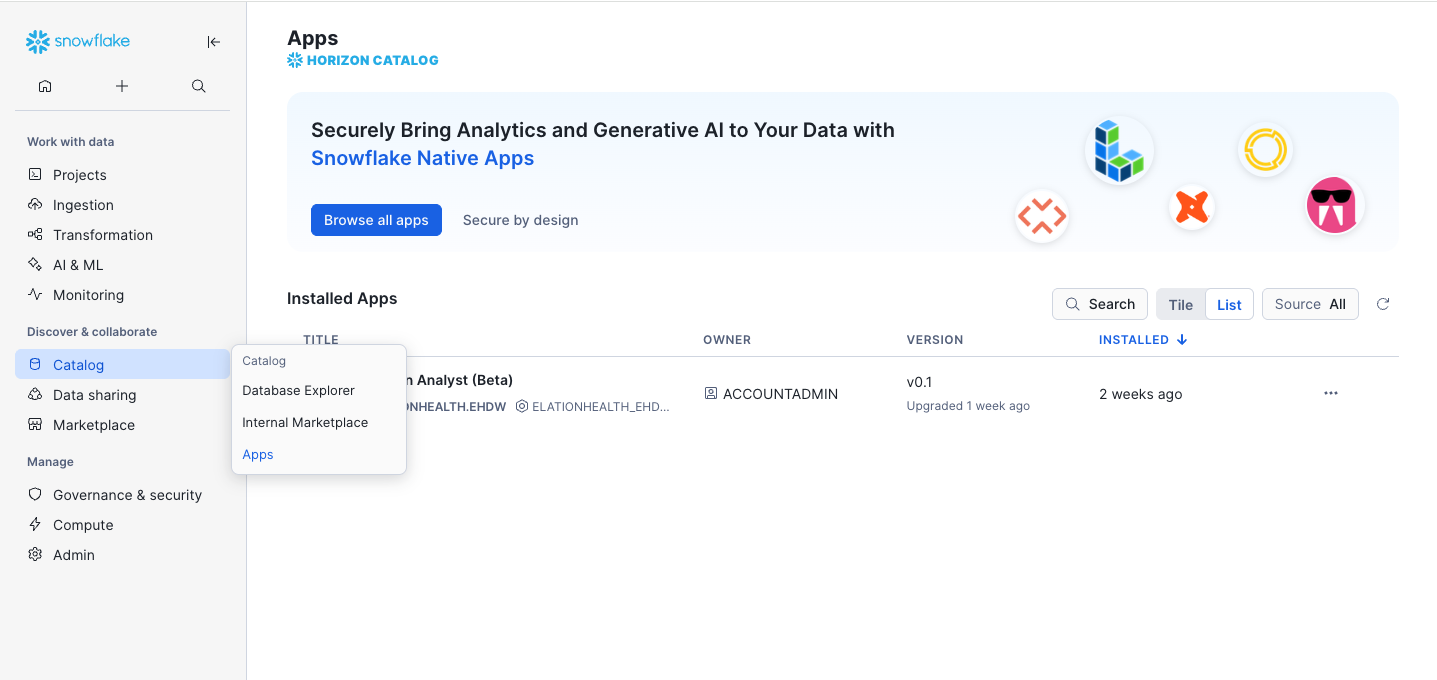 |
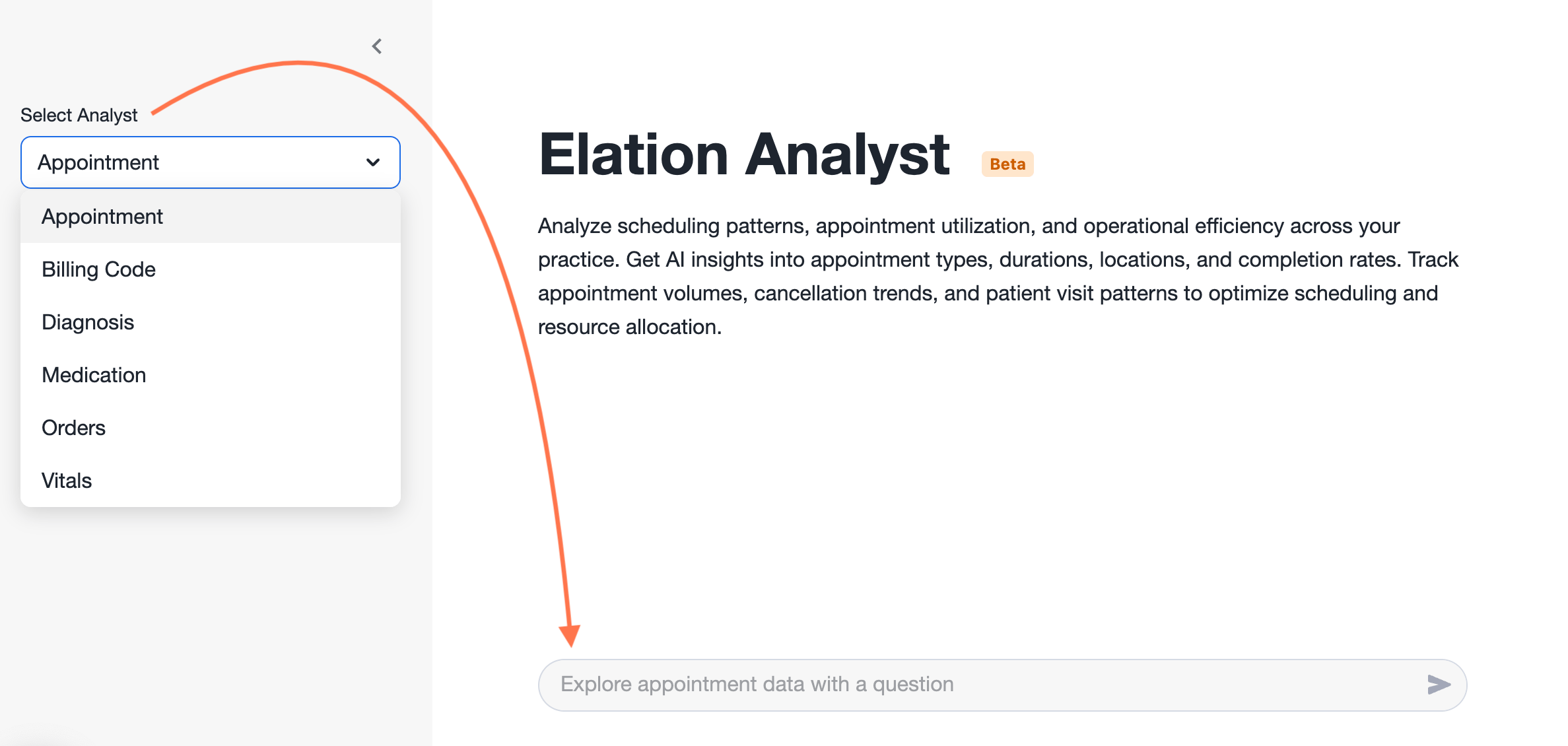
| **4** | Select the type of Analyst you want to use from the dropdown. |
| **5** | Type a question and then click the **>** icon or **Return**/**Enter** key on your keyboard to submit the question. Your questions should be clear and specific. If the response isn’t quite right, try rewording your prompt slightly or adding additional context to the question. • [Click here for a list of sample questions you can ask.](#resources) |
|
| **4** | Select the type of Analyst you want to use from the dropdown. |
| **5** | Type a question and then click the **>** icon or **Return**/**Enter** key on your keyboard to submit the question. Your questions should be clear and specific. If the response isn’t quite right, try rewording your prompt slightly or adding additional context to the question. • [Click here for a list of sample questions you can ask.](#resources) |
 ### Viewing results
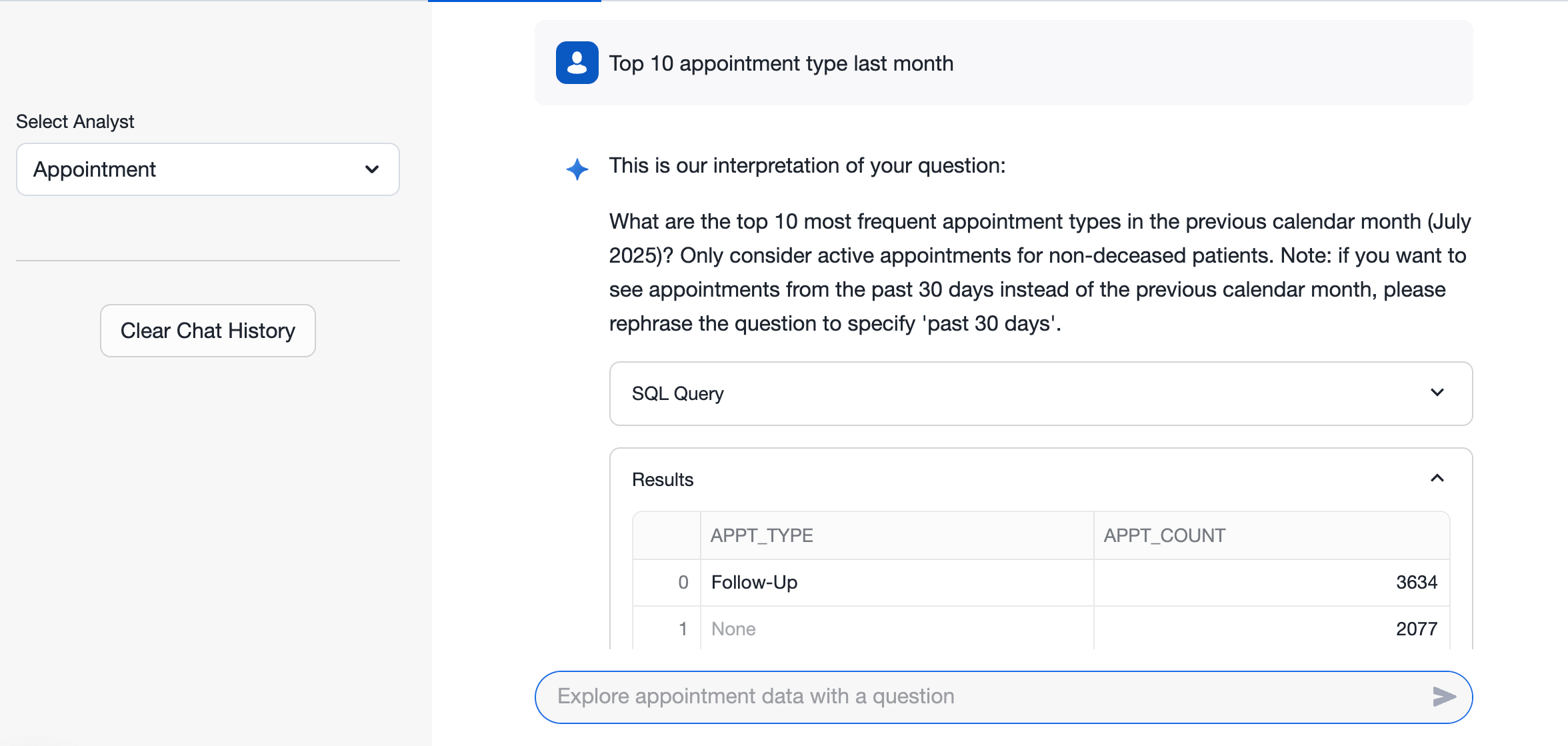
The answer to your question (i.e. the results after analyzing your data) will appear below the question in the App. You will first see the **SQL** query used to generate the results followed by the **Results** table.
### Viewing results
The answer to your question (i.e. the results after analyzing your data) will appear below the question in the App. You will first see the **SQL** query used to generate the results followed by the **Results** table.
 #### Providing feedback about the results
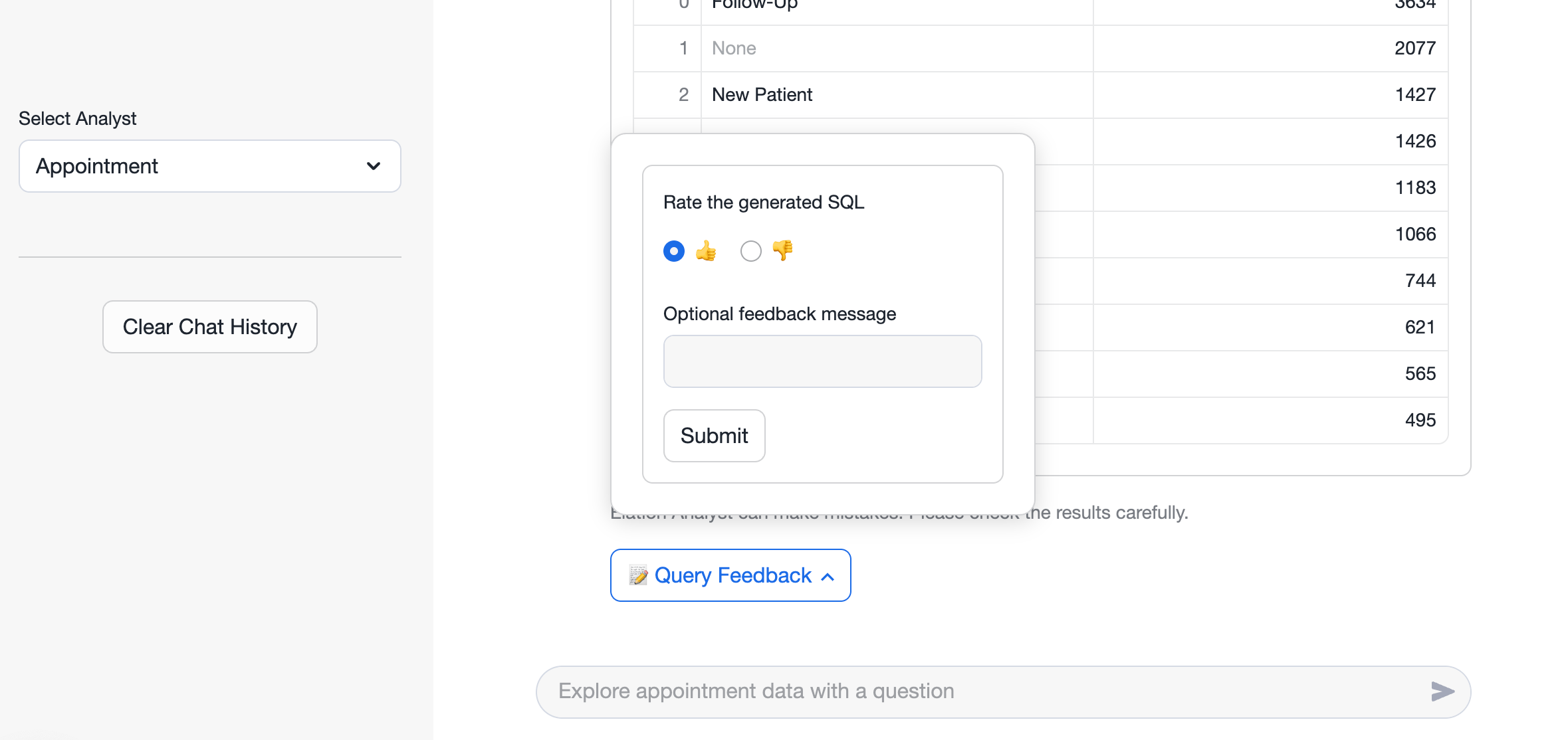
If the results are inaccurate, send us the feedback so that we can continue improving on the App’s skills.
| **1** | Select **Query Feedback** . |
| ----- | ------------------------------------------------------------------------------------------------------ |
| **2** | Select **thumbs up** if the answer met expectations • **thumbs down** if the answer needs improvement. |
| **3** | Enter feedback in a message if needed. |
| **4** | Click **Submit** . |
#### Providing feedback about the results
If the results are inaccurate, send us the feedback so that we can continue improving on the App’s skills.
| **1** | Select **Query Feedback** . |
| ----- | ------------------------------------------------------------------------------------------------------ |
| **2** | Select **thumbs up** if the answer met expectations • **thumbs down** if the answer needs improvement. |
| **3** | Enter feedback in a message if needed. |
| **4** | Click **Submit** . |
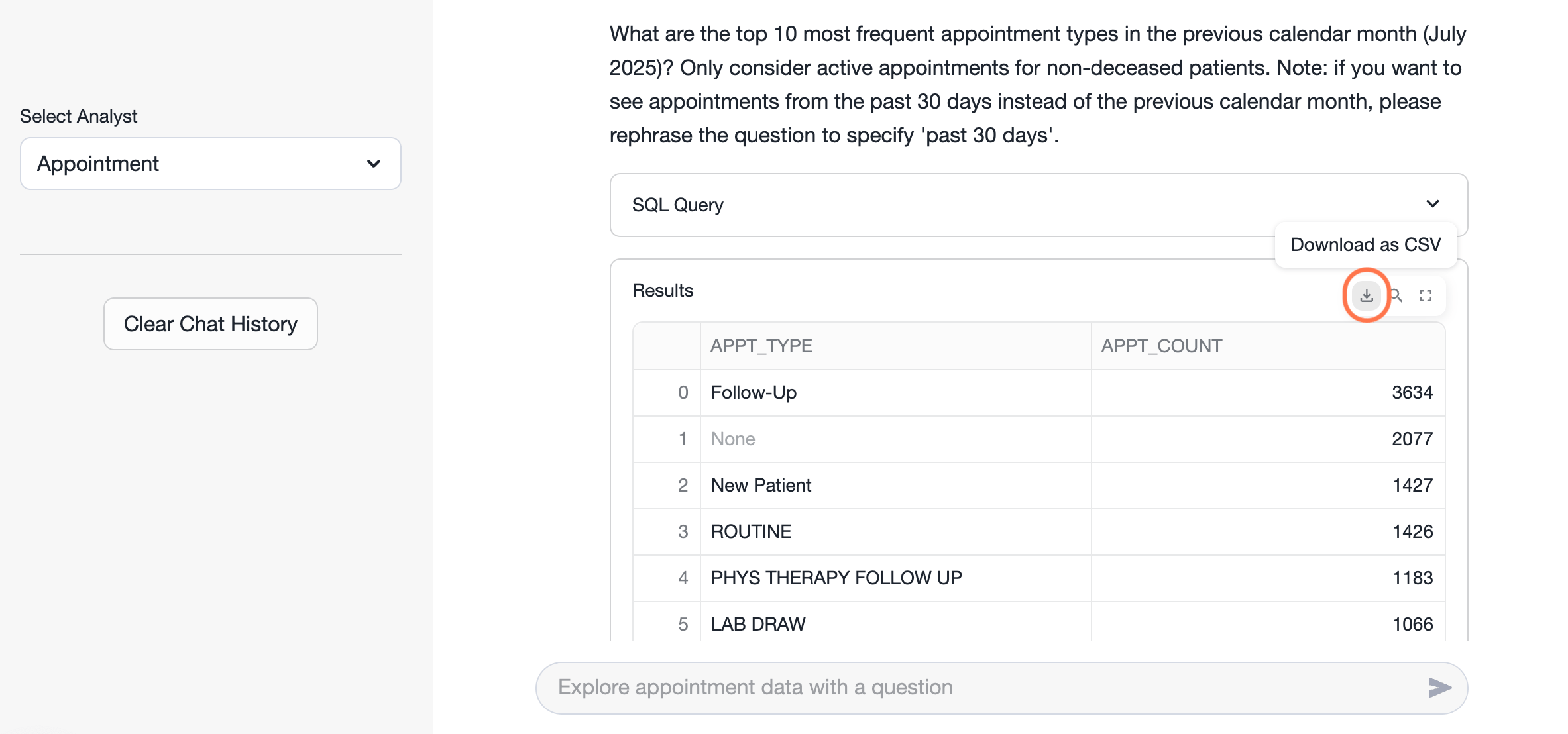
 #### Downloading results
| **1** | Hover over the **Results** section some icons appear. |
| ----- | ----------------------------------------------------------------- |
| **2** | Hover over the download icon and then click **Download as CSV** . |
#### Downloading results
| **1** | Hover over the **Results** section some icons appear. |
| ----- | ----------------------------------------------------------------- |
| **2** | Hover over the download icon and then click **Download as CSV** . |
 #### Copying the SQL Query
| **1** | Expand the **SQL Query** by clicking the down arrow. |
| ----- | ----------------------------------------------------------------------------------------------- |
| **2** | Place your cursor over the query to surface the copy icon & then click on it to copy the query. |
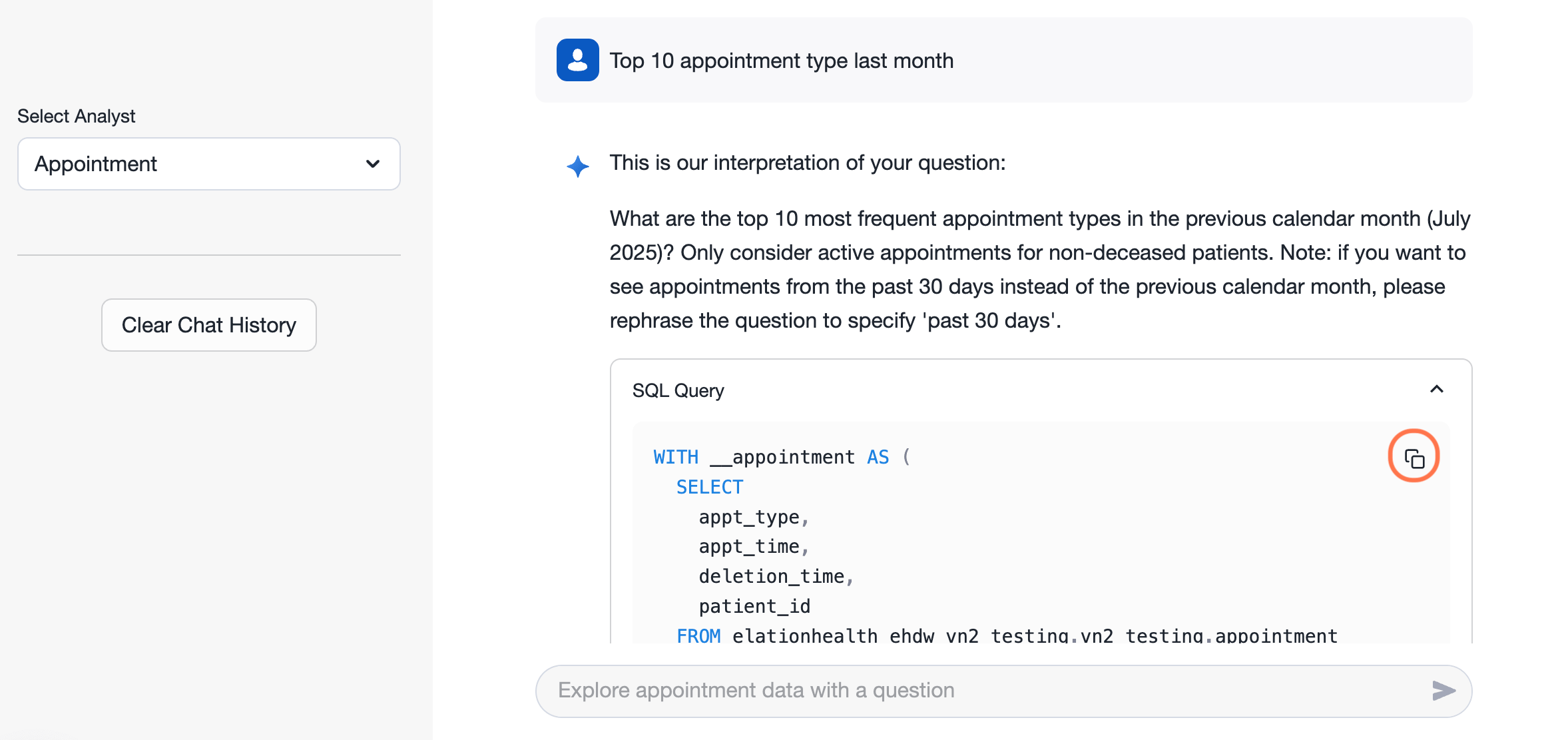
#### Copying the SQL Query
| **1** | Expand the **SQL Query** by clicking the down arrow. |
| ----- | ----------------------------------------------------------------------------------------------- |
| **2** | Place your cursor over the query to surface the copy icon & then click on it to copy the query. |
 ### Leveraging the results data
#### Building your analytics library
Keep track of the searches that give you the answers you need, and easily update them as your priorities change. Over time, you’ll build a go-to set of insights that grow with your practice—always just a click away.
| **1** | Expand the **SQL Query** . |
| ----- | --------------------------------------------------------------------------------------------------------------------------------------------------------------------------------------------------------------------------------------------------------------------------------------------------------------------------------------------------------------------------------------------------------------------------------------------------------------------------------------------------------------------------------------------------------------------------------------------------------------------------------------------------------------------------------------------------------------------------------------------------------------------------------------------------------------------------------------------------------------------------------------------------------------------------------------------------------------------------------------------------------------------------------------------------------------------------------------------------------------------------------------------------------------------------------------------------------------------------------------------------------------------------------------------------------------------------------------------------------------------------------------------------------------------------------------------------------------------------------------------------------------------------------------------------------------------------------------------------------------------------------- |
| **2** | Place your cursor over the query to surface the copy icon & then click on it to copy the query. |
| **3** | Go to **Projects** -> **Worksheets** . |
| **4** | Click the plus **+** icon to open a new SQL Worksheet.
### Leveraging the results data
#### Building your analytics library
Keep track of the searches that give you the answers you need, and easily update them as your priorities change. Over time, you’ll build a go-to set of insights that grow with your practice—always just a click away.
| **1** | Expand the **SQL Query** . |
| ----- | --------------------------------------------------------------------------------------------------------------------------------------------------------------------------------------------------------------------------------------------------------------------------------------------------------------------------------------------------------------------------------------------------------------------------------------------------------------------------------------------------------------------------------------------------------------------------------------------------------------------------------------------------------------------------------------------------------------------------------------------------------------------------------------------------------------------------------------------------------------------------------------------------------------------------------------------------------------------------------------------------------------------------------------------------------------------------------------------------------------------------------------------------------------------------------------------------------------------------------------------------------------------------------------------------------------------------------------------------------------------------------------------------------------------------------------------------------------------------------------------------------------------------------------------------------------------------------------------------------------------------------- |
| **2** | Place your cursor over the query to surface the copy icon & then click on it to copy the query. |
| **3** | Go to **Projects** -> **Worksheets** . |
| **4** | Click the plus **+** icon to open a new SQL Worksheet. 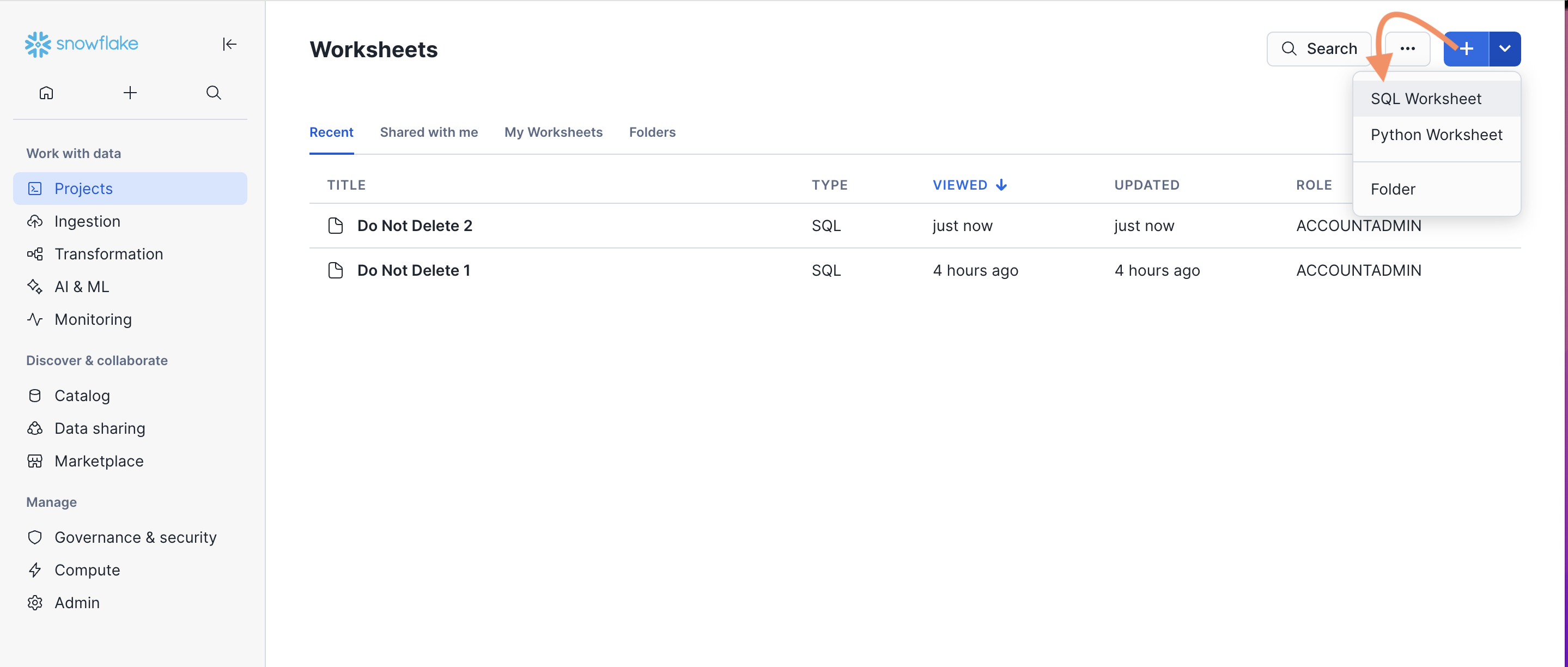 |
| **5** | Paste the **SQL Query** into the worksheet & then click the run icon. |
| **6** | The query is now saved to your Worksheets and can be accessed any time. |
| **7** | Double click the name of the query to rename it as needed. |
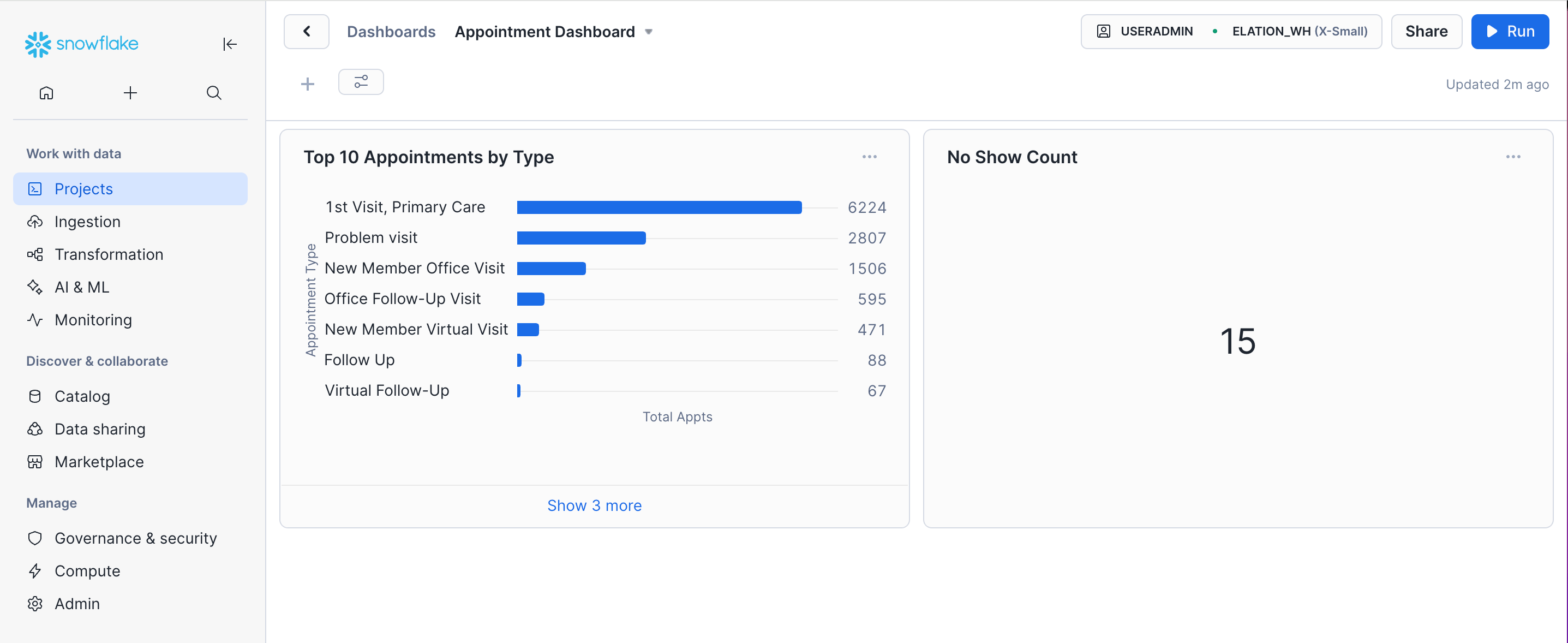
### Creating a dashboard from a query
Quickly create a dashboard to keep an eye on what matters most to your practice—all in one place. Whether it’s appointments, prescriptions, conditions, or patients, you can track it all in just a few clicks.
| **1** | Expand the **SQL Query** . |
| ----- | ----------------------------------------------------------------------------------------------- |
| **2** | Place your cursor over the query to surface the copy icon & then click on it to copy the query. |
| **3** | Go to **Projects** -> **Dashboard** . |
| **4** | Click **+ Dashboard** |
| **5** | Name your dashboard. |
| **6** | Click **Create Dashboard** . |
| **7** | Click **New Tile** -> **From SQL Worksheet** . |
| **8** | Paste the SQL query into the worksheet. |
| **9** | Click **Run** . |
|
| **5** | Paste the **SQL Query** into the worksheet & then click the run icon. |
| **6** | The query is now saved to your Worksheets and can be accessed any time. |
| **7** | Double click the name of the query to rename it as needed. |
### Creating a dashboard from a query
Quickly create a dashboard to keep an eye on what matters most to your practice—all in one place. Whether it’s appointments, prescriptions, conditions, or patients, you can track it all in just a few clicks.
| **1** | Expand the **SQL Query** . |
| ----- | ----------------------------------------------------------------------------------------------- |
| **2** | Place your cursor over the query to surface the copy icon & then click on it to copy the query. |
| **3** | Go to **Projects** -> **Dashboard** . |
| **4** | Click **+ Dashboard** |
| **5** | Name your dashboard. |
| **6** | Click **Create Dashboard** . |
| **7** | Click **New Tile** -> **From SQL Worksheet** . |
| **8** | Paste the SQL query into the worksheet. |
| **9** | Click **Run** . |
 ## Resources
### Sample questions for Elation Analyst
#### Appointment Analyst
* Who has missed their appointments this year?
* List of appointments by type most to least in 2025
* List of patients who canceled appointments
* Show me appointment data from last month
* Total appointments created vs Patient seen
#### Billing Code Analyst
* What is the distribution of billing statuses for all bills created year to date?
* I want a list of patients who have not had a flu vaccine in 2025, include contact info and dob, exclude anyone under age 10
* What are the top 5 most frequently billed CPT per month for the last 3 months
* I want to know what is unbilled this year
* How many AWV have we billed this year?
#### Diagnosis Codes Analyst
* I want to find patients by Diagnosis X (e.i.Diabetes)
* I want to see patients diagnosed with 46635009 (SNOMED Code)
* I want to see patients diagnosed with E08 (CPT for Diabetes mellitus due to an underlying condition)
* I want to find patients with Risk Scores between 2-5. Above 5.
* What is the average risk score, for provider X? For practice Z?
#### Medications Analyst
* I want to see all open med orders, include patient info and medication details
* I want to see total open med orders by provider, most to least
* How many medications were discontinued last month? By Provider. By Practice.
* I want to know who is on medication X
* I want to know who is on depression meds and group by age, most to least
#### Orders Analyst
* I want to see open orders grouped by provider and type, include a count
* I want to know how many open referrals there are and the patients associated to them
* I want to know how many open \[Imaging, Cardiac, Colonoscopy, Lab, Pulmonary, Mammogram, Sleep] Orders there are and the patients associated to them
* Show me patients and their tests and results that show abnormal cardiac conditions
* I want to find patients with an A1C result above 9. Between 5-6
#### Vitals Analyst
* I want to know the last vitals for patient X
* I want to know who has a blood pressure reading of 130/80 mm Hg or higher and what diagnosis they have, include medication list
* I want to see all patients with a bmi between 30 and 35. Above 30.
* I want to know average patient BMI for patients over 65
* I want to see patients with an oxygen level below 90 percent, include oxygen level, grouped by provider
#### Patient Tags Analyst
* I want to create a list of all patients with X tag.
* I want to find all patients who have X tag but not Y tag.
* I want to count the number of patients who have X tag.
## Frequently Asked Questions
### Will Elation fine-tune Elation Analyst to be especially smart at analyzing other types of information?
Yes, we will, please send us the feedback so that we can continue improving on the App’s skills.
| **1** | Select **Query Feedback** . |
| ----- | ----------------------------------------------------------------------------- |
| **2** | Enter the type of information you want us to analyze in the feedback message. |
| **3** | Click **Submit** . |
### What happens if the information I am looking for is unavailable?
Please send us the feedback so that we can continue improving on the App’s skills.
| **1** | Select **Query Feedback** . |
| ----- | ----------------------------------------------------------------------------- |
| **2** | Enter the type of information you want us to analyze in the feedback message. |
| **3** | Click **Submit** . |
### What happens if Elation Analyst is wrong?
If the results are inaccurate, send us the feedback so that we can continue improving on the App’s skills.
| **1** | Select **Query Feedback** . |
| ----- | ------------------------------------------------------------------------------------------------------ |
| **2** | Select **thumbs up** if the answer met expectations • **thumbs down** if the answer needs improvement. |
| **3** | Enter feedback in a message if needed. |
| **4** | Click **Submit** . |
### Can Elation Analyst use results from previous questions?
Elation Analyst can see your previous questions, but it doesn’t have access to the answers. For example, if you first ask, **Which appointment types had more than 5 cancellations last month?** and then follow up with, **Give me the name of the patients for the second one?**, it won’t know what “the second one” is. You’ll need to ask the second question more specifically, like: **Give me the name of all the patients that cancelled with the Annual Wellness Exam appointment type**.
### What should I do if Elation Analyst seems confused after multiple questions?
If you ask many questions in a row or change topics often, Elation Analyst may have trouble keeping up with your requests. When this happens, it’s best to start a new conversation by clicking **Clear Chart History** and ask your question again.
## Related Articles
* [Hosted Database Guide - Using Elation Analyst](/articles/Elation-Analyst)
## Resources
### Sample questions for Elation Analyst
#### Appointment Analyst
* Who has missed their appointments this year?
* List of appointments by type most to least in 2025
* List of patients who canceled appointments
* Show me appointment data from last month
* Total appointments created vs Patient seen
#### Billing Code Analyst
* What is the distribution of billing statuses for all bills created year to date?
* I want a list of patients who have not had a flu vaccine in 2025, include contact info and dob, exclude anyone under age 10
* What are the top 5 most frequently billed CPT per month for the last 3 months
* I want to know what is unbilled this year
* How many AWV have we billed this year?
#### Diagnosis Codes Analyst
* I want to find patients by Diagnosis X (e.i.Diabetes)
* I want to see patients diagnosed with 46635009 (SNOMED Code)
* I want to see patients diagnosed with E08 (CPT for Diabetes mellitus due to an underlying condition)
* I want to find patients with Risk Scores between 2-5. Above 5.
* What is the average risk score, for provider X? For practice Z?
#### Medications Analyst
* I want to see all open med orders, include patient info and medication details
* I want to see total open med orders by provider, most to least
* How many medications were discontinued last month? By Provider. By Practice.
* I want to know who is on medication X
* I want to know who is on depression meds and group by age, most to least
#### Orders Analyst
* I want to see open orders grouped by provider and type, include a count
* I want to know how many open referrals there are and the patients associated to them
* I want to know how many open \[Imaging, Cardiac, Colonoscopy, Lab, Pulmonary, Mammogram, Sleep] Orders there are and the patients associated to them
* Show me patients and their tests and results that show abnormal cardiac conditions
* I want to find patients with an A1C result above 9. Between 5-6
#### Vitals Analyst
* I want to know the last vitals for patient X
* I want to know who has a blood pressure reading of 130/80 mm Hg or higher and what diagnosis they have, include medication list
* I want to see all patients with a bmi between 30 and 35. Above 30.
* I want to know average patient BMI for patients over 65
* I want to see patients with an oxygen level below 90 percent, include oxygen level, grouped by provider
#### Patient Tags Analyst
* I want to create a list of all patients with X tag.
* I want to find all patients who have X tag but not Y tag.
* I want to count the number of patients who have X tag.
## Frequently Asked Questions
### Will Elation fine-tune Elation Analyst to be especially smart at analyzing other types of information?
Yes, we will, please send us the feedback so that we can continue improving on the App’s skills.
| **1** | Select **Query Feedback** . |
| ----- | ----------------------------------------------------------------------------- |
| **2** | Enter the type of information you want us to analyze in the feedback message. |
| **3** | Click **Submit** . |
### What happens if the information I am looking for is unavailable?
Please send us the feedback so that we can continue improving on the App’s skills.
| **1** | Select **Query Feedback** . |
| ----- | ----------------------------------------------------------------------------- |
| **2** | Enter the type of information you want us to analyze in the feedback message. |
| **3** | Click **Submit** . |
### What happens if Elation Analyst is wrong?
If the results are inaccurate, send us the feedback so that we can continue improving on the App’s skills.
| **1** | Select **Query Feedback** . |
| ----- | ------------------------------------------------------------------------------------------------------ |
| **2** | Select **thumbs up** if the answer met expectations • **thumbs down** if the answer needs improvement. |
| **3** | Enter feedback in a message if needed. |
| **4** | Click **Submit** . |
### Can Elation Analyst use results from previous questions?
Elation Analyst can see your previous questions, but it doesn’t have access to the answers. For example, if you first ask, **Which appointment types had more than 5 cancellations last month?** and then follow up with, **Give me the name of the patients for the second one?**, it won’t know what “the second one” is. You’ll need to ask the second question more specifically, like: **Give me the name of all the patients that cancelled with the Annual Wellness Exam appointment type**.
### What should I do if Elation Analyst seems confused after multiple questions?
If you ask many questions in a row or change topics often, Elation Analyst may have trouble keeping up with your requests. When this happens, it’s best to start a new conversation by clicking **Clear Chart History** and ask your question again.
## Related Articles
* [Hosted Database Guide - Using Elation Analyst](/articles/Elation-Analyst)